





jztreso
Members
-
Joined
-
Last visited
Everything posted by jztreso
-
Yeah it's a known thing that pinning CPU cores is a must for good VM performance. I had an R9 7900x and struggled to make 10 year old games perform before doing so - apparently the hypervisor's tasks are prioritised, so even though the VM is running much more demanding tasks, they're still being queued. I think for the background tasks, that sounds more like a performance issue. I never needed to turn off services or background tasks to run my services with 4 cores reserved for unraid and 8 were pinned to the VM.
-
Hey i'm not quite sure what you mean by this: "extrapolation notifications and packet bursts" Are they Unraid notifications, network related or something in windows? I kind of moved away from a consolidated system and moved unraid to a smaller machine, due to powerdraw concerns. So to answer your question - I don't think so 😅
-
Hi so i'm looking at rebuilding my nas setup and i'm really tempted to buy something like an Arc A380, with all it's accelerators and surprisingly good support! I'm running a Jellyfin server and a couple other dockers that can take advantage of either the accelerators or genereal compute of a GPU. My question is, now that SR-IOV is supports the gpu to be split between multiple VMs, would that also allow the GPU to be split between VMs and Dokers? I would love to use the card for Jellyfin, but not have it inaccesible from being bound to vfio, once another application or VM is utilising it. Has anyone had good experience with sharing the hardware in this manner?
-
Honestly I just gave up on it, since unraid doesn't have any mover functionality based on tiered directory activity. I think you could maybe make it work if you have an external service managing the data between the array and your ssd. If you manage to make an iSCSI drive on your array and pass that on to a VM, together with an SSD, you could probably use some kind of windows raid or tiered caching software inside that to manage your files. Obviously that would only really make sense if you use that VM as your lightroom pc. The iSCSI drive also wouldn't be scalable i believe, so you'd have to pick a capacity on your array dedicated to that. Moving from the iSCSI drive to the array for cold storage also couldn't be done with the mover, since ISCSI data isn't visible on the array.
-
Additional findings: It seems like when the GUI for either one of my services or terminals and especially the one for unraid itself is open it triggers activity on my pinned cores, causing a jump back to C3 for the majority of my isolated cores. It's usually able to go down to C1-2: 0% and C3: ~40% So it's mostly sitting at lower C-states, as long as I don't interact with my services or unraid AT ALL. I'm still curious why these tasks would cause load on the cores and why it's so fragile - I can't know if they're reaching lower C-states if i can't check it, but i can't check it cause then they will jump back up to C3...
-
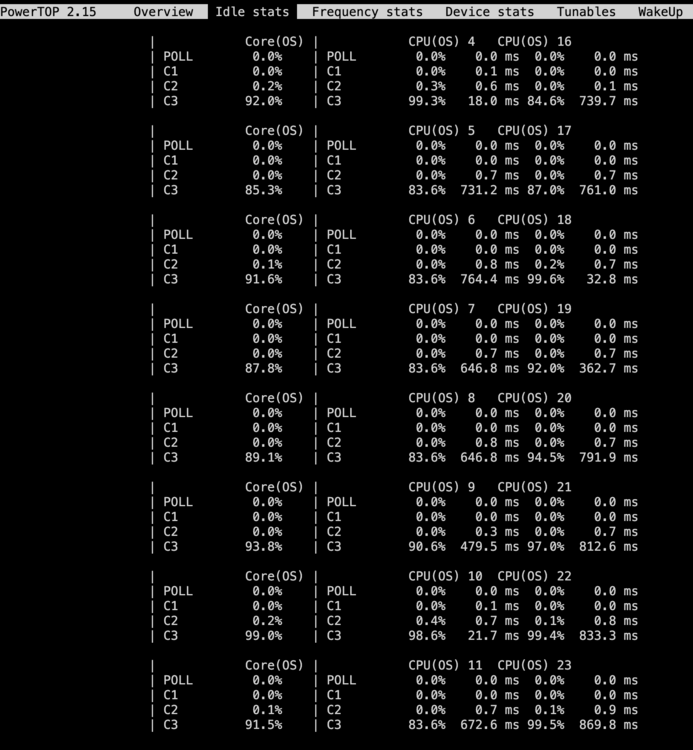
Hey so I'm trying to improve the efficiency of my server, which seems to be a bigger hassle than i expected (especially when running zen 4...). My setup is the following: R9 7900X RTX 3070 TI Gigabyte B650I 96GB Crucial 6000 x2 Seagate Exos 16TB x3 mixed NVMe ssds x1 Sata Samsung QVO Sata SSD Corsair SF850L So I've been trying to follow the unraid guide for power efficiency and taking out ASPM conflicting parts and being limited to only seeing C-state 1-3 hasn't made things easy, but now I'm looking at how to pin my cores most efficiently to maximise the amount of core parking and time in lower C-states. I wasn't seeing the kind of behaviour I was expecting when disabling cores so I tried isolating unraid to only utilise core 0 (for testing, i know this isn't much). Then I pinned my VMs (HA and Volumio) and Dockers (around 15) to core 1-3 and left the remaining cores pinned to my gaming VM. The result I expected from this was that my 8 cores would be going to lower C-states and remain there, but i'm intermittently seeing 1% usage on those cores, preventing them from going lower than C3 most of the time: As seen most. of the cores are ~90% of the time in C3, and only ~10% of the time in lower C-states, even though they're not running any processes. When I tried to search for answers the only thing i really found was people being confused about the difference between isolation and pinning so I was hoping someone knew if this is expected behaviour or something out of the ordinary? Good monday to everyone
-
For me it worked to upgrade to 7.0.1. It has been running for 17 hours now, which it never did on 7.0.0 so i think i'll be closing the ticket. I unfortunately doubt this is the threat for your issue, and imo it sound like a bit like a hardware issue so maybe run a memtest86, replace components if possible, run in maintenence mode and see if it still happens Happy this solved it for me and good monday!
-
I'm having similar issues, mine are just way more frequent after updating to 7.0.0. I just saw 7.0.1 release, with a patch note that there was a potential nchan memory leakage problem, so I mirrored my syslog to the USB and saw I the last call before my server crashed was regarding the nchan issue. Maybe it's triggerede by an automation on your server, running around 4:00, so i'd recommend you update to 7.0.1 and mirror your syslog to see if it still happens and what may have caused it.
-
Looks like I was victim of the nchan memory leakage bug in 7.0.0, since that's what the last call in syslog_previous reported on before it crashed. I've updated to 7.0.1 now and will report back if things stabilise or continues to misbehave!
-
Okau Thanks I wasn't exactly sure how the syslog server worked, but this makes a lot of sense! I thought I had to use another system as a syslog server haha. I'll try and wait for a system restart again and attach the logs and system diagnostics
-
Hey, I've been experiencing random shutdowns, potentially after upgrading to version 7.0.0, but i'm unsure how to troubleshoot it. my system consists of the following: R7 7900x Gigabyte B650I v1.0 RTX 3070 TI x2 48GB (96GB) Micron 5600Mhz DDR5 x1 Sata SSD x2 seagate x18 16 tb x3 nvme SSD's from Intel, Kingston and Samsung Corsair SF850L PSU I've been running unraid pretty stably on 6.12.11 and upgraded to 7.0.0 about 2 weeks ago, and ever since it hasn't been stabil for more than a few hours. it doesn't seem like it's caused by the PSU, and I've pulled out my GPU to ease the load on on it, but no clicks occurs when the system restarts, so i'm suspecting it's a software issue, rather than a hardware problem. Yesterday i also ran memtest86 for 10 hours and it passed with 0 errors (also with no shutdowns). It has now been running in maintenance mode for a little over 16 hours now and there has been no restarting. I also made sure to check for system temperatures, and all components was running at pretty stabil temps - Cpu stayed at around 40c at idle and gpu at about the same. Even during high load operations the cpu stayed below 70, and the drives never really exceeded 40c. I've read in a previous post, that some people have experienced shutdowns after deploying a new docker container or downloading plugins, which i have done in the meantime. Since the system shuts down and I therefore don't have any useful logs, I'd try and see if there was a known issue regarding this, before i start testing out all 20 of my containers Happy sunday!
-
You are absolutely godsent! I had been tinkering a bit with unraid and found that binding my gpu and soundcard to vfio at boot solved my problem in far most of my games, but cyberpunk still wouldn't bulge and give me more than about 45 fps. I just copied the following lines to my VM and everything is running at pretty much bare metal performance now! <timer name='hypervclock' present='yes'/> <timer name='hpet' present='no'/> <timer name='tsc' present='yes' mode='native'/>
-
It's funny you say this cause i think i've found the root of my issues. I hadn't gone and bound my gpu and soundcard to vfio at boot, which apparently caused my vm to not get full access to my gpu's resources... It's been running great for about a week now and i haven't had one game act weird on me, where i wasn't able to get full gpu utilisation!
-
Wow that's one overpowered surveillance box ahaha. So basically all your gpu performance stabilized once you switched to an intel cpu? I've heard a few threads talk about amd VM performance issues, but they have mainly been on amd gpus so it's all really confusing to me since i'm not experiencing issues with my cpu performance but rather my Nvidia card, which i would expect to be better supported for virtualisation than AMD tbh.
-
Hey i'm on the same cpu, isolated 8 cores for my vm with 64gb of ram and a 3070 ti, can't seem to get above 50% gpu utilisation, while cpu is chilling at 20-35%. I am able to get 100% gpu usage on a few games, so wanted to check in and see if you figured something out?
-
Hi I've had a bit of trouble finding a silver line in what my problem is, but to boil it down i'm seeing between 35-55% gpu usage in most games, and after following all the guides I could find, i'm still not able to utilize the full potential of my setup. In cyberpunk i'm at a pretty consitant 50% usage In Black ops 6 (open beta) im getting between 45-65% And that trend continues in many other games, but to throw a curve ball, i'm getting a consitant 98% on MW2 (2021), with the expected performance of my setup. My setup is a Ryzen 7900x with 4 isolated cores to unraid and dockers, while the other 8 are dedicated to my VM. GPU is a 3070 TI 64 out of my 96gb of ram. boot SSD is a gen3 vdisk and SSD 2 is passed through. I doubt it's my hardware's fault though, since I'm rarely ever seeing above 35% CPUusage. I have the latest virtio and nvidia drivers installed, fully updated windows, sandbox, hyperv and subsystem for linux disabled, so i'm at a bit of a loss and hope someone in here could help me :i Here's my xml: <domain type='kvm' id='6'> <name>Windows 11</name> <uuid>6a5b5a04-5a0e-1b12-e2ac-65184375aa5b</uuid> <metadata> <vmtemplate xmlns="unraid" name="Windows 11" icon="windows11.png" os="windowstpm"/> </metadata> <memory unit='KiB'>66060288</memory> <currentMemory unit='KiB'>66060288</currentMemory> <memoryBacking> <nosharepages/> </memoryBacking> <vcpu placement='static'>16</vcpu> <cputune> <vcpupin vcpu='0' cpuset='1'/> <vcpupin vcpu='1' cpuset='13'/> <vcpupin vcpu='2' cpuset='2'/> <vcpupin vcpu='3' cpuset='14'/> <vcpupin vcpu='4' cpuset='3'/> <vcpupin vcpu='5' cpuset='15'/> <vcpupin vcpu='6' cpuset='4'/> <vcpupin vcpu='7' cpuset='16'/> <vcpupin vcpu='8' cpuset='5'/> <vcpupin vcpu='9' cpuset='17'/> <vcpupin vcpu='10' cpuset='6'/> <vcpupin vcpu='11' cpuset='18'/> <vcpupin vcpu='12' cpuset='7'/> <vcpupin vcpu='13' cpuset='19'/> <vcpupin vcpu='14' cpuset='8'/> <vcpupin vcpu='15' cpuset='20'/> </cputune> <resource> <partition>/machine</partition> </resource> <os> <type arch='x86_64' machine='pc-q35-7.2'>hvm</type> <loader readonly='yes' type='pflash'>/usr/share/qemu/ovmf-x64/OVMF_CODE-pure-efi-tpm.fd</loader> <nvram>/etc/libvirt/qemu/nvram/6a5b5a04-5a0e-1b12-e2ac-65184375aa5b_VARS-pure-efi-tpm.fd</nvram> </os> <features> <acpi/> <apic/> </features> <cpu mode='host-passthrough' check='none' migratable='on'> <topology sockets='1' dies='1' cores='8' threads='2'/> <cache mode='passthrough'/> <feature policy='require' name='topoext'/> <feature policy='disable' name='svm'/> </cpu> <clock offset='localtime'> <timer name='rtc' tickpolicy='catchup'/> <timer name='pit' tickpolicy='delay'/> <timer name='hpet' present='no'/> </clock> <on_poweroff>destroy</on_poweroff> <on_reboot>restart</on_reboot> <on_crash>restart</on_crash> <devices> <emulator>/usr/local/sbin/qemu</emulator> <disk type='file' device='disk'> <driver name='qemu' type='raw' cache='writeback'/> <source file='/mnt/desktop/domains/PC/vdisk1.img' index='2'/> <backingStore/> <target dev='hdc' bus='virtio'/> <serial>vdisk1</serial> <boot order='1'/> <alias name='virtio-disk2'/> <address type='pci' domain='0x0000' bus='0x03' slot='0x00' function='0x0'/> </disk> <disk type='file' device='cdrom'> <driver name='qemu' type='raw'/> <source file='/mnt/user/isos/virtio-win-0.1.262-2.iso' index='1'/> <backingStore/> <target dev='hdb' bus='sata'/> <readonly/> <alias name='sata0-0-1'/> <address type='drive' controller='0' bus='0' target='0' unit='1'/> </disk> <controller type='sata' index='0'> <alias name='ide'/> <address type='pci' domain='0x0000' bus='0x00' slot='0x1f' function='0x2'/> </controller> <controller type='pci' index='0' model='pcie-root'> <alias name='pcie.0'/> </controller> <controller type='pci' index='1' model='pcie-root-port'> <model name='pcie-root-port'/> <target chassis='1' port='0x8'/> <alias name='pci.1'/> <address type='pci' domain='0x0000' bus='0x00' slot='0x01' function='0x0' multifunction='on'/> </controller> <controller type='pci' index='2' model='pcie-root-port'> <model name='pcie-root-port'/> <target chassis='2' port='0x9'/> <alias name='pci.2'/> <address type='pci' domain='0x0000' bus='0x00' slot='0x01' function='0x1'/> </controller> <controller type='pci' index='3' model='pcie-root-port'> <model name='pcie-root-port'/> <target chassis='3' port='0xa'/> <alias name='pci.3'/> <address type='pci' domain='0x0000' bus='0x00' slot='0x01' function='0x2'/> </controller> <controller type='pci' index='4' model='pcie-root-port'> <model name='pcie-root-port'/> <target chassis='4' port='0xb'/> <alias name='pci.4'/> <address type='pci' domain='0x0000' bus='0x00' slot='0x01' function='0x3'/> </controller> <controller type='pci' index='5' model='pcie-root-port'> <model name='pcie-root-port'/> <target chassis='5' port='0xc'/> <alias name='pci.5'/> <address type='pci' domain='0x0000' bus='0x00' slot='0x01' function='0x4'/> </controller> <controller type='pci' index='6' model='pcie-root-port'> <model name='pcie-root-port'/> <target chassis='6' port='0xd'/> <alias name='pci.6'/> <address type='pci' domain='0x0000' bus='0x00' slot='0x01' function='0x5'/> </controller> <controller type='pci' index='7' model='pcie-root-port'> <model name='pcie-root-port'/> <target chassis='7' port='0xe'/> <alias name='pci.7'/> <address type='pci' domain='0x0000' bus='0x00' slot='0x01' function='0x6'/> </controller> <controller type='pci' index='8' model='pcie-root-port'> <model name='pcie-root-port'/> <target chassis='8' port='0xf'/> <alias name='pci.8'/> <address type='pci' domain='0x0000' bus='0x00' slot='0x01' function='0x7'/> </controller> <controller type='virtio-serial' index='0'> <alias name='virtio-serial0'/> <address type='pci' domain='0x0000' bus='0x02' slot='0x00' function='0x0'/> </controller> <controller type='usb' index='0' model='ich9-ehci1'> <alias name='usb'/> <address type='pci' domain='0x0000' bus='0x00' slot='0x07' function='0x7'/> </controller> <controller type='usb' index='0' model='ich9-uhci1'> <alias name='usb'/> <master startport='0'/> <address type='pci' domain='0x0000' bus='0x00' slot='0x07' function='0x0' multifunction='on'/> </controller> <controller type='usb' index='0' model='ich9-uhci2'> <alias name='usb'/> <master startport='2'/> <address type='pci' domain='0x0000' bus='0x00' slot='0x07' function='0x1'/> </controller> <controller type='usb' index='0' model='ich9-uhci3'> <alias name='usb'/> <master startport='4'/> <address type='pci' domain='0x0000' bus='0x00' slot='0x07' function='0x2'/> </controller> <interface type='bridge'> <mac address='52:54:00:d9:b9:77'/> <source bridge='br0'/> <target dev='vnet5'/> <model type='virtio-net'/> <alias name='net0'/> <address type='pci' domain='0x0000' bus='0x01' slot='0x00' function='0x0'/> </interface> <serial type='pty'> <source path='/dev/pts/1'/> <target type='isa-serial' port='0'> <model name='isa-serial'/> </target> <alias name='serial0'/> </serial> <console type='pty' tty='/dev/pts/1'> <source path='/dev/pts/1'/> <target type='serial' port='0'/> <alias name='serial0'/> </console> <channel type='unix'> <source mode='bind' path='/var/lib/libvirt/qemu/channel/target/domain-6-Windows 11/org.qemu.guest_agent.0'/> <target type='virtio' name='org.qemu.guest_agent.0' state='disconnected'/> <alias name='channel0'/> <address type='virtio-serial' controller='0' bus='0' port='1'/> </channel> <input type='mouse' bus='ps2'> <alias name='input0'/> </input> <input type='keyboard' bus='ps2'> <alias name='input1'/> </input> <tpm model='tpm-tis'> <backend type='emulator' version='2.0' persistent_state='yes'/> <alias name='tpm0'/> </tpm> <audio id='1' type='none'/> <hostdev mode='subsystem' type='pci' managed='yes'> <driver name='vfio'/> <source> <address domain='0x0000' bus='0x01' slot='0x00' function='0x0'/> </source> <alias name='hostdev0'/> <address type='pci' domain='0x0000' bus='0x04' slot='0x00' function='0x0'/> </hostdev> <hostdev mode='subsystem' type='pci' managed='yes'> <driver name='vfio'/> <source> <address domain='0x0000' bus='0x01' slot='0x00' function='0x1'/> </source> <alias name='hostdev1'/> <address type='pci' domain='0x0000' bus='0x05' slot='0x00' function='0x0'/> </hostdev> <hostdev mode='subsystem' type='pci' managed='yes'> <driver name='vfio'/> <source> <address domain='0x0000' bus='0x10' slot='0x00' function='0x0'/> </source> <alias name='hostdev2'/> <address type='pci' domain='0x0000' bus='0x06' slot='0x00' function='0x0'/> </hostdev> <hostdev mode='subsystem' type='pci' managed='yes'> <driver name='vfio'/> <source> <address domain='0x0000' bus='0x11' slot='0x00' function='0x3'/> </source> <alias name='hostdev3'/> <address type='pci' domain='0x0000' bus='0x07' slot='0x00' function='0x0'/> </hostdev> <hostdev mode='subsystem' type='usb' managed='no'> <source> <vendor id='0x0e8d'/> <product id='0x0616'/> <address bus='1' device='3'/> </source> <alias name='hostdev4'/> <address type='usb' bus='0' port='1'/> </hostdev> <memballoon model='none'/> </devices> <seclabel type='dynamic' model='dac' relabel='yes'> <label>+0:+100</label> <imagelabel>+0:+100</imagelabel> </seclabel> </domain>
-
I had it up and running in about and hour and it has been running pretty much flawlessly for over a month now, so not at all!
-
For anyone looking for a similar solution in the future, i ended up finding spaceinvaders tutorial on running Volumio in a VM, which is significantly less resource heavy than the other VM option i mentioned. It's kinda overkill for my purpose, but i'm happy with how lightweight it is and that i know i won't be limited in the future! I wasn't able to passthrough my audio jack, but igpu soundcard worked just fine. I was gonna order a DAC anyway, so whether it was jack or hdmi isn't really the biggest deal - just be aware chipset soundcard and VM compatibility isn't a priority for Volumio, so you may not be able to run everything on their virtualised OS.
-
Hi i live in a studio apartment and don't have much space/money and would like to consolidate my tech clutter, while making best use of the hardware i already have. My unraid server is right next to my desk, where i have a pair of fairly expensive genelec monitors. The setup is very old school and doesn't have any wireless capabilities and i'm not really liking the idea of them just sitting there, while having to use a shitty bluetooth speaker, whenever i want to listen to casual music. My audio interface allows for advanced routing though, so if i could use a jack from my unraid server to my audio interface, i'd have a pretty decent way to feed the audio to my monitors, whenever i don't have my laptop plugged in. I would therefor like to know if anyone have stumbled upon a docker that'll make my server into a streaming device and forward the music to my sound card? I have looked into running a lightweight VM, install spotify and call it a day, but It just doesn't seem like a resource optimised solution to me. Hope someone can help me out a little, happy Sunday
-
Seemed like a dns i had running was blocking the port. Works now.
-
Hey i've been looking into the idea of making a cached games share for my unraid gaming VM, but to me it doesn't look like the caching system in unraid covers my needs, or maybe there's something I don't understand about the different caching methods? The most logical approach I found was to use the array as main storage and the cache as second storage option (move from Array -> Cache) But this presents me with a couple issues: 1st issue i find is that if my game library exceeds the 1tb of my cache drive (which it will quickly) how does unraid know which files and folders to move to the cache drive? I was hoping unraid prefers the most frequently/recently used files to store on the cache, but as far as i can tell there's no tiered caching system in unraid? 2nd issue is, is there a way to invoke the mover to move the files to the array, once the're being read on the drive? If i use the array as the initial download path, that mean they won't be on the cache, once i want to play them. I was hoping there would be an option to move the files to cache upon reading, but afik there's not a way to mitigate this either? If there's a way to set this up in mover, with a docker/plugin or perhaps passthrough the ssd to the vm and use host caching instead? Cheers
-
Ended up sending back the drive - talked with customer service and looks like it's probably a hardware defect rather than unraid acting up.
-
Just tried downloading Music-assistant and it behaved similar to what i experienced when updating qbittorrent, but with a different error message: IMAGE ID [1005227837]: Pulling from music-assistant/server. IMAGE ID [e1caac4eb9d2]: Already exists. IMAGE ID [51d1f07906b7]: Pulling fs layer. Downloading 100% of 3 MB. Verifying Checksum. Download complete. Extracting. Pull complete. IMAGE ID [fe87ad6b112e]: Pulling fs layer. Downloading 100% of 12 MB. Verifying Checksum. Download complete. Extracting. Pull complete. IMAGE ID [4d8ccb72bbad]: Pulling fs layer. Downloading 100% of 244 B. Verifying Checksum. Extracting. Pull complete. IMAGE ID [8100581c78dd]: Pulling fs layer. Downloading 100% of 3 MB. Verifying Checksum. Download complete. Extracting. Pull complete. IMAGE ID [3d1c47d32dcd]: Pulling fs layer. Downloading 100% of 93 B. Download complete. Extracting. Pull complete. IMAGE ID [c089b4cae7a5]: Pulling fs layer. Downloading 100% of 203 MB. Verifying Checksum. Download complete. Extracting. IMAGE ID [b3c6b210aa7f]: Pulling fs layer. Downloading 100% of 78 MB. Verifying Checksum. Download complete. IMAGE ID [3273c87dc306]: Pulling fs layer. Downloading 100% of 16 MB. Verifying Checksum. Download complete. IMAGE ID [4f4fb700ef54]: Pulling fs layer. Downloading 100% of 32 B. Verifying Checksum. Download complete. TOTAL DATA PULLED: 316 MB Error: failed to register layer: flate: corrupt input before offset 110304872
-
Hey since i downloaded 6.12.8 I wasn't able to open qbittorrent. Yesterday after i had updated unraid, i saw another update for Binhex qbittorrent was available, but when it finished extracting everything it came up with an error, referring to something saying "Sync input/output error". I didn't save the exact error, but tried reinstalling the docker instead. Now when i download the docker it appears with the following error in the logs: https://hub.docker.com/u/binhex/ XSLoader.pm did not return a true value at /usr/lib/perl5/5.38/core_perl/Fcntl.pm line 61. Compilation failed in require at /usr/lib/perl5/5.38/core_perl/POSIX.pm line 17. BEGIN failed--compilation aborted at /usr/lib/perl5/5.38/core_perl/POSIX.pm line 17. Compilation failed in require at /usr/sbin/ts line 54. BEGIN failed--compilation aborted at /usr/sbin/ts line 54. I have tried downgrading to 6.12.6 together with previous docker flags but to no avail, so I decided to just update again. I've attached the diagnostics in hopes someone can help - *ve unly been using unraid for around 4 month so i'm still fairly new and kinda lost on whether this is an unraid or a binhex problem? tower-diagnostics-20240221-1805.zip
-
I have 16gb on a 5 drive setup (3 array, 1 cache and one for installs) I run pretty much the full arr suite, about 15 dockers, jellyfin with both friends and family using it, lots of home automation and sometimes a lightweight linux vm and i think i have yet to break 10gb.


