





KevinE
Members
-
Joined
-
Last visited
-
Finally fixed my problem. I am running nginx reverse proxy and part of the setup for my unraid domain, I had 'cache assets' enabled. Suspect this got corrupted somewhere along the line. All good now that I disabled it and restarted nginx.
-
Thanks. Tried this, it worked for a minute but the display issues are back again
-
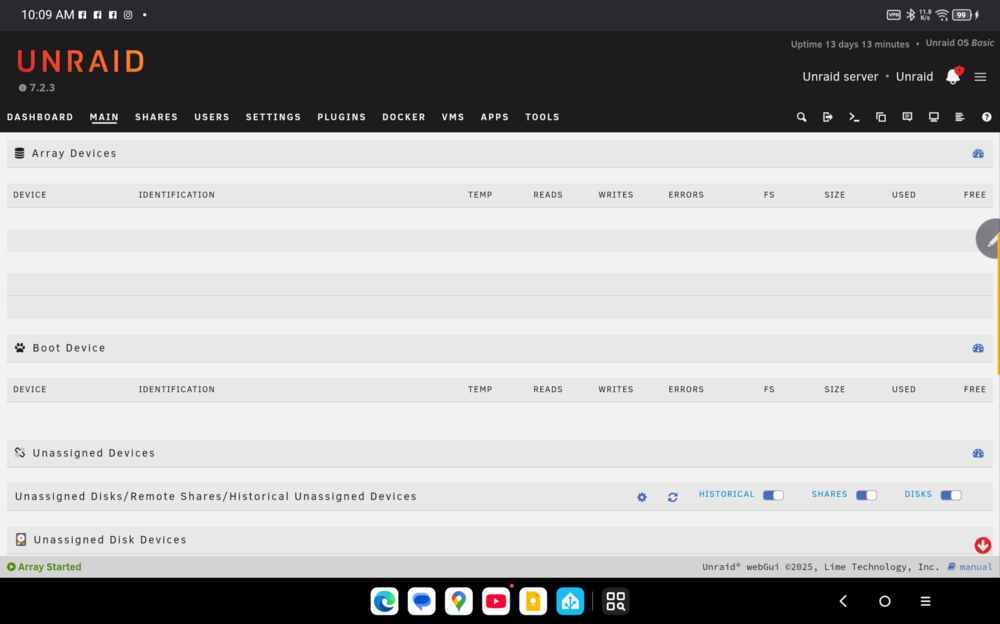
Wondering how to reset display settings? I have tried resetting display settings on unraid, toggling dark mode on my device and also viewing the desktop site. Same issue on both my android phone and Android tablet. Same issue updating containers, i cannot see any echo text of the update nor confirmation buttons on completion. 2nd issue: on android tablet, i can't enter a terminal session, the terminal displays something like hit enter to continue but i cant send an enter event - neither with the onscreen keyboard or bluetooth keyboard. Is there a work around? Same issue for viewing container log files. Both issues tested on edge and chrome browsers.
-
Setting Up myanonamouse.net seedbox for use with qbt over VPN I need to execute this command with the session id created with my vpn ip: sudo curl -c /path/docker/persists/mam.cookies -b 'mam_id=IP_session_cookie' https://t.myanonamouse.net/json/dynamicSeedbox.php What do I enter for the path to mam.cookies?
-
Getting the following issues trying to get this connection up. Header of my ovpn is included as well. Newb VPN guy here. My extraparams is --cap-add=NET_ADMIN --dns=8.8.8.8 --sysctl net.ipv6.conf.all.disable_ipv6=1 Tried running Privileged on and off. 2024-03-09 09:39:39 Initialization Sequence Completed 2024-03-09 09:39:55 Authenticate/Decrypt packet error: packet HMAC authentication failed 2024-03-09 09:40:15 [yvr-002.vpn.privado.io] Inactivity timeout (--ping-restart), restarting 2024-03-09 09:40:15 SIGUSR1[soft,ping-restart] received, process restarting 2024-03-09 09:40:15 Restart pause, 1 second(s) 2024-03-09 09:40:16 TCP/UDP: Preserving recently used remote address: [AF_INET]71.19.248.113:1194 2024-03-09 09:40:16 TCP/UDP: Preserving recently used remote address: [AF_INET]71.19.248.113:1194 2024-03-09 09:40:16 Socket Buffers: R=[212992->986432] S=[212992->986432] 2024-03-09 09:40:16 UDPv4 link local: (not bound) 2024-03-09 09:40:16 UDPv4 link remote: [AF_INET]71.19.248.113:1194 2024-03-09 09:40:16 TLS: Initial packet from [AF_INET]71.19.248.113:1194, sid=f58dd431 b754607e 2024-03-09 09:40:16 VERIFY OK: depth=1, CN=Privado 2024-03-09 09:40:16 VERIFY KU OK 2024-03-09 09:40:16 Validating certificate extended key usage 2024-03-09 09:40:16 ++ Certificate has EKU (str) TLS Web Server Authentication, expects TLS Web Server Authentication 2024-03-09 09:40:16 VERIFY EKU OK 2024-03-09 09:40:16 VERIFY OK: depth=0, CN=yvr-002.vpn.privado.io 2024-03-09 09:40:16 Control Channel: TLSv1.2, cipher TLSv1.2 ECDHE-RSA-AES256-GCM-SHA384, peer certificate: 4096 bit RSA, signature: RSA-SHA512 2024-03-09 09:40:16 [yvr-002.vpn.privado.io] Peer Connection Initiated with [AF_INET]71.19.248.113:1194 2024-03-09 09:40:16 TLS: move_session: dest=TM_ACTIVE src=TM_INITIAL reinit_src=1 2024-03-09 09:40:16 TLS: tls_multi_process: initial untrusted session promoted to trusted 2024-03-09 09:40:18 SENT CONTROL [yvr-002.vpn.privado.io]: 'PUSH_REQUEST' (status=1) 2024-03-09 09:40:18 PUSH: Received control message: 'PUSH_REPLY,redirect-gateway def1 bypass-dhcp,dhcp-option DNS 198.18.0.1,dhcp-option DNS 198.18.0.2,rcvbuf 493216,sndbuf 493216,explicit-exit-notify 5,route-gateway 172.21.60.1,topology subnet,ping 20,ping-restart 40,ifconfig 172.21.60.95 255.255.254.0,peer-id 1' 2024-03-09 09:40:18 WARNING: You have specified redirect-gateway and redirect-private at the same time (or the same option multiple times). This is not well supported and may lead to unexpected results 2024-03-09 09:40:18 OPTIONS IMPORT: --sndbuf/--rcvbuf options modified 2024-03-09 09:40:18 Socket Buffers: R=[986432->986432] S=[986432->986432] 2024-03-09 09:40:18 OPTIONS IMPORT: --ifconfig/up options modified 2024-03-09 09:40:18 OPTIONS IMPORT: route options modified 2024-03-09 09:40:18 OPTIONS IMPORT: route-related options modified 2024-03-09 09:40:18 OPTIONS IMPORT: --ip-win32 and/or --dhcp-option options modified 2024-03-09 09:40:18 Using peer cipher 'AES-256-CBC' 2024-03-09 09:40:18 Preserving previous TUN/TAP instance: tun0 2024-03-09 09:40:18 NOTE: Pulled options changed on restart, will need to close and reopen TUN/TAP device. 2024-03-09 09:40:18 net_route_v4_del: 0.0.0.0/0 via 172.21.20.1 dev [NULL] table 0 metric -1 2024-03-09 09:40:18 net_route_v4_del: 71.19.248.113/32 via 172.17.0.1 dev [NULL] table 0 metric -1 2024-03-09 09:40:18 net_route_v4_del: 0.0.0.0/1 via 172.21.20.1 dev [NULL] table 0 metric -1 2024-03-09 09:40:18 net_route_v4_del: 128.0.0.0/1 via 172.21.20.1 dev [NULL] table 0 metric -1 2024-03-09 09:40:18 Closing TUN/TAP interface 2024-03-09 09:40:18 net_addr_v4_del: 172.21.20.109 dev tun0 2024-03-09 09:40:19 net_route_v4_best_gw query: dst 0.0.0.0 2024-03-09 09:40:19 net_route_v4_best_gw result: via 172.17.0.1 dev eth0 2024-03-09 09:40:19 ROUTE_GATEWAY 172.17.0.1/255.255.0.0 IFACE=eth0 HWADDR=02:42:ac:11:00:03 2024-03-09 09:40:19 GDG6: remote_host_ipv6=n/a 2024-03-09 09:40:19 net_route_v6_best_gw query: dst :: 2024-03-09 09:40:19 sitnl_send: rtnl: generic error (-101): Network is unreachable 2024-03-09 09:40:19 ROUTE6: default_gateway=UNDEF 2024-03-09 09:40:19 TUN/TAP device tun0 opened 2024-03-09 09:40:19 net_iface_mtu_set: mtu 1500 for tun0 2024-03-09 09:40:19 net_iface_up: set tun0 up 2024-03-09 09:40:19 net_addr_v4_add: 172.21.60.95/23 dev tun0 2024-03-09 09:40:19 Data Channel: cipher 'AES-256-CBC', auth 'SHA1', peer-id: 1 2024-03-09 09:40:19 Timers: ping 20, ping-restart 40 2024-03-09 09:40:19 Protocol options: explicit-exit-notify 5 2024-03-09 09:40:22 net_route_v4_add: 71.19.248.113/32 via 172.17.0.1 dev [NULL] table 0 metric -1 2024-03-09 09:40:22 net_route_v4_add: 0.0.0.0/1 via 172.21.60.1 dev [NULL] table 0 metric -1 2024-03-09 09:40:22 net_route_v4_add: 128.0.0.0/1 via 172.21.60.1 dev [NULL] table 0 metric -1 2024-03-09 09:40:22 net_route_v4_add: 0.0.0.0/0 via 172.21.60.1 dev [NULL] table 0 metric -1 2024-03-09 09:40:22 WARNING: OpenVPN was configured to add an IPv6 route. However, no IPv6 has been configured for tun0, therefore the route installation may fail or may not work as expected. 2024-03-09 09:40:22 add_route_ipv6(::/0 -> :: metric -1) dev tun0 2024-03-09 09:40:22 net_route_v6_add: ::/0 via :: dev tun0 table 0 metric -1 2024-03-09 09:40:22 sitnl_send: rtnl: generic error (-13): Permission denied 2024-03-09 09:40:22 ERROR: Linux route add command failed Am I supposed to comment out the setting for openvpn version < 2.5??? client dev tun proto udp remote yvr-002.vpn.privado.io 1194 resolv-retry infinite nobind persist-key persist-tun persist-remote-ip tls-client #block-outside-dns route-ipv6 ::/0 route 0.0.0.0 0.0.0.0 vpn_gateway route-delay 3 # if you're using openvpn versions later than 2.5 uncomment the following: data-ciphers AES-256-CBC data-ciphers-fallback AES-256-CBC # openvpn versions <= 2.5 use the following default settings: #auth SHA256 #cipher AES-256-CBC #tls-cipher TLS-DHE-RSA-WITH-AES-256-CBC-SHA:TLS-DHE-DSS-WITH-AES-256-CBC-SHA:TLS-RSA-WITH-AES-256-CBC-SHA remote-cert-tls server auth-user-pass verb 3 <ca> -----BEGIN CERTIFICATE-----
-
Setup a cloudflare tunnel and install the cloudflare addon in HA. I just tried setting up a tunnel into my unraid with a redirect to ha instance and I couldn't get it to work. There was some issue with HA not responding to reverse proxy requests. I don't know enough about it so went with direct tunnel into my ha instance and using the addon inside ha. So in cloudflare I have a tunnel to my unraid server (for radarr and sonarr) and a separate one for ha. On thing I am trying to setup is 2 factor authentication but haven't been able to get that running with the android app yet. I have it running on my unraid tunnel so that cloudflare asks for an email to send an authentication code before you can get to the logon screen for the app.
-
I am halfway through my 30 day trial and loving unraid. My use case is to run a nas box on my sailboat - which means my hardware is exposed to salt air - so a hardware failure is not an if, it's a when. Just curious how this will work if I am running a 3 or 4 disk spanned array (with 1 parity drive) and end up having to introduce new hardware which may or may not be the same as what I am currently running (QNAP)?
-
This board is interesting. I am building a boat / rv computer running unraid so it has to be small form factor, 12v power supply ideally with minimal idle power consumption. 2 SATA ports is a problem as I am thinking 3 hard drive setup (with 1 parity). Is anybody aware of another board with 12v power supply (non-atx) and at least 3 sata ports? Would prefer to not go down the m2 -> sata adapter route.
