





kcossabo
Members
-
Joined
-
Last visited
Everything posted by kcossabo
-
@Hoopster - Thank You Found (at least) one of the issues. One of the two internal SATA Adaptors was set to IDE not AHCI. I changed them both to AHCI and I moved from (about) 50mbps to 150mbs, and now the parity rebuild (no workloads) is 24 hours. I am 12 hours in and seems to be tracking to the 24 hour mark. Problem 1 - Set the SATA controllers to AHCI
-
I am at another break point on this. I have learned a lot, but, after 4 days of a parity build, the server failed at 7:27am 1) I have a sys log Server set up, and nothing was logged since 4:38 Date Time Level Host Name Category Program Messages 2024-03-31 04:38:50 Notice SpaceStation user SysDrivers SysDrivers Build Complete 2024-03-31 04:38:38 Notice SpaceStation user network reload service: nginx 2024-03-31 04:38:23 Info SpaceStation daemon avahi-daemon Service "SpaceStation" (/services/sftp-ssh.service) successfully established. 2024-03-31 04:38:23 Info SpaceStation daemon avahi-daemon Service "SpaceStation" (/services/smb.service) successfully established. 2024-03-31 04:38:23 Info SpaceStation daemon avahi-daemon Service "SpaceStation" (/services/ssh.service) successfully established. 2024-03-31 04:38:22 Notice SpaceStation user root Starting Nginx server daemon... 2024-03-31 04:38:22 Info SpaceStation daemon avahi-daemon Server startup complete. Host name is SpaceStation.local. Local service cookie is 262143705. 2024-03-31 04:38:22 Info SpaceStation user emhttpd shcmd (31): /etc/rc.d/rc.nginx start 2024-03-31 04:38:22 Notice SpaceStation user root Starting php-fpm done 2024-03-31 04:38:22 Info SpaceStation user emhttpd shcmd (30): /etc/rc.d/rc.php-fpm start 2024-03-31 04:38:22 Info SpaceStation user emhttpd Autostart disabled (device configuration change) 2024-03-31 04:38:21 Info SpaceStation daemon avahi-dnsconfd Successfully connected to Avahi daemon. 2024-03-31 04:38:21 Notice SpaceStation user root Starting Avahi mDNS/DNS-SD DNS Server Configuration Daemon: /usr/sbin/avahi-dnsconfd -D 2024-03-31 04:38:21 Info SpaceStation user emhttpd shcmd (25): /etc/rc.d/rc.avahidnsconfd start 2024-03-31 04:38:21 Info SpaceStation daemon avahi-daemon Registering new address record for 10.10.102.13 on br0.IPv4. 2024-03-31 04:38:21 Info SpaceStation daemon avahi-daemon Registering new address record for 10.10.10.5 on br2.40.IPv4. 2024-03-31 04:38:21 Info SpaceStation daemon avahi-daemon Network interface enumeration completed. 2024-03-31 04:38:21 Info SpaceStation daemon avahi-daemon New relevant interface br0.IPv4 for mDNS. 2024-03-31 04:38:21 Info SpaceStation daemon avahi-daemon Joining mDNS multicast group on interface br0.IPv4 with address 10.10.102.13. 2) hardware platform reported that the OS Failed 2024-03-29 01:57:58 (UTC-0400) System Software event: System Event sensor, OEM System Boot Event was asserted 2024-03-29 01:58:11 (UTC-0400) System Software event: System Event sensor, Timestamp Clock Synch was asserted 2024-03-29 01:58:17 (UTC-0400) System Software event: System Event sensor, Timestamp Clock Synch was asserted 2024-03-29 01:59:24 (UTC-0400) System Software event: OS Boot sensor, boot completed - boot device not specific was asserted 2024-03-31 07:26:17 (UTC-0400) System Software event: OS Stop Or Shutdown sensor, Run-time Critical Stop was asserted 2024-03-31 07:35:24 (UTC-0400) System Software event: System Event sensor, OEM System Boot Event was asserted 2024-03-31 07:35:27 (UTC-0400) System Software event: System Event sensor, OEM System Boot Event was asserted 3) now the parity rebuild has restarted Total size: 12 TB Elapsed time: 22 minutes Current position: 103 GB (0.9 %) Estimated speed: 45.1 MB/sec Estimated finish: 3 days, 1 hour, 12 minutes Three 12TB Drives, and a 12TB Parity takes 3 days to build? Are you suppose to be able to use the server during the parity build? I know that writing to the drive throws everything off, so I hydrated the 20TB of data before I started the Parity build, but with PLEX and a few arr's running I am about to rebuild to ESXi or Proxmox to see if it is unRAID or the hardware. QUESTIONs 1) Is 3 days to rebuild normal? This is as long or longer than a SHR rebuild on my NAS? 2) Do I need to not use the server for the 3 days? 3) beyond writing syslog to a remote server is there any other forensic data that I can pull on why this is CRASHING, to be clear the server was on, heat was low, the OS CRASHED.
-
So far I am at Unraid Built-In (pro) the availability of the community apps plugin (pro) the ability to easily get to the webui, console, or logs of a container (pro) ease of updates (cons) rebuilding is a webgui (cons) Can not document / comment what I did and why docker-compose never used portainer (pro) the ability to quickly rebuild the setup with just a file (pro) available on all my docker platforms (Ubuntu, unRAID, NAS) (cons) harder to access the webui, console, or logs of a container from unRAID GUI (pro) ability to integrate into GitHub (I write the compose with MS Code, then git it to gthub) and do version control (pro) Easy to port and relaunch (pro) can document the code with remarks Result: They all play well, so, I use unRAID super cool, easy apps (docker) and one is Portainer CE, that hosts my complex Compose/STACKs Now if there was a way to expose the webUI to unRAID for a container built by Portainer, that would ROCK, and I might eliminate my 'homer' launch page.
-
Fun story, I played with that, but, it took to long to move files compared to MC.... now I know why. I thought it was because it was in a container. I assume it will work with docker turned down?
-
I will, and I found the problem. When MC is used to move a directory in this casespacestation-diagnostics-20240328-1026.zip /mnt/usr/system/* -> /mnt/usr/system2/ Even though system2 is on cache, the files do not move. (just tested it with my trouble shooting) If I Copy them, they do actually appear on the Cache.
-
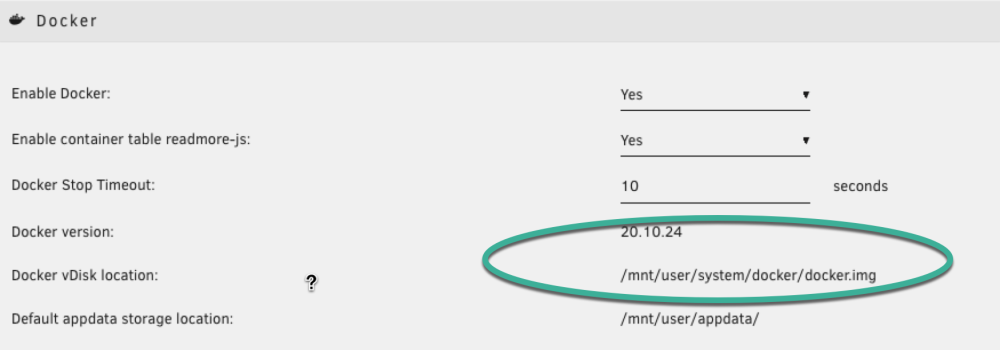
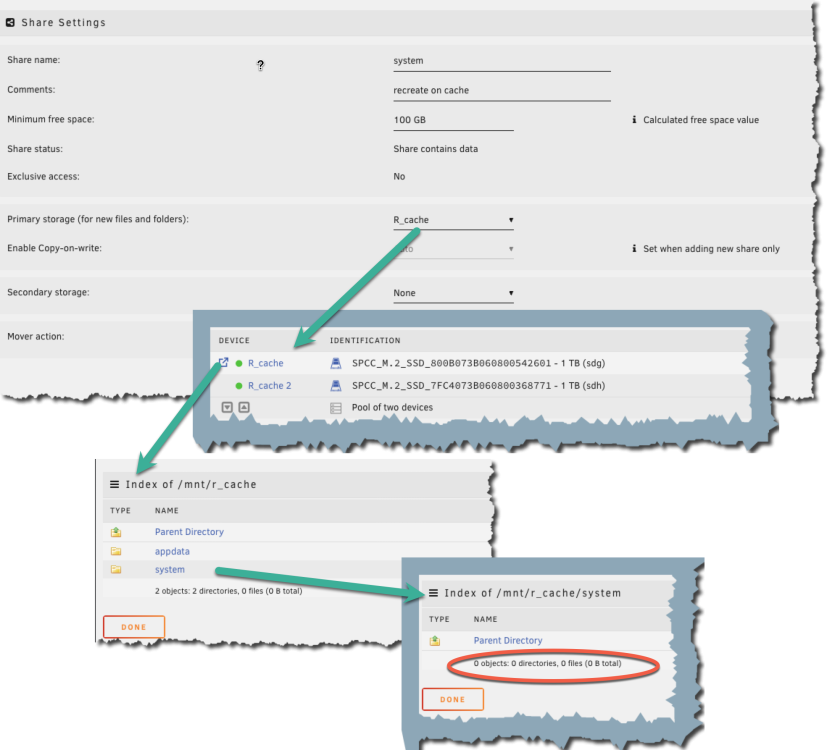
@trurl Thank You for the help. I reboot (array is not set to start, yet, on reboot), and - created a share 'system2' - move all the files from system to the new system2 (used MC at the CLI) - destroyed share, created share system on the cache (system) - moved data back from system2 to system Now I am totally confused. 1) Docker is set to /mnt/user/system/docker/docker.img 2) that share is on the cache, but has no files? 3) If I navigate to the share and look at the files, they are on the array, not the cache Appreciate the help, I will keep pocking at this.

-
I will reboot, after stoping VM and Docker, the mover has not completed in over 30 minutes.
-
Oh, the VM Manager… I stopped the Docker, but not the VM. I have no VM, but it is enabled.
-
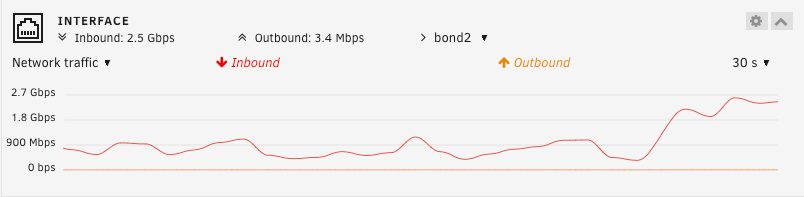
Thank You so much. I did set it up on the main array, now changed it to the cache, and invoked the mover, that is not a quick action. When I spun up the docker containers, while the system was on the array, the network performance dropped. When I stopped Docker to move the share, the network recovered. I have a few rsync's running moving data back to this server from a backup. I am (10GE Attached) getting a peek of 2.7Gbps (on unRAID screen and 1.4 on my switch) with docker off, and drops to 120Kbps with it on (with the system on the array). Would this be expected? once the mover moves appdata and system to the cache (dual 1TB SSD) then I will try again, but curious if this is a known situation.

-
@Faceman - same issue here. Curious if you found a cure
-
I assume there is nothing else in a normal /usr/system directory?
-
Background Working through a number of bad disk issues, and a system that was rebuilt 20+ times in the last 4 months. The latest was a Seagate SMR disk that went bad (2 months old). Console reported kernel: ata3.00: failed command: READ FPDMA QUEUED found the drive, removed it, then tried to use > Tools > New Config to reset the array, but, kept getting this nginx: 2024/03/26 18:49:02 [error] 5208#5208: *4210 connect() to unix:/var/run/emhttpd.socket failed (11: Resource temporarily unavailable) while connecting to upstream, client: 10.10.10.99, server: , request: "POST /update.htm HTTP/1.1", upstream: "http://unix:/var/run/emhttpd.socket:/update.htm", host: "10.10.10.5", referrer: "http://10.10.10.5/Tools/NewConfig" So I found a post that said you could reset the config by removing everything but the key and go from /boot/config Did this rebuilding the server. Now there is no /mnt/user/system - thus no /mnt/user/system/docker/docker.img find /mnt -name libvirt.img returns nothing. Question: how do I recreate the /mnt/user/system correctly (I know I can build the share) so that it has all the correct files, in particular docker.img Thank You
-
found the issue. %Cpu(s): 0.2 us, 88.5 sy, 0.0 ni, 11.0 id, 0.3 wa, 0.0 hi, 0.1 si, 0.0 st MiB Mem : 128800.0 total, 124426.1 free, 1536.2 used, 2837.7 buff/cache MiB Swap: 0.0 total, 0.0 free, 0.0 used. 125040.5 avail Mem PID USER PR NI VIRT RES SHR S %CPU %MEM TIME+ COMMAND 1717 root -2 0 0 0 0 R 97.0 0.0 16:41.31 acpi_pad/5 1735 root -2 0 0 0 0 R 96.7 0.0 16:42.05 acpi_pad/22 1638 root -2 0 0 0 0 R 95.4 0.0 16:43.78 acpi_pad/1 1715 root -2 0 0 0 0 R 95.4 0.0 16:41.49 acpi_pad/3 1718 root -2 0 0 0 0 R 95.4 0.0 16:40.45 acpi_pad/6 1720 root -2 0 0 0 0 R 95.4 0.0 16:42.80 acpi_pad/7 1721 root -2 0 0 0 0 R 95.4 0.0 16:42.07 acpi_pad/8 1727 root -2 0 0 0 0 R 95.4 0.0 16:41.63 acpi_pad/14 1728 root -2 0 0 0 0 R 95.4 0.0 16:43.09 acpi_pad/15 1730 root -2 0 0 0 0 R 95.4 0.0 16:41.88 acpi_pad/17 1731 root -2 0 0 0 0 R 95.4 0.0 16:41.03 acpi_pad/18 1732 root -2 0 0 0 0 R 95.4 0.0 16:42.11 acpi_pad/19 1736 root -2 0 0 0 0 R 95.4 0.0 16:42.64 acpi_pad/23 1739 root -2 0 0 0 0 R 95.4 0.0 16:42.17 acpi_pad/26 1740 root -2 0 0 0 0 R 95.4 0.0 16:43.18 acpi_pad/27 1741 root -2 0 0 0 0 R 95.4 0.0 16:41.27 acpi_pad/28 1742 root -2 0 0 0 0 R 95.4 0.0 16:41.92 acpi_pad/29 1745 root -2 0 0 0 0 R 95.4 0.0 16:41.97 acpi_pad/32 1746 root -2 0 0 0 0 R 95.4 0.0 16:41.92 acpi_pad/33 1747 root -2 0 0 0 0 R 95.4 0.0 16:42.47 acpi_pad/34 1750 root -2 0 0 0 0 R 95.4 0.0 16:41.95 acpi_pad/37 1751 root -2 0 0 0 0 R 95.4 0.0 16:42.37 acpi_pad/38 1753 root -2 0 0 0 0 R 95.4 0.0 16:41.25 acpi_pad/40 1637 root -2 0 0 0 0 R 95.1 0.0 16:41.82 acpi_pad/0 1714 root -2 0 0 0 0 R 95.1 0.0 16:40.85 acpi_pad/2 1716 root -2 0 0 0 0 R 95.1 0.0 16:41.90 acpi_pad/4 1722 root -2 0 0 0 0 R 95.1 0.0 16:40.76 acpi_pad/9 1723 root -2 0 0 0 0 R 95.1 0.0 16:43.21 acpi_pad/10 1724 root -2 0 0 0 0 R 95.1 0.0 16:41.61 acpi_pad/11 1725 root -2 0 0 0 0 R 95.1 0.0 16:42.07 acpi_pad/12 1726 root -2 0 0 0 0 R 95.1 0.0 16:41.34 acpi_pad/13 1729 root -2 0 0 0 0 R 95.1 0.0 16:42.44 acpi_pad/16 1733 root -2 0 0 0 0 R 95.1 0.0 16:42.86 acpi_pad/20 1734 root -2 0 0 0 0 R 95.1 0.0 16:42.53 acpi_pad/21 1737 root -2 0 0 0 0 R 95.1 0.0 16:42.44 acpi_pad/24 1738 root -2 0 0 0 0 R 95.1 0.0 16:41.72 acpi_pad/25 I issued modprobe --remove acpi_pad and the time to rebuild is dropping quickly, unlike last nights. I am down to less than 9 hours in less than 8 min.
-
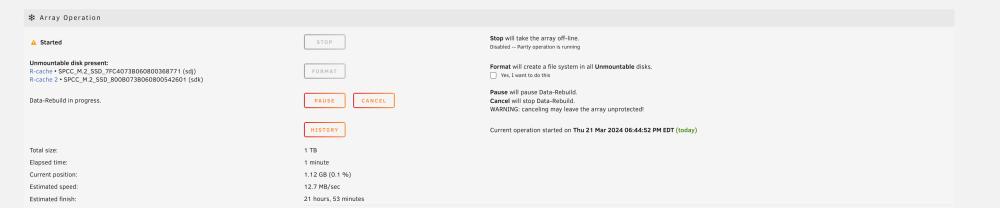
That diagnosis is big. Not sure what to look at, but for fun I am swapping another 1TB drive 21 hours for this 1TB....
-
Nothing accessing the array at this time. Lost the Cache drive, so all the Containers are Dead. Not sharing this out to other devices at this time. I GREATLY APPRECIATE the link to Diagnostics. Will post what I find.
-
a 9211-8i HbA controller -LSI SAS2x36 expander with 24 SAS drives, if that impacts anything. The other drives are SATA off of the mother board
-
I was very very surprised when I changed the drive and it reported a 12+ Hour rebuild estimate, to wake up this morning to it still rebuilding. My hope for the 24x 1TB drives was to have a quick rebuild, so when a failure occurred, I was not rebuilding 12TB; I was rebuilding 1/12th of that... this is a 9211-8i HbA controller -LSI SAS2x36 expander with 24 SAS drives, if that impacts anything.
-
I am thinking of re-starting my server build. I have 29 disks in the array, one parity drive in a 44TB Array; - 8TB Parity - 2x 8TB Data - 3TB Data - 25 x 1TB Disks (long story) I have 28.8TB in use with 80% of it already on another system (Still migrating) I have had a Cache drive fail (the one with appdata, and no active backup, I installed it, just forgot to configure it) I have has one of the 1TB Drives fail and it takes 12 hours to rebuild I read the article on Shrinking Array I am thinking of going to a; - 22TB Parity Drive - 2x 12TB - 3x 8TB Question: It seems the right move, as I have a landing place for the data on the server to move to, is to back-up, destroy, rebuild, migrate data back. but what are your thoughts on the following options, or please add your thoughts. 1) Move Data off of server, then rebuild from scratch - 12-24 hours to move the data (probably less) with rSync and SMB mounts on the 10GE network. 2) Use the "The "Remove Drives Then Rebuild Parity" Method". The time it would take to remove 25 x 1TB drives safely by the parity rebuild would be 12+ Days. 3) Use the "The "Clear Drive Then Remove Drive" Method" - with active parity drive 4) I could use 'unbalance' to move the data off of the drives, a modified "The "Clear Drive Then Remove Drive" Method" Thoughts.
-
Issue 4: Thank You @Frank1940 Over 250B/s
-
Feb 17, 2024 Issue 1 - rebuild seems to have fixed this. Issue 2 - still working issue Issue 3 - get over it Issue 4 - unRAID is not RAID, thus no stripping of data, thus, the speed is the speed of a single HDD unless I do a pool. Still playing Issue 5 - see issue 4 issue 6 NEW - 10GE line card needs to be in a specific PCIE slot for unRAID to use it. ESXi did not care, but unRAID could not see it.
-
Issues with unRAID, may need to look elsewhere. Does anyone have an optimization guide for LAN and maybe HDD? System ``` 2x Intel E5-2690 V3 2.60Ghz 12 Cores cpu (Total 24 cores) 128Gb DDR4 ECC REG Memory 24 bay 2.5" caddy SFF on 9211-8i HbA controller ``` Issue 1 The server goes 100% unresponsive when I launch a new VM or Container until it finishes the creation. This one was bad yesterday, not as bad today. No idea why Issue 2 Why with - 3 Ubuntu Servers - 5 Mac - 2 Windows - 4 Synology NAS All doing SMB/CIFS that **NOW I NEED TO CHANGE SMB SETTINGS** to work with unRAID? Ubuntu works out of the box, is FREE and unRAID will cost me $120, and is also community supported? If I mount a share off of unRAID to Mac Studio M1 Ultra @ 10G, and then try to move an Ubuntu ISO it never completes. Reboot the MAC still can not complete the transfer. The first transfer attempt took 14 min, and the second attempt took under 2, but nether 'completed' and hung the FINDER app on Mac. Issue 3 Most of this is over, but what stupid default settings! - Docker ON - VM ON - all interfaces in an Aggregate Group Boot up, find the IP, figure out how to disable the Docker and VM, so that the LAN connections can be edited, then finally go back and turn things on? Who wants 2x 1GE and 2x 10GE all in the same aggregate / br group, that is insanely stupid Issue 4 I am getting about 150Mb/s (18.75 MB/s) adding a CIFS transfer from a Synology NAS that transfer caps at 34MB/s (also 10GE attached) Total and then gets After this, the SMB share on unRAID is no longer accessible (does not show up when you browse or try to connect directly). It did reappear after 15 min (no reboot) FTP is able to access the share at a 29MB/s Single Source Second NAS to unRAID (SMB) 6 to 12MB/s Reference Same Client same app Cyber Duck FTP Client - from MacStudio to unRAID = 29MB/s - from MacStudio to Synology 1821+ = 108MB/s (min) bursts to 208MB/s Same Client same app SMB(Finder no modification) Client to Synology 1821+ - same directory - from MacStudio to unRAID = 17MB/s peaks, about a 50% idle between bursts (about 2 days) - from MacStudio to Synology 1821+ = 82MB/s (min) bursts to 800MB/s no idle times (about 1 hour) Issue 5 Hydrating data from a Synology NAS to the unRAID on a 10GE network using Syncthing is INSANELY slow. About 1 TiB per day.


