





Gandalf1369
Members
-
Joined
-
Last visited
Everything posted by Gandalf1369
-
Excellent!! It works! THANK YOU . . .
-
Does anyone know what is the minimum Unraid version that is needed for this to work?? Will it work on ANY 7.X version?
-
Click the "padlock" icon to the left of the "Tools" in the Dashboard header. The "padlock" icon will turn red and the blue wrench will appear at the top of the tile that contains your system info (i.e. server name, Unraid version etc.). After you finish making any adjustments you want don't forget to click the "padlock" icon again to lock your Dashboard changes in place.
-
You should try going to the "Help & Suport" page from the main Unmanic container page. Once there look for "Logs" and click the "Log Buffer Retention" dropdown. Choose a short interval and make sure that "Enable Debugging" is turned off. Restart the container - this will take a LONG time as the ungodly number of files are being deleted. Once the container has restarted you should be back to a much more resonable "restart" time. On my server the container GUI now starts up in a few seconds. Hope this helps. . .
-
Just installed Unraid Connect. Couldn't sign in. The above steps solved the problem. Thank you!!
-
Thanks. Worked like a charm!!
-
Thank you - never noticed that icon before.
-
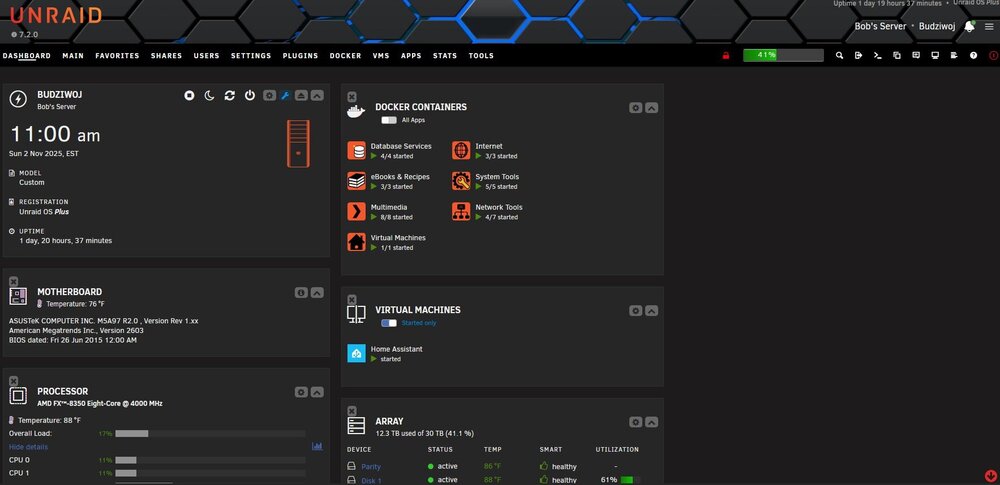
Is anyone having an issue with the layout of their dashboard since updating to 7.2?? I am stuck with having only two columns of tiles and cannot get it to display three columns. When I was on 7.14 the dashboard display was working well with three columns. This situation only showed up after updating to 7.2. I tried to rearrange the tiles after "unlocking" the display by using the padlock in the upper right corner but no luck. Beside this very minor problem everything appears to be working well. I know this is a very insignificant glitch on my server but I would like to resolve it if possible. Thanks for any help . . . I've attached an image for clarity.
-
I have been using Unraid for a relatively short time but I am constantly getting this message in the terminal syslog window : "Apr 18 11:19:32 Budziwoj kernel: mce: [Hardware Error]: Machine check events logged Apr 18 11:19:32 Budziwoj kernel: [Hardware Error]: Corrected error, no action required. Apr 18 11:19:32 Budziwoj kernel: [Hardware Error]: CPU:7 (15:2:0) MC1_STATUS[-|CE|MiscV|AddrV|-|-|-]: 0x8c00000000000012 Apr 18 11:19:32 Budziwoj kernel: [Hardware Error]: Error Addr: 0x0000000001c3c400 Apr 18 11:19:32 Budziwoj kernel: [Hardware Error]: MC1 Error: L2 TLB parity error. Apr 18 11:19:32 Budziwoj kernel: [Hardware Error]: cache level: L2, tx: INSN" The server, in all respects, functions absolutely fine (as far as I can tell). I realize the error message says that the error has been corrected and no further action is needed, but I am really curious on what is causing the error and if there is any way to correct it permanently. I have attached the zipped diagnostics file thinking that would be useful in figuring out the problem. I am using Unraid version 6.12.10. The server has 2 10TB data drives and 1 10tb parity drive. The CPU is an AMD FX-8350 with 32GB DDR3 non-EEC memory. Grateful for any help you might offer . . . . budziwoj-diagnostics-20240418-1310.zip
