





bonienl
Community Developer
-
Joined
-
Last visited
Everything posted by bonienl
-
Great to hear. Some further explanation of your issue before. VLAN 3 was set up with DHCP, this means your Unraid server gets an IP address in the same subnet as the Docker containers. It then wants to use VLAN 3 to communicate directly with the containers, because it is the nearest connection. Docker however doesn't allow direct communication between host and containers in the same network. So when traffic leaves the tunnel at the server side, it will get blocked by Docker and can't reach the containers (this gives your 2nd hop unreachable). This is exactly the same issue when people are using br0 as their custom container network!! When no IP address is assigned to VLAN 3, the server doesn't learn a direct connection to the containers, but instead will send traffic to the default gateway (your router). The router in return can forward the traffic to the destined container and communication is established, with the condition that a static route on your router exists for the return path. That is containers back to the tunnel. Another "none visible" issue you have solved here is asymmetric routing. The DHCP assignment of VLAN 3 caused the server to learn a second default gateway via VLAN 3. This means that traffic destined for the Internet could either leave via eth0 or VLAN 3, since both ended up here at the same router and there are no specific firewall rules in place, this didn't cause a connection problem, but it is always better to avoid asymmetric routing.
-
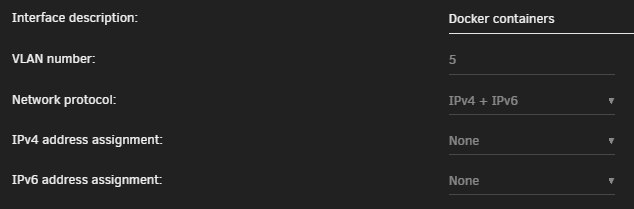
Ok, you have to make changes for the docker part. First the VLAN used for Docker should have no IPv4 (and no IPv6 assignment). Here is my config (you can use IPv4 only) Next, you need to assign the VLAN network (br0.3) to Docker. Define subnet, gateway and DHCP pool accordingly. Here is my config for br0.5 (docker subnet) Start Docker and retest, it should go much better now 😃

-
I suspect a routing issue on the Unraid server itself, hence I like to see the network configuration file.
-
What does a traceroute look like from server to gateway 192.168.1.1 (so done from the Unraid server)? Can you also post the content of the /config/network.cfg file on your USB stick.
-
The second hop goes from the server (10.253.0.1) to your router (192.168.1.1). Any firewall rule set in the LAN LOCAL section which may interfere?
-
No, both methods work. You should do a traceroute from the peer device. I expect multiple hops (3) to reach the final destination.
-
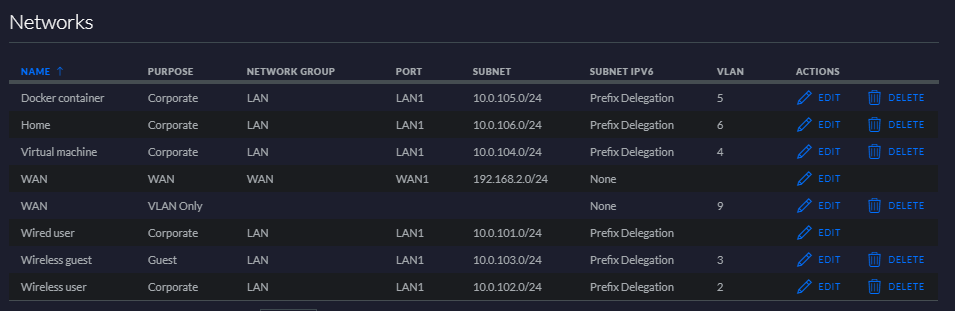
This is my networks configuration, yours should look similar - sans IPv6 (ignore the WAN - VLAN only, it serves a special case).
-
Or firewall issue. Do you allow traffic between subnets (the LAN IN and LAN OUT sections?)
-
It should work! I have a similar set up with containers on separate VLANs and interfaces and these are reachable (I just tried Heimdall which for me is on br0.5). I'll have a look at your settings. Q: what do you use as peer device (sorry if already mentioned)? Q: Can you show the routing table of the gateway (you need to ssh into the USG). Below is mine (LAN = eth0, WAN = eth2) admin@Blaster:~$ show ip route Codes: K - kernel route, C - connected, S - static, R - RIP, O - OSPF, I - ISIS, B - BGP, > - selected route, * - FIB route S>* 0.0.0.0/0 [1/0] via xxx.xxx.xxx.xxx, eth2 C>* 10.0.101.0/24 is directly connected, eth0 C>* 10.0.102.0/24 is directly connected, eth0.2 C>* 10.0.103.0/24 is directly connected, eth0.3 C>* 10.0.104.0/24 is directly connected, eth0.4 C>* 10.0.105.0/24 is directly connected, eth0.5 C>* 10.0.106.0/24 is directly connected, eth0.6 S>* 10.253.0.0/16 [1/0] via 10.0.101.5, eth0 C>* 127.0.0.0/8 is directly connected, lo
-
Your set up is working because you configured your clients to use the gateway as DNS forwarder, however this solution renders pi-hole useless because of the DNS caching your gateway will do.
-
This is not entirely true. With your router acting as DNS forwarder, it will cache DNS entries and make them available to your cliients BEFORE pi-hole gets a chance to block. In other words you will still see many advertisments. The only true way to block unwanted content is by setting the pi-hole DNS server as the FIRST choice to clients.
-
I have made an update to the WireGuard plugin, which allows more selective NAT rules when multiple tunnels exist. You need to re-apply all existing tunnel configurations to change the settings. Afterwards a reboot is required unless you know how to manipulate iptables manually (a crime).
-
I did (a lot of) testing and made line traces to monitor what is happening exactly. 1. If you have docker containers with a custom IP address assigned to br0 (the management interface of Unraid) then containers will never be reachable thru WG. The reason: the tunnel terminates on the host, but docker doesn't allow communication between host (Unraid) and containers. The solution: create a separate interface or VLAN for docker containers 2. When the setting "Local gateway uses NAT" is set to YES, it will cause Unraid to use its own LAN address as source for communication to other devices on the LAN network. I am going to change the name of this setting, because it has nothing to do with the local gateway (router). With NAT enabled on the Unraid server, all devices respond directly to Unraid (i.e. not via the default gateway). In my testing, however, the NAT setting causes issues when talking to containers with custom IP addresses. These reply wrongly and consequently are not reachable, but any other device in the LAN works correctly, just not containers. 3. When the setting "Local gateway uses NAT" is set to NO, it will cause Unraid to use the WG tunnel address as source for communication. In this case the default gateway (your router) needs a static route added to point tunnel addresses back to the Unraid server. With this set up both docker containers and other devices are reachable. 4. I have issues when using UPnP on my router (Ubiquiti) and ended up making manual forwarding port rules instead. User mistake, UPnP is working correctly with Ubiquiti.
-
Do you use UPnP or manual port forwarding? Also is bridging enabled for eth0 (it should be)?
-
Yes, you need to create two peers. Both can be active/used at the same time.
-
Test with the setting "Local gateway uses NAT" set to NO.
-
Try testing with "Local gateway uses NAT = NO" This prevents adding additional iptables rules to the server.
-
I can't because I don't know your setup, which seems odd with so many routers chained. It may create different paths which do not exist in a 'regular' set up.
-
From www.wireguard.com WireGuard® is an extremely simple yet fast and modern VPN that utilizes state-of-the-art cryptography. It aims to be faster, simpler, leaner, and more useful than IPsec, while avoiding the massive headache. It intends to be considerably more performant than OpenVPN. You can search online for comparisons between WireGuard and other VPN solutions.
-
-
You can add a second tunnel, one for IPv4 and another for IPv6
-
Excellent, I presume you have set up a manual port forwarding rule on your router. Btw. This solution is also applicable to docker containers running on custom IP addresses (e.g. pi-hole in a container with its own address)
-
Need more info. I have multiple VMs all reachable when wireguard is active
-
No, this means the wireguard tunnel receives the packet but the next-hop device (your pfsense) doesn't know the way back. Ps. if the router doesn't know how to reach the destination, you get "destination unreachable" as answer.
-
Can you do a traceroute (windows = tracert) from the peer to an IP address of the docker container >tracert -d 10.0.101.100 Tracing route to 10.0.101.100 over a maximum of 30 hops 1 3 ms 2 ms 2 ms 10.253.0.1 2 2 ms 2 ms 2 ms 10.0.101.100 Trace complete. Above is a traceroute from my laptop to one of my containers (pi-hole) with a custom IP address (10.0.101.100). It goes over the tunnel and the container respond as well.



