





bonienl
Community Developer
-
Joined
-
Last visited
Everything posted by bonienl
-
Yes, you are right. The import parser went wrong on the comment statement(s). I have made an update with the fix. Thanks.
-
The config files look alright, but in your screenshots there are missing mandatory fields. Did you remove those fields or they are not populated after importing the config file? What happens when all fields are filled in (see also my screenshot)?
-
I miss a couple of mandatory fields. These should be present in the config file generated by TorGuard Local private key - generated by TorGuard Peer public key - generated by TorGuard Peer endpoint - this is the URL of the TorGuard VPN access Peer allowed IPs - this should be 0.0.0.0/0 Here is a screenshot of my VPN connection
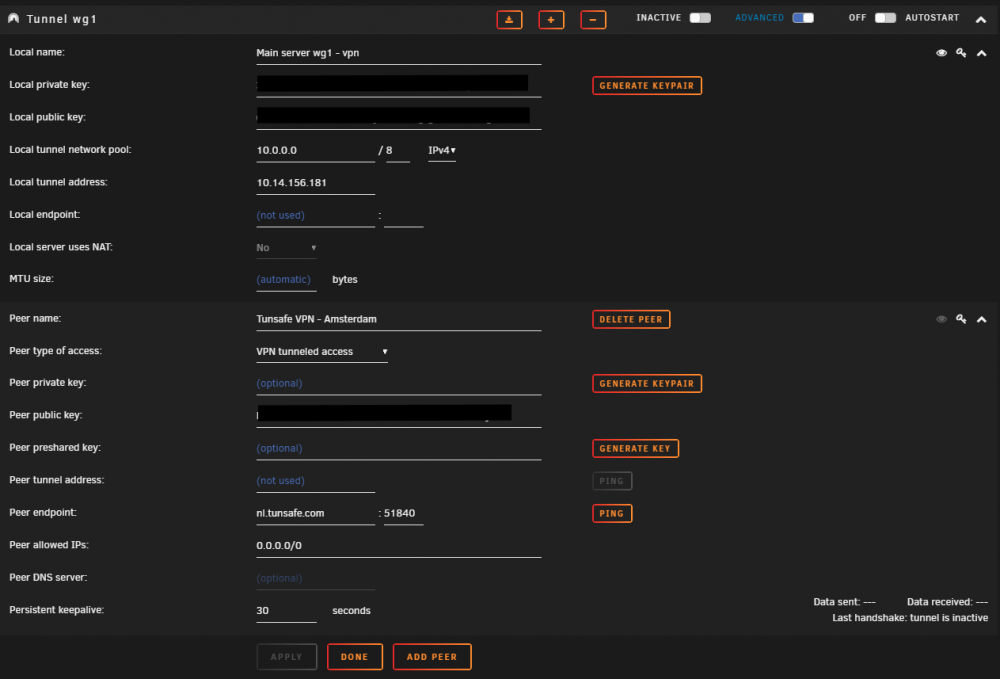
-
I made an update, please try again.
-
Disable UPnP, see advanced settings.
-
Did you create a new (WG1) tunnel for this connection? In other words do not add this as another peer to an existing tunnel (WG0) Set all other tunnels inactive when using VPN tunneled access
-
Remove the "ListenPort" in the TorGuard config, it is not needed/used because the peer will always initiate the connection.
-
Try to set the MTU size to 1400 and see if that makes a difference.
-
Very often I see people marking their issue as "urgent" because it has impact on the operation of their system. Please consider carefully when to use the "urgent" priority. Using this level implies a serious bug affecting a large group of people. Make sure it is not related to the specific set up of your system. At minimum the issue must be reproduceable in safe mode. Any issue marked as "urgent" gets high attention at Limetech, but this gives a lot more burdon to investigate. If uncertain start with marking as "minor", if it turns out to be a serious issue its priority can always be raised.
-
Why not buying a second NIC, that is the easiest and quickest solution
-
Nothing hardcoded. Verification is done using regular expressions and the current implementation accepts top domain names between 2 and 6 characters. Your ".network" is 7 characters. I'll make an update to allow longer names. Ps. Update is available
-
I have tested and confirmed working, the updated plugin Dynamix System Temp on my test server, which has an AMD Ryzen 3400G processor and ASRock X570M Pro4 motherboard.
-
I have made an update to "Dynamix System Temp". It will not overwrite the sensors-detect file included in Unraid 6.8. After updating the plugin, you will need to reboot the system in order to restore the sensors-detect file of Unraid 6.8. In addition driver detection is made a background process and the well-known Unraid spinner is displayed while detection takes place.
-
Give the default gateway under eth0 a metric 1 Give the default gateway under eth4 a metric 2
-
@Hoopster made a nice tutorial, which explains well what to do. See
-
Switching between portrait and landscape mode, makes it scrollable, but for some reason not for CA.
-
BR0 is a directly connected interface and it is not possible to overrule routing to point to the gateway, which has always a higher metric.
-
Sorry, I don't understand what you try to say. When UPnP is enabled on Unraid (see management settings) and UPnP is enabled on the router, then port forwarding is done automatically. The result is displayed in the GUI. When the router has UPnP disabled or does not support it, or Unraid has the UPnP setting disabled, then manual port forwarding is required on the router, in this case Unraid can not check the actual status and gives the remark message.
-
Do you mean "own IP address"? If yes, go through this topic, there are explanations and solutions given.
-
It is explained in the OT
-
The remark is given as a reminder to the user, because the server can't really check if the proper forwarding rule is actually set on your router.
-
Maybe change to nicht erfolgreich 😉
-
You are right. Need to correct that. Thanks
-
Not necessarily. An alternative is to add a second ethernet interface to your server.
-
I've made another update to the WireGuard plugin, everybody is encouraged to update. Again, if your current version is prior to 2019.10.25, follow the instructions given a few posts earlier in this topic.




