





SkepticalOptimist
Members
-
Joined
-
Last visited
-
Whoever stumbled on this.. Issue was resolved with help from chatgpt. Needed a route for the docker on a wg network to unifi VPN client. I also got chatgpt to create a script to make the fix permanent on restart for multiple wg network tunnels. All good now..
-
I had zero issue with PFSENSE allowing either OPENVPN or WG clients accessing UNRAID Docker UI's that had any type of network type. I just switched to Unifi and everything is working fine. I can access UNRAID and dockers on bridge or custom. But, I cannot access any UI of a Docker with a network type defined via VPN Manager. (VPN provider) I have tried countless things including Host access custom network "enabled", FW rules to the docker VPN IP, ... No joy. I am hoping ;this is something simple and not what I have been reading on messing with routes.
-
You are correct. Your branch is up to date with 'origin/v2-master'. HEAD is now at 3de321a4 Merge pull request #2028 from causefx/v2-develop I really don't understand why it didn't appear to be updating as I do monthly appdatabackup which would take the container offline for a few minutes. Thanks for the help.
-
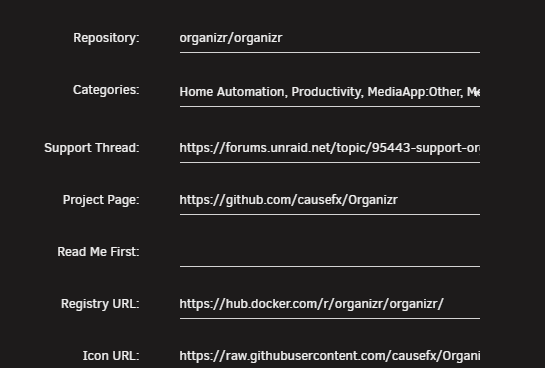
Well I edited my question because I wasn't receiving a response and either I have a misconfiguration or I haven't received an update I believe since I installed it well over a year ago. I do see updates to https://github.com/causefx/Organizr. I have the following config for Docker:
-
Updated: I see the Docker is pretty much dead. But, the source seems alive. Hopefully someone picks this up..
-
I saw that and figured that may be it. But, had to ask as I wasn't' 100% sure and don't want to break it. Thanks for responding.
-
7.1.4 running latest GlueTunVPN PR release. How and why is GluetunVPN starting itself as soon as array starts? It's the only Docker I have ever seen this symptom. Autostart is 100% set to off and it still starts on it's own. I'll be honest. I only installed roughly a month ago and I had disabled all docker starts due to a licensing issue I ran into a couple of days ago. That is when I noticed this.
-
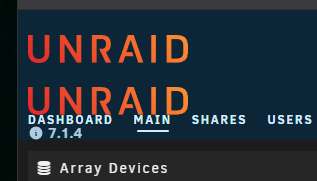
I confirmed with Unraid support that my license was indeed removed. I don't have an explanation as to why as of yet. The implications or results of losing my license: You will likely lose Unraid Connect and have a big red ! with no explanation. As soon as I restarted array, I was prompted to install UConnect which re-established itself and ! disappeared. Potentially the Java script error documented above. I am not validating this is fixed right away. Will do so on next reboot. Potentially double Unraid logo. Corrected itself right after Unraid Connect re-applied.
-
I went online and my license seems to be completely gone. I opened a support ticket to find out what is going on...
-
I tested another browser and same results (Edge vs Brave) I don't understand what you have proved? The error only occurs ( in subject) in normal No GUI boot mode. It doesn't appear in safe mode as mentioned. Therefore, there is something in regular boot mode which is causing both the Java error and double Unraid logo. I also see this: (attached) Something is clearly wrong. This all began following either 7.1.4 upgrade and/or 2 power failures (UPS didn't hold) and/or both. I researched a bit further and I am seeing no license key associated with my account when I own 2. What is going on?

-
I stand corrected. This is not solved. In fact, I restarted as I suspected I was still in safe and the same error and double Unraid logo appears. Gluetunvpn is still self starting even with set to off in docker.
-
Now I am getting this for the webui: I cannot click on dashboard or main. Also, noticed GlutenVPN is auto starting even though auto start is set to OFF. Logs show this: Jul 8 17:51:54 unraidserver kernel: veth5b6058e: renamed from eth0 Jul 8 17:51:54 unraidserver kernel: docker0: port 1(veth6e829bd) entered disabled state Jul 8 17:51:54 unraidserver kernel: veth6e829bd (unregistering): left allmulticast mode Jul 8 17:51:54 unraidserver kernel: veth6e829bd (unregistering): left promiscuous mode Jul 8 17:51:54 unraidserver kernel: docker0: port 1(veth6e829bd) entered disabled state
-
Trying to figure out why I have this error near end of startup. Jul 8 17:30:29 unraidserver avahi-daemon[2350]: Service "unraidserver" (/services/smb.service) successfully established. Jul 8 17:30:30 unraidserver root: <anonymous_script>:1 Jul 8 17:30:30 unraidserver root: Jul 8 17:30:30 unraidserver root: Jul 8 17:30:30 unraidserver root: SyntaxError: Unexpected end of JSON input Jul 8 17:30:30 unraidserver root: at JSON.parse (<anonymous>) Jul 8 17:30:30 unraidserver root: at ApiStateConfig.parseConfig (file:///usr/local/unraid-api/dist/assets/plugin.module-_9apkWTJ.js:971:32) Jul 8 17:30:30 unraidserver root: at async loadApiConfig (file:///usr/local/unraid-api/dist/assets/plugin.module-_9apkWTJ.js:1071:24) Jul 8 17:30:30 unraidserver root: at async PluginService.listPlugins (file:///usr/local/unraid-api/dist/assets/plugin.module-_9apkWTJ.js:2253:34) Jul 8 17:30:30 unraidserver root: at async PluginService.importPlugins (file:///usr/local/unraid-api/dist/assets/plugin.module-_9apkWTJ.js:2219:32) Jul 8 17:30:30 unraidserver root: at async PluginCliModule.register (file:///usr/local/unraid-api/dist/assets/plugin.module-_9apkWTJ.js:12650:25) Jul 8 17:30:30 unraidserver root: Box is accessible and seems to be running but still trying to determine reason for extreme latency on Dockers in particular.
-
Will give it a go. Wasn't even aware there was a DIscord for Unraid. I see at least 1 of the JF posts is still up. Must be a friend of the Mod.
-
Perfect example(s) of some qualify some don't. Let's see how long this one is up:
