





Stephan4711
Members
-
Joined
-
Last visited
Everything posted by Stephan4711
-
Simon says: No TPM on VM :-( ;-)
-
And TPM licensing with proxmox host isn't supported? I have an efi disk and a tpm 2.0 configured, but I don't even have any button shown for move to tpm. (the whole Registration button is missing, but entering the URL in the browser works)
-
What's the recommended size for the boot disk? I need to add virtual disk to my promox VM. I want to set it as small as needed (also for some future development)
-
I moved all data to the other disk. I created a new VM-Disk and changed them. I formated the new Disk with btrfs, when it was attached to the Array. Then the update to 7.1.2 was no problem. Then I moved my data back.
-
the problem still exists, that there is the fdisk error and while the array was broken, the disks appeared as unassigned drives, there I could do a file system check, which was with errors for disk1 and the fix option, didn't work. So I would like to repair this mess, so that next updates will work without trouble.
-
That's why I asked If I should keep the disk setting with new config. I'm not doing new configs on a daily base, so I'm not familar with it. Right now I'm moving all stuff vom disk1 to disk3. When done, I'll kill disk1 and recreate it. Mabe also with BTFRS instead of XFS
-
back on 7.0.1 I made all config manually new to the disk assignment, but there is still the fdisk size error. Wouldn't it be good to fix this?
-
after downgrade and new config it's still a complete broken mess
-
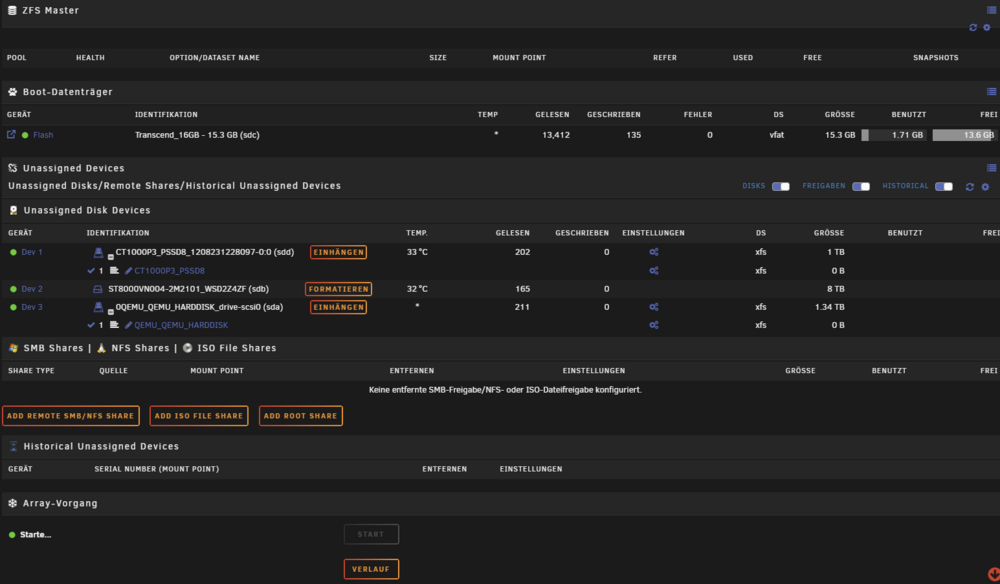
Doesn't really look good at all.
-
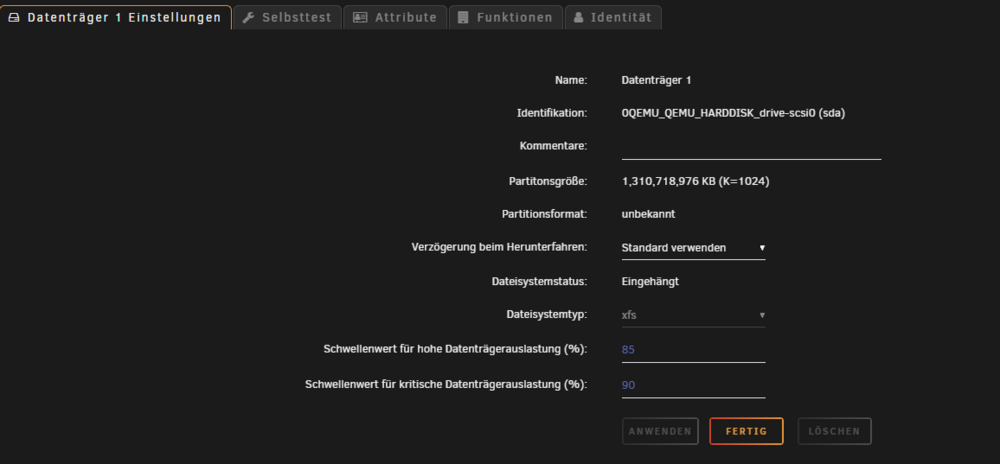
I'm confused, I thought, this is all available inside this partition. Nevertheless, how can I fix the partition size, best without restoring backups

-
My partition is also 1,3 TB 🙈 can I fix this before the update or just update an create a new config? Do I need to keep disk settings with new config?
-
this is the output from 7.0.1 Disk /dev/sda: 1.22 TiB, 1342177280000 bytes, 2621440000 sectors Disk model: QEMU HARDDISK Units: sectors of 1 * 512 = 512 bytes Sector size (logical/physical): 512 bytes / 512 bytes I/O size (minimum/optimal): 512 bytes / 512 bytes Disklabel type: dos Disk identifier: 0x00000000 Device Boot Start End Sectors Size Id Type /dev/sda1 2048 1048575999 1048573952 500G 83 Linux
-
I'm back on 7.0.1 here is everything fine. Want this output here too, before I do an upgrade again?
-
here we are tower-diagnostics-20250512_1152.zip
-
Here is the log output: May 12 08:28:53 Tower kernel: mdcmd (30): import 29 May 12 08:28:53 Tower kernel: md: import_slot: 29 empty May 12 08:28:53 Tower emhttpd: /bin/lsblk -lnbo TYPE,PARTN,NAME,START,SIZE,PTTYPE,PARTTYPE /dev/sdd 2>&1 May 12 08:28:53 Tower emhttpd: disk sdd 1000204886016 dos May 12 08:28:53 Tower emhttpd: part 1 sdd1 2048 1000203837440 dos 0x83 May 12 08:28:53 Tower emhttpd: device sdd partition: sdd1 type: dos start: 2048 size: 976761560, code: 0x83 (4) May 12 08:28:54 Tower emhttpd: import 30 pool device: (sdd) CT1000P3_PSSD8_1208231228097-0:0 May 12 08:28:54 Tower emhttpd: /bin/lsblk -lnbo TYPE,PARTN,NAME,START,SIZE,PTTYPE,PARTTYPE /dev/sdc 2>&1 May 12 08:28:54 Tower emhttpd: disk sdc 15289286656 dos May 12 08:28:54 Tower emhttpd: part 1 sdc1 2048 15288238080 dos 0xc May 12 08:28:54 Tower emhttpd: device sdc partition: sdc1 type: dos start: 2048 size: 14929920, code: 0xc (4) May 12 08:28:54 Tower emhttpd: /sbin/blkid /dev/sdc1 2>&1 May 12 08:28:54 Tower emhttpd: /dev/sdc1: LABEL_FATBOOT="UNRAID" LABEL="UNRAID" UUID="2732-64F5" BLOCK_SIZE="512" TYPE="vfat" May 12 08:28:54 Tower emhttpd: import 31 flash device: (sdc) May 12 08:28:54 Tower emhttpd: update_pool_cfg: 30 cache 0 May 12 08:28:56 Tower SysDriversBuild: Submitting SysDrivers Build May 12 08:28:56 Tower sysDrivers: SysDrivers Build Starting May 12 08:28:56 Tower usb_manager: Info: rc.usb_manager Building Connected Status May 12 08:28:56 Tower emhttpd: read SMART /dev/sdd May 12 08:28:56 Tower emhttpd: read SMART /dev/sdb May 12 08:28:56 Tower emhttpd: read SMART /dev/sdc May 12 08:28:56 Tower emhttpd: read SMART /dev/sda May 12 08:28:57 Tower emhttpd: Starting services... May 12 08:28:57 Tower emhttpd: shcmd (17): /etc/rc.d/rc.samba reload May 12 08:28:57 Tower emhttpd: shcmd (20): /etc/rc.d/rc.nfsd start May 12 08:28:57 Tower rc.nfsd: Starting NFS server daemon... May 12 08:28:57 Tower kernel: RPC: Registered named UNIX socket transport module. May 12 08:28:57 Tower kernel: RPC: Registered udp transport module. May 12 08:28:57 Tower kernel: RPC: Registered tcp transport module. May 12 08:28:57 Tower kernel: RPC: Registered tcp-with-tls transport module. May 12 08:28:57 Tower kernel: RPC: Registered tcp NFSv4.1 backchannel transport module. May 12 08:28:58 Tower rc.rpc: Starting RPC server daemon... May 12 08:28:58 Tower rc.rpc: Starting RPC portmapper May 12 08:28:58 Tower rc.rpc: /sbin/rpcbind -w -h 192.168.100.29 May 12 08:28:58 Tower rc.rpc: Starting RPC NSM (Network Status Monitor) May 12 08:28:58 Tower rc.rpc: /sbin/rpc.statd May 12 08:28:58 Tower rpc.statd[6106]: Version 2.8.3 starting May 12 08:28:58 Tower sm-notify[6108]: Version 2.8.3 starting May 12 08:28:58 Tower rpc.statd[6106]: Failed to read /var/lib/nfs/state: Success May 12 08:28:58 Tower rpc.statd[6106]: Initializing NSM state May 12 08:28:58 Tower rc.rpc: RPC server daemon... Started. May 12 08:28:58 Tower rc.nfsd: /usr/sbin/exportfs -r May 12 08:28:58 Tower rc.nfsd: /usr/sbin/rpc.nfsd -u -H 192.168.100.29 -H 127.0.0.1 -s 8 May 12 08:28:59 Tower kernel: NFSD: Using UMH upcall client tracking operations. May 12 08:28:59 Tower kernel: NFSD: Using UMH upcall client tracking operations. May 12 08:28:59 Tower kernel: NFSD: starting 90-second grace period (net f0000000) May 12 08:28:59 Tower rc.nfsd: /usr/sbin/rpc.mountd May 12 08:28:59 Tower rpc.mountd[6291]: Version 2.8.3 starting May 12 08:29:00 Tower rc.nfsd: NFS server daemon... Started. May 12 08:29:00 Tower emhttpd: shcmd (22): /etc/rc.d/rc.avahidaemon reload May 12 08:29:00 Tower unassigned.devices: Updating share settings... May 12 08:29:00 Tower unassigned.devices: Share settings updated. May 12 08:29:00 Tower emhttpd: Autostart disabled (device configuration change) May 12 08:29:00 Tower emhttpd: shcmd (27): /etc/rc.d/rc.php-fpm start May 12 08:29:00 Tower rc.php-fpm: Starting PHP-fpm daemon... May 12 08:29:00 Tower rc.php-fpm: /usr/sbin/php-fpm --daemonize --fpm-config /etc/php-fpm.conf --pid /var/run/php-fpm.pid --allow-to-run-as-root May 12 08:29:01 Tower rc.php-fpm: PHP-fpm daemon... Started. May 12 08:29:01 Tower emhttpd: shcmd (28): /etc/rc.d/rc.unraid-api install May 12 08:29:01 Tower emhttpd: shcmd (29): /etc/rc.d/rc.nginx start May 12 08:29:01 Tower rc.nginx: Starting Nginx server daemon... May 12 08:29:06 Tower root: Starting the Unraid API May 12 08:29:07 Tower webgui: Successful login user root from 192.168.100.142 May 12 08:29:11 Tower sysDrivers: SysDrivers Build Complete May 12 08:29:19 Tower root: [PM2][WARN] Applications unraid-api not running, starting... May 12 08:29:19 Tower root: [PM2][WARN] App unraid-api has option 'wait_ready' set, waiting for app to be ready... May 12 08:29:19 Tower root: [PM2] App [unraid-api] launched (1 instances) May 12 08:29:19 Tower root: ┌────┬───────────────┬─────────────┬─────────┬─────────┬──────────┬────────┬──────┬───────────┬──────────┬──────────┬──────────┬──────────┐ May 12 08:29:19 Tower root: │ id │ name │ namespace │ version │ mode │ pid │ uptime │ ↺ │ status │ cpu │ mem │ user │ watching │ May 12 08:29:19 Tower root: ├────┼───────────────┼─────────────┼─────────┼─────────┼──────────┼────────┼──────┼───────────┼──────────┼──────────┼──────────┼──────────┤ May 12 08:29:19 Tower root: │ 0 │ unraid-api │ default │ 4.8.0+… │ fork │ 7744 │ 7s │ 0 │ online │ 0% │ 193.2mb │ root │ disabled │ May 12 08:29:19 Tower root: └────┴───────────────┴─────────────┴─────────┴─────────┴──────────┴────────┴──────┴───────────┴──────────┴──────────┴──────────┴──────────┘ May 12 08:29:19 Tower root: Starting nchan processes... May 12 08:29:19 Tower rc.nginx: Nginx server daemon... Started. May 12 08:29:19 Tower emhttpd: shcmd (30): /etc/rc.d/rc.flash_backup start May 12 08:29:19 Tower flash_backup: stop watching for file changes May 12 08:29:20 Tower flash_backup: flush: /usr/local/emhttp/plugins/dynamix.my.servers/scripts/UpdateFlashBackup update May 12 08:29:23 Tower flash_backup: checking for changes every 1800 seconds May 12 08:29:23 Tower flash_backup: adding task: /usr/local/emhttp/plugins/dynamix.my.servers/scripts/UpdateFlashBackup update May 12 08:31:22 Tower root: Fix Common Problems Version 2025.03.12 May 12 08:31:23 Tower root: Fix Common Problems: Other Warning: Array is not started
-
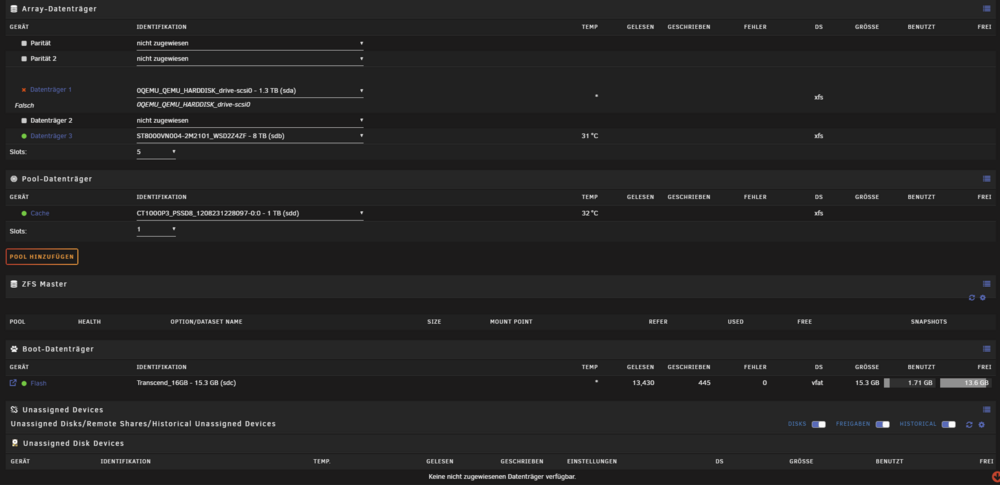
I I updated twice already. My Unraid runs on a Proxmox Server as VM. I don't use parity. I already made a Filesystemcheck which was without errors. Going back to Unraid 7.0.1 the Disk is back online. Is there a way to fix this? I did
-
It's not possible to save the extra origins. The button is just grey It's only one name but also adding a second name doesn't change the behaviour.



