neatgz
Members
-
Joined
-
Last visited
Everything posted by neatgz
-
Hello, Thank you for this very useful NUT plugin. Thanks a lot. I only have one UPS, which supports three NAS. The power draw is high, and the UPS can only provide about 2 minutes of power. So I want to set the "time on battery" for the three NAS to 0s, 30s, and 1min, so that all three NAS can shut down safely in sequence. In the NUT plugin, when setting the "time on battery", the shortest time I can set is 1 minute. May I ask, if I want to set the "time on battery" to 0s or 10s, how can I configure that? Thank you.
-
Hello, Thank you for this very useful NUT plugin. Thanks a lot. I only have one UPS, which supports three NAS. The power draw is high, and the UPS can only provide about 2 minutes of power. So I want to set the "time on battery" for the three NAS to 0s, 30s, and 1min, so that all three NAS can shut down safely in sequence. In the NUT plugin, when setting the "time on battery", the shortest time I can set is 1 minute. May I ask, if I want to set the "time on battery" to 0s or 10s, how can I configure that? Thank you.
-
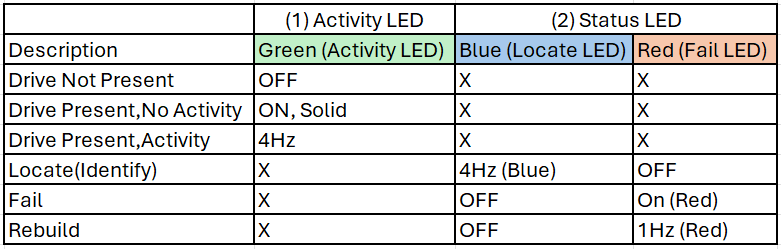
Hello, When I click the Locate button, the Green Activity LED light starts flashing, but the Blue Locate LED light does not respond. The indicator signal definition for the hard drive backplane in my chassis complies with the SFF-8489 specification and the SGPIO specification. I am using an LSI 3008 HBA card. storcli command Many RAID or HBA adapters, like those that use the storcli (megaraid) management utility have the ability to control identification LEDs. eg. LSI / Broadcom adapters I successfully managed to light up the Blue Locate LED using the following commands. storcli /cx[/ex]/sx start locate First, identify the device identifier (e.g., /dev/sdb) of the hard drive that needs to be located in the system, then use the smartctl tool to obtain its unique serial number. smartctl -a /dev/sdX | grep -i 'Serial number' Use the storcli command to find the specific physical location of this hard drive on the RAID or HBA card, namely the Controller, Enclosure (optional), and Slot numbers. storcli /call/eall/sall show all | grep -B5 -i "your serial number" Turn on the Blue Locate LED storcli /cx[/ex]/sx start locate (here are my 2nd hard drive) storcli /c0/s2 start locate Turn off the Blue Locate LED storcli /c0/s2 stop locate It works well ! The following command might also work, but I haven't tested it yet. (General method, especially suitable for simple storage environments without a RAID card or HBA card.) ledctl locate=/dev/sdX Finally, I would like to suggest if it's possible to add an option in the settings to choose the command used by the Locate button? Or to customize the command executed by the Locate button? Thank you. Thanks a lot.
-
I asked the manufacturer. 1, They responded with some instructions for ECO mode, which works like a backup-UPS, but with a little difference. When the input voltage meets the set range (for example 220v±5v), it directly outputs 220v±5v, the rectifier and inverter are not working but are standby, which can save energy and reduce heat generation. When the input voltage exceeds the set range, (for example 230v), the inverter works to provide stable pure sinusoidal 220v AC power output with a conversion time of 0ms. When there is a power outage, the inverter works and is powered by the battery, outputting 220v AC power with a conversion time of 1.8ms (< 4ms). 2, The manufacturer responded with some instructions about ups.status. ups.status OL means Online mode ups.status OL BYPASS means ECO mode ups.status OL CHRG means Online mode, charging ups.status BYPASS means Bypass mode ups.status OVER BYPASS means Bypass mode, overloaded ups.status OB means Battery mode ups.status LB means Low battery .... Personally, Saves energy reduces heat and fan noise are more important for me than the stable pure sinusoidal AC output. so I choose to use Eco mode. I was confused why they chose to use "OL BYPASS" for their ECO mode. Anyway, as long as it works normally, this warning doesn't matter. Thanks again.
-
Hello, thanks to the greate plugin, Network UPS Tools (NUT) for UNRAID, works well. And I have a small question to ask. My UPS has 6 modes listed here: Online mode When the input voltage is within the allowable range, the inverter works to provide stable pure sinusoidal AC power output and charge the battery at the same time. In the event of a power outage, the switching time to battery power is 0ms. ECO mode When the input voltage is within the set voltage range, the UPS will switch to bypass mode to achieve energy saving. In the event of a power outage, the switching time to battery power is <4ms. Frequency Conversion mode When the input frequency is within the set allowable range, the UPS can set the output frequency to 50Hz or 60Hz, and the UPS will charge the battery at the same time. Battery mode When the input voltage is abnormal or there is a power outage, the UPS switches to battery mode and the buzzer sounds once every 4 seconds, and the UPS will be powered by battery power. Bypass mode When the UPS is operating in online mode and is overloaded, if the input voltage is within the allowable range, the UPS will automatically enter bypass mode. Standby mode When the UPS is plugged into the mains supply and not turned on, the UPS works in standby mode, only charging the battery, and the UPS has no output. Personally, I use Eco mode, because it saves energy and reduces heat and fan noise. The UPS works on Eco mode, But the NUT says “On Line - UPS bypass circuit is active (no battery protection is available)” What can I do to solve the alert? or Could you add an option to set whether to hide this alert? Thanks a lot.
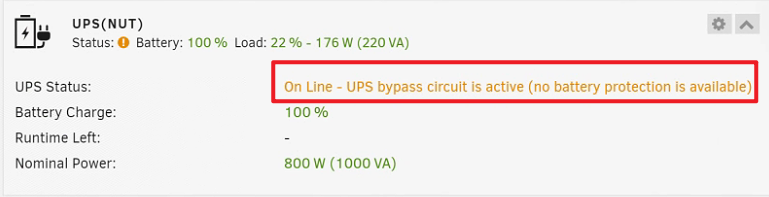
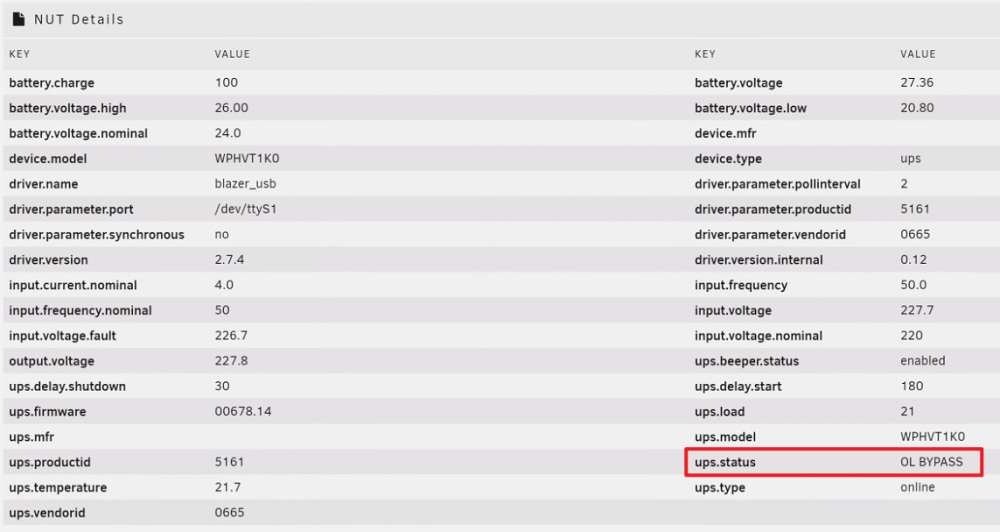
-
Works well, thanks to @trurl and @JorgeB Thanks a lot.
-
When unraid 6.12.0 released, I was busy with work. I learned from the release notes that there are a lot of changes, including the addition of zfs, etc. So I decided to stay on 6.11.5 to avoid possible problems that may affect usage. Because of my busy work schedule, I need NAS to stay undisturbed undisturbing and stable. One year has passed, and now I have some free time, so I decided to upgrade the NAS hardware and unraid OS. 1, The hardware was totally changed. 2, From 6.11.5 to 6.12.8, the big update spanned too many versions, so I decided to install unraid 6.12.8 from scratch to avoid possible bugs or configuration conflicts. So back to my question, if I just copy the \config\plugins\dockerMan\ folder to the new USB drive and then restart the system, instead of copying the entire \config\, will my problem be solved? Thanks a lot.
-
Hello, I Found the Configuration in the \config\plugins\dockerMan\ directory (in old udisk) . I would like to ask, if I shut down the NAS, copy this folder directly from the old USB flash drive to the new USB flash drive, and then restart the new unraid, will the problem be solved? Or do I have to delete the old docker first and reinstall them in APPS one by one ? Thanks a lot.
-
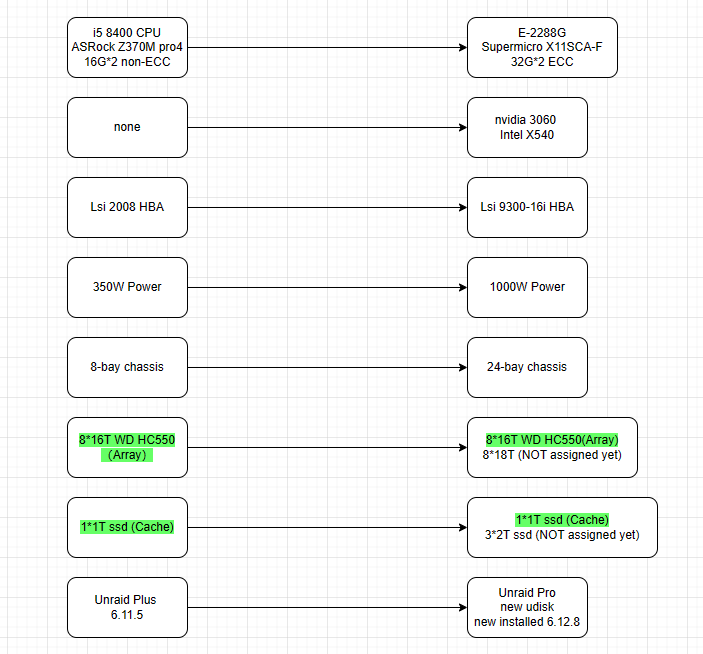
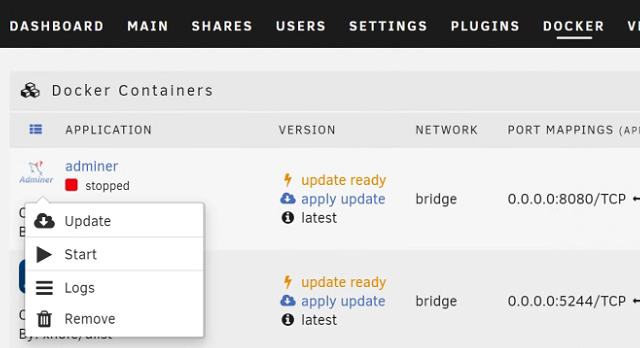
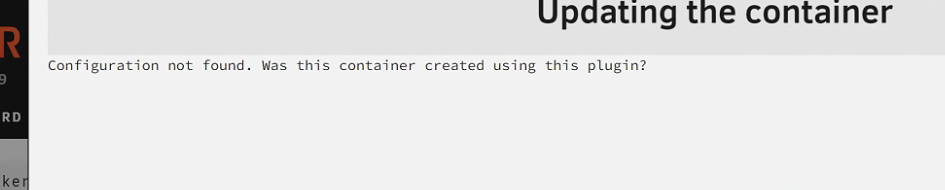
Hello, I updated my NAS recently, the hardware changes are listed here: I started the new unraid 6.12.8, the config and plugins disappered as expected. The VMs and Dockers stored in img files in Cache pool. So they are still there. I can edit the VMs, it is all OK. I can start stop the dockers, BUT I CAN NOT edit or update dockers. No edit option. When I want to update the docker, it says "Updating the container Configuration not found. Was this container created using this plugin?" Where are the Configuration above? they are not in the docker.img file? Thanks a lot.