Bob-omb
Members
-
Joined
-
Last visited
Everything posted by Bob-omb
-
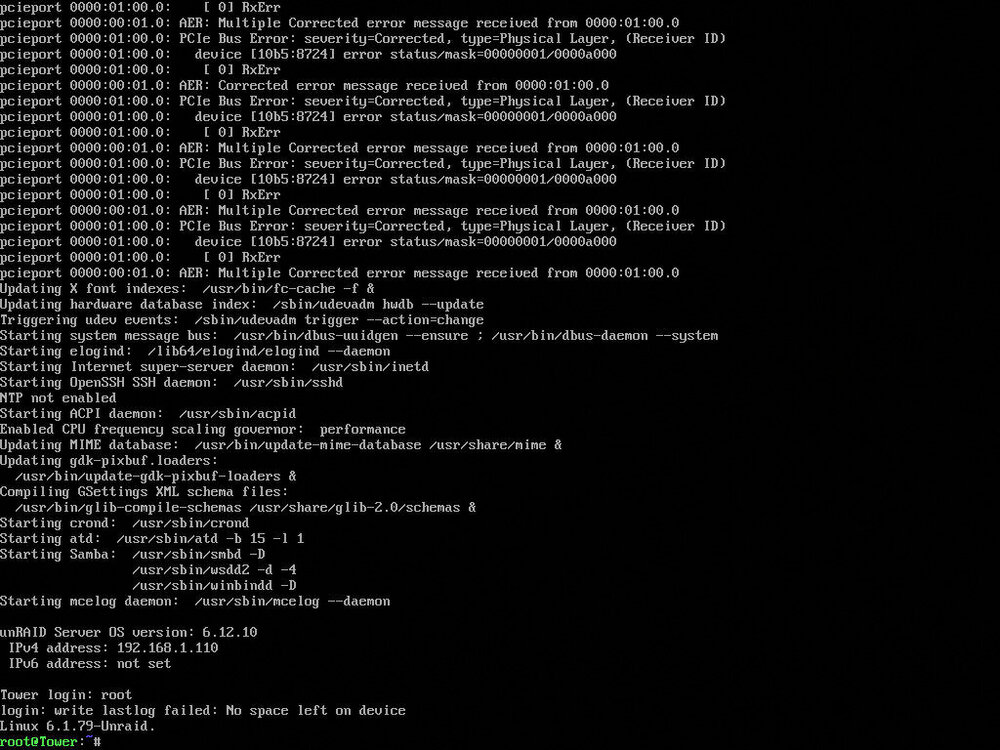
88735283.mp4 Here is a video recording showing what is happening. It shows that the copy times out for no apparent reason. On the right side, I am continually pinging my Unraid server, which always responds. On the left, I am using ping.canbeuseful.com/ to continually check for WAN dropouts in case there are problems with my router. Everything seems normal. However, I should mention that I had a bunch of PCIe warnings in the log previously. I don't know if that is the problem. I am honestly getting really frustrated with Unraid. "Switch to Unraid," they said. "It's great," they said.... 😂 I have had almost nothing but problems since I started some weeks ago. I am super close to giving up and going back to Windows. I really appreciate getting some help, though. I really, really don't want to start over, and I don't even know if that will solve the problem.
-
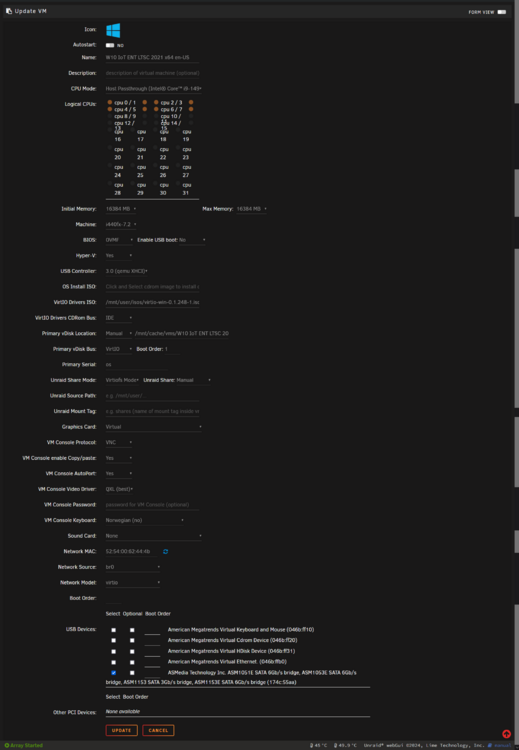
Sure. Here it is. <?xml version='1.0' encoding='UTF-8'?> <domain type='kvm' id='1'> <name>W10 IoT ENT LTSC 2021 x64 en-US</name> <uuid>560f1466-c2db-571b-f1ea-453ec93e1b20</uuid> <metadata> <vmtemplate xmlns="unraid" name="Windows 10" icon="windows.png" os="windows10"/> </metadata> <memory unit='KiB'>16777216</memory> <currentMemory unit='KiB'>16777216</currentMemory> <memoryBacking> <nosharepages/> <source type='memfd'/> <access mode='shared'/> </memoryBacking> <vcpu placement='static'>8</vcpu> <cputune> <vcpupin vcpu='0' cpuset='0'/> <vcpupin vcpu='1' cpuset='1'/> <vcpupin vcpu='2' cpuset='2'/> <vcpupin vcpu='3' cpuset='3'/> <vcpupin vcpu='4' cpuset='4'/> <vcpupin vcpu='5' cpuset='5'/> <vcpupin vcpu='6' cpuset='6'/> <vcpupin vcpu='7' cpuset='7'/> </cputune> <resource> <partition>/machine</partition> </resource> <os> <type arch='x86_64' machine='pc-i440fx-7.2'>hvm</type> <loader readonly='yes' type='pflash'>/usr/share/qemu/ovmf-x64/OVMF_CODE-pure-efi.fd</loader> <nvram>/etc/libvirt/qemu/nvram/560f1466-c2db-571b-f1ea-453ec93e1b20_VARS-pure-efi.fd</nvram> </os> <features> <acpi/> <apic/> <hyperv mode='custom'> <relaxed state='on'/> <vapic state='on'/> <spinlocks state='on' retries='8191'/> <vendor_id state='on' value='none'/> </hyperv> </features> <cpu mode='host-passthrough' check='none' migratable='on'> <topology sockets='1' dies='1' cores='4' threads='2'/> <cache mode='passthrough'/> </cpu> <clock offset='localtime'> <timer name='hypervclock' present='yes'/> <timer name='hpet' present='no'/> </clock> <on_poweroff>destroy</on_poweroff> <on_reboot>restart</on_reboot> <on_crash>restart</on_crash> <devices> <emulator>/usr/local/sbin/qemu</emulator> <disk type='file' device='disk'> <driver name='qemu' type='raw' cache='writeback'/> <source file='/mnt/cache/vms/W10 IoT ENT LTSC 2021 x64 en-US/vdisk1.img' index='2'/> <backingStore/> <target dev='hdc' bus='virtio'/> <serial>os</serial> <boot order='1'/> <alias name='virtio-disk2'/> <address type='pci' domain='0x0000' bus='0x00' slot='0x04' function='0x0'/> </disk> <disk type='file' device='cdrom'> <driver name='qemu' type='raw'/> <source file='/mnt/user/isos/virtio-win-0.1.248-1.iso' index='1'/> <backingStore/> <target dev='hdb' bus='ide'/> <readonly/> <alias name='ide0-0-1'/> <address type='drive' controller='0' bus='0' target='0' unit='1'/> </disk> <controller type='usb' index='0' model='qemu-xhci' ports='15'> <alias name='usb'/> <address type='pci' domain='0x0000' bus='0x00' slot='0x07' function='0x0'/> </controller> <controller type='ide' index='0'> <alias name='ide'/> <address type='pci' domain='0x0000' bus='0x00' slot='0x01' function='0x1'/> </controller> <controller type='virtio-serial' index='0'> <alias name='virtio-serial0'/> <address type='pci' domain='0x0000' bus='0x00' slot='0x05' function='0x0'/> </controller> <controller type='pci' index='0' model='pci-root'> <alias name='pci.0'/> </controller> <interface type='bridge'> <mac address='52:54:00:62:44:4b'/> <source bridge='br0'/> <target dev='vnet0'/> <model type='virtio'/> <alias name='net0'/> <address type='pci' domain='0x0000' bus='0x00' slot='0x03' function='0x0'/> </interface> <serial type='pty'> <source path='/dev/pts/0'/> <target type='isa-serial' port='0'> <model name='isa-serial'/> </target> <alias name='serial0'/> </serial> <console type='pty' tty='/dev/pts/0'> <source path='/dev/pts/0'/> <target type='serial' port='0'/> <alias name='serial0'/> </console> <channel type='unix'> <source mode='bind' path='/var/lib/libvirt/qemu/channel/target/domain-1-W10 IoT ENT LTSC 202/org.qemu.guest_agent.0'/> <target type='virtio' name='org.qemu.guest_agent.0' state='disconnected'/> <alias name='channel0'/> <address type='virtio-serial' controller='0' bus='0' port='1'/> </channel> <channel type='qemu-vdagent'> <source> <clipboard copypaste='yes'/> <mouse mode='client'/> </source> <target type='virtio' name='com.redhat.spice.0' state='disconnected'/> <alias name='channel1'/> <address type='virtio-serial' controller='0' bus='0' port='2'/> </channel> <input type='tablet' bus='usb'> <alias name='input0'/> <address type='usb' bus='0' port='1'/> </input> <input type='mouse' bus='ps2'> <alias name='input1'/> </input> <input type='keyboard' bus='ps2'> <alias name='input2'/> </input> <graphics type='vnc' port='5900' autoport='yes' websocket='5700' listen='0.0.0.0' keymap='no'> <listen type='address' address='0.0.0.0'/> </graphics> <audio id='1' type='none'/> <video> <model type='qxl' ram='65536' vram='65536' vgamem='16384' heads='1' primary='yes'/> <alias name='video0'/> <address type='pci' domain='0x0000' bus='0x00' slot='0x02' function='0x0'/> </video> <hostdev mode='subsystem' type='usb' managed='no'> <source> <vendor id='0x174c'/> <product id='0x55aa'/> <address bus='2' device='3'/> </source> <alias name='hostdev0'/> <address type='usb' bus='0' port='2'/> </hostdev> <memballoon model='virtio'> <alias name='balloon0'/> <address type='pci' domain='0x0000' bus='0x00' slot='0x06' function='0x0'/> </memballoon> </devices> <seclabel type='dynamic' model='dac' relabel='yes'> <label>+0:+100</label> <imagelabel>+0:+100</imagelabel> </seclabel> </domain>
-
Uhm, I don't know what debugfs is.
-
OK, so I managed to take a diagnostic dump right after I noticed a freeze in the SMB. The freeze happened around 11:33. In this case, I copied a bunch of large video files to the share called backup on the array. <------log removed------>
-
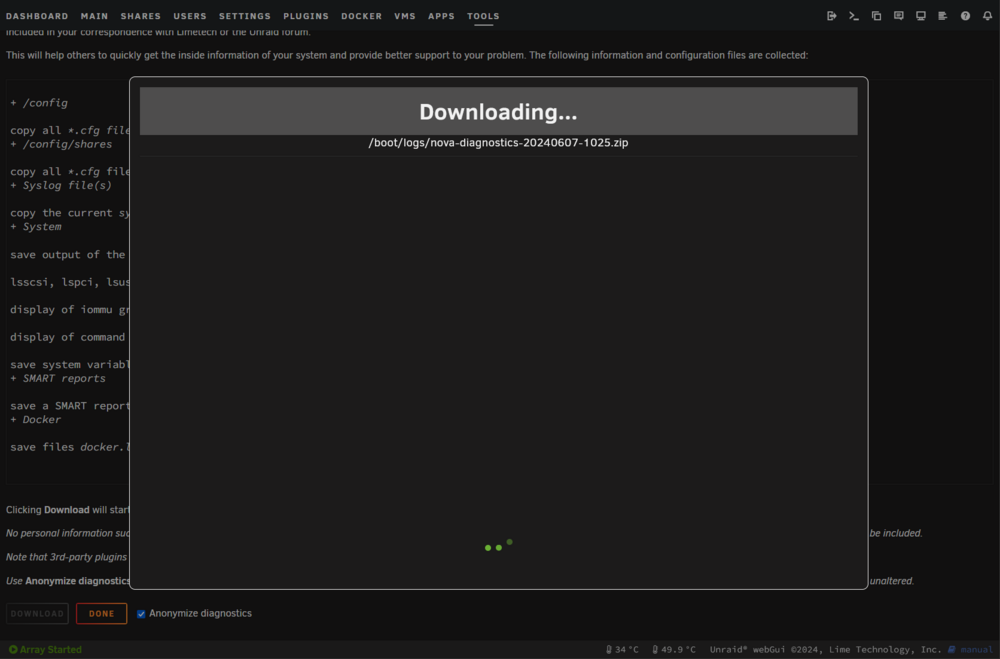
Oh boy... It's one of those days... When I am trying to export a diagnostics using the tools it's just forever stuck like this:
-
The link you provided is for resetting the password. I am not sure how to get diagnostics.
-
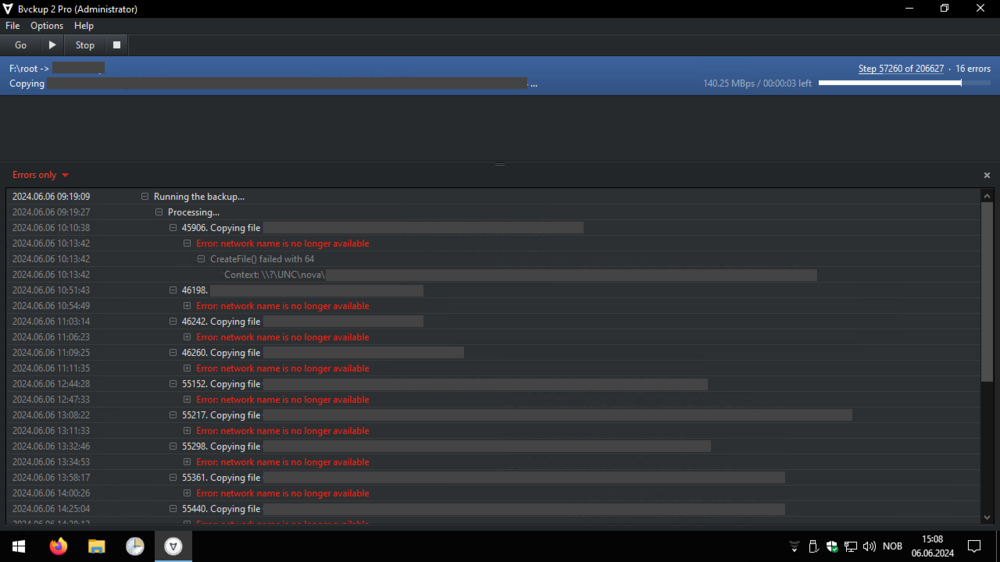
I am in the process of copying the contents of a whole drive to my Unraid array. Since the drive is encrypted with BitLocker I have to do this through a Windows virtual machine. The problem I am facing is that the network share seems to become unavailable intermittently. After about 10 to 115 seconds it comes back. This does not seem to occur if I am not copying files in the VM. During the outage of the network share the share becomes unavailable for all clients, not just the VM. In the screenshot below you can see that the backup software I am using (Bvckup 2 Pro) is giving me errors that the network name is no longer available. However, the problem persists even if I am just copying files using Windows Explorer. I don't know if this is a common issue, but I was hoping anyone could point me in the right direction, as I have no idea how to troubleshoot this. Here is what I have tried: Restarting Unraid Stopping all docker containers Assigning more RAM to the VM (now 16 GB)
-
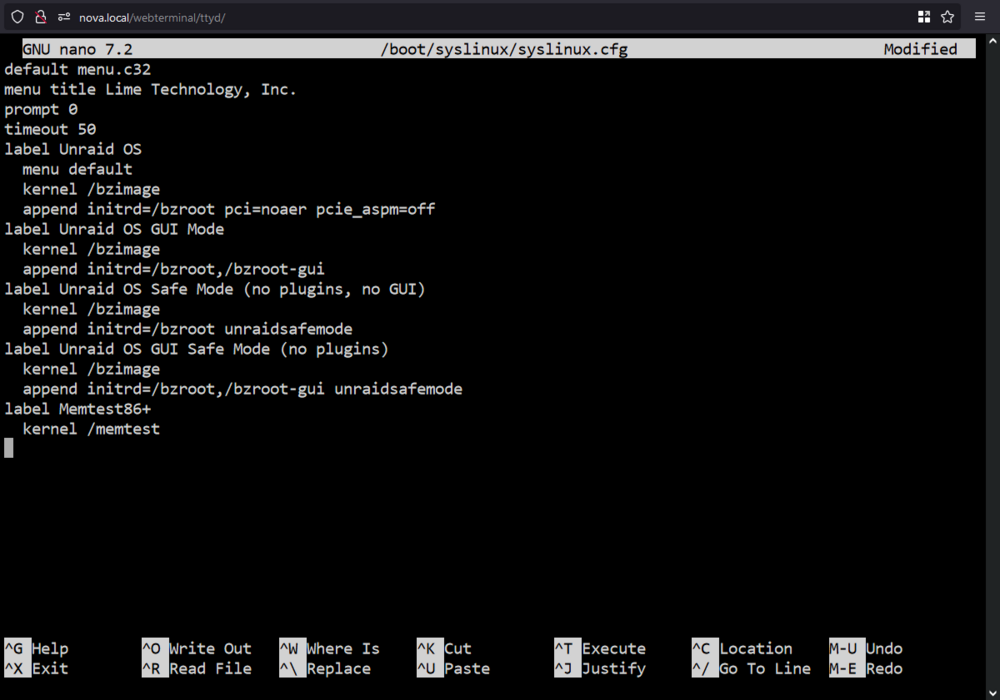
Edit: In the end, I decided to get rid of the LSI 9300-16i because I didn't want to take the risk of using it while not fully understanding what the error messages meant. The following part was my solution to turn off the warnings, but it might not be so wise: OK I think I managed to turn off the warnings eating up the log file. I am not seeing the error anymore, but I also don't know if I should be worried about it. Everything works, but only as far as I can tell. Here is what I did: Made a backup of the flash drive I opened the terminal in Unraid and entered: nano /boot/syslinux/syslinux.cfg I entered the pci=noaer pcie_aspm=off on line 9 CTRL + X to exit, Y to confirm, and Enter to save. Here is the full syslinux.cfg after the change: default menu.c32 menu title Lime Technology, Inc. prompt 0 timeout 50 label Unraid OS menu default kernel /bzimage append initrd=/bzroot pci=noaer pcie_aspm=off label Unraid OS GUI Mode kernel /bzimage append initrd=/bzroot,/bzroot-gui label Unraid OS Safe Mode (no plugins, no GUI) kernel /bzimage append initrd=/bzroot unraidsafemode label Unraid OS GUI Safe Mode (no plugins) kernel /bzimage append initrd=/bzroot,/bzroot-gui unraidsafemode label Memtest86+ kernel /memtest
-
Thanks for helping me out. To be honest I have no idea what you are saying. Is this in English? 😂 I am not a Linux guy so I don't know what any of this means. Are you saying I should edit some settings on my Unraid flash drive?
-
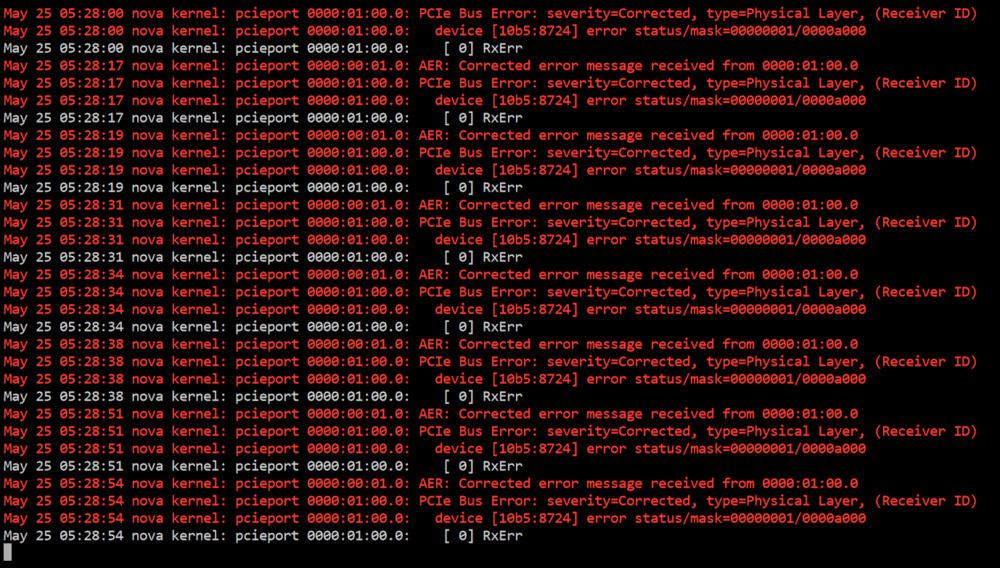
I have been getting these errors since I started using Unraid. I am not sure if they actually cause harm, but the server recently shut down randomly after I initiated a reformat of a drive. The only two cards I have attached are an Asus IPMI card and a Broadcom LSI 9300-16i. Any suggestions?
-
I seem to have solved this issue. Here is what I did: Reinstalled Unraid using the Unraid USB Creator on the same flash drive. Then I transferred my license by going to Tools ➜ Recover Key ➜ Copying the URL to the key file ➜ Pasting the key in Tools: Install key. I was kind of lucky since the flash drive itself was not physically damaged. It was just that I had messed up the config. I would still love to see a guide on how to "start fresh". Especially if there is an option to completely start fresh but keep the array since building an array parity can take days. I kind of struggled with this, which is why I managed to mess this up.
-
I wanted to start fresh and I read somewhere I should delete the config folder on my Unraid boot flash drive, so I did. However, now that I try to start the Unraid server I can't resolve tower.local or the IP. Luckily I have remote management but I don't know what to do next: