






Bob-omb
Members
-
Joined
-
Last visited
Everything posted by Bob-omb
-
root@example:~# tail -300 /var/log/nginx/error.log 2026/07/23 09:29:33 [error] 24016#24016: *4041444 open() "/usr/local/emhttp/plugins/dynamix.docker.manager/images/question.png" failed (2: No such file or directory) while sending to client, client: 100.32.174.2, server: example.example.ts.net, request: "GET /plugins/dynamix.docker.manager/images/question.png HTTP/2.0", host: "example.example.ts.net", referrer: "https://example.example.ts.net/Docker" 2026/07/23 09:29:33 [error] 24016#24016: *4041444 open() "/usr/local/emhttp/plugins/dynamix.docker.manager/images/question.png" failed (2: No such file or directory) while sending to client, client: 100.32.174.2, server: example.example.ts.net, request: "GET /plugins/dynamix.docker.manager/images/question.png HTTP/2.0", host: "example.example.ts.net", referrer: "https://example.example.ts.net/Docker" 2026/07/23 09:29:33 [error] 24016#24016: *4041444 open() "/usr/local/emhttp/plugins/dynamix.docker.manager/images/question.png" failed (2: No such file or directory) while sending to client, client: 100.32.174.2, server: example.example.ts.net, request: "GET /plugins/dynamix.docker.manager/images/question.png HTTP/2.0", host: "example.example.ts.net", referrer: "https://example.example.ts.net/Docker" 2026/07/23 09:29:33 [error] 24016#24016: *4041444 open() "/usr/local/emhttp/plugins/dynamix.docker.manager/images/question.png" failed (2: No such file or directory) while sending to client, client: 100.32.174.2, server: example.example.ts.net, request: "GET /plugins/dynamix.docker.manager/images/question.png HTTP/2.0", host: "example.example.ts.net", referrer: "https://example.example.ts.net/Docker" 2026/07/23 09:29:33 [error] 24016#24016: *4041444 open() "/usr/local/emhttp/plugins/dynamix.docker.manager/images/question.png" failed (2: No such file or directory) while sending to client, client: 100.32.174.2, server: example.example.ts.net, request: "GET /plugins/dynamix.docker.manager/images/question.png HTTP/2.0", host: "example.example.ts.net", referrer: "https://example.example.ts.net/Docker" 2026/07/23 09:29:33 [error] 24016#24016: *4041444 open() "/usr/local/emhttp/plugins/dynamix.docker.manager/images/question.png" failed (2: No such file or directory) while sending to client, client: 100.32.174.2, server: example.example.ts.net, request: "GET /plugins/dynamix.docker.manager/images/question.png HTTP/2.0", host: "example.example.ts.net", referrer: "https://example.example.ts.net/Docker" 2026/07/23 09:29:33 [error] 24016#24016: *4041444 open() "/usr/local/emhttp/plugins/dynamix.docker.manager/images/question.png" failed (2: No such file or directory) while sending to client, client: 100.32.174.2, server: example.example.ts.net, request: "GET /plugins/dynamix.docker.manager/images/question.png HTTP/2.0", host: "example.example.ts.net", referrer: "https://example.example.ts.net/Docker" 2026/07/23 09:29:33 [error] 24016#24016: *4041444 open() "/usr/local/emhttp/plugins/dynamix.docker.manager/images/question.png" failed (2: No such file or directory) while sending to client, client: 100.32.174.2, server: example.example.ts.net, request: "GET /plugins/dynamix.docker.manager/images/question.png HTTP/2.0", host: "example.example.ts.net", referrer: "https://example.example.ts.net/Docker" 2026/07/23 09:29:33 [error] 24016#24016: *4041444 open() "/usr/local/emhttp/plugins/dynamix.docker.manager/images/question.png" failed (2: No such file or directory) while sending to client, client: 100.32.174.2, server: example.example.ts.net, request: "GET /plugins/dynamix.docker.manager/images/question.png HTTP/2.0", host: "example.example.ts.net", referrer: "https://example.example.ts.net/Docker" 2026/07/23 09:29:33 [error] 24016#24016: *4041444 open() "/usr/local/emhttp/plugins/dynamix.docker.manager/images/question.png" failed (2: No such file or directory) while sending to client, client: 100.32.174.2, server: example.example.ts.net, request: "GET /plugins/dynamix.docker.manager/images/question.png HTTP/2.0", host: "example.example.ts.net", referrer: "https://example.example.ts.net/Docker" 2026/07/23 09:29:33 [error] 24016#24016: *4041444 open() "/usr/local/emhttp/plugins/dynamix.docker.manager/images/question.png" failed (2: No such file or directory) while sending to client, client: 100.32.174.2, server: example.example.ts.net, request: "GET /plugins/dynamix.docker.manager/images/question.png HTTP/2.0", host: "example.example.ts.net", referrer: "https://example.example.ts.net/Docker" 2026/07/23 09:29:33 [error] 24016#24016: *4041444 open() "/usr/local/emhttp/plugins/dynamix.docker.manager/images/question.png" failed (2: No such file or directory) while sending to client, client: 100.32.174.2, server: example.example.ts.net, request: "GET /plugins/dynamix.docker.manager/images/question.png HTTP/2.0", host: "example.example.ts.net", referrer: "https://example.example.ts.net/Docker" 2026/07/23 09:29:33 [error] 24016#24016: *4041444 open() "/usr/local/emhttp/plugins/dynamix.docker.manager/images/question.png" failed (2: No such file or directory) while sending to client, client: 100.32.174.2, server: example.example.ts.net, request: "GET /plugins/dynamix.docker.manager/images/question.png HTTP/2.0", host: "example.example.ts.net", referrer: "https://example.example.ts.net/Docker" 2026/07/23 09:29:33 [error] 24016#24016: *4041444 open() "/usr/local/emhttp/plugins/dynamix.docker.manager/images/question.png" failed (2: No such file or directory) while sending to client, client: 100.32.174.2, server: example.example.ts.net, request: "GET /plugins/dynamix.docker.manager/images/question.png HTTP/2.0", host: "example.example.ts.net", referrer: "https://example.example.ts.net/Docker" 2026/07/23 09:29:33 [error] 24016#24016: *4041444 open() "/usr/local/emhttp/plugins/dynamix.docker.manager/images/question.png" failed (2: No such file or directory) while sending to client, client: 100.32.174.2, server: example.example.ts.net, request: "GET /plugins/dynamix.docker.manager/images/question.png HTTP/2.0", host: "example.example.ts.net", referrer: "https://example.example.ts.net/Docker" 2026/07/23 09:29:33 [error] 24016#24016: *4041444 open() "/usr/local/emhttp/plugins/dynamix.docker.manager/images/question.png" failed (2: No such file or directory) while sending to client, client: 100.32.174.2, server: example.example.ts.net, request: "GET /plugins/dynamix.docker.manager/images/question.png HTTP/2.0", host: "example.example.ts.net", referrer: "https://example.example.ts.net/Docker" 2026/07/23 09:29:33 [error] 24016#24016: *4041444 open() "/usr/local/emhttp/plugins/dynamix.docker.manager/images/question.png" failed (2: No such file or directory) while sending to client, client: 100.32.174.2, server: example.example.ts.net, request: "GET /plugins/dynamix.docker.manager/images/question.png HTTP/2.0", host: "example.example.ts.net", referrer: "https://example.example.ts.net/Docker" 2026/07/23 09:29:33 [error] 24016#24016: *4041444 open() "/usr/local/emhttp/plugins/dynamix.docker.manager/images/question.png" failed (2: No such file or directory) while sending to client, client: 100.32.174.2, server: example.example.ts.net, request: "GET /plugins/dynamix.docker.manager/images/question.png HTTP/2.0", host: "example.example.ts.net", referrer: "https://example.example.ts.net/Docker" 2026/07/23 09:29:33 [error] 24016#24016: *4041444 open() "/usr/local/emhttp/plugins/dynamix.docker.manager/images/question.png" failed (2: No such file or directory) while sending to client, client: 100.32.174.2, server: example.example.ts.net, request: "GET /plugins/dynamix.docker.manager/images/question.png HTTP/2.0", host: "example.example.ts.net", referrer: "https://example.example.ts.net/Docker" 2026/07/23 09:29:33 [error] 24016#24016: *4041444 open() "/usr/local/emhttp/plugins/dynamix.docker.manager/images/question.png" failed (2: No such file or directory) while sending to client, client: 100.32.174.2, server: example.example.ts.net, request: "GET /plugins/dynamix.docker.manager/images/question.png HTTP/2.0", host: "example.example.ts.net", referrer: "https://example.example.ts.net/Docker" 2026/07/23 09:29:33 [error] 24016#24016: *4041444 open() "/usr/local/emhttp/plugins/dynamix.docker.manager/images/question.png" failed (2: No such file or directory) while sending to client, client: 100.32.174.2, server: example.example.ts.net, request: "GET /plugins/dynamix.docker.manager/images/question.png HTTP/2.0", host: "example.example.ts.net", referrer: "https://example.example.ts.net/Docker" 2026/07/23 09:29:33 [error] 24016#24016: *4041444 open() "/usr/local/emhttp/plugins/dynamix.docker.manager/images/question.png" failed (2: No such file or directory) while sending to client, client: 100.32.174.2, server: example.example.ts.net, request: "GET /plugins/dynamix.docker.manager/images/question.png HTTP/2.0", host: "example.example.ts.net", referrer: "https://example.example.ts.net/Docker" 2026/07/23 09:29:33 [error] 24016#24016: *4041444 open() "/usr/local/emhttp/plugins/dynamix.docker.manager/images/question.png" failed (2: No such file or directory) while sending to client, client: 100.32.174.2, server: example.example.ts.net, request: "GET /plugins/dynamix.docker.manager/images/question.png HTTP/2.0", host: "example.example.ts.net", referrer: "https://example.example.ts.net/Docker" 2026/07/23 09:29:33 [error] 24016#24016: *4041444 open() "/usr/local/emhttp/plugins/dynamix.docker.manager/images/question.png" failed (2: No such file or directory) while sending to client, client: 100.32.174.2, server: example.example.ts.net, request: "GET /plugins/dynamix.docker.manager/images/question.png HTTP/2.0", host: "example.example.ts.net", referrer: "https://example.example.ts.net/Docker" 2026/07/23 09:29:33 [error] 24016#24016: *4041444 open() "/usr/local/emhttp/plugins/dynamix.docker.manager/images/question.png" failed (2: No such file or directory) while sending to client, client: 100.32.174.2, server: example.example.ts.net, request: "GET /plugins/dynamix.docker.manager/images/question.png HTTP/2.0", host: "example.example.ts.net", referrer: "https://example.example.ts.net/Docker" 2026/07/23 09:29:33 [error] 24016#24016: *4041444 open() "/usr/local/emhttp/plugins/dynamix.docker.manager/images/question.png" failed (2: No such file or directory) while sending to client, client: 100.32.174.2, server: example.example.ts.net, request: "GET /plugins/dynamix.docker.manager/images/question.png HTTP/2.0", host: "example.example.ts.net", referrer: "https://example.example.ts.net/Docker" 2026/07/23 09:29:33 [error] 24016#24016: *4041444 open() "/usr/local/emhttp/plugins/dynamix.docker.manager/images/question.png" failed (2: No such file or directory) while sending to client, client: 100.32.174.2, server: example.example.ts.net, request: "GET /plugins/dynamix.docker.manager/images/question.png HTTP/2.0", host: "example.example.ts.net", referrer: "https://example.example.ts.net/Docker" 2026/07/23 09:29:33 [error] 24016#24016: *4041444 open() "/usr/local/emhttp/plugins/dynamix.docker.manager/images/question.png" failed (2: No such file or directory) while sending to client, client: 100.32.174.2, server: example.example.ts.net, request: "GET /plugins/dynamix.docker.manager/images/question.png HTTP/2.0", host: "example.example.ts.net", referrer: "https://example.example.ts.net/Docker" 2026/07/23 09:29:33 [error] 24016#24016: *4041444 open() "/usr/local/emhttp/plugins/dynamix.docker.manager/images/question.png" failed (2: No such file or directory) while sending to client, client: 100.32.174.2, server: example.example.ts.net, request: "GET /plugins/dynamix.docker.manager/images/question.png HTTP/2.0", host: "example.example.ts.net", referrer: "https://example.example.ts.net/Docker" 2026/07/23 09:29:33 [error] 24016#24016: *4041444 open() "/usr/local/emhttp/plugins/dynamix.docker.manager/images/question.png" failed (2: No such file or directory) while sending to client, client: 100.32.174.2, server: example.example.ts.net, request: "GET /plugins/dynamix.docker.manager/images/question.png HTTP/2.0", host: "example.example.ts.net", referrer: "https://example.example.ts.net/Docker" 2026/07/23 09:29:33 [error] 24016#24016: *4041444 open() "/usr/local/emhttp/plugins/dynamix.docker.manager/images/question.png" failed (2: No such file or directory) while sending to client, client: 100.32.174.2, server: example.example.ts.net, request: "GET /plugins/dynamix.docker.manager/images/question.png HTTP/2.0", host: "example.example.ts.net", referrer: "https://example.example.ts.net/Docker" 2026/07/23 09:29:33 [error] 24016#24016: *4041444 open() "/usr/local/emhttp/plugins/dynamix.docker.manager/images/question.png" failed (2: No such file or directory) while sending to client, client: 100.32.174.2, server: example.example.ts.net, request: "GET /plugins/dynamix.docker.manager/images/question.png HTTP/2.0", host: "example.example.ts.net", referrer: "https://example.example.ts.net/Docker" 2026/07/23 09:29:33 [error] 24016#24016: *4041444 open() "/usr/local/emhttp/plugins/dynamix.docker.manager/images/question.png" failed (2: No such file or directory) while sending to client, client: 100.32.174.2, server: example.example.ts.net, request: "GET /plugins/dynamix.docker.manager/images/question.png HTTP/2.0", host: "example.example.ts.net", referrer: "https://example.example.ts.net/Docker" 2026/07/23 09:29:33 [error] 24016#24016: *4041444 open() "/usr/local/emhttp/plugins/dynamix.docker.manager/images/question.png" failed (2: No such file or directory) while sending to client, client: 100.32.174.2, server: example.example.ts.net, request: "GET /plugins/dynamix.docker.manager/images/question.png HTTP/2.0", host: "example.example.ts.net", referrer: "https://example.example.ts.net/Docker" 2026/07/23 09:29:33 [error] 24016#24016: *4041444 open() "/usr/local/emhttp/plugins/dynamix.docker.manager/images/question.png" failed (2: No such file or directory) while sending to client, client: 100.32.174.2, server: example.example.ts.net, request: "GET /plugins/dynamix.docker.manager/images/question.png HTTP/2.0", host: "example.example.ts.net", referrer: "https://example.example.ts.net/Docker" 2026/07/23 09:29:33 [error] 24016#24016: *4041444 open() "/usr/local/emhttp/plugins/dynamix.docker.manager/images/question.png" failed (2: No such file or directory) while sending to client, client: 100.32.174.2, server: example.example.ts.net, request: "GET /plugins/dynamix.docker.manager/images/question.png HTTP/2.0", host: "example.example.ts.net", referrer: "https://example.example.ts.net/Docker" 2026/07/23 09:29:33 [error] 24016#24016: *4041444 open() "/usr/local/emhttp/plugins/dynamix.docker.manager/images/question.png" failed (2: No such file or directory) while sending to client, client: 100.32.174.2, server: example.example.ts.net, request: "GET /plugins/dynamix.docker.manager/images/question.png HTTP/2.0", host: "example.example.ts.net", referrer: "https://example.example.ts.net/Docker"
-
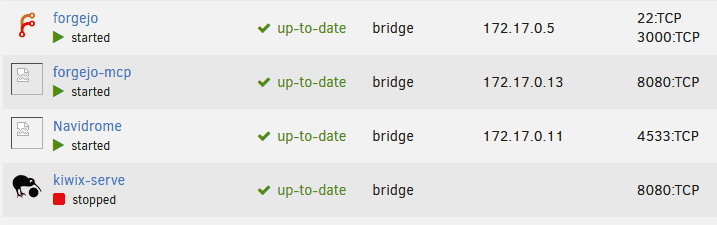
After updating to 7.3.2 missing docker icons frequently attempts to load but fails. This causes /var/log/nginx/error.log to fill up and in turn makes my VMs unable to startup with the error Unable to write to file /var/log/libvirt/qemu/KS.log: No space left on device
-
Just checked. It's not.
-
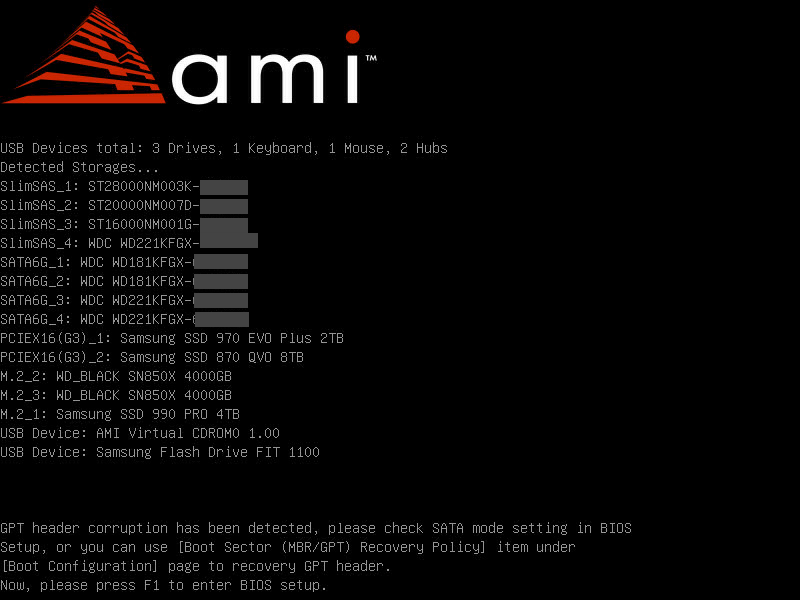
After preclearing a new disk in Unraid booting the PC shows this: This has never happened before. Then again, I don't think I have ever done a full preclear before either.
-
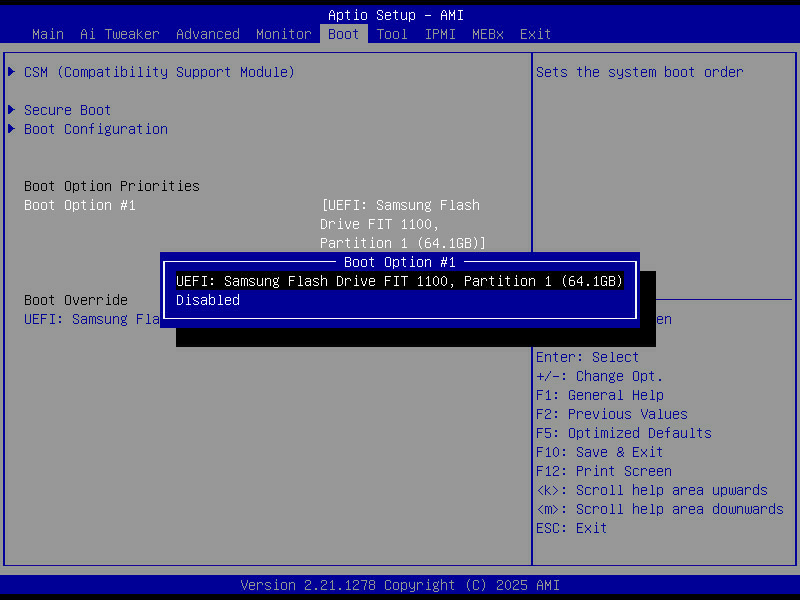
I noticed that in BIOS the flash drive was not available as a boot device. Kind of strange. Another reboot seems to have solved the issue.
-
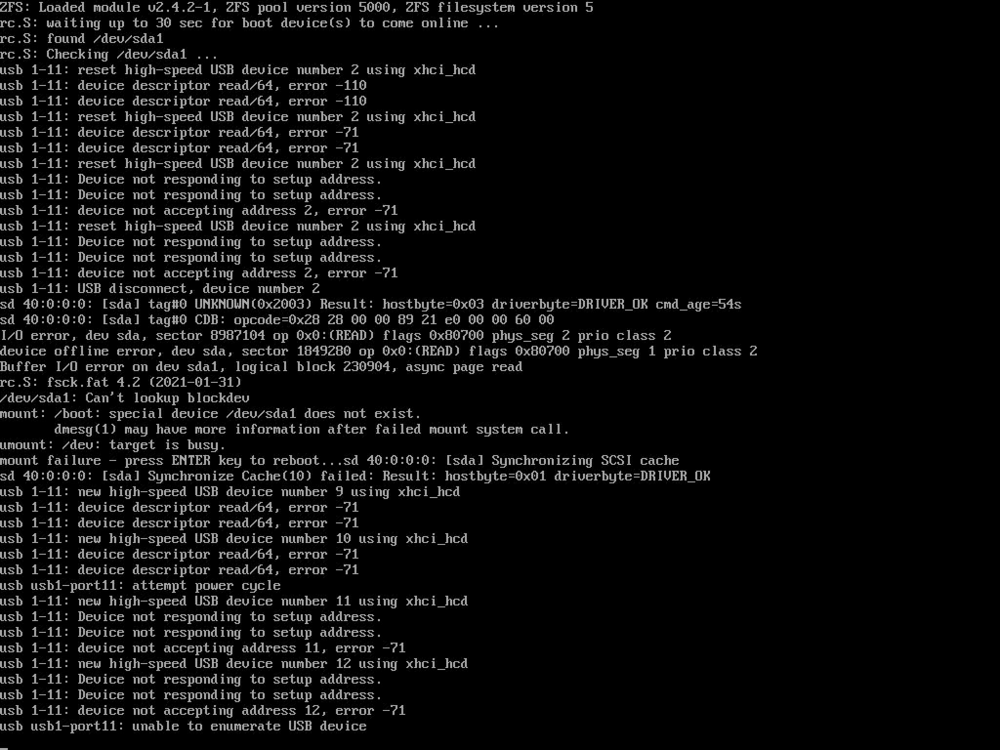
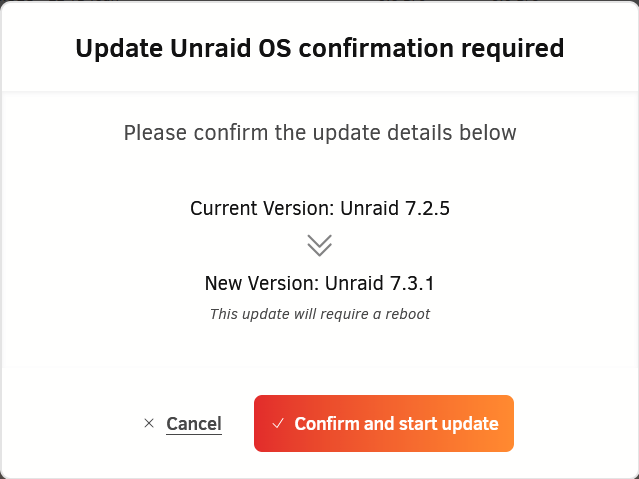
Upgrading from 7.2.5 to 7.3.1: After a reboot: Now what?
-
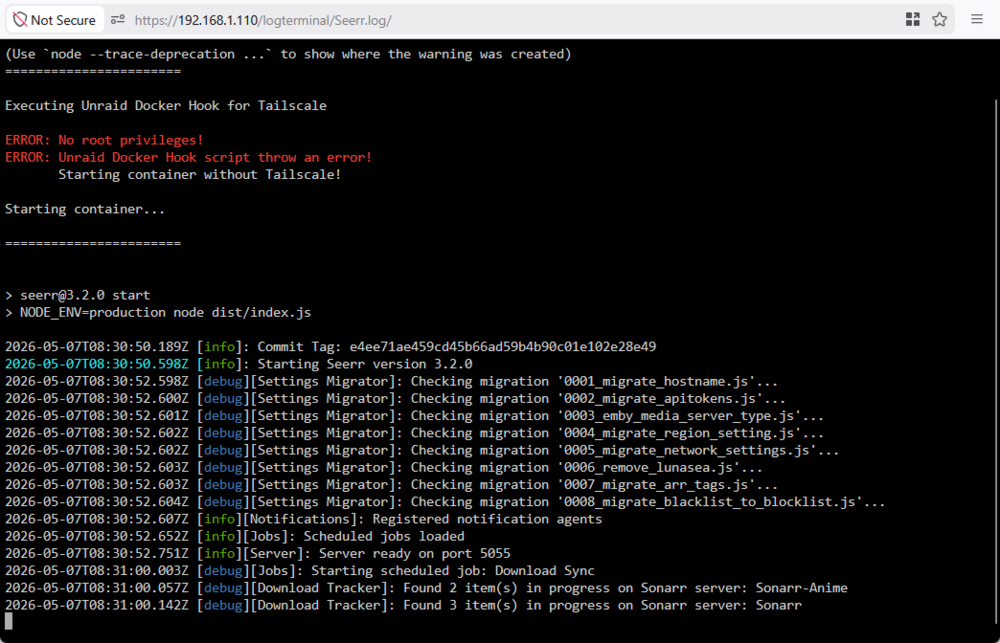
Is there a guide for how to configure this? I can install Tailscale-Docker but I have no idea how to set it.
-
I also have this problem. Any advice would be great.
-
I also have this problem and I have no idea how to configure Tailscale Services.
-
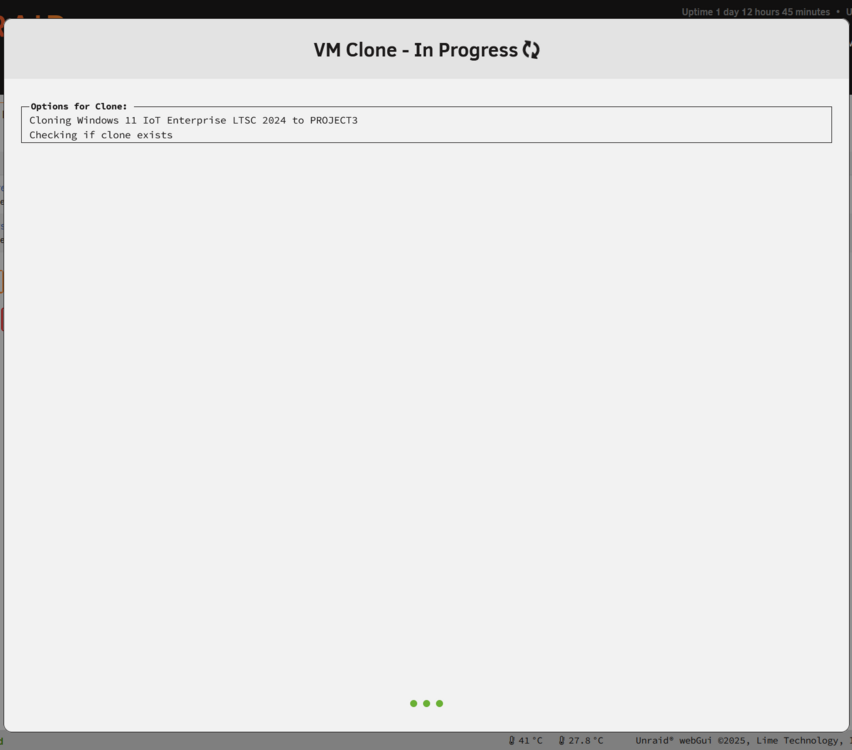
Cloning VM is stuck. Syslog shows nothing. Seems like the GUI doesn't even reach the cloning phase. It’s stuck before execution.
-
I assume this has to with Unraid 7.2.5 upgrading Docker to version 29, but I am not sure. Seems like there might be two solutions here. Solution 1: Use container networks Set the network type to Container and use the container that has VPN as the "Container Network". In this case you don't have to use --net=container:<YOUR_CONTAINER_NAME> Solution 2: Remove port mappings Remove all port mappings from the routed container. Add those ports to the VPN container instead. For example: add SABnzbd’s 8080 WebUI port to the VPN container and remove the port from the SABnzbd container. Make sure not to use The important part is that the routed container must not have both --net=container:<VPN_CONTAINER_NAME> together with any Docker network attachment or port publishing.

-
After upgrading to version 7.2.5 Unraid fails to start some containers. Here is an example: docker start binhex-sabnzbd Error response from daemon: failed to set up container networking: container sharing network namespace with another container or host cannot be connected to any other network failed to start containers: binhex-sabnzbdNote that this only happens for containers that I have routed through a VPN container with the --net=container:<YOUR_CONTAINER_NAME>. What should I do? I still want to use VPN for the container.
-
Nevermind. Seems to work again after another reboot. Strange...
-
The flash disk is simply not available as a boot drive after upgrading to version 7.2.5 and restarting. If I add the flash drive to my Windows computer I can navigate the directories on the flash drive. Seems like something broke. Where should I begin?
-
In that case it is definitely not working for me. If I click START ALL only some containers will start. The containers that does not start doesn't have any errors. Manually starting them through the WebGUI works so I am not sure why.
-
What do you mean by "stopped containers"? Any container that is not running?
-
If I click on START ALL I noticed that not all containers will start. What is this button supposed to do? Furthermore some apps that were previously off will turn on even if they autostart is disabled. I am mildly confused.

-
When you say they they "they have disappeared again", what exactly are you referring to? You can't see them in the UnraidUI or in SMB? A screenshot would help.
-
Alright, cool. I am backing up the flash drive nightly to OneDrive, local disk and FTP with Duplicacy using a User Script. Let's hope I never need it.
-
Where are we at this point? Does the latest Unraid (7.2.2) support it yet?
-
I want to manually backup the flash drive (for many reasons). Can I do that while the system is running or is there something i should be aware of like locked files etc? What exactly does the native "flash backup" button do when it backs up the flash drive? Is it just a simple copy operation followed by compression?
-
There is absolutely no reason to backup mnt/user That is what causing problems. I assume you have added that path to the docker container, but you should remove it. There is no need to map it. The two other paths are fine though.
-
Sure it can, but there would be no point. You would just waste IO and resources. Correct me if I am wrong but as far as I know deduplicating tools like Duplicacy/Restic/Borg work on a block/chunk level meaning they will identify identical chunks of data and store only the differences between backups. This only works efficiently if the underlying binary data remains aligned and unchanged. With .tar files each new backup folder appears entirely different to the deduplication tool, meaning you’ll end up re-backing up almost all of the same data and deduplication is practically pointless. But please educate me if I am missing something. I don't think I can find that particular conversation in 82 pages of posts easily 😂 Update: You might be right- This post confirms what you are saying, though I haven't tested it. Though this post suggests it might be sub-optimal to do so.
-
Is there a food reason for this? I am asking because I am thinking about making my own solution that can use a tool such as Borg or Duplicacy to deduplicate and compress backups instead. If there are considerations which led you to use tar I would love to know before I spend the next 1000 hours making a script that can do this 😂
-
Is there any way to copy files without making tar files? @KluthR I tried turning off compression, but the files are still .tar


