Free Man
Members
-
Joined
-
Last visited
-
Quick comment to mention that I'm on 7.3.4, production version of the plugin and it seems to be working great for me. Thanks for picking this up, chodeus!
-
You are a life saver! Apparently, this has been an issue for a while, but I haven't needed to hit up the App store for a while. Ran into this 2 days ago and was beating my head on the desk. Making that change, followed by ipconfig /flushdns at the command line and I'm back up and running.
-
Wow! Without stopping Docker or VMs first, just hitting "Stop" and "Proceed", it took 3:12 (192 seconds) to stop the array. The miracle is that I've had only 2 unclean shutdowns. I'll move the timeout from 90 to 230 seconds. I did a "Stop All" on the container page and that took 3:06 (186 seconds). I'll definitely add 30 seconds to that timeout as well. Follow up question, though: The setting (Settings | Docker| Docker Stop Timeout) appears to be the timeout for a single container stop. It's a default of 10, which seems very short to me. Do I want to test shutting down each individual container and set it to a comfort margin above the slowest recorded shut down time, or does this also apply to a bulk shut down, such as on a restart, therefore it needs to be larger than the combined time? For now, I've bumped the timeout from 10 seconds to 45, assuming my first theory is correct and it's not a total timeout.
-
I've rebooted my server twice in the last week or two. First time, I hit the "Reboot" button under Array Operations on the Main tab, the second time, I clicked the "Reboot now" button after installing the 7.3.1 upgrade (from 7.3.0). I have no idea what might have caused these unclean shutdowns, since I asked the server to do it, and it wasn't the result of a power outage or other unexpected situation. This afternoon, I tried shutting down the VM service, then rebooted, and it came up clean. I don't know if that had anything to do with it or not. Diagnostics are from after this most recent (successful/clean) reboot, though I don't know if they'll be all that helpful. I'm also attaching the copy of the syslog that's being written to a pool by the Syslog Server (don't know if that's got any older info that may not be included in the diagnostics). The upgrade & reboot happened on 1 June with the reboot starting at "Jun 1 16:54:29" (to make searching easier). If anyone can find a reason that the shutdown was unclean, I'll at least have an idea of what to watch for before doing a restart in the future. As it stands, it seems that shutting down the VM service (I only have one VM running) "fixes" the problem, so maybe it's not waiting long enough for the VM to stop and it still has files open, leading to the "unclean" tag when the server restarts? nas-diagnostics-20260603-1648.zipsyslog-192.168.1.5.log
-
Thank you!! I'm new to USB manager and enabled HUB Processing to see what it would do and got that message. Didn't realize that I must have also enabled USBIP at the same time. I was wondering what I broke... What is USBIP? Does that allow a VM to access a USB device that's elsewhere on the network?
-
Took me about as long to note your reply as it did you to note my post, so I'd say we're even. 😀 Thanks for the info. I'll try to remember that the next time I have an "issue" with DiskLocation. Note that issue is in quotes because I don't think I've had any other than of my own doing.
-
Fix Common Problems has alerted me that I'm getting Out Of Memory errors. I've noted that the dashboard shown RAM usage at ~75% for a while now, but I've not seen it hit 100%. Of course, that may be happening when I'm not looking. nas-diagnostics-20260503-1457.zip Open to recommendations, suggestions, fixes, whatever you got! TIA
-
For the record: I did shutdown VM & Docker, run mover, and start them back up.
-
Thanks for the tip! Both domains & system are now set to live on the 'apps' share (with the mover set to move array -> apps), along with my appdata share that was already there. I'm using barely 100GB out of the 1TB of space in that array, so I'm sure there will be plenty of space. I can stop the VM service and shut down all containers except the disk speed test to run it clean, if you think that would be of benefit. Otherwise, I'll just wait until 1 May to see what happens...
-
Is it recommended to have this on cache somewhere? I've got space on an SSD pool that I could easily move it.
-
Not yet - I wanted to let the check finish since I was so many hours into it. I'm pondering now, though, how do I use the Disk Speed Test container when the array is in Maintenance mode? Doesn't that prevent Docker & VM from running, which means I can't run a container?
-
Well, it finally finished! My last parity builds/checks since I installed this 14TB parity drive: Scheduled Non-Correcting Parity-Check 2026-04-07, 03:48:18 (Tuesday) 14 TB 2 day, 7 hr, 32 min, 8 sec 70.0 MB/s OK 0 2 day, 8 hr, 36 min, 4 sec 5 Scheduled Correcting Parity-Check 2026-04-03, 19:11:09 (Friday) 14 TB 1 day, 13 hr, 13 min, 57 sec 104.5 MB/s Canceled 0 1 day, 14 hr, 31 min, 59 sec 3 Parity-Check 2026-04-01, 11:53:25 (Wednesday) 14 TB 3 hr, 17 min, 2 sec Unavailable Canceled 0 Parity-Sync 2026-03-08, 12:48:33 (Sunday) 14 TB 20 hr, 32 min, 53 sec 189.3 MB/s OK 0 1 day, 20 hr, 56 min, 54 sec 4 I don't get it. I guess we'll see how it goes next month...
-
Well, I've just let it run. It's now 10TB and running around 120MB/s, though I did note one brief drop to about 20MB/s. I wish there was a way to record the speed every second/minute & graph it and see if the graph at all looked like the disk speed test graph...
-
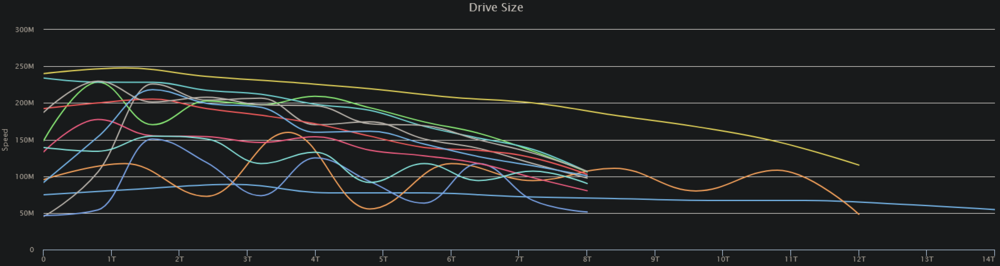
It finished just as I posted that. Overall, it's a pretty bleak picture without the Speed Gap detection. Again, though, on March 8th was one of my fastest parity checks ever, including this 14TB drive as the parity drive. Disk 11 (the wavy orange line extending to 12TB) is the only drive added since that last check, but it shouldn't be impacting the 1st TB speed this severely.
-
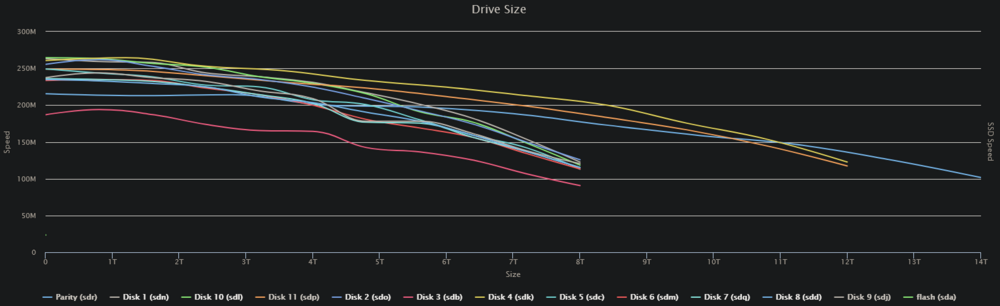
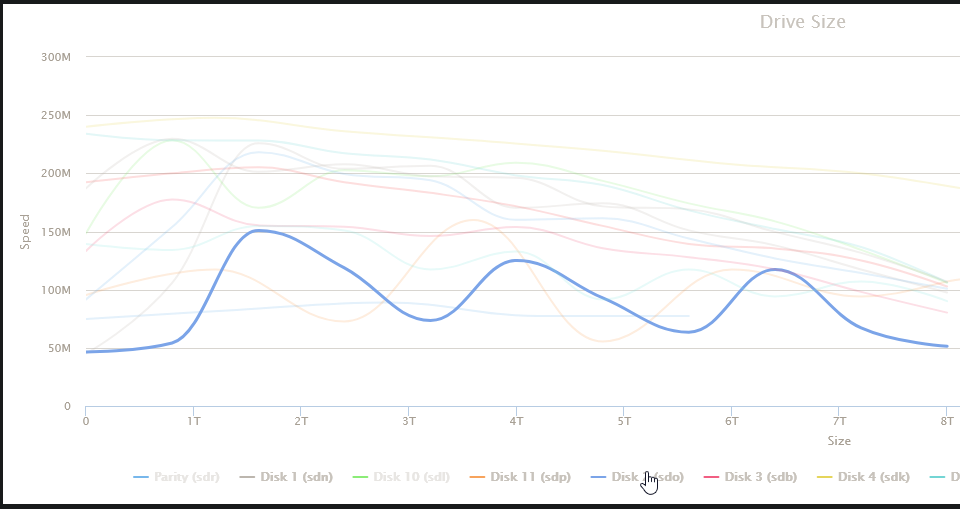
I even rebooted my desktop machine and I'm still getting the writes on 5 & 2. Then I realized I've got a VM running! 🤦♂️ I've shut it down, but I'm still getting some writes. I'm also getting some all-drive reads and a parity drive/drive 2 write combos. Something is still active on the server, but I'm at a loss... Diskspeed test results: The comments on the run: Disk 3 is a bit of an outlier and slower than the rest, but none of them are 50MB/s slow! The test is completed and something is still pushing little blips to disk2, and my parity check is still running at 57MB/s... I was getting a number of Speed Gap warnings, so I decided to run it with that disabled. I think I found my problem: The question now: Why has Disk 2 suddenly decided to read so slowly??? My last parity check last month: Hard to believe that the overall speed would have climbed to 189MB/s after a start like this from disk2. There's nothing in the SMART data that indicates there are any issues, at least not to my untrained eye. I'm open to any & all suggestions/fixes.