nuunuu
Members
-
Joined
-
Last visited
Everything posted by nuunuu
-
I've been having a really hard time getting Nordlynx to work with my new networking setup and I'm starting to think it could be a bug or undocumented limitation in the actual container: Basically, if I set up nordlynx with the default or a custom bridge without any special settings, it works perfectly. Unraid shows ports mapping from the nordlynx container to the bridged ip address. My problem is, I'm trying to route containers on a DMZ vlan through the nordlynx container and nordlynx does not seem to play nicely with any custom network configuration. My unraid network setup consists of br0 (internal), br0.30 (private), and br0.40 (DMZ). On unraids docker configuration, I have two networks being created for br0.30 and br0.40 with a reserved DHCP pool on the subnet. These are created by unraid as ipvlan type networks. If I set up any of my containers on the br0.40 network, I'm able to communicate with them, they're able to communicate with the internet, and swag can route to them without issue. However, if I place the nordlynx container on the br0.40 network, it fails to connect to anything outside of the NET_LOCAL parameter. I can connect to DNS if the DNS is inside the net_local range, but I can't actually make the call to the api servers. My guess is that whatever network is bridged is the *external* network and whatever network is specified as NET_LOCAL is the *internal* network. It would seem then that the only solution is to create a bridge, but since my unraid machine is attached to 3 separate vlans, I need to make sure the bridge specifically binds to the 40 vlan address. I set up an address at 192.168.40.123 for unraid on the 40 vlan and used opnsense to block off all access to that ip (since setting up a new ip for unraid creates all the connections for the gui and ssh), then ran the following to bind the bridge to it: root@unraid:~# docker network create test-bridge -o com.docker.network.bridge.host_binding_ipv4=192.168.40.123 However, whenever I do this, the UI shows that I'm bound to the br0 address (192.168.1.123) and not the br0.40 address (192.168.40.123) and from what I can tell in my firewall logs, the docker container will use any and all of the IP addresses attached to the host machine. If I ping 192.168.40.1, the connection usually (but not always) comes from 192.168.40.123. If I ping 192.168.1.1, the connection either gets blocked as it should OR comes from 192.168.1.123. Sometimes I could get a traceroute to the destination, but sometimes it was blocked by interface specific rules on the router, and doing a traceroute to each of the addresses of the host machine was a single operation (no router involved). Now, at this point, if I limit NET_LOCAL to 192.168.40.0/24 (the 40 vlan), it seems like its fairly reliable that it communicates with the the correct ip since it can't do anything internally outside of that scope I believe, but it looks like I can actually access the unraid gui from here. I'm able to wget on 192.168.40.123 and pull in the gui on that ip address despite having it blocked on my router/firewall. In my opinion, this is a pretty massive security hole if I'm trying to isolate the containers from the host. I would have expected that reaching the other ip addresses on unraid would have to bounce off the router and come back, but that isn't the case here. Note that when I use the default bridge here (192.168.1.123) and the same NET_LOCAL setting (192.168.40.0/24), I actually can't reach the 192.168.1.123 gui OR the 192.168.40.123 gui. The 192.168.1.123 address is outside of my NET_LOCAL and the 192.168.40.0 address has to cross my router like I would expect in order to communicate, where it gets blocked. This means this security hole only gets opened if you bridge Nordlynx (the only way to get it to work) with the same address that your unraid gui sits on (which is the standard recommended way to do this). Its likely I'm just not understanding how docker containers are supposed to network with each other, but I do know that this is not something I would ever be comfortable leaving as is. All of that said, I'm really not sure where to go from here. Nordlynx doesn't seem able to run in ipvlan mode, I can't open an IP address in the DMZ for nordlynx to bridge to, and without either of those things, I don't see any possible way to configure nordlynx for a vlan setup. Has anyone had any success doing this without putting nordlynx basically in host mode?
-
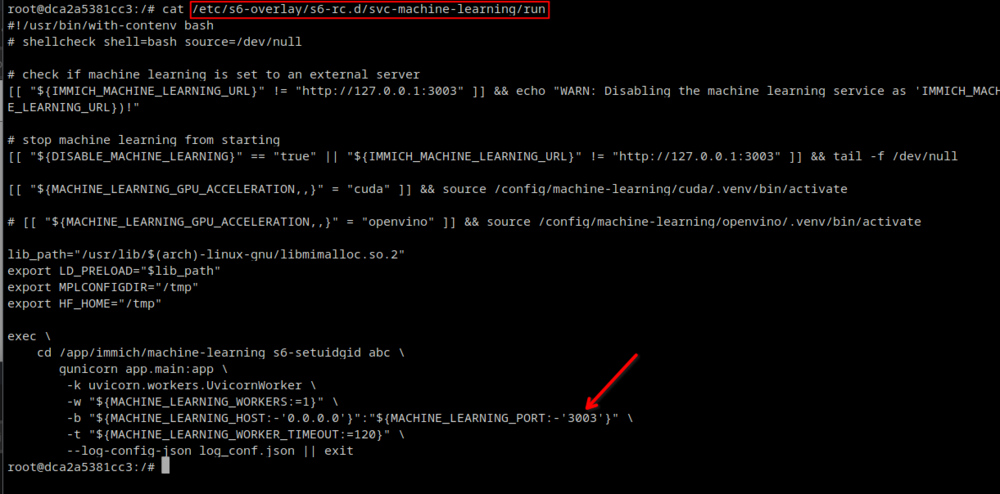
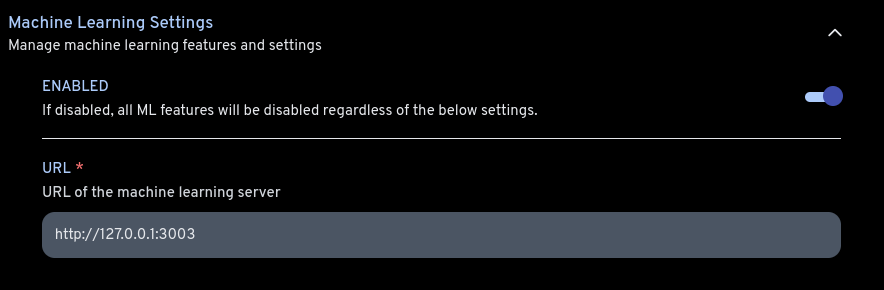
Sorry for the bad german, I am using google translate, but I had the same problem today and was able to fix it. I believe this is a bug in the /etc/s6-overlay/s6-rc.d/svc-machine-learning/run file where the single quote is being included as part of the port number. According to the code here, if container variables exist for MACHINE_LEARNING_HOST and MACHINE_LEARNING_PORT, then the bad code is circumvented. Entschuldigung für das schlechte Deutsch, ich verwende Google Translate, aber ich hatte heute das gleiche Problem und konnte es beheben. Ich glaube, das ist ein Fehler in der Datei /etc/s6-overlay/s6-rc.d/svc-machine-learning/run, wo das einfache Anführungszeichen als Teil der Portnummer eingefügt wird. Wenn gemäß dem Code hier Containervariablen für MACHINE_LEARNING_HOST und MACHINE_LEARNING_PORT vorhanden sind, wird der fehlerhafte Code umgangen. I tried setting these Container Variables in unraid like so: Ich habe versucht, diese Containervariablen wie folgt in unraid festzulegen: Once I did this, the errors stopped appearing in my log, and after synced the host and port in my immich settings, the machine learning stopped throwing errors and the "'3003'" error stopped appearing Sobald ich dies tat, tauchten die Fehler nicht mehr in meinem Protokoll auf, und nachdem ich den Host und den Port in meinen IMMICH-Einstellungen synchronisiert hatte, gab das maschinelle Lernen keine Fehler mehr aus und der Fehler "'3003'" erschien nicht mehr Hope this helps! Hoffe das hilft!