





Tuntira
Members
-
Joined
-
Last visited
Everything posted by Tuntira
-
I have removed the top panel from my PC server and increased the speed of the fans that are on the HBA. Hopefully that helps. Is there anyway to track the HBA temps in unraid? The fans are PWN so it would be cool if they PC/software could control the speed as needed
-
Damn! So should I try and redo the steps that I did and then get the diagnostics? I am prepping to put my server in a proper cabinet with better cooling, for now I will redo my fans.
-
HI All, My parity device was/is disabled so I followed the steps that have been recommended: Stopped the server. Unassigned the parity drive. Start up the server. Stop server again. Reassign the parity drive. Start up the server. Maintenance mode was NOT used at all in the above. The rebuild begun and was done last night however, the parity drive is still disabled. Attached are the diagnostics, any help would be appreciated! datavault972-diagnostics-20251109-0843.zip
-
Ok Thanks, I will buy a new SFF8644 to Sata cable and try that out. I am using an LSI SAS9206-16e board with 3 x SFF8644 to SATA cable to connect. I will also try moving that plug around to see if the error moves.
-
Hi All, One of my hard drives keeps getting the Device is Disabled error and needs to be taken care of. Can I assume that this HDD is starting to fail? datavault972-diagnostics-20251014-1930.zip
-
Hi There! Back again dealing with the same issues. I continue to get random dropouts on my system. I am thinking buying a new PSU but I want to make sure that I have worked through all the other "free" solutions. I have attached the diagnostics as of typing this message. Any further help in testingthe system (PSU included) would be great. In the meantime I will check the system using unraid tools. datavault972-diagnostics-20251004-1841.zip
-
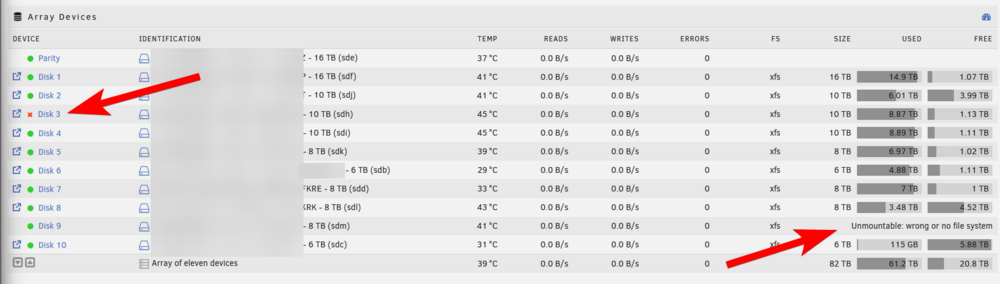
SO I have 12 HDDs in my case. In the photo, i daisy chained 8 HDDs together on one 6 Pin SATA Power Port on my PSU. The other 4 have their own dedicated 6 Pin SATA Power Port. As you suggested, I added another 6 pin port into the picture so every power port is only powering 4 HDDs. However, when doing this, it appears that the PSU stop delivering power to the HDDs and Unraid says that no HDDs are mounted. I confirmed that this only occurs when the PSU has 3 SATA ports in use but not when it has 2. However the SAME number of drives are being powered.
-
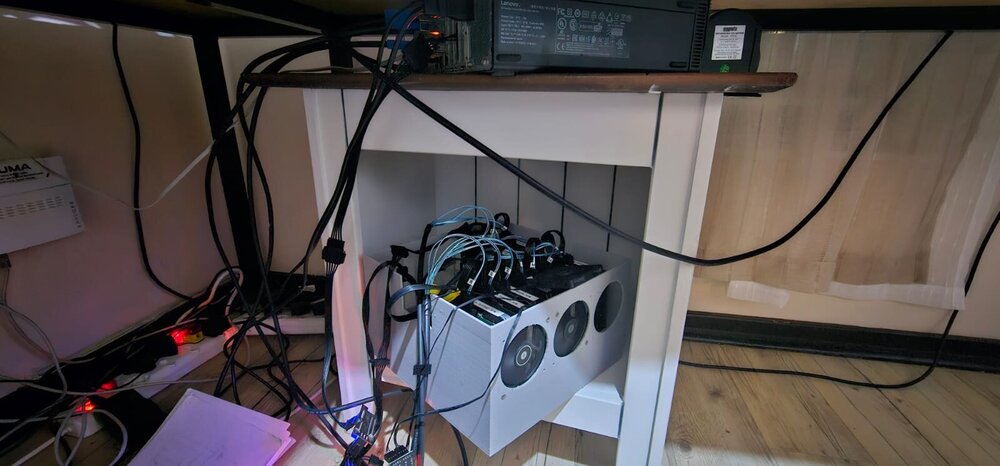
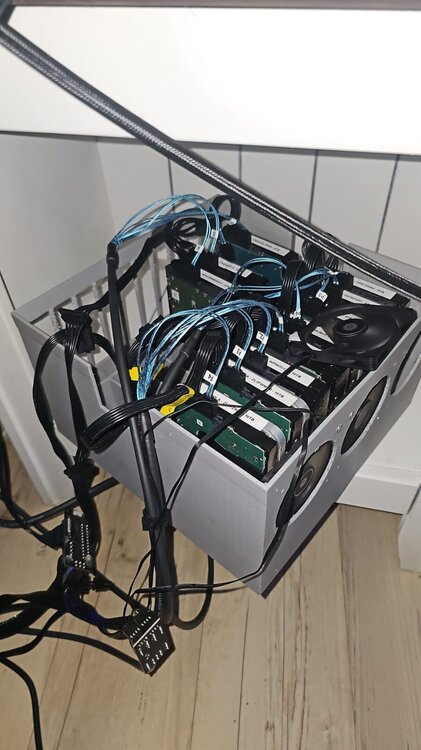
Hi Guys, Like the topic says, I am getting Device is Disabled issues pretty much multiple times a week. I then fix the drive, the parity check happens and then a day or 2 later a drive is Disabled again. As you can imagine, this is SUPER frustrating especially since Unraid is AWESOME and I cannot get the most out of it with this happening. Just this morning I reboot my system after a parity check (which can take up to 27hours), everything was fine, all drives were reading fine. When I got home after work, one of the drives is disabled. My setup is as follows: Lenovo M90s connected to 11 hdds via an LSI 9206-16e with MINI SAS HD SFF-8644 cables. The HDDs are of various types. The Power supply powering the HDDs is a 560w Fractal Design 80 Platinum. More than enough power. I am going to be buying a proper server cabinet so that I can put my server in the garage (my office is simply too loud with the server in it). the M90s will sit on a shelf in the cabinet while I am still figuring out a way to mount all my HDDs and leave room for growth. Do you think that the problem is my very janky setup or could it be bad drives? Would love some guidance on resolving my issues! I have attached photos of my system and also my diags. datavault972-diagnostics-20250730-2251.zip
-
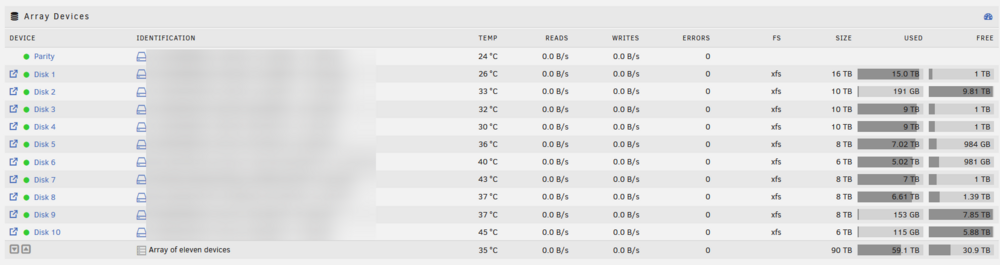
HI All, Like the subject says, I added 2 new HDDs to my servers and when I go to the Shares tab and look for my previously loaded data, Unraid says that the folder is empty. This is weird because in the Main tab, if shows that most of my drives are nearly full so there is definitely DATA on the server. (see below) I had opened up Unraid to Windows, meaning that I could view my files from Windows explorer, now that is saying that the folders are empty? Anyone know what could be happening. I attached my diagnostics; datavault972-diagnostics-20250718-2101.zip I am also concerned because it seems like Unraid cannot pick up those folders and while I was trying to re install qbitorrent, I cannot map it to the right folders.

-
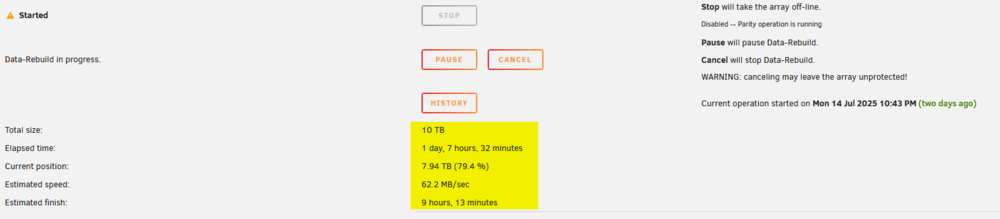
The System has been rebuilding for a while....will seewhat happens when it is done. My Sonarr and Radarr indicate that I have lost a LOT of data, but I will wait to see what happens when it is done. datavault972-diagnostics-20250716-0614.zip
-
Done...attached are the docs datavault972-diagnostics-20250714-2004.zip
-
HI all, I'm having more issues with my server. On Friday I had one of my discs give me the "Disk is disabled" error. So I stopped array, put it in maintenance mode and tried to fix it. Unfortunately I now have ANOTHER disc giving me the issue (a different one). I've added the logs to this post. Any help would be appreciated. I am starting to think that it is something other than my HDDs datavault972-diagnostics-20250713-2048.zip
-
Hi @JorgeB sorry I missed your post as I was away and when I had come back (on sunday) my array was fine after letting it rebuild. However now my PArity drive is disabled. I have tried un-assigning and reassigning the drive while stopping the array but that has not solved the problem. attached are my diags. For added context my setup is as follows: Server: Lenovo M90s i7 10700 @ 2.9ghz16gb DDR4 I have 12HDDs connected to the PC via MINI SAS SFF 8644 cables to an LSI 9206-16e SAS HBA card. I use normal 15 pin splitter cables to power the HDDs and they are all powered by a high quality brand name (can't remember it right now) PSU datavault972-diagnostics-20250528-1842.zip
-
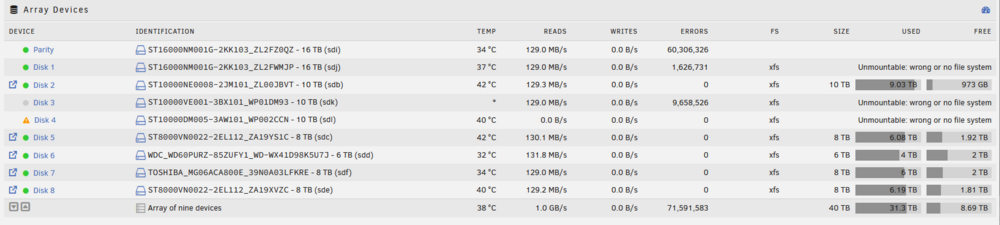
Some not so great news! Got some more errors at random and followed the following process: "Stop the array, unassign the disk, start the array in maintenance mode, stop it again, reassign the drive to the same slot. The idea is to start the array temporarily with the drive “missing” so it changes from “disabled” to “emulated” status, then to stop it and “replace” the drive to get it back to “active” status." Like before, however upon restarting the array I had the below: 3 unmountable drives.... currently my server is rebuilding, should I be worried about this? Unfortunately I have to wait 24hours for it to sort itself out before I see how the rebuilding process went. datavault972-diagnostics-20250523-2047.zip
-
Unfortunately this didn't give any info whatsoever
-
HI @trurl I am back up and running, that Disk 5 issue was the biggest problem I had! Many thanks!
-
Ah I see, so I am guessing that I need to let it do it's thing! I will do that. With regards to the lost+found, I haven't as yet, I went to the folder and it is currently loading. see attached
-
Ok so I mounted it and all seems ok! It does however have a warning icon, should I be worried about that? When I run this "du -h /mnt/disk1/lost+found" I get "19G du -h /mnt/disk1/lost+found"

-
Here are the diagnostics datavault972-diagnostics-20250515-2220.zip
-
I Am currently getting the "All exiting data on this device will be OVERWRITTEN when array is Started" Notification! Not sure why but What I did was the following: Stop the array, unassign the disk, start the array in maintenance mode, stop it again, reassign the drive to the same slot. The idea is to start the array temporarily with the drive “missing” so it changes from “disabled” to “emulated” status, then to stop it and “replace” the drive to get it back to “active” status. It was a suggestion off reddit. Anyone know if it is safe to restart the array, I don't want to lose the data on there
-
Here you go datavault972-diagnostics-20250515-2122.zip
-
Awesome, So I did that and everything looked to have workout, however, that drive is still disabled, how does one enable the drive\
-
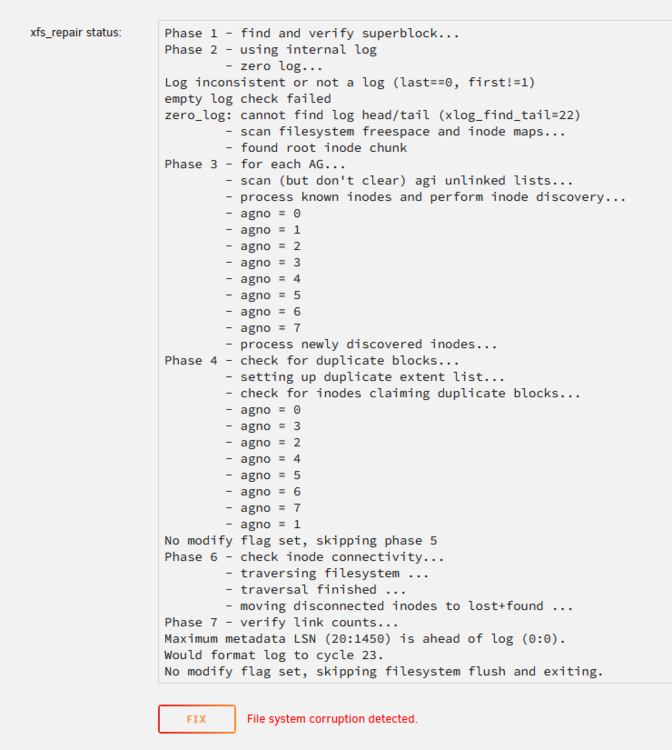
Phase 1 - find and verify superblock... Phase 2 - using internal log - zero log... Log inconsistent or not a log (last==0, first!=1) empty log check failed zero_log: cannot find log head/tail (xlog_find_tail=22) - scan filesystem freespace and inode maps... - found root inode chunk Phase 3 - for each AG... - scan (but don't clear) agi unlinked lists... - process known inodes and perform inode discovery... - agno = 0 - agno = 1 - agno = 2 - agno = 3 - agno = 4 - agno = 5 - agno = 6 - agno = 7 - process newly discovered inodes... Phase 4 - check for duplicate blocks... - setting up duplicate extent list... - check for inodes claiming duplicate blocks... - agno = 0 - agno = 3 - agno = 2 - agno = 4 - agno = 5 - agno = 6 - agno = 7 - agno = 1 No modify flag set, skipping phase 5 Phase 6 - check inode connectivity... - traversing filesystem ... - traversal finished ... - moving disconnected inodes to lost+found ... Phase 7 - verify link counts... Maximum metadata LSN (20:1450) is ahead of log (0:0). Would format log to cycle 23. No modify flag set, skipping filesystem flush and exiting.
-
SO I got to the check filesysystem part and got this...
-
Here you go! datavault972-diagnostics-20250515-1953.zip


