





Tuntira
Members
-
Joined
-
Last visited
Everything posted by Tuntira
-
I also got the "Unmountable: Wrong or No File System" Error on that drive

-
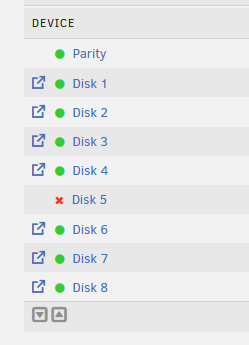
Thanks for the response, I did, it has been like this for a bit and I am not exactly sure how to resolve the issues, before typing this message and I went to my HDDs and reseated all cables to ensure that nothing is loose.
-
Not sure if this is allowed but bump
-
HI All, I have been having some issues with my server over the last couple of days and have not been able to resolve the issues. In Docker, for some reason Radarr refuses to stay started, whenever I start it, after a couple of minuted it moves to Stopped mode. Sonarr has the green play button, however it doesn't launch the app when I click on Web UI (or access via the IP). I have a couple of Docker apps that stay in Stopped mode and when I do start them they say " Server Error , Execution Error". Or they do the same thing as Radarr. I also experienced this weird error where one of my drives was unmountable, I did the XFS repair and that fixed it though. I am also noticing that some of my files are going missing. My sonarr was pretty clean, however with all this happening it is full of missing files and starts to search for them. I have attached the logs to the thread in a hope that I can get some assistance. Thanks in Advance! datavault972-diagnostics-20250512-2113.zip
-
HI All, As the title says, I am getting Docker "Service failed to start." and cannot run apps. It started happening after a power outage at my place and the server decided to change IP address. Not sure if that is the cause of it though. Logs attacheddatabunker972-diagnostics-20250417-1753.zip
-
Thanks for the Help, embarrassingly, my 8088 cables were not plugged in correctly! Closing thread now!
-
Hi All, I recently upgraded my room with a new desk and this required that I pack up my server before rebuilding it again. I didn't change anything in terms of hardware, however when I fired up the server, I got the "Too Many Wrong and/or missing Disks". This is preventing me from starting my array. Does anyone have any idea what I can do to resolve?
-
Hi All, I have a drive that is showing Device disabled, contents emulated, cananyone help me figure out if I need to replace the drive? databunker972-smart-20250119-1700.zip
-
Thanks for the link! I noticed that in one of the replies on the post @JorgeB mentioned that the max length from controller to SATA devices is 1m, I purchased 2m cables (https://www.ebay.com/itm/404899847766?var=674932978994) It looks like that could be the problem. As a matter of interest, why would they sell 2m cables if only 1m cable work?
-
Thanks for the feedback, can you elaborate on reverse instead of forward breakout?
-
databunker972-diagnostics-20240614-2158.zip Above is the diagnostic file, any thoughts?
-
SO I got my card from ebay (Ad: https://www.ebay.com/itm/394354192990) as you can see it says, IT mode, which leads me to ASSUME that it has been flashed already. Is there anyway to confirm this?
-
HI All! I recently decided to upgrade from a USB based NAS to a HBA NAS (if you can call it that) My build is as follows: PC = Lenovo M90s - i7 10th gen HBA = LSI 9206-16e Card Cables = SFF8644 to 4x SATA HDDs = 1x 1tb + 1x 4tb (only using for testing for now) When looks in the MAIN tab on UNraid, I cannot see either of those drives in the drop downs. I can feel that the HDDs are working as they are spinning up. I was wondering what I did wrong for them not to show. Any help would be appreciated!

