





AEnterprise
Members
-
Joined
-
Last visited
-
tested a bit more, re-enableling auto unlock only lets it unlock the original drives. it does not unlock the new ones and claims they are corrupted and need to be formatted. disabling it again and manually entering the passphrase on reboot unlocks both old and new
-
The plugin somehow corrupts unraids ability to setup new encrypted drives when auto-unlock is enabled, and then fails to unlock new drives as well. steps to reproduce enable disk auto unlocking move to internal boot with data cache on the same disks as well (i presume just using a new disk does the same but don't have a spare blank drive i can test with atm) set filesystem to ZFS (encrypted) start array and format drives put data on the pool reboot server it is now completely corrupted and the data unrecoverable. auto unlock fails, and even disabling it, removing the plugin, ... will all fail as if it was encrypted with a different key the plugin made up and threw away if you disable auto unlocking, then let unraid setup the drives it works just fine. so something in that auto unlock process corrupts something unraid still needs to setup the new drives
-
looking at the passwords the do all contain the & special character, maybe that is messing with the http request? but unlocking works fine
-
made a new usb drive when updating to unraid 7.3, only kept the disk assignments and share configs. no plugins, no docker, none of that. this did not fix the issue. i am still unable to change the encryption key
-
Yes i am using the ui, there is no automation or anything custom. Just ubraid in safe mode, using the ui
-
Originally reported it here (https://product.unraid.net/p/unable-to-replace-disk-encryption-key ) but they told me to make a forum post here so here i am I am still trying to replace the encryption passphrase on my machine with a encryption keyfile (since using the password written to a file no longer works for newer systems ). However when trying to do that in the settings does not work. It appears to do nothing in the webpage, and a csrf token error is logged in the syslog. Doesn't work even in safe mode, i've attached those diagnostics as well. I've tried on 2 different machines now and it doesn't work on either of them. Just straight connecting over ip and port, no reverse proxy or anything in between vault-safemode-diagnostics-20260406-1329.zip
-
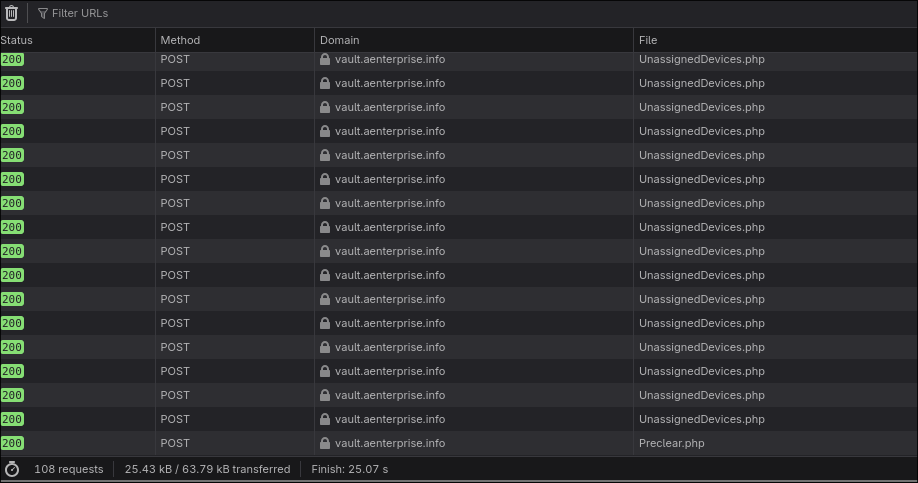
running the 7.2 beta (not sure if it's relevant or not but may be): seeing the unassigned devices plugin spam non stop request to the server to get updates, as soon as one finishes the next one starts. this isn't great for keeping the ui responsive (and low power devices can really struggle with this kind of behavior, especially since it seems to inject the response in the dom each time) cleared the network stats once the page loaded to better show the behavior
-
After upgrading to i am unable to start my array, it just gets stuck. All my disks are encrypted, with the auto start at boot option enabled it gets stuck in a starting state, never even allowing me to input the passphrase. Getting stuck in some kine of weird state where it thinks the disks are unlocked when they aren't. No option to abort and enter the passphrase either Attached are diagnostics from that state. If i disable that option and reboot, then i can enter the passphrase to start the array. However nothing happens but disabling the start button. The array does not start. I know sure the key is valid, downgrading back to 7.1.4 and inputting the exact same key works fine
-
When starting the upgrade on firefox through unraid.net, the changelog is blocked due to a COEP policy not allowing it to be embedded.
-
When you deploy a docker container that is the same as an existing one, but differs only in casing, the template file for the already existing container is overwriten by the new one. For example make a container called "HandBrake", then make another one with different settings (like same image but another var, other path, ...). Unraid will make the 2nd one but overwrite the on disk config of the already existing container. Now when clicking edit on either container goes to the same template and you lost the template for the original container entirely
-
Native docker compose integration would be neat. Docker containers often have dependencies on each other. And while the start order helps a lot, for things like updating containers you still need to manually spin down the dependants first.

