





Rayman
Members
-
Joined
-
Last visited
-
using VS code I see it's LF. Can't see this with the usual notepad
-
Yes I have the config for Dropbox something like [dropbox] type = dropbox token = {"access_token":"XXXXXXXXXXXXXXXXXXXXX","token_type":"bearer","refresh_token":"XXXXXXXXX","expiry":"2025-07-30T23:02:20.5410928+02:00","expires_in":14399}
-
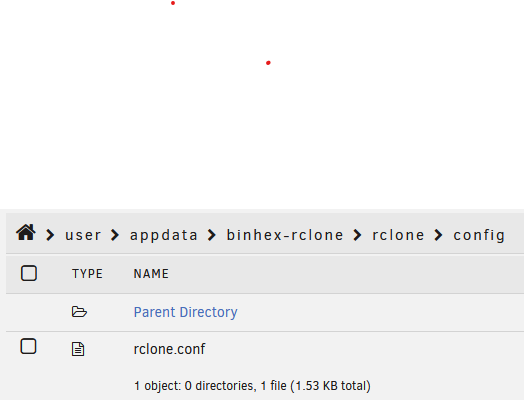
yes the config file is in the right place and full with my dropbox connection
-
you mean this ? docker run -d --name='binhex-rclone' --net='bridge' --pids-limit 2048 -e TZ="Europe/Paris" -e HOST_OS="Unraid" -e HOST_HOSTNAME="Mimir" -e HOST_CONTAINERNAME="binhex-rclone" -e 'RCLONE_CONFIG_PATH'='/config/rclone/config/rclone.conf' -e 'RCLONE_MEDIA_SHARES'='/mnt/user/' -e 'RCLONE_REMOTE_NAME'='remote' -e 'RCLONE_SLEEP_PERIOD'='24h' -e 'RCLONE_OPERATION'='copy' -e 'RCLONE_DIRECTION'='localtoremote' -e 'ENABLE_WEBUI'='yes' -e 'WEBUI_USER'='rclone' -e 'WEBUI_PASS'='rclone' -e 'RCLONE_USER_FLAGS'='' -e 'RCLONE_POST_CHECK'='yes' -e 'RCLONE_POST_REPORT'='combined' -e 'HEALTHCHECK_COMMAND'='' -e 'HEALTHCHECK_ACTION'='' -e 'PUID'='99' -e 'PGID'='100' -e 'UMASK'='000' -l net.unraid.docker.managed=dockerman -l net.unraid.docker.webui='http://[IP]:[PORT:5572]' -l net.unraid.docker.icon='https://raw.githubusercontent.com/binhex/docker-templates/master/binhex/images/rclone-icon.png' -p '5572:5572/tcp' -p '53682:53682/tcp' -v '/mnt/user/appdata/binhex-rclone':'/config':'rw' -v '/mnt/user/':'/media':'rw' --restart=always 'ghcr.io/binhex/arch-rclone' debae1a1d9c317035ae8ef0f7cd71b4a31dab5c0fcfb8111edd0448f3c2d4e57
-
Hello, the docker was working good few weeks/month ? ago but I see now that my config file was deleted so my scripts was not functionnal. I try to create a new connection (dropbox). Now I have the config file in appdata/binhex-rclone/rclone/config/ but if I type rclone config this is the output : 2025/07/30 19:06:10 NOTICE: Config file "/home/nobody/.config/rclone/rclone.conf" not found - using defaults No remotes found, make a new one? Also this is the log. I'm lost ^^' 2025-07-30 19:05:53.935606 [info] Host is running unRAID 2025-07-30 19:05:53.953895 [info] System information: Linux 406c6446d653 6.12.24-Unraid #1 SMP PREEMPT_DYNAMIC Sat May 3 00:12:52 PDT 2025 x86_64 GNU/Linux 2025-07-30 19:05:53.972433 [info] Image tags: BASE_RELEASE_TAG=2025071001,IMAGE_RELEASE_TAG=1.70.3-1-02 2025-07-30 19:05:53.994274 [info] PUID defined as '99' 2025-07-30 19:05:54.054737 [info] PGID defined as '100' 2025-07-30 19:05:54.119265 [info] UMASK defined as '000' 2025-07-30 19:05:54.139547 [info] Permissions already set for '/config' 2025-07-30 19:05:54.162106 [info] Deleting files in /tmp (non recursive)... 2025-07-30 19:05:54.184987 [info] RCLONE_CONFIG_PATH defined as '/config/rclone/config/rclone.conf' 2025-07-30 19:05:54.211330 [info] RCLONE_MEDIA_SHARES defined as '/mnt/user/' 2025-07-30 19:05:54.231768 [info] RCLONE_REMOTE_NAME defined as 'remote' 2025-07-30 19:05:54.252621 [info] RCLONE_SLEEP_PERIOD defined as '24h' 2025-07-30 19:05:54.274380 [info] RCLONE_OPERATION defined as 'copy' 2025-07-30 19:05:54.295097 [info] RCLONE_DIRECTION defined as 'localtoremote' 2025-07-30 19:05:54.316301 [info] RCLONE_POST_CHECK defined as 'yes' 2025-07-30 19:05:54.337146 [info] RCLONE_POST_REPORT defined as 'combined' 2025-07-30 19:05:54.360960 [info] ENABLE_WEBUI defined as 'yes' 2025-07-30 19:05:54.381605 [info] WEBUI_USER defined as 'rclone' 2025-07-30 19:05:54.401986 [warn] WEBUI_PASS defined as 'rclone' is weak, please consider using a stronger password 2025-07-30 19:05:54.426327 [info] Starting Supervisor... 2025-07-30 19:05:54,588 INFO Included extra file "/etc/supervisor/conf.d/rclone.conf" during parsing 2025-07-30 19:05:54,588 INFO Set uid to user 0 succeeded 2025-07-30 19:05:54,594 INFO RPC interface 'supervisor' initialized 2025-07-30 19:05:54,594 CRIT Server 'unix_http_server' running without any HTTP authentication checking 2025-07-30 19:05:54,594 INFO supervisord started with pid 7 2025-07-30 19:05:55,596 INFO spawned: 'start-script' with pid 115 2025-07-30 19:05:55,597 INFO reaped unknown pid 8 (exit status 0) 2025-07-30 19:05:55,606 DEBG 'start-script' stdout output: [info] Waiting for Rclone Web UI process to start listening on port 5572... 2025-07-30 19:05:55,606 INFO success: start-script entered RUNNING state, process has stayed up for > than 0 seconds (startsecs) 2025-07-30 19:05:55,612 DEBG 'start-script' stderr output: /bin/bash: line 1: log_rotate: command not found 2025-07-30 19:05:55,612 DEBG 'start-script' stderr output: /bin/bash: line 1: log_rotate: command not found 2025-07-30 19:05:56,204 DEBG 'start-script' stdout output: [info] Rclone Web UI process listening on port 5572 2025-07-30 19:05:56,210 DEBG 'start-script' stderr output: /bin/bash: line 1: log_rotate: command not found 2025-07-30 19:05:56,212 DEBG 'start-script' stdout output: [warn] Media share '/mnt/user/' does not exist, skipping 2025-07-30 19:05:56,212 DEBG 'start-script' stdout output: [info] rclone finished, sleeping 24h before re-running...Especially this line : [warn] Media share '/mnt/user/' does not exist, skipping this folder exist outside the docker (also I never change this and it was working) thx for any help.
-
Thx for this guide. I check for the "Hardware transcoding device" in plex and it's only for the plex pass so I guess it will not work even if I use the right image ? I try but I do not have the beta channel and I do not have the "Hardware transcoding device" in the transcode tab :(
-
Hello, I'm having some trouble to connect to the db. I got this error : SQLSTATE[HY000] [1045] Access denied for user 'rayman'@'172.17.0.1' (using password: YES) If i try with adminer, it works perfectly but not with a simple php code. <?php $serveur = "192.168.1.9:3307"; $utilisateur = "rayman"; $motDePasse = "xxxxxxx"; $baseDeDonnees = "DB_NAME"; $dsn = 'mysql:host='.$serveur.';dbname='.$baseDeDonnees; /* Connexion DB */ // Connexion à la base de données MySQL try { $bdd = new PDO($dsn, $utilisateur, $motDePasse); // Configurez PDO pour générer des exceptions en cas d'erreur $bdd->setAttribute(PDO::ATTR_ERRMODE, PDO::ERRMODE_EXCEPTION); } catch (PDOException $e) { die('Erreur de connexion à la base de données : ' . $e->getMessage()); } So I use the same IP:host as adminer but i get a access denied. Also I don't understand the ip 172.17.0.1 as my unraid ip is 192.168.1.9 Is someone can help me ? thx a lot !
-
I encountered no errors in safe mode, so I restarted in normal mode. It's been more than a week now, and everything is working well. I'm not sure what happened, but let's keep our fingers crossed! Thanks for your help.
-
Thx ! i'll test this asap. I use it to start my pc when i'm not home.
-
I see this is deprecated. Any up to date plugin/docker with the same purpose ?
-
I have the same issue than you I try to put the port 8080 so the default port on swag is good I can reach filebrowser with the ip but the domain fail. error 502 (bad gateway) It was working before but not anymore (i think because of the last update of swag) I try a restart of swag but nothing help. EDIT : I update the port in the filebrowser.subdomain.conf and put again port 80 and it's work like a charm. Don't understand why it was not working at the first time.
-
On 26/10/2024 error 500 again ... The only thing I'v done is updating plex. It was working fine just after the update (this morning) and now I have the error.
-
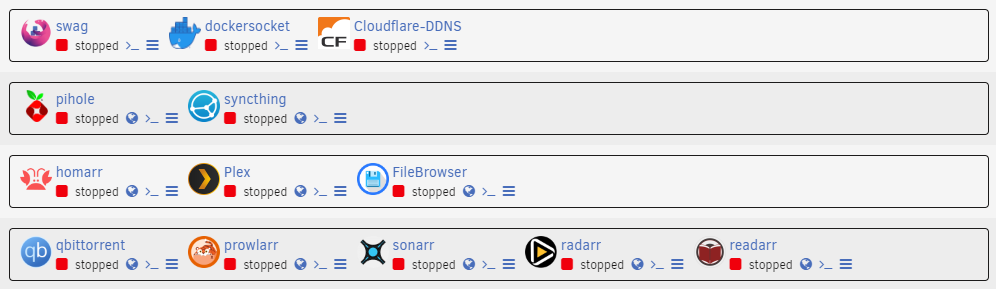
After starting each Docker container individually, I no longer get the 500 error. I didn’t change anything, so I don’t understand why. I’ll wait a few days/weeks to see if the problem occurs again.
-
Thx ! I found this : https://selfhosters.net/commands/ So i restart with the command and deactivate all docker. I'll wait a few hours and see if I get the error 500 again. For information this is the docker I use : I will do like you say. stay tune
-
I will try that. Do you have a list of the unraid command ? That would be helpfull. Thank you

