





steelsoap
Members
-
Joined
-
Last visited
-
I am pretty unhappy with what unraid provides in this regard. As part of my migration, I have to manually mount all my disk as UD cannot mount most of them. I have to manually copy it to a disk or multiple disks of the array, cannot copy to share. All this as root on a system without even the "man" utility and without straightforward way to install such utilities or customizations. Also, performance is very slow of the copies. Reconstructive write would help I'd imagine but not with my later use cases. I should probably try to set up a priviliaged container and do everything from there.
-
Btw the source disk is not part of the array so only one disk would have IO on it, BUT I have that other disk clear going on as well so that makes 2.
-
Well, I enabled reconstructive write and now my other disk in the array has read operations going on on it, spiking up to 4MB/s. Speed of copy remains unaffected.
-
I wonder how it knows when such operation finishes. I thought it working "dynamically" means that it (de)activates between lower level operations like individual file copies.
-
Quick question. I have a disk clear going on with a newly added disk. I have a disk-to-disk copy going on. What happens if during all this I flip this switch to "reconstruct write"?
-
Just modify flash's /etc/profile or /etc/profile.d and that's it? Would that be the most practical way of doing it? And how does the new bash history feature work? I don't see ".bash_history" referenced anywhere yet it works.
-
As of late we can have bash history. Not bad. But I want to have a shell init process involving sourcing bashrc and things like that. Could be done in multiple ways (modify flash files or use cache/array), I am curious if anyone has a well thought out User Script that does this.
-
It's under Settings -> Console Settings -> Persistent Bash History btw. I wonder how it actually works though.
-
Okay, so as described here, Bit weird that I can't copy from a isolated UD disk to a share but alright. So disk-to-disk is okay.
-
I added my PCI bridge's id to the syslinux configuration as pcie_acs_override, like so: Find this id at Tools System devices; looks like this for me: [<PCI bridge id>] 03:00.2 PCI bridge: Advanced Micro Devices, Inc. [AMD] 400 Series Chipset PCIe Bridge (rev 01) Go to Main tab, find your Flash device, click on it Scoll down to Syslinux Configuration At Unraid OS section change "append initrd=/bzroot" to "append initrd=/bzroot pcie_acs_override=id:<PCI bridge id>" I tried vfio-pci.ids=... method but that resulted in erroneous boot. This guided me: EDIT: On ther other hand, unfortunately, the virtualized guest functions way slower so something's not right.
-
There are checkboxes I can't check, 2 groups', one of which has my VGA. So this will require me to delve deeper in to sysconfig modification.
-
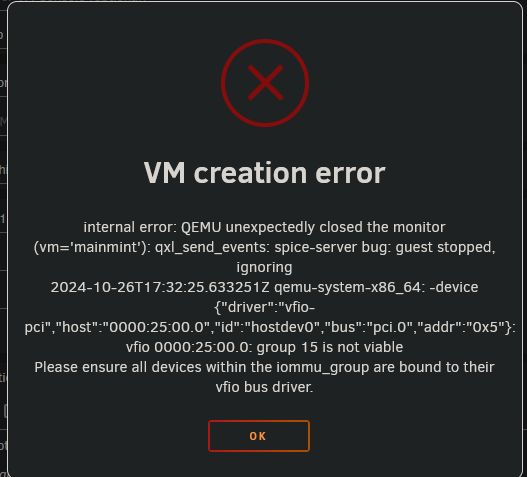
I swapped my VGA and a sata expansion card. VGA was in a PCIe x16 v3 slot, now it's in a v2 one. Now I can't create a (linux mint 22) VM: Logs: 2024-10-26 17:32:25.442+0000: 25653: warning : qemuDomainObjTaintMsg:7164 : Domain id=3 name='mainmint' uuid=f2c2a99c-b682-1055-3f61-d81ba4872679 is tainted: high-privileges 2024-10-26 17:32:25.666+0000: 540951: error : qemuMonitorIORead:397 : Unable to read from monitor: Connection reset by peer 2024-10-26 17:32:25.666+0000: 540951: error : qemuProcessReportLogError:1933 : internal error: QEMU unexpectedly closed the monitor (vm='mainmint'): qxl_send_events: spice-server bug: guest stopped, ignoring 2024-10-26T17:32:25.633251Z qemu-system-x86_64: -device {"driver":"vfio-pci","host":"0000:25:00.0","id":"hostdev0","bus":"pci.0","addr":"0x5"}: vfio 0000:25:00.0: group 15 is not viable Please ensure all devices within the iommu_group are bound to their vfio bus driver. I can boot into my Ubuntu OS on the same machine without any issue. Is there a way to reset libvirt state? Or do you have some recommendation? (I couldn't connect to my existing VM with another error but along these lines)
-
Couldn't I just maybe cp/mv stuff between disks inter- & intra-array as written here: https://docs.unraid.net/legacy/FAQ/transferring-files-within-the-unraid-server/? Not a lot of caveats are mentioned here but I'm sure there are plenty.
-
That would be very cumbersome. Using another computer to host the disks, similarly.
-
Okay, but I don't see how that helps me mounting my device.
