





UsAs
Members
-
Joined
-
Last visited
-
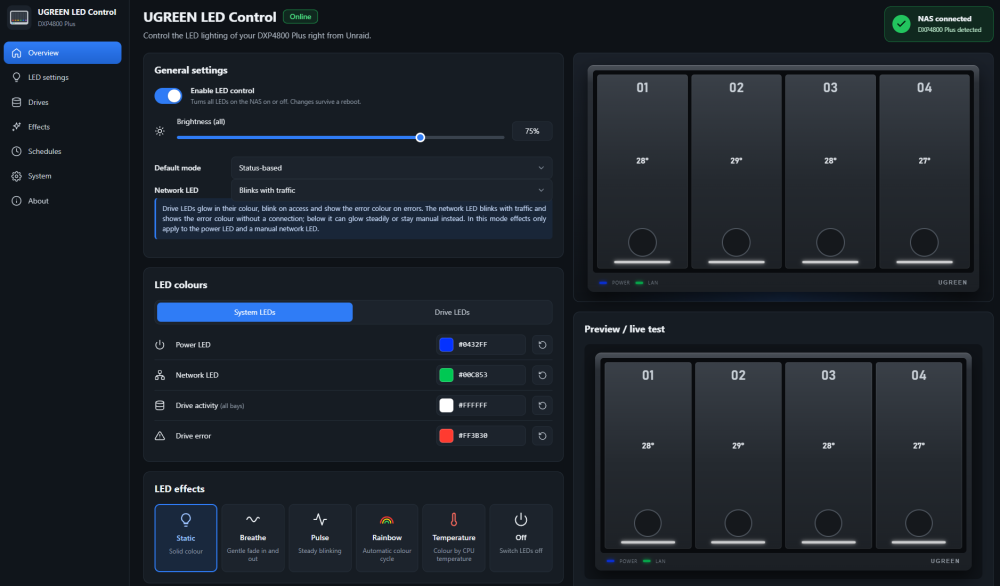
I'd like to put a big thank you for this project. Works like a charm on my 4800 Plus. 💯
-
As an ugreen user i have to say thank you for the support and enabling the leds since i went to unraid when i bought my ugreen nas. I have to check what to to, when i change to 7.4 final. Staying on 7.3.2 until now. Again, thanks for your work!
-
Went for 7.1.4 on my ugreen nas and have zero problems. Thx for the update.

-
Upgrade from 7.1.2 to .3 went fine without any problems on my ugreen. Thx for the update.

-
Did the update on my ugreen and no issues so far. System went up without any problems. Thanks for the new release!
-
Everything worked like a charme, thanks for your help!
-
I would like to move from 6.12.15 directly to 7.0.1. I don't have ZFS Pools (only xfs file- and btrfs nvme cache pool), neither do i have a realtek nic. Shouldn't be a problem, does it? Thanks in advance!
-
Running with no problems so far. Thanks for the update.
-
Noticed the same on my device. Seems to be a bug. Auto and manual spin down is broken, button on the gui seems to do nothing too. Recognized it after my disks not spinning down after a few hours of no usage. .11 didn't have the problem. Would love if a dev could look into this.


