parhamsan
Members
-
Joined
-
Last visited
Everything posted by parhamsan
-
Hello, Is there any way I can install ver 2025.12.13 on Unraid version 7.1.4? I get the following msg when trying to install the new version: Thanks! plugin: updating: ipmi.plg Executing hook script: CA_preHook Clearing Community Applications plugin cache Executing hook script: pre_plugin_checks +============================================================================== | Skipping package freeipmi-1.6.15-x86_64-1sf (already installed) +============================================================================== plugin: skipping: freeipmi-1.6.6-x86_64-1.txz - Unraid version too high, requires at most version 6.12.99 plugin: skipping: freeipmi-1.5.7-x86_64-2.txz - Unraid version too high, requires at most version 6.7.99 plugin: skipping: freeipmi-1.4.11-x86_64-3.txz - Unraid version too high, requires at most version 6.1.99 +============================================================================== | Skipping package ipmi-2025.11.07-x86_64-1 (already installed) +============================================================================== loading ipmi drivers... starting ipmi services... ----------------------------------------------------------- ipmi has been installed. Copyright 2015-2021, SimonFair Version: 2025.11.07 ----------------------------------------------------------- plugin: ipmi.plg updated Executing hook script: CA_postHook Clearing Community Applications plugin cache Executing hook script: post_plugin_checks
-
Hey, Yes I figured that the folderview2 was the issue, after uninstalling it now I can access docker container web UIs again. I guess I have to wait for an update on the folderview2! Thanks for your response!
-
As the title says after upgrading to Unraid 7.1.0 I no longer can access any docker container web UI. I have tried different browsers with the same result. This is what I get on every browser I have tried: about:blank#blocked Any help would be appreciated! Thanks.
-
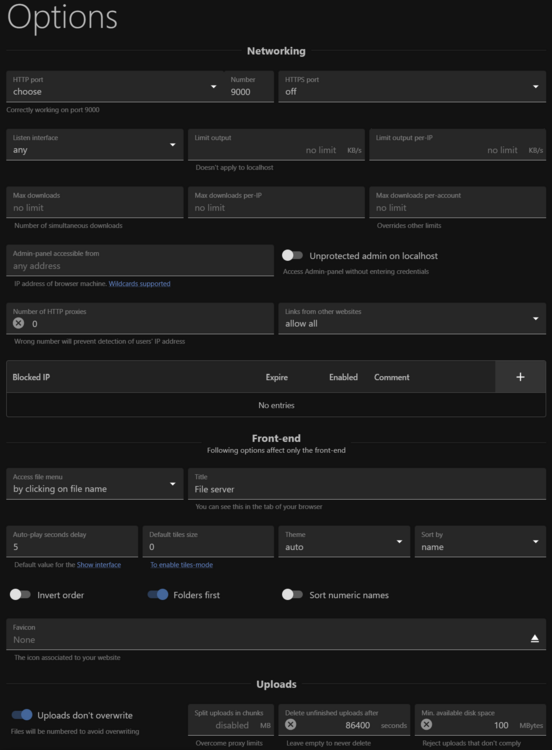
Hey, Thanks for releasing the RejettoHFS3 Beta on UNRAID community app. I want to access RejettoHFS3 with my own subdomain (hfs3.mysubdomain.com) using nginx proxy manager. I dont want to upload HTTPS Certificate files or keys; I want NPM to take care of the certificates. I have assigned a static ip (192.168.1.123) to RejettoHFS3 container and set HFS_FORCE_HTTPS: false. Also set HFS_HTTPS_PORT:9443 and HFS_PORT: 9000 on the UNRAID Docker. I can confirm I can access the HFS with http://192.168.1.123:9000/ but when I try to access over https with NPM and my subdomain, I get 502 Bade Gateway openresty error In the HFS options menu below are my settings: What am I doing wrong here? All the other HFS instances on windows PCs are working with the same settings and NPM. Any help would be appreciated! Thanks again!!!