MonadProxy
Members
-
Joined
-
Last visited
Everything posted by MonadProxy
-
Hi folks, so recently I noticed that when I lose power only for less than 20 seconds, all my containers get turned off and are not restarted after power return and the cancellation of the shutdown operation. This is quite annoying as this regularly happens where I live, sometimes it's just the AC compressor that makes the power in that room trip for 2-3 seconds before returning, when that occurs for slighlty longer than that, I wake up or return to all my containers turned off, there is no attempt to restart them or anything. Even if that was the case I would still have to log back in into a lot of them. The desired behavior was to shutdown after the 300 seconds that I mentioned in the settings, only after that should the full procedure be engaged and the containers turned off, etc not before, it only takes 30 seconds to turn off all my containers so I don't need it to be done pre-emptively. Just like a regular shutdown if I had pressed the button from the main tab. I am posting about this here because, this is not really related to NUT or the network side of the UPS which I have another issue about I will post elsewhere. This is just related to how the OS behaves when power is lost. Maybe I got something wrong, some setting I missed or anything? I would really like to correct this behaviour to the desired one as it occurs to me several times a week. In comparison, in a regular Linux distro or even Windows, when you set the UPS to shutdown after 300 seconds, it shuts down after 300 seconds, there is no closing all the programs and then wait for the shutdown, closing everything is part of the shutdown procedure and should only be initiated when that time limit is reached. Again I may have missed something here. Please let me know.
-
Thanks for this reply, will look into graphana meanwhile.
-
Worked, thanks!
-
Alright I will try that and mark as a solution if it does the trick for me. Thanks.
-
Hi folks, recently since the last 2 minor updates, I have to run these commands modprobe i2c-i801 modprobe i2c-devbefore I can get openrgb to work with my RAM, as I just want to turn the lights off on it and it defaults to rainbow mode. The thing is that when I add these commands to my go file, they don't seem to run, openrgb won't pick up on my sticks until I run these commands in a terminal and restart the container. Am i doing the go file thing right? I would just like these commands to run before I start the array and my containers, I don't have any of these on auto-start. Thanks again for any info.
-
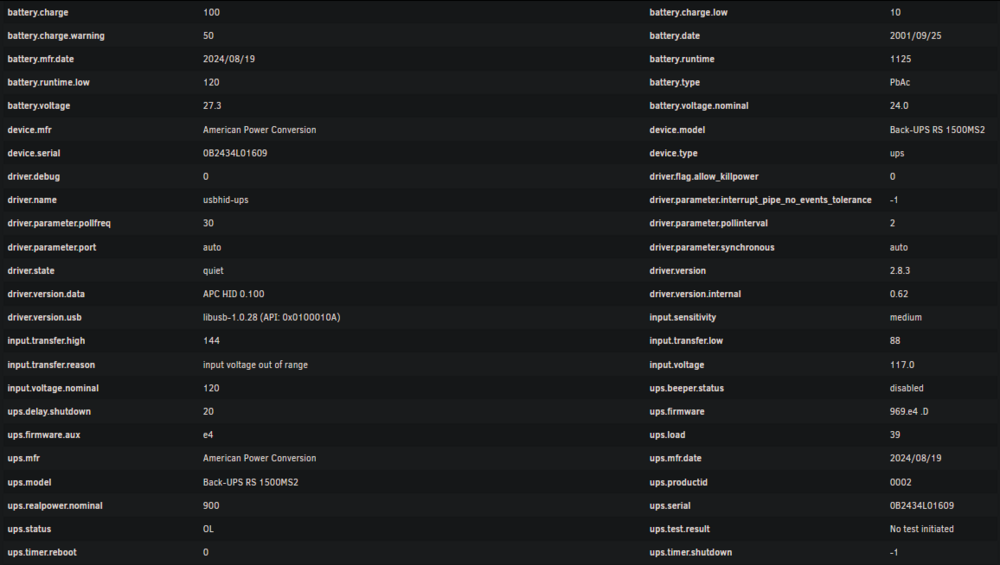
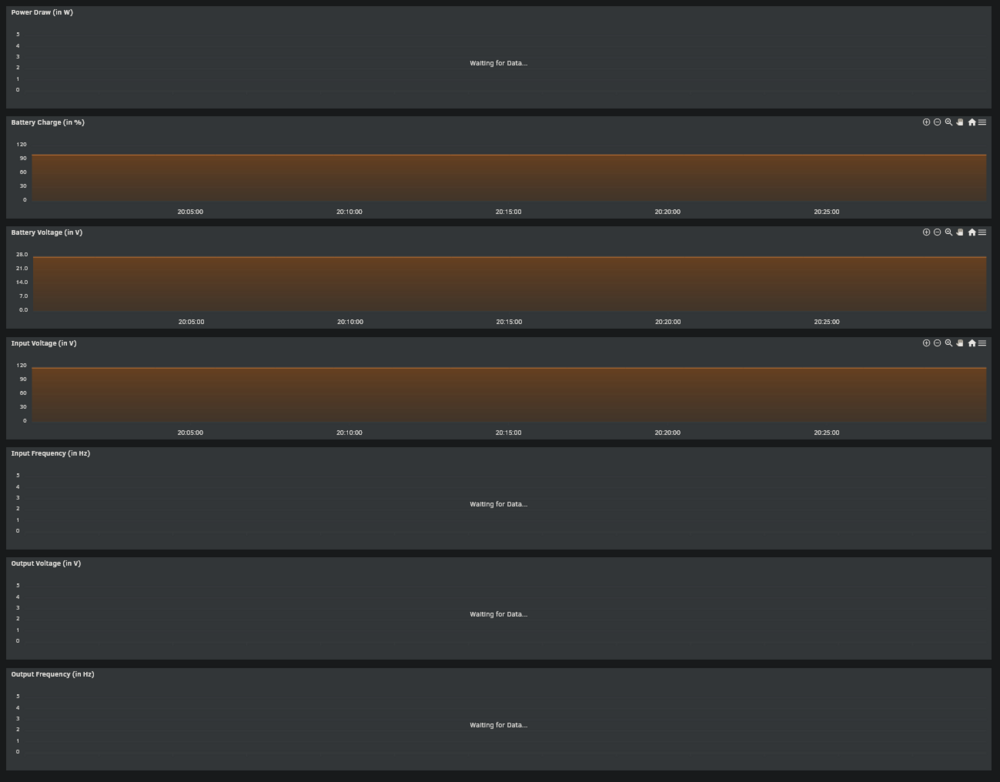
UPS question regarding stats and event history: So I had the APC ups where I was able to track the electrical cost and the power failure events quite precisely, but I seem unable to do that directly with NUT? In the NUT Statistics page, the details are not all that I could get with the Cyberpower app or APC's web UI. The curves for the power draw, the input/output voltage and frequencies are missing as well. I have a APC Back-UPS pro 1500s which should be pretty standard. Not only that but I don't see any section keeping track of events outside of Unraid notifications and it seems like NUT is unable to keep track of micro power losses whereas the original software could and would register it in the events. Unraid only picks up on if it lasts more than a certain amount of seconds it seems. I live in a place where small outages are very frequent so for me it would be a big plus if someone had a clue maybe a plugin or some container that could compensate for that? Thanks for letting me know. Here I can see some information but not all is there and the some curves are not working even if the info is available:
-
Hi folks, So I had the APC ups where I was able to track the electrical cost and the power failure events quite precisely, but I seem unable to do that directly with NUT? In the NUT Statistics page, the details are not all that I could get with the Cyberpower app or APC's web UI. The curves for the power draw, the input/output voltage and frequencies are missing as well. I have a APC Back-UPS pro 1500s which should be pretty standard. Not only that but I don't see any section keeping track of events outside of Unraid notifications and it seems like NUT is unable to keep track of micro power losses whereas the original software could and would register it in the events. Unraid only picks up on if it lasts more than a certain amount of seconds it seems. I live in a place where small outages are very frequent so for me it would be a big plus if someone had a clue maybe a plugin or some container that could compensate for that? Thanks for letting me know. Here I can see some information but not all is there and the some curves are not working even if the info is available:
-
Thanks for the tip, before proceeding, I will read about this, not that I don't trust you but I prefer to understand commands before I run them.
-
Ok, thanks for the tip, my guess is that I can find this in the bios? I will google it anyway, thanks.
-
Ok aside from this log regarding the gpu here is what I noticed: if I start unraid with a keyboard plugged in and leave it plugged it I just have to press enter to retrieve the signal on the monitor but if I connect the keyboard after the fact it does not pick up on it for some reason. I will continue experimenting.
-
I just wanted to add that I don't get this error systematically I just rebooted and it didn't happen.
-
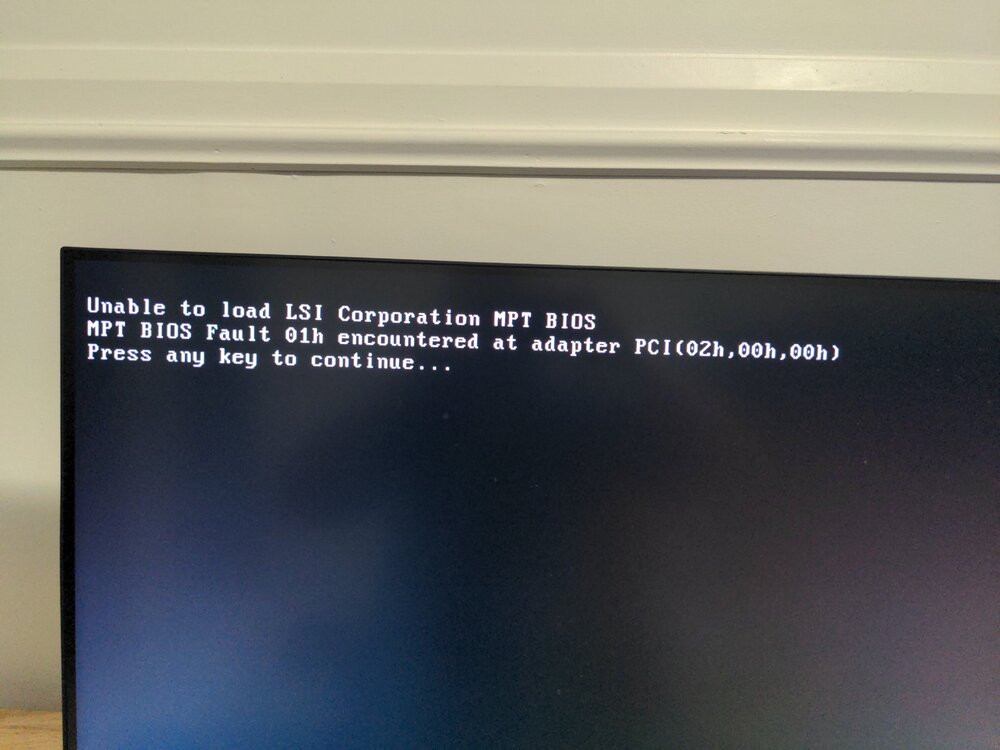
Hi folks so recently I got myself and LSI card (LSI Logic 9211-8i SGL SAS RAID Controller) and while everything I plug on it works just fine, I often have to face this message when rebooting. I have then to look for a keyboard plug it and press enter each time. I was wondering, is there a way to disable, bypass this: Do I have to flash something on it or change some bios setting? Thanks again if you have any idea.
-
Hi folks so since I got unraid, I started on ver. 7 and at some point, this issue appeared where everytime I start it, the CLI and GUI mode work fine until I lose display after a while, I can still access the server but I can't display it through the DP output directly. I will try later on in safe mode to see if a container may be the cause of the issue which I don't remember if I did already or not. Today after the update to 7.1.2 I got this in my syslog server: ``` text error warn system array login May 16 11:12:43 Taichi kernel: br1: port 1(eth1) entered blocking state May 16 11:12:43 Taichi kernel: br1: port 1(eth1) entered forwarding state May 16 11:12:44 Taichi kernel: r8169 0000:06:00.0 eth1: Link is Down May 16 11:12:44 Taichi kernel: br1: port 1(eth1) entered disabled state May 16 11:12:47 Taichi ntpd[2253]: Deleting 2 br1, [169.254.179.14]:123, stats: received=0, sent=0, dropped=0, active_time=17336 secs May 16 11:12:47 Taichi kernel: r8169 0000:06:00.0 eth1: Link is Up - 2.5Gbps/Full - flow control rx/tx May 16 11:12:47 Taichi kernel: br1: port 1(eth1) entered blocking state May 16 11:12:47 Taichi kernel: br1: port 1(eth1) entered forwarding state May 16 11:12:49 Taichi upsd[4527]: User [email protected] logged into UPS [ups] May 16 11:12:50 Taichi ntpd[2253]: Listen normally on 3 br1 169.254.179.14:123 May 16 11:12:50 Taichi ntpd[2253]: new interface(s) found: waking up resolver May 16 11:24:34 Taichi flash_backup: adding task: /usr/local/emhttp/plugins/dynamix.my.servers/scripts/UpdateFlashBackup update May 16 14:13:08 Taichi upsd[4527]: User [email protected] logged out from UPS [ups] May 16 14:13:09 Taichi kernel: r8169 0000:06:00.0 eth1: Link is Down May 16 14:13:09 Taichi kernel: br1: port 1(eth1) entered disabled state May 16 14:13:11 Taichi kernel: r8169 0000:06:00.0 eth1: Link is Up - 10Mbps/Full - flow control off May 16 14:13:11 Taichi kernel: br1: port 1(eth1) entered blocking state May 16 14:13:11 Taichi kernel: br1: port 1(eth1) entered forwarding state May 16 14:14:11 Taichi kernel: r8169 0000:06:00.0 eth1: Link is Down May 16 14:14:11 Taichi kernel: br1: port 1(eth1) entered disabled state May 16 14:14:14 Taichi kernel: r8169 0000:06:00.0 eth1: Link is Up - 2.5Gbps/Full - flow control rx/tx May 16 14:14:14 Taichi kernel: br1: port 1(eth1) entered blocking state May 16 14:14:14 Taichi kernel: br1: port 1(eth1) entered forwarding state May 16 14:14:15 Taichi kernel: r8169 0000:06:00.0 eth1: Link is Down May 16 14:14:15 Taichi kernel: br1: port 1(eth1) entered disabled state May 16 14:14:18 Taichi kernel: r8169 0000:06:00.0 eth1: Link is Up - 2.5Gbps/Full - flow control rx/tx May 16 14:14:18 Taichi kernel: br1: port 1(eth1) entered blocking state May 16 14:14:18 Taichi kernel: br1: port 1(eth1) entered forwarding state May 16 14:14:20 Taichi upsd[4527]: User [email protected] logged into UPS [ups] May 16 16:03:16 Taichi kernel: NVRM: GPU at PCI:0000:01:00: GPU-8a0b2d5f-14cb-5a68-c089-617b8002d4cf May 16 16:03:16 Taichi kernel: NVRM: Xid (PCI:0000:01:00): 119, pid=1548, name=nv_open_q, Timeout after 6s of waiting for RPC response from GPU0 GSP! Expected function 103 (GSP_RM_ALLOC) (0x80 0x38). May 16 16:03:16 Taichi kernel: NVRM: GPU0 GSP RPC buffer contains function 103 (GSP_RM_ALLOC) and data 0x0000000000000080 0x0000000000000038. May 16 16:03:16 Taichi kernel: NVRM: GPU0 RPC history (CPU -> GSP): May 16 16:03:16 Taichi kernel: NVRM: entry function data0 data1 ts_start ts_end duration actively_polling May 16 16:03:16 Taichi kernel: NVRM: 0 103 GSP_RM_ALLOC 0x0000000000000080 0x0000000000000038 0x00063546457e323c 0x0000000000000000 y May 16 16:03:16 Taichi kernel: NVRM: -1 103 GSP_RM_ALLOC 0x0000000000000000 0x0000000000000078 0x00063546457e3191 0x00063546457e323a 169us May 16 16:03:16 Taichi kernel: NVRM: -2 76 GSP_RM_CONTROL 0x0000000020800a9f 0x00000000000000b8 0x00063546457e2aab 0x00063546457e313c 1681us May 16 16:03:16 Taichi kernel: NVRM: -3 76 GSP_RM_CONTROL 0x000000002080017e 0x0000000000000008 0x00063546457e296d 0x00063546457e2a85 280us May 16 16:03:16 Taichi kernel: NVRM: -4 76 GSP_RM_CONTROL 0x0000000020802a06 0x0000000000000004 0x00063546457e2778 0x00063546457e2945 461us May 16 16:03:16 Taichi kernel: NVRM: -5 76 GSP_RM_CONTROL 0x0000000020802a0d 0x000000000000009c 0x00063546457e1fac 0x00063546457e2775 1993us May 16 16:03:16 Taichi kernel: NVRM: -6 76 GSP_RM_CONTROL 0x0000000020802a06 0x0000000000000004 0x00063546457e1e18 0x00063546457e1fa6 398us May 16 16:03:16 Taichi kernel: NVRM: -7 76 GSP_RM_CONTROL 0x0000000020802a0f 0x0000000000000018 0x00063546457e1db5 0x00063546457e1e15 96us May 16 16:03:16 Taichi kernel: NVRM: GPU0 RPC event history (CPU <- GSP): May 16 16:03:16 Taichi kernel: NVRM: entry function data0 data1 ts_start ts_end duration during_incomplete_rpc May 16 16:03:16 Taichi kernel: NVRM: 0 4128 GSP_POST_NOCAT_RECORD 0x0000000000000002 0x0000000000000027 0x00063546457b22f0 0x00063546457b22f1 1us May 16 16:03:16 Taichi kernel: NVRM: -1 4128 GSP_POST_NOCAT_RECORD 0x0000000000000005 0x00000000057f1344 0x00063546457b0422 0x00063546457b0424 2us May 16 16:03:16 Taichi kernel: NVRM: -2 4098 GSP_RUN_CPU_SEQUENCER 0x00000000000001ea 0x0000000000003fe2 0x00063546457ab1d9 0x00063546457ab505 812us May 16 16:03:16 Taichi kernel: CPU: 7 UID: 0 PID: 1548 Comm: nv_open_q Tainted: P O 6.12.24-Unraid #1 May 16 16:03:16 Taichi kernel: Tainted: [P]=PROPRIETARY_MODULE, [O]=OOT_MODULE May 16 16:03:16 Taichi kernel: Hardware name: To Be Filled By O.E.M. To Be Filled By O.E.M./Z490 Taichi, BIOS P1.90 03/17/2021 May 16 16:03:16 Taichi kernel: Call Trace: May 16 16:03:16 Taichi kernel: <TASK> May 16 16:03:16 Taichi kernel: dump_stack_lvl+0x47/0x70 May 16 16:03:16 Taichi kernel: _nv013207rm+0x508/0x5b0 [nvidia] May 16 16:03:16 Taichi kernel: ? _nv013118rm+0x77/0x330 [nvidia] May 16 16:03:16 Taichi kernel: ? _nv051941rm+0x149/0x380 [nvidia] May 16 16:03:16 Taichi kernel: ? _nv021071rm+0x6e4/0x810 [nvidia] May 16 16:03:16 Taichi kernel: ? _nv021071rm+0x62f/0x810 [nvidia] May 16 16:03:16 Taichi kernel: ? _nv005859rm+0x1aa/0x2b0 [nvidia] May 16 16:03:16 Taichi kernel: ? _nv005460rm+0x4b/0x80 [nvidia] May 16 16:03:16 Taichi kernel: ? _nv051190rm+0x98/0x1b0 [nvidia] May 16 16:03:16 Taichi kernel: ? _nv011602rm+0x286/0x5e0 [nvidia] May 16 16:03:16 Taichi kernel: ? _nv053308rm+0x2a5/0xac0 [nvidia] May 16 16:03:16 Taichi kernel: ? _nv053306rm+0x260/0x470 [nvidia] May 16 16:03:16 Taichi kernel: ? _nv051309rm+0x171/0x300 [nvidia] May 16 16:03:16 Taichi kernel: ? _nv051308rm+0x3b/0x50 [nvidia] May 16 16:03:16 Taichi kernel: ? _nv051387rm+0xc0/0x2b0 [nvidia] May 16 16:03:16 Taichi kernel: ? _nv051387rm+0x8e/0x2b0 [nvidia] May 16 16:03:16 Taichi kernel: ? _nv013180rm+0x14e/0x210 [nvidia] May 16 16:03:16 Taichi kernel: ? _nv038885rm+0x8b/0xa70 [nvidia] May 16 16:03:16 Taichi kernel: ? _nv038911rm+0x21/0xf0 [nvidia] May 16 16:03:16 Taichi kernel: ? _nv029618rm+0xa1/0x790 [nvidia] May 16 16:03:16 Taichi kernel: ? _nv029616rm+0x613/0x9a0 [nvidia] May 16 16:03:16 Taichi kernel: ? _nv029886rm+0x3a/0x140 [nvidia] May 16 16:03:16 Taichi kernel: ? _nv000768rm+0x11c6/0x20f0 [nvidia] May 16 16:03:16 Taichi kernel: ? rm_init_adapter+0xcd/0xf0 [nvidia] May 16 16:03:16 Taichi kernel: ? nv_open_device+0x542/0x810 [nvidia] May 16 16:03:16 Taichi kernel: ? nvidia_open_deferred+0x33/0xd0 [nvidia] May 16 16:03:16 Taichi kernel: ? _main_loop+0xef/0x120 [nvidia] May 16 16:03:16 Taichi kernel: ? __pfx__main_loop+0x10/0x10 [nvidia] May 16 16:03:16 Taichi kernel: ? kthread+0xec/0x100 May 16 16:03:16 Taichi kernel: ? __pfx_kthread+0x10/0x10 May 16 16:03:16 Taichi kernel: ? ret_from_fork+0x21/0x40 May 16 16:03:16 Taichi kernel: ? __pfx_kthread+0x10/0x10 May 16 16:03:16 Taichi kernel: ? ret_from_fork_asm+0x1a/0x30 May 16 16:03:16 Taichi kernel: </TASK> May 16 16:03:22 Taichi kernel: NVRM: Xid (PCI:0000:01:00): 119, pid=1548, name=nv_open_q, Timeout after 6s of waiting for RPC response from GPU0 GSP! Expected function 103 (GSP_RM_ALLOC) (0x2080 0x4). May 16 16:03:24 Taichi kernel: NVRM: Rate limiting GSP RPC error prints for GPU at PCI:0000:01:00 (printing 1 of every 30). The GPU likely needs to be reset. May 16 16:03:36 Taichi kernel: NVRM: GPU 0000:01:00.0: RmInitAdapter failed! (0x25:0xffff:1545) May 16 16:03:36 Taichi kernel: NVRM: GPU 0000:01:00.0: rm_init_adapter failed, device minor number 0 ``` I did not use to get this message before that but would still lose display and since it happens randomly I can't take note of the time stamp and pin point an exact moment in the log. This may or may not even be related. I've read around and noticed certain users have this issue as well.
-
You have a compatibility list here: https://networkupstools.org/stable-hcl.html Is it updated frequently? Will your UPS work even if not listed? I don't know.
-
Ok I just updated to 7.1.2 and took time to set up multichannel, let's see how that goes.
-
Thanks for the tips, I will try to enable it when I can turn off the array and let you know the results. You also made me notice that all my exclusive shares reverted to non-exclusive but that's another story for another day...
-
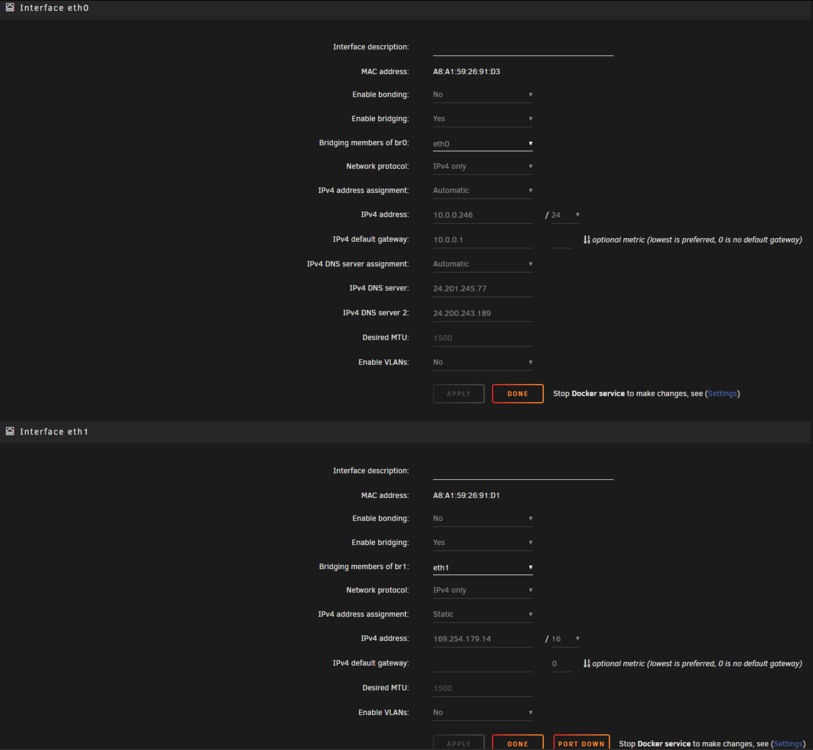
Hi folks, so I have this setup where all my devices use the regular IP (the one .local uses) to access Unraid but my main machine is linked to Unraid both ways: With the regular IP and another IP address that I use for faster access by plugging the 2nd Ethernet port of the Unraid machine directly to the 2nd Ethernet port of my main machine. That allows me to avoid a lot of overhead and get much better speeds on read and writes at least 3x from everything I tested so I would like things to remain that way. That being said once or twice a week, I may lose connection and I have to reset the adapter in the network settings for it to work again. I would like to solve that as this does not happen on the other default IP of eth0 I am still able to access that when the connection drops. here are my network settings (eth1 being the direct link between the 2 machines): here is the log output for the day: ``` May 12 03:24:39 Taichi upsd[4708]: User [email protected] logged out from UPS [ups] May 12 03:24:41 Taichi kernel: r8169 0000:06:00.0 eth1: Link is Down May 12 03:24:41 Taichi kernel: br1: port 1(eth1) entered disabled state May 12 03:24:42 Taichi kernel: r8169 0000:06:00.0 eth1: Link is Up - 10Mbps/Full - flow control off May 12 03:24:42 Taichi kernel: br1: port 1(eth1) entered blocking state May 12 03:24:42 Taichi kernel: br1: port 1(eth1) entered forwarding state May 12 03:25:42 Taichi kernel: r8169 0000:06:00.0 eth1: Link is Down May 12 03:25:42 Taichi kernel: br1: port 1(eth1) entered disabled state May 12 03:25:45 Taichi kernel: r8169 0000:06:00.0 eth1: Link is Up - 2.5Gbps/Full - flow control rx/tx May 12 03:25:45 Taichi kernel: br1: port 1(eth1) entered blocking state May 12 03:25:45 Taichi kernel: br1: port 1(eth1) entered forwarding state May 12 03:25:46 Taichi kernel: r8169 0000:06:00.0 eth1: Link is Down May 12 03:25:46 Taichi kernel: br1: port 1(eth1) entered disabled state May 12 03:25:49 Taichi kernel: r8169 0000:06:00.0 eth1: Link is Up - 2.5Gbps/Full - flow control rx/tx May 12 03:25:49 Taichi kernel: br1: port 1(eth1) entered blocking state May 12 03:25:49 Taichi kernel: br1: port 1(eth1) entered forwarding state May 12 03:25:51 Taichi upsd[4708]: User [email protected] logged into UPS [ups] May 12 06:26:10 Taichi upsd[4708]: User [email protected] logged out from UPS [ups] May 12 06:26:11 Taichi kernel: r8169 0000:06:00.0 eth1: Link is Down May 12 06:26:11 Taichi kernel: br1: port 1(eth1) entered disabled state May 12 06:26:12 Taichi kernel: r8169 0000:06:00.0 eth1: Link is Up - 10Mbps/Full - flow control off May 12 06:26:12 Taichi kernel: br1: port 1(eth1) entered blocking state May 12 06:26:12 Taichi kernel: br1: port 1(eth1) entered forwarding state May 12 06:27:12 Taichi kernel: r8169 0000:06:00.0 eth1: Link is Down May 12 06:27:12 Taichi kernel: br1: port 1(eth1) entered disabled state May 12 06:27:16 Taichi ntpd[2343]: Deleting 5 br1, [169.254.179.14]:123, stats: received=0, sent=0, dropped=0, active_time=827661 secs May 12 06:27:19 Taichi kernel: r8169 0000:06:00.0 eth1: Link is Up - 2.5Gbps/Full - flow control rx/tx May 12 06:27:19 Taichi kernel: br1: port 1(eth1) entered blocking state May 12 06:27:19 Taichi kernel: br1: port 1(eth1) entered forwarding state May 12 06:27:21 Taichi upsd[4708]: User [email protected] logged into UPS [ups] May 12 06:27:22 Taichi ntpd[2343]: Listen normally on 6 br1 169.254.179.14:123 May 12 06:27:22 Taichi ntpd[2343]: new interface(s) found: waking up resolver May 12 09:27:41 Taichi upsd[4708]: User [email protected] logged out from UPS [ups] May 12 09:27:42 Taichi kernel: r8169 0000:06:00.0 eth1: Link is Down May 12 09:27:42 Taichi kernel: br1: port 1(eth1) entered disabled state May 12 09:27:43 Taichi kernel: r8169 0000:06:00.0 eth1: Link is Up - 10Mbps/Full - flow control off May 12 09:27:43 Taichi kernel: br1: port 1(eth1) entered blocking state May 12 09:27:43 Taichi kernel: br1: port 1(eth1) entered forwarding state May 12 09:28:43 Taichi kernel: r8169 0000:06:00.0 eth1: Link is Down May 12 09:28:43 Taichi kernel: br1: port 1(eth1) entered disabled state May 12 09:28:47 Taichi ntpd[2343]: Deleting 6 br1, [169.254.179.14]:123, stats: received=0, sent=0, dropped=0, active_time=10885 secs May 12 09:28:50 Taichi kernel: r8169 0000:06:00.0 eth1: Link is Up - 2.5Gbps/Full - flow control rx/tx May 12 09:28:50 Taichi kernel: br1: port 1(eth1) entered blocking state May 12 09:28:50 Taichi kernel: br1: port 1(eth1) entered forwarding state May 12 09:28:53 Taichi upsd[4708]: User [email protected] logged into UPS [ups] May 12 09:28:53 Taichi ntpd[2343]: Listen normally on 7 br1 169.254.179.14:123 May 12 09:28:53 Taichi ntpd[2343]: new interface(s) found: waking up resolver May 12 14:41:57 Taichi webgui: Successful login user root from 169.254.31.117 May 12 14:43:11 Taichi kernel: r8169 0000:06:00.0 eth1: Link is Down May 12 14:43:11 Taichi kernel: br1: port 1(eth1) entered disabled state May 12 14:43:15 Taichi ntpd[2343]: Deleting 7 br1, [169.254.179.14]:123, stats: received=0, sent=0, dropped=0, active_time=18862 secs May 12 14:43:15 Taichi kernel: r8169 0000:06:00.0 eth1: Link is Up - 2.5Gbps/Full - flow control rx/tx May 12 14:43:15 Taichi kernel: br1: port 1(eth1) entered blocking state May 12 14:43:15 Taichi kernel: br1: port 1(eth1) entered forwarding state May 12 14:43:18 Taichi ntpd[2343]: Listen normally on 8 br1 169.254.179.14:123 May 12 14:43:18 Taichi ntpd[2343]: new interface(s) found: waking up resolver ``` Let me know if you have any clue thanks again... This happens to me generally when I try to access files big or small docs or videos.
-
You could start a parity check that you would pause and resume as you use the machine until its complete, if you have certain hours of the day where you need it less.
-
Thanks for the offer, I appreciate but I'm good you can donate them instead to a charity or whichever project you feel like. Glad you solved your issue.
-
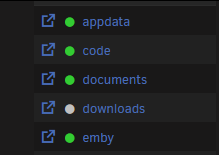
It was triggering my OCD so what I did is make my own userscript for that. It turns the warning sign into a grey dot instead, I hope it will be of use for someone else: // ==UserScript== // @name change-warning-icon // @namespace change-warning-icon.namespace // @version 1.0 // @description Change the icon class on page load // @author MonadProxy // @match *://0.0.0.0/* // Adjust this to the URL of your server and add it to the script settings in the match field as well // @grant none // ==/UserScript== (function () { 'use strict'; // Function to change the class function changeIconClass() { const iconElement = document.querySelector('i.fa.fa-warning.orb.yellow-orb'); if (iconElement) { iconElement.className = 'fa fa-circle orb grey-orb'; console.log('Icon class updated!'); } } // Use MutationObserver to detect changes in the DOM const observer = new MutationObserver(() => { changeIconClass(); }); // Start observing the document body for changes observer.observe(document.body, { childList: true, subtree: true }); // Also attempt to change the class immediately in case the element is already there changeIconClass(); })(); result: Maybe is there a more appropriate place on the forum to share this?
-
Hi folks, I was wondering if it would be possible to make the discord channel accessible without a phone number? A lot of Channel's allow that and are at a much higher risk of trolling and other behaviours. For instance big channels such as Stash, Python, Autohotkey, Jellyfin do not require that. I don't think that would be a big issue on Unraid's channel since most of the people who will be there would be paying customers looking for support or just to have a discussion centered around servers, docker containers and similar. Plus you can always kick them out if they misbehave. Just like on the forums. Verification with an e-mail would be preferable. A lot of people value their privacy and don't see the need to provide a phone number just to access a Discord channel. That's one of the reasons why I don't use any google product. It's not even really about giving that number to Limetech but I would prefer not to hand it over an app partly owned by Tencent. Forum is still here for sure but that would provide more real-time discussions and lifting that barrier of entry in my opinion would only make your Discord and in return Unraid, more popular.
-
Be careful though my friend as the only reason I deleted that config file in my case is because I knew the drives were empty, I wouldn't recommend if you have precious data on them.
-
Thats what my wife told me 😂 More seriously, yes after the parity check is done by tomorrow morning, I will generate other diags and post them. Thanks again.
-
Ok I managed to boot to the gui by taking cache.cfg out of the usb drive. The cache drives were empty so no issue here but as I tried recreating 2 pools I still get an error message concerning the nvme drive as you can see in the pic, how can I just remove it from that pool and have just cache 1 and 2, after all before starting the array, I made sure to place that disk in another pool. Could it be due to the fact that all 3 disks were initially configured in raid1 so 'they keep looking for each other' in simple words? At this point all I want is use the 2 500gb drives together and the nvme by itself for downloads. Let me know if you have any clue. Thanks again.

-
Hi folks so I will attach diagnostics and explained what I tried to do: I created a cache pool with 3 ssds in btrfs raid 1, that cache pool was emptied in the array prior with the recommended mover method as seen here: https://docs.unraid.net/unraid-os/manual/storage-management/#adding-disks-to-a-pool Everything was working fine but after that I decided to keep only 2 ssds in the multi device cache pool and remove nvmeOn1 to leave it in a separate pool unprotected since it will just contain new downloads so I thought I would avoid the fragmentation and leave the other 2 for more sensitive data. The problem is after stopping the array and removing the drive and starting it I was was seeing an error in the cache pool saying a drive was missing as I was planning to be able to just reformat the pool with the 2 devices but apparently no so I decided to stop the array and figure out what's wrong. The array got stuck while stopping for a very long time so I sent a reboot signal and it turned off but after that I found myself unable to start the WEB UI. When I try to force start nginx and php-fpm I get an error 500 I am able to access the login page when running these commands but after that, it's a blank screen when I run wget unraid_IP, I get a connection refused with all of them I have currently a flash backup on unraid connect but I am afraid the moment at which the backup was made is way too close and could be in the middle of when the problem occured... My guess is that is was an automated flash backup made when I shutdown the system? What I coincidence as I just had set it to do cloud backups a few days ago. Let me know if you have any clue by checking the logs or if I could just slap in a new unraid install on the same usb key and restore parts of the old install selectively. Ideally I would prefer to solve this without restoring the usb config. Thanks in advance. tower-diagnostics-20250323-2322.zip syslog