





SickPup404
Members
-
Joined
-
Last visited
Everything posted by SickPup404
-
New diags attached... Drives still aren't spinning down. All are set to default delay, and that's 30 minutes. The "Shares" applet on the Dashboard shows three shares with stream and they are all cache only. The Active Streams app has two - both on cache. No Plex streams. Where else can I look to find the culprit(s)? nasbox-u1-diagnostics-20250320-1430.zip
-
There ya go! That orange triangle bit me on that one too (wanted to get rid of all of them when I set up). I missed moving those files... VM/Docker Managers shut down, files moved, restarted the managers. Waiting for the timeout now, but I have no doubt I'm straight now!
-
Good morning, Had a busy few days at work, but was finally able to make changes for the better (I hope). Not sure if I have something configured incorrectly, but it seems like the array isn't spinning down. I just made another change with removing mapped drives in Windows so it only has cache pool drives mapped. Anyway, latest diags are attached. Cheers! nasbox-u1-diagnostics-20250320-0908.zip
-
Ok, Here’s my thoughts, please feel free to recommend changes where needed. POOLS vm_nvme I’d like to use this solely for VM’s since it’s the fastest of the drives. At this point, I only have one running, but plan on a couple others. They are not critical, but I would like to have them backed up since it can be such a pain to reinstall/reconfigure everything. cache_nvme I’d like to use this solely for AppData, again because of speed. As you noticed, I do have the AppData Backup plugin installed. I’ll look over it to ensure it’s backing up as I intended. cache_ssd_mirror My thought was to have this as the main storage for things like My Documents from Windows. I may not understand completely, but I was hoping that it could be configured so that anything done during the day just remained on the SSDs during the day, then overnight, Mover could move it to the array. If I access something that is less frequently used, it would pull from the array, but more frequent stuff would stay on the SSDs (if that makes sense). SHARES AppData As noted above, I’d like this to be on the cache_nvme pool and not on the array. Would be backed up. Domains As noted above, I’d like this to be on the vm_nvme pool and not on the array. Would be backed up. ISOs Currently doesn’t have any files in the share, and no mappings in any VMs. Could really be put on any pool, just not sure which is ideal - maybe vm_nvme? System I’m not sure exactly what is on here. I see libvirt and docker ima files. I guess they are the vdisk files for the VMs & Containers? Again, it can be anywhere but I’m not sure where. Does it need to be backed up? MISC Ideally, I would love for the drives to spin down. Right now, they obviously don’t. Also, any thoughts on the bonus from my initial post (any need to worry about the distribution of data)? My current drive utilization has two of the 8TB drives over 75%. I've done some searches and it seems like it's nothing to worry about. Hopefully, this helps you get me on the right path to getting this straight!
-
This is great info! I will post back to you later this evening when I have a chance to sit and think about what I intend. (Late afternoon here - eastern US.) You don't realize how much I appreciate the expertise! (I know just enough to be dangerous to my server!)
-
OK, ready for next steps. Completed: Reassigned data share to have cache_ssd_mirror as primary, array as secondary Triggered Mover in the Scheduler Changed data share back to array only as primary Verified files got moved (manually picked up one straggler that didn't get moved) Deleted empty folders in the data folder of cache_ssd_mirror Attached current diags. Thanks! nasbox-u1-diagnostics-20250317-1425.zip
-
Good to know! I will post back after Mover runs.
-
So I should: Reassign the data share to have cache_ssd_mirror as prinary with the array as secondary Wait overnight and Mover will take care of it I think since I removed the cache_ssd_mirror after it filled up, but before Mover could run, that caused the issue. THANK YOU!
-
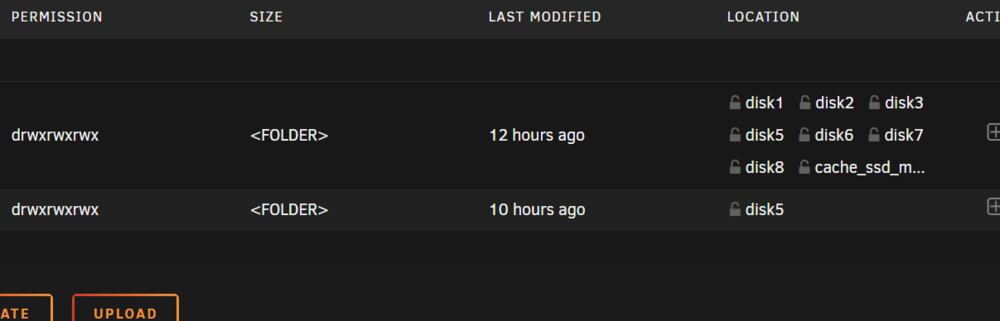
Good morning, First, just want to thank you for your help - it's greatly appreciated! This is the output from the ls command: root@NASBox-U1:~# ls -lah /mnt/cache_ssd_mirror total 16K drwxrwxrwx 1 nobody users 26 Mar 17 04:40 ./ drwxr-xr-x 25 root root 500 Mar 17 07:25 ../ drwxrwxrwx 1 nobody users 58 Mar 15 14:19 M---y/ drwxrwxrwx 1 nobody users 10 Mar 16 20:40 data/ drwxrwxrwx 1 nobody users 24 Feb 11 15:40 isos/ The data folder is where the media files are. When I open data in File Manager, these are the subfolders (data is the top one): The sequence I originally did on the data share: I had the array initially configured as primary Got that bright idea to make cache_ssd_mirror the primary with the array as secondary Got the utilization warning/errors while copying media files Changed the data share back to have array as primary and removed cache_ssd_mirror As I've been looking deeper, the files that are on cache_ssd_mirror in the data share are not dupes and I need to move them off somehow. Last night I: Opened cache_ssd_mirror in File Manager Selected the data folder Tried to Copy it to a different folder NOT under the data share (/mnt/user/data) elsewhere on the array (/mnt/user/newfolder) Got an "Invalid Target" message. I do have a mobile drive dock that I'm currently copying the files over to. After that's complete, I just need to be able to delete them from cache_ssd_mirror and put them back on the array without messing something up. Is it as simple as that - delete them from cache_ssd_mirror, then copy them from the mobile drive back to the data share on the array? The other issue with AppData (files on the array when it is assigned to the cache_nvme pool) was picked up by Fix Common Problems over night. I'll follow recommendations there to resolve that. Thanks!
-
Sorry, didn't include since I didn't think it was relevant. Attached now, nasbox-u1-diagnostics-20250316-1926.zip
-
For background, I have the following pools/array: - cache_nvme (1x WD SN770 1TB) - cache_ssd_mirror (2x TeamGroup T-Fforce Vulcan Z 1TB) - vm_nvme (1x WD SN770 1TB) - Main array (140TB with dual parity, 15 drives either 8TB or 14TB) I had originally set up using Space Invader's recommendations - VM's use the vm_nvme, AppData on the cache_nvme, and various other files I wanted fast access to on the cache_ssd_mirror. I then had the bright idea to assign AppData secondary storage to the main array, then I also started to put my media files in a folder that happened to be on the cache_ssd_mirror without realizing it. I started getting the utilization warnings/errors on the ssd mirror while copying files over. I've removed the array assignment on AppData so it only points to the nvme cache, and placed my media share on the array only. But now I have a couple issues: - I have media files clogging up the SSD cache that should be on the array - I have AppData files on the array that should be on the nvme cache I'd like to know how I can move these around so I can clean it up. I have also started to get corrupted SQLite DB errors in Plex and other apps that use it. I was reading that the mix of array/nvme on the SQLite DB files is likely a cause of the issue there, so if I get the storage assignment cleaned up, I should be able to recover the DB files affected (I've done it a couple times already, but it keeps recurring). Some of the media files on the SSDs are already on the array and appear to be duplicates. I'm guessing I can just safely delete them if so, but if there are any that are missing from the array, I need to move them but don't want to mess up where UnRAID thinks they are if I start moving stuff around on individual drives. For bonus points, I have two 8TB drives that are almost 90% full, but several empty drives. I've used Unbalanced to empty a drive in preparation for removal, but is there a way to only partially move files around to more evenly distribute the files? Or should I just not worry about it? Thanks very much for any help/advice! Sorry for the wall of text!
-
lol! And the numbers jokes are spot on!
-
Cool, thanks! Works great!
-
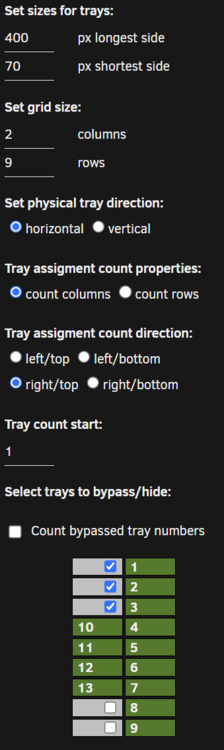
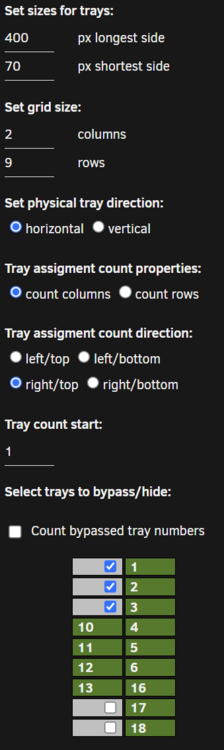
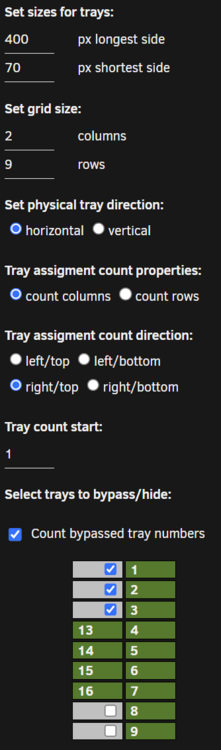
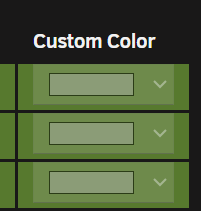
Good morning! I've got two questions, and I'm sure they are something I must be missing... Thanks for a very nice map that my OCD loves! And thanks for any help/pointers! #1 - In the Tray Allocations tab, I can't select a custom color - they appear to be disabled. I've tried in Safari on Mac, Safari on iPad, and Firefox/Chrome/Edge on Windows. #2 - I'm having some difficulty getting my tray configuration the way I want it. What I'd like to see: Here's what I get with "Count bypassed..." UNchecked: And here's what I get with "Count bypassed..." Checked:
-
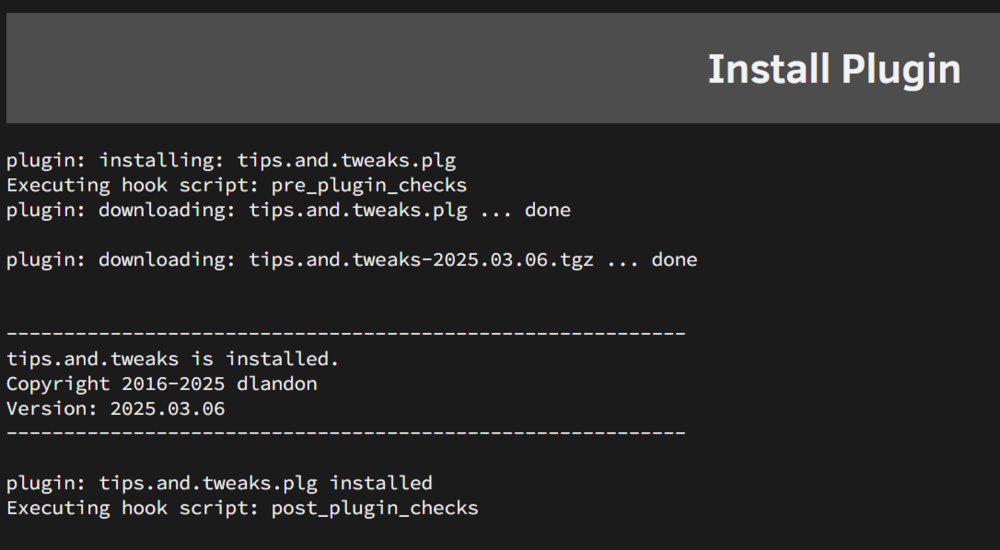
Confirmed successful (no changes to DNS) - Just lucky to hit a just the right time!
-
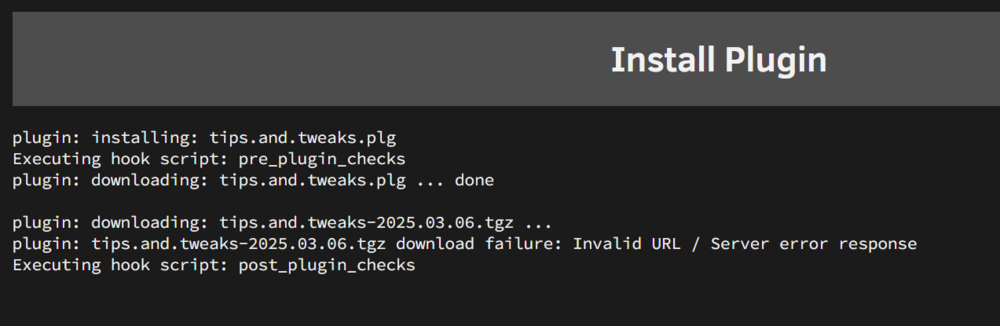
Good afternoon, Tried to update to current release and it failed. Uninstalled and attempting to reinstall and am getting this:
-
Hello, If I cancel an in-progress file copy operation (long running since it's a media folder) so I can do a shutdown and replace a drive, if I re-do the copy operation and DON'T check the "Overwrite Existing Files" option, will that just skip over all the files I've already copied without any intervention? Thanks!!
-
Ah! Makes sense. Thanks again for all your assistance during my learning curve - really appreciate it!!
-
Good morning, Data rebuild finished this morning. The drive with s/n C4YD returned to normal operation. I stopped the array from maint mode, added in the two good WD Reds (leaving out the one that failed preclear), started the array, and formatted the two new drives. New diagnostics attached. Two questions: - Do you see anything jumping out in the diags that are red flags for you? - I only noticed the drive dropped from the array yesterday when I stopped it to add those two drives. Is there someplace that it should have shown up elsewhere? Maybe in the fix common problems (I run it on a daily schedule). I would hate to have a drive drop from the array and not notice a problem. Thanks very much!! nasbox-u1-diagnostics-20250115-0830.zip
-
OK, wanted to save mucking about in the Seagate HD settings to use only as a last resort. Steps I've done: - Reset the spindown delay to Never - Stop the array - Unassign the disk - Started the array in maint mode again to have the drive drop - Stopped it again - Reassigned the drive - Started the array in main mode once more - Started a resync Estimate is a little over 12 hours, so I'll see how it goes and post back tomorrow with diags again for your review for power issues. Thanks!!
-
OK, a couple more questions before I attempt changing these settings later today... I've been reading several threads on these both here and on r/unRAID & r/DataHoarder and maybe I'm getting them mixed up... - Seems like varying opinions on applying the "disable" changes to three features: EPCfeature, lowCurrentSpinup, & powerBalanceFeature - Also seems like some think it's just IronWolf drives (8TB/10TB?), while others mention Exos drives as well Should I be applying only EPC & LowCurrentSpinup, or all three? Since I have both IronWolf and Exos drives, should I be applying the changes to both? Thanks!
-
Also, is this the LSI/Seagate issue you mentioned?
-
What setting would that be? Under Settings...Disk Settings, I have Auto-Start disabled, Default Spindown Delay 30 mins, and Spinup Groups disabled. Sorry, I can be a bit dense. Pretend I'm a 6 year old! LOL! (And I appreciate your efforts to help me out!)
-
Good morning, I just noticed I have a drive that has the red "X" with the above message in the Array Devices list. I have attached the current diagnostics. How I got here (some info might not be needed, but I figured I'd include all): - Current array drives all have passed short, long, and preclear tests - Data has been copied to drives - Server was shut down - I added drives to the case that were going to be precleared and added to the array (WD60EFRX drives, s/n's ending in 0F7Z, 3H5P, & V8ZY) - Above drive with s/n 3H5P failed post read, other two passed fine; will be removing that one from case - Stopped array to add the two passing drives to the array - Noticed the red "X" on ST8000VN0022 with s/n ending in C4YD (SDL) - Ran short test; passed - Started array in maint mode - Ran XFS check (without modify flag) and everything appears ok - Started Read Check - Pulled current diagnostics I'd like to try to figure out why the drive went disabled. I've searched here and on Google and reviewed a bunch of results here and on Reddit. Seems like a rebuild in place is the final fix, but not sure why this dropped or if I can trust this drive. I will be checking cabling shortly, but is there anything else I need to do? Sorry for the need for so much handholding during these past few weeks, but I'm new to UnRAID. Thanks in advance! nasbox-u1-diagnostics-20250114-0836.zip
-
Thanks very much!!


