





timg11
Members
-
Joined
-
Last visited
Everything posted by timg11
-
I've had this WIndows 11 VM running in Unraid for a few months. Twice it has failed during updates and not only failed to re-start Windows 11, but brought down the entire Unraid system. The lack of response to this topic has me wondering which of the following is true: 1) I am one of very few people using Windows 11 in a VM under Unraid, so nobody has any knowledge of issues. 2) Others are using a Windows VM in Unraid, but I am one of very few people experiencing failures of WIndows Updates which crash the entire Unraid system. Please reply here if you are successfully running Windows 11 as VM in Unraid, and your Windows Updates have been installed without any issues. I'd like to compare notes on the system and environments.
-
I'm running a script on my Windows VM that is reading a file from the Array, processing it, writing an intermediate file to the virtual C: drive (which Unraid VM reports as "/mnt/user/domains/Windows 11/vdisk1.Windows--generateqcow2 (cache) vdisk1 SATA"). Then it does further processing on the temp file and writes the result back to the Unraid Array. The files on the Unraid array are access with UNC paths. \\unraid\share\and\some\path\and\file.dat As I monitor performance in the Windows environment it seems to be network limited. The system is showing network throughtput flatlining at 1 Gigabit per second. The data is to the host IP of the parent Unraid instance. CPU is about 30%. When I look at the network interface in the Windows VM, it is called "Ethernet Instance 0", and it reports a speed of 10 Gbps. Why would the access to the Array in the VM's parent Unraid instance be limited to 1 Gbps? It is not passing over a physical Ethernet at all.
-
Maybe I'm the only one using Windows 11 in a VM under Unraid? My workaround is using GPEDIT.MSC to "Configure Automatic Updates" to option 3 "Auto Download and notify for install". That won't help with updates rendering the VM unbootable, but at least I can do updates when I'm present and ready to address the issue. For the Unraid VM experts here, apparently Windows tries a few reboots to see if it can auto-repair. However, it appears that Windows in a VM gets confused, and restarts the entire machine, not only the VM. That causes an unclean restart of UnRaid, and days of parity reconstruction. Are there any settings in the VM that could "isolate" the Windows restart attempt from affecting the underlying hardware and the Unraid OS?
-
I just installed pwm fan on my T440 server with Unraid. I'm trying to get functionality like HD Sentinel Pro that I used on Windows, to warn me of drive overheat, and control the fan appropriate. By default, the T440 seems to control the FAN based on CPU load only, and the drives can be hot, but the fan stays at idle rate. In the plugin settings, under "PWM FAN INFO, available Devices" nothing is shown. Does that mean pwm fan did not automatically detect my FAN control? Is it possible for me help if find the fan and fan control?
-
@ Rhysee, that's a good idea for the short term! @ MowMdown, Given the "installed" tag, I conclude you chose PWM Fan. I'll have to study the 22 pages of the support thread. My primary question is if the Dell T440 already has a dynamic FAN control (assumed in the BIOS), does that have to be disabled so PWM Fan won't conflict?
-
I'm getting notification emails from Unraid about drive temperature. One drive in the array seems to be oscillating to the 46C warning and back to normal every few minutes. Is that really happening or is this a phantom behavior? Is there any hysteresis in the 46 C threshold? The T440 has dynamically controlled case fan speed. It will speed up the fans when the CPU load increases. However, I'm sitting next to the server, and the fans are at "idle" speed while these drive temperature warnings are coming in by email. Is there any type of graph that shows drive temperature over time? Any way to link case fan speed to drive temperature as well as CPU temperature? I saw this very old thread on temperature monitoring which ran for several years without a solution being found. I saw this solution for controlling fans, but it seems quite complicated. I saw reference to Dynamix System Temp Plugin but it says "package needs to be installed on Unraid versions lower than 6.11" Is there any solution or approach appropriate for Unraid 7+ for monitoring and graphing HD temperatures, and controlling case fans to increase circulation.

-
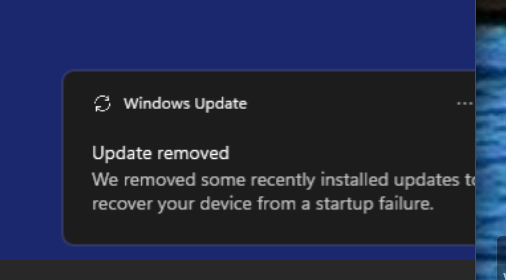
I been running my Unraid system with a Windows 11 VM and a Debian 12 VM. Periodically, I find the Unraid system has crashed and restarted, and the Windows VM is stuck at "Repair Windows" I repeatedly restart the Windows VM from the VNC console. The first time it again crashes Unraid and restarts, coming to the same boot failure for Windows. Eventually, Windows starts to boot, and when it arrives at the desktop, there is a notification that Windows Update failed and was removed. How can I prevent these WIndows updates and the resulting complete system failure of Unraid and Windows that they are causing ? Edit: Suggestion for Unraid VM improvement - The VM status shows "Windows 11- Started", even if boot has failed. It would be helpful to modify the status also show something like "Boot Failed", or "Pre-boot" instead of "Started" until Windows has actually successfully booted.
-
I have worked around the problem by connecting the drives to the USB3 controller that is passed-through to the Windows VM. The drives mount and function perfectly from within Windows. Next time I have a USB3 drive connected to a non-passthrough drive under Unraid control, I'll post the output from lsusb -vt
-
This has not happened again, but I'm still concerned that my Windows VM is not reliable.
-
I am looking for this too. Very little discussion. From what I can tell it is not native to Unraid 7.0.1
-
I connected an external Pluggable USB3 external drive doc to a USB3 port on the T440. It is recognized by the Unassigned Devices plugin. I click Mount, and after several minutes an error message appears. See the log below. The USB drive was working normally when removed from a Windows system. I re-mounted it under Windows and did a CHKDSK /F which completed without errors. Do any of these log entries make sense to anyone, and point to the root cause of the failure? Image of drive in Unassigned Disk Devices: Log contents after mount attempt: Jun 22 15:03:28 T440 kernel: I/O error, dev sdi, sector 6388720 op 0x0:(READ) flags 0x84700 phys_seg 30 prio class 2 Jun 22 15:03:58 T440 kernel: sd 19:0:0:0: [sdi] tag#5 uas_eh_abort_handler 0 uas-tag 4 inflight: CMD IN Jun 22 15:03:58 T440 kernel: sd 19:0:0:0: [sdi] tag#5 CDB: opcode=0x88 88 00 00 00 00 00 00 62 a4 e0 00 00 00 10 00 00 Jun 22 15:03:58 T440 kernel: sd 19:0:0:0: [sdi] tag#4 uas_eh_abort_handler 0 uas-tag 3 inflight: CMD IN Jun 22 15:03:58 T440 kernel: sd 19:0:0:0: [sdi] tag#4 CDB: opcode=0x88 88 00 00 00 00 00 00 62 a3 f0 00 00 00 f0 00 00 Jun 22 15:03:58 T440 kernel: sd 19:0:0:0: [sdi] tag#3 uas_eh_abort_handler 0 uas-tag 2 inflight: CMD IN Jun 22 15:03:58 T440 kernel: sd 19:0:0:0: [sdi] tag#3 CDB: opcode=0x88 88 00 00 00 00 00 00 62 a3 e0 00 00 00 10 00 00 Jun 22 15:03:58 T440 kernel: sd 19:0:0:0: [sdi] tag#2 uas_eh_abort_handler 0 uas-tag 1 inflight: CMD IN Jun 22 15:03:58 T440 kernel: sd 19:0:0:0: [sdi] tag#2 CDB: opcode=0x88 88 00 00 00 00 00 00 62 a2 f0 00 00 00 f0 00 00 Jun 22 15:03:58 T440 kernel: scsi host19: uas_eh_device_reset_handler start Jun 22 15:03:58 T440 kernel: usb 2-1: reset SuperSpeed USB device number 8 using xhci_hcd Jun 22 15:03:58 T440 kernel: scsi host19: uas_eh_device_reset_handler success Jun 22 15:03:58 T440 kernel: sd 19:0:0:0: [sdi] tag#5 UNKNOWN(0x2003) Result: hostbyte=0x07 driverbyte=DRIVER_OK cmd_age=30s Jun 22 15:03:58 T440 kernel: sd 19:0:0:0: [sdi] tag#5 CDB: opcode=0x88 88 00 00 00 00 00 00 62 a4 e0 00 00 00 10 00 00 Jun 22 15:03:58 T440 kernel: I/O error, dev sdi, sector 6464736 op 0x0:(READ) flags 0x80700 phys_seg 2 prio class 2 Jun 22 15:03:58 T440 kernel: sd 19:0:0:0: [sdi] tag#4 UNKNOWN(0x2003) Result: hostbyte=0x07 driverbyte=DRIVER_OK cmd_age=30s Jun 22 15:03:58 T440 kernel: sd 19:0:0:0: [sdi] tag#4 CDB: opcode=0x88 88 00 00 00 00 00 00 62 a3 f0 00 00 00 f0 00 00 Jun 22 15:03:58 T440 kernel: I/O error, dev sdi, sector 6464496 op 0x0:(READ) flags 0x84700 phys_seg 30 prio class 2 Jun 22 15:03:58 T440 kernel: sd 19:0:0:0: [sdi] tag#3 UNKNOWN(0x2003) Result: hostbyte=0x07 driverbyte=DRIVER_OK cmd_age=30s Jun 22 15:03:58 T440 kernel: sd 19:0:0:0: [sdi] tag#3 CDB: opcode=0x88 88 00 00 00 00 00 00 62 a3 e0 00 00 00 10 00 00 Jun 22 15:03:58 T440 kernel: I/O error, dev sdi, sector 6464480 op 0x0:(READ) flags 0x80700 phys_seg 2 prio class 2 Jun 22 15:03:58 T440 kernel: sd 19:0:0:0: [sdi] tag#2 UNKNOWN(0x2003) Result: hostbyte=0x07 driverbyte=DRIVER_OK cmd_age=30s Jun 22 15:03:58 T440 kernel: sd 19:0:0:0: [sdi] tag#2 CDB: opcode=0x88 88 00 00 00 00 00 00 62 a2 f0 00 00 00 f0 00 00 Jun 22 15:03:58 T440 kernel: I/O error, dev sdi, sector 6464240 op 0x0:(READ) flags 0x84700 phys_seg 30 prio class 2 Jun 22 15:04:29 T440 kernel: sd 19:0:0:0: [sdi] tag#7 uas_eh_abort_handler 0 uas-tag 4 inflight: CMD IN Jun 22 15:04:29 T440 kernel: sd 19:0:0:0: [sdi] tag#7 CDB: opcode=0x88 88 00 00 00 00 00 00 63 3b e0 00 00 00 10 00 00 Jun 22 15:04:29 T440 kernel: sd 19:0:0:0: [sdi] tag#5 uas_eh_abort_handler 0 uas-tag 2 inflight: CMD IN Jun 22 15:04:29 T440 kernel: sd 19:0:0:0: [sdi] tag#5 CDB: opcode=0x88 88 00 00 00 00 00 00 63 3c e0 00 00 00 10 00 00 Jun 22 15:04:29 T440 kernel: sd 19:0:0:0: [sdi] tag#4 uas_eh_abort_handler 0 uas-tag 1 inflight: CMD IN Jun 22 15:04:29 T440 kernel: sd 19:0:0:0: [sdi] tag#4 CDB: opcode=0x88 88 00 00 00 00 00 00 63 3b f0 00 00 00 f0 00 00 Jun 22 15:04:59 T440 kernel: sd 19:0:0:0: [sdi] tag#6 uas_eh_abort_handler 0 uas-tag 3 inflight: CMD IN Jun 22 15:04:59 T440 kernel: sd 19:0:0:0: [sdi] tag#6 CDB: opcode=0x85 85 08 0e 00 00 00 01 00 00 00 00 00 00 00 ec 00 Jun 22 15:04:59 T440 kernel: scsi host19: uas_eh_device_reset_handler start Jun 22 15:05:05 T440 kernel: xhci_hcd 0000:00:14.0: Timeout while waiting for setup device command Jun 22 15:05:10 T440 kernel: xhci_hcd 0000:00:14.0: Timeout while waiting for setup device command Jun 22 15:05:11 T440 kernel: usb 2-1: device not accepting address 8, error -62 Jun 22 15:05:16 T440 kernel: xhci_hcd 0000:00:14.0: Timeout while waiting for setup device command Jun 22 15:05:22 T440 kernel: xhci_hcd 0000:00:14.0: Timeout while waiting for setup device command Jun 22 15:05:22 T440 kernel: usb 2-1: device not accepting address 8, error -62 Jun 22 15:05:27 T440 kernel: xhci_hcd 0000:00:14.0: Timeout while waiting for setup device command Jun 22 15:05:33 T440 kernel: xhci_hcd 0000:00:14.0: Timeout while waiting for setup device command Jun 22 15:05:33 T440 kernel: usb 2-1: device not accepting address 8, error -62 Jun 22 15:05:38 T440 kernel: xhci_hcd 0000:00:14.0: Timeout while waiting for setup device command Jun 22 15:05:44 T440 kernel: xhci_hcd 0000:00:14.0: Timeout while waiting for setup device command Jun 22 15:05:44 T440 kernel: usb 2-1: device not accepting address 8, error -62 Jun 22 15:05:44 T440 kernel: scsi host19: uas_eh_device_reset_handler FAILED err -19 Jun 22 15:05:44 T440 kernel: sd 19:0:0:0: Device offlined - not ready after error recovery Jun 22 15:05:44 T440 kernel: sd 19:0:0:0: Device offlined - not ready after error recovery Jun 22 15:05:44 T440 kernel: usb 2-1: USB disconnect, device number 8 Jun 22 15:05:44 T440 kernel: sd 19:0:0:0: Device offlined - not ready after error recovery Jun 22 15:05:44 T440 kernel: sd 19:0:0:0: Device offlined - not ready after error recovery Jun 22 15:05:44 T440 kernel: sd 19:0:0:0: [sdi] tag#4 UNKNOWN(0x2003) Result: hostbyte=0x07 driverbyte=DRIVER_OK cmd_age=105s Jun 22 15:05:44 T440 kernel: sd 19:0:0:0: [sdi] tag#4 CDB: opcode=0x88 88 00 00 00 00 00 00 63 3b f0 00 00 00 f0 00 00 Jun 22 15:05:44 T440 kernel: I/O error, dev sdi, sector 6503408 op 0x0:(READ) flags 0x84700 phys_seg 30 prio class 2 Jun 22 15:05:44 T440 kernel: sd 19:0:0:0: [sdi] tag#5 UNKNOWN(0x2003) Result: hostbyte=0x07 driverbyte=DRIVER_OK cmd_age=105s Jun 22 15:05:44 T440 kernel: sd 19:0:0:0: [sdi] tag#5 CDB: opcode=0x88 88 00 00 00 00 00 00 63 3c e0 00 00 00 10 00 00 Jun 22 15:05:44 T440 kernel: I/O error, dev sdi, sector 6503648 op 0x0:(READ) flags 0x80700 phys_seg 2 prio class 2 Jun 22 15:05:44 T440 kernel: sd 19:0:0:0: [sdi] tag#7 UNKNOWN(0x2003) Result: hostbyte=0x07 driverbyte=DRIVER_OK cmd_age=105s Jun 22 15:05:44 T440 kernel: sd 19:0:0:0: [sdi] tag#7 CDB: opcode=0x88 88 00 00 00 00 00 00 63 3b e0 00 00 00 10 00 00 Jun 22 15:05:44 T440 kernel: I/O error, dev sdi, sector 6503392 op 0x0:(READ) flags 0x80700 phys_seg 2 prio class 2 Jun 22 15:05:44 T440 kernel: device offline error, dev sdi, sector 6503152 op 0x0:(READ) flags 0x0 phys_seg 8 prio class 2 Jun 22 15:05:44 T440 kernel: buffer_io_error: 24574 callbacks suppressed Jun 22 15:05:44 T440 kernel: Buffer I/O error on dev sdi2, logical block 6238960, async page read Jun 22 15:05:44 T440 kernel: Buffer I/O error on dev sdi2, logical block 6238961, async page read Jun 22 15:05:44 T440 kernel: Buffer I/O error on dev sdi2, logical block 6238962, async page read Jun 22 15:05:44 T440 kernel: Buffer I/O error on dev sdi2, logical block 6238963, async page read Jun 22 15:05:44 T440 kernel: Buffer I/O error on dev sdi2, logical block 6238964, async page read Jun 22 15:05:44 T440 kernel: Buffer I/O error on dev sdi2, logical block 6238965, async page read Jun 22 15:05:44 T440 kernel: Buffer I/O error on dev sdi2, logical block 6238966, async page read Jun 22 15:05:44 T440 kernel: Buffer I/O error on dev sdi2, logical block 6238967, async page read Jun 22 15:05:44 T440 kernel: device offline error, dev sdi, sector 0 op 0x1:(WRITE) flags 0x800 phys_seg 0 prio class 2 Jun 22 15:05:44 T440 kernel: sd 19:0:0:0: [sdi] Synchronizing SCSI cache Jun 22 15:05:44 T440 kernel: sd 19:0:0:0: [sdi] Synchronize Cache(10) failed: Result: hostbyte=0x07 driverbyte=DRIVER_OK Jun 22 15:05:45 T440 unassigned.devices: Mount of 'sdi2' failed: 'ntfs_attr_pread_i: ntfs_pread failed: Input/output error Failed to read NTFS $Bitmap: Input/output error Failed to read NTFS $Bitmap: Input/output error NTFS is either inconsistent, or there is a hardware fault, or it's a SoftRAID/FakeRAID hardware. In the first case run chkdsk /f on Windows then reboot into Windows twice. The usage of the /f parameter is very important! If the device is a SoftRAID/FakeRAID then first activate it and mount a different device under the /dev/mapper/ directory, (e.g. /dev/mapper/nvidia_eahaabcc1). Please see the 'dmraid' documentation for more details. Failed to sync device /dev/sdi2: No such device Failed to close volume /dev/sdi2: No such device' Jun 22 15:05:45 T440 unassigned.devices: Partition 'MediaBack_K_(1)' cannot be mounted. Jun 22 15:05:47 T440 emhttpd: offline: Hitachi_HDS5C4040ALE630_PL1331LAGDEVGH (sdi) 512 7814037168 Jun 22 15:05:50 T440 kernel: xhci_hcd 0000:00:14.0: Timeout while waiting for setup device command Jun 22 15:05:55 T440 kernel: xhci_hcd 0000:00:14.0: Timeout while waiting for setup device command Jun 22 15:05:56 T440 kernel: usb 2-1: device not accepting address 9, error -62 Jun 22 15:06:01 T440 kernel: xhci_hcd 0000:00:14.0: Timeout while waiting for setup device command Jun 22 15:06:07 T440 kernel: xhci_hcd 0000:00:14.0: Timeout while waiting for setup device command Jun 22 15:06:07 T440 kernel: usb 2-1: device not accepting address 10, error -62 Jun 22 15:06:07 T440 kernel: usb usb2-port1: attempt power cycle Jun 22 15:06:13 T440 kernel: xhci_hcd 0000:00:14.0: Timeout while waiting for setup device command Jun 22 15:06:18 T440 kernel: xhci_hcd 0000:00:14.0: Timeout while waiting for setup device command Jun 22 15:06:19 T440 kernel: usb 2-1: device not accepting address 11, error -62 Jun 22 15:06:24 T440 kernel: xhci_hcd 0000:00:14.0: Timeout while waiting for setup device command Jun 22 15:06:30 T440 kernel: xhci_hcd 0000:00:14.0: Timeout while waiting for setup device command Jun 22 15:06:30 T440 kernel: usb 2-1: device not accepting address 12, error -62 Jun 22 15:06:30 T440 kernel: usb usb2-port1: unable to enumerate USB device

-
@PeteAsking thanks again for all your help! I've got the AP's migrated to the controller on the new server in the Docker container. I've updated the APs to the latest firmware. Everything seems to be working!
-
Thanks again for all your help! I'm back again today. I have the new controller running. I can access the Unifi controller dashboard at the Unraid server IP: https://192.168.27.4:8443/manage/default/dashboard On the dashboard, I see this: Self-HostedNetwork 7.5.187 Server IP 172.17.0.2 Why is that server IP different than the Unraid server? Is that something to do with Docker? Edit - yes - answered this question. I see that IP under Container IP in the Unraid Docker Container page. I restored the Unifi backup and the Docker container shut down and did not restart. I changed Auto-start to On, and restarted it. I have not set the Override IP and the old controller is still running. I see the error in the image below. In the old V5 controller, the the override IP was in Settings / Controller / Controller Settings. In the new V7.5 controller, the only settings that are not grayed out are Wi-Fi, Networks, Profiles, and System. Profiles says "a gateway or switch is required". I do not find the controller settings for IP and Override under System. Edit - Found Inform - there was an Advanced tab hidden behind the warning dialog above. When I closed it, I clicked Advanced, and scrolling down found a checkbox for Inform Host - Override. I'm ready to shut down the old controller and check the box, unless there are settings in the Wi-Fi configuration (warning dialog above) that I should attend to first.

-
Are the APs with version 4.0.10.9653 supported by 7.5.187, or should I update them to 5.43.56.12784 before moving to the new controller? Installed the Docker container, and have one warning. Does it matter? docker run -d --name='unifi-controller-reborn' --net='bridge' --pids-limit 2048 -e TZ="America/Chicago" -e HOST_OS="Unraid" -e HOST_HOSTNAME="T440" -e HOST_CONTAINERNAME="unifi-controller-reborn" -e 'MEM_LIMIT'='4096' -e 'MEM_STARTUP'='2048' -e 'UMASK'='002' -l net.unraid.docker.managed=dockerman -l net.unraid.docker.webui='https://[IP]:[PORT:8443]' -l net.unraid.docker.icon='https://user-images.githubusercontent.com/11403137/277435263-1b01facd-1b15-4ba7-9495-e709c291d67f.jpg' -p '8443:8443/tcp' -p '3478:3478/udp' -p '10001:10001/udp' -p '8080:8080/tcp' -p '1900:1900/udp' -p '8843:8843/tcp' -p '8880:8880/tcp' -p '6789:6789/tcp' -p '5514:5514/udp' -v '/mnt/user/appdata/unifi-controller-reborn':'/unifi/var':'rw' --memory=8G '11notes/unifi:7.5.187-unraid' WARNING: Your kernel does not support swap limit capabilities or the cgroup is not mounted. Memory limited without swap. 66a19e55ad71ac4699f89f5105dad39a742992b5328a572b934da80824ccb7c8
-
Thanks for quick answers! On installation, I clicked App install and it took me to Add Container in Unraid GUI. There I changed the Repository to 11notes/unifi:7.5.187-unraid I leave network type as Bridge so Unifi will be available at the IP of the Unraid server on port 8443? Before I click Apply, are there any other settings need to be changed from default other than Repository? Once installed I will restore the backup configuration. In the existing controller, There is a setting for "Controller Hostname/IP" which is the IP of the Windows Server. Below that an unchecked option "Override inform host with controller hostname/IP" So, on the new controller it will need to have the IP of the Unraid server, and I will check the box by "Override inform host with controller hostname/IP" Correct? There is also the option "Make controller discoverable on L2 network" which is unchecked on the old controller. Should I check it on the new controller? My network is flat L2 on one /24 subnet. There are VLANs for guest networks.
-
Thanks! I created a manual backup with 365 day data retention - 5.9.29-20250621-1619.unf I'm not sure about your " install using this tag fresh" with link to hub.docker.com. In the Unraid WebGui Apps page, I find the page for unifi-controller-reborn with this info: Application Type Docker Categories Tools:Utilities, Network:Management Added Jun 19, 2025 Downloads More than 10,000 Repository 11notes/unifi:8.6.9-unraid DockerHub Stars: 15 I was going to just click "Install", thinking that would get it to a ready to run state. Is there any tutorial or guideline for starting with an image on hub.docker.com and getting it running in Unraid? My oldest AP is 4.0.10.9653, but one of them is 5.43.56.12784 and is working with the current controller fine. So I can upgrade all APs to 5.43.56.12784 before trying the migration. I saw your second post - Where do I set "the inform ip" Is that in the new controller in the Docker image, or in the old controller? So I: 1) Bring up new controller in Docker, load backup configuration .unf file 2) Set Inform IP (in old or new controller? presumably old since new doesn't know about APs yet) 3) Shut down old controller 4) Then how to transition APs - will they just find the new controller? or do I need to power cycle each?
-
New Unraid user here - starting out with 7.0.1. I'm not sure if I should tag onto this thread or start a new one for noob questions. I'm migrating from Unifi Controller 5.9.29 running on a Windows Server. Yea, that's old, but Ubiquiti went through a rough patch where updates were broken a few years back, so I held with what was working. My APs are UniFi AP-AC-LR running 5.43. The Windows Server is retiring and I'm moving to my new Unraid server. I see two Unifi Docker images for Unraid, but only "unifi-controller-reborn" appears to be current and updated. Is there any tutorial or guidance for migrating an existing network from one controller to another (with minimal downtime)? I'm new with Docker, and with Docker on Unraid, so any guidance or pre-requisites w.r.t Docker other than enabling it in Unraid? Can I migrate settings from existing autobackup*.unf files to the new Docker instance? If Unraid is at a new IP compared to the existing Windows server, how do I migrate the APs to the new Docker on Unraid? I don't see a function to "un-adopt" APs in the existing controller UI. Should I select the "unifi:8.6.9-unraid" tag since it is the oldest and the smallest step from my existing controller? I like the sound of no downtime. It looks like that is the one offered in the Unraid Apps page: "Repository 11notes/unifi:8.6.9-unraid". Anything else I should do before I click "Install"?
-
@SimonF Thank you - very helpful introduction! I tried the Create Snapshot menu item from my Debian VM on the VMs page. I got this error: "Execution error: Requested operation is not valid: cannot migrate domain: The vdagent chardev doesn't yet support migration" I tried it with the Windows VM and got this: "Execution error: Requested operation is not valid: cannot migrate domain: The vdagent chardev doesn't yet support migration; 0000:01:00.0: VFIO migration is not supported in kernel; 0000:03:00.0: VFIO migration is not supported in kernel" Searching on that error, I found a post from you in the long thread last year where you said "It should work if you dont do the memory dump, but I have not tested." I tried unchecking memory dump, and it worked without errors. The VMs page now says 1 snapshots. Surprising to learn that "there is no command available to be added to a script" since that is the next thing I would do after getting it to work manually.
-
I'm a new Unraid user, starting with 7.0.1. I'd like to use snapshots to back up my two VMs. I looked through the long thread on VM Snapshots here. It seems to be mostly discussion on debugging the beta - not a FAQ or tutorial. The release notes for 7.0.0 only says "Improvements: Added support for VM clones, snapshots, and evdev passthru." Searches take me to many posts about plugins and other ways of doing snapshots, but they are from before Unraid 7. Can anyone point me to clear instructions on how to use Unraid 7 to: 1) Create a snapshot of a VM while it is running? 2) specify where the snapshots are stored on the array? 3) restore a snapshot if a VM fails or has to be rolled back? 4) Automate the creation of snapshots periodically? There is a 1 minute video that seems to imply that these things are possible, but several levels of letterboxing make the Unraid settings in the video too small to be legible.
-
@JorgeB, so you saying that the poor deleting performance is normal and expected? So the overhead is due to FUSE. However during the hours-long deleting process, there was no processor use on the server above background. What is causing the bottleneck? I searched for "exclusive mode". It does not appear to be mentioned in the docs, but I found a bit in the update on Version 6.12.0 2023-06-14. It is not clear what is exclusive about it, and whether it would apply to my setup. My shares have Array as primary, and included disks All. What is the downside of exclusive mode? Why wouldn't it be defaulted to On for all shares if there is such a performance difference?
-
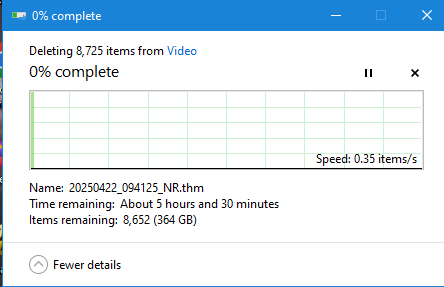
Unraid 7.0.1 on Dell T440. A share is set up with Export=Yes and Security=Private. The client is a Windows 10 machine used for video production- reasonable performance with i7-6700K and 64G of RAM. I need to clean up thousands of old video clips on the Unraid Array. I select the files in the Windows File Explorer browser and hit Delete. I see the usual windows dialog showing progress, but it is moving extremely slow. (image below) Estimating 5.5 hours to delete the directory of 8700 files. Copying files to/from the Unraid server has been at reasonable speed, nothing like this 100x slowdown on deleting. Unraid CPU is 10-12% while it is working on deleting. Windows estimates the speed as .33 items/second. Or 3 seconds per deleted file??? Nothing notable seen in the Unraid log. Yes I could ssh into the Unraid server and delete files from the terminal. But my expectation is that Unraid should perform at least on par with the 15 year old Windows server it is replacing. Especially on regular tasks such as interacting with the file system from Windows Explorer. How should I diagnose the problem?
-
I found my Windows VM in my Unraid server non-functional today. The VM Console VNC showed the VM had failed to boot, and was at the blue repair screen. I tried the repair option, and it started to boot, but then the host Unraid OS restarted. After I was able to log in to the Unraid web interface, I looked at the log http://t440.local/webterminal/syslog/ to see what happened. I didn't see anything that was helpful in diagnosing they cause of the restart. The Windows VM Console VNC again showed the VM had failed to boot, and was at the blue repair screen. This time instead of repair, I selected Advanced, and boot Windows 11 normally. It booted and displayed a notification that a windows update was removed. In the Windows System Log I found Installation Failure: Windows failed to install the following update with error 0x800F0845: 2025-06 Cumulative Update for Windows 11 Version 24H2 for x64-based Systems (KB5060842). Has anyone else had issues with a Windows update failing and crashing the VM and Unraid? Any suggestions on preventing this in the future?
-
I found a new twist on this sharing workaround. It turns out that when a client accesses the share through the symlink path, it is able to read and write (according to the user permissions in Unraid), but gets "Access Denied" when trying to delete anything. Navigating back through the root of the share tree allows read/write and delete access.
-
I have created 4 shares in Unraid that I want to be able to always access from the Debian 12 VM. In /etc/fstab, I have these lines: //T440.local/linux /mnt/linux cifs rw,credentials=/etc/samba/servershare.conf,uid=1000 0 0 //T440.local/D /mnt/D cifs rw,credentials=/etc/samba/servershare.conf,uid=1000 0 0 //T440.local/e-i-root /mnt/e-i-root cifs rw,credentials=/etc/samba/servershare.conf,uid=1000 0 0 //T440.local/j /mnt/j cifs rw,credentials=/etc/samba/servershare.conf,uid=1000 0 0 These worked for a while, but then failed. The result of the failure can be seen from the directories in /mnt: ls: cannot open directory '.': Stale file handle tim@sun-debian:/mnt/linux$ cd .. tim@sun-debian:/mnt$ ls ls: cannot access 'D': Resource temporarily unavailable ls: cannot access 'linux': Stale file handle D e-i-root j linux I searched and got conflicting information on how to cause the system to re-load fstab and re-establish the shares. mount -a seemed to have no effect. Another post in the article suggested "To refresh systemd’s view of the world, including changes to /etc/fstab, run systemctl daemon-reload This did not fix the problem. I resorted to restarting the VM, and now the shares are operating normally again. I would like to learn what I'm doing wrong and how to keep my mounted shares functional over time.
-
I need to attach external USB drives that I use for off-site backup. I've been told that to make these easily un-mountable in Unraid I should use the Unassigned Devices plugin. The primary use case is Beyond Compare BC (running in Windows VM) to perform a mirror from a portion of the Unraid array to an external drive, which is periodically unmounted and swapped with off-site storage. Option 1: Connect the external USB3 drive dock to a USB3 port on the server that is managed by Unraid. Mount it with Unassigned Devices, and create a share to make it visible to the VMs. Run BC to mirror from an Unraid Share representing part of the Array, to the Unraid share for the external drive. Un-Mount it with Unassigned Devices as required to remove external drive. Option 2: Connect the external USB3 drive dock to a USB3 controller that is configured to passthrough to the Windows VM. Mount it as a Windows drive. Run BC to mirror from an Unraid Share representing part of the Array, to the external drive (a local drive to Windows). Unmount using the Windows "Safely remove" function for removable drives. Would option 1 or 2 provide better performance for the BC mirroring operation?



