





timg11
Members
-
Joined
-
Last visited
Everything posted by timg11
-
@JorgeB Thank you for your help. I finally got the storage expanded in the VM. It's disappointing the BOSS card didn't allow the SSDs to run under native Unraid control, but I was able to expand the space to use the new drives. That was just the first step in a more complex process, because the Windows VM recovery partition had to be moved to the end before I could expand the data partition. That required booting into Image For Linux, which meant mounting a new CDROM ISO in the VM, which had its own complications with IDE/SATA issues. The boot order must be adjusted in the VM settings since it is impossible to get an F12 keystroke through VNC before Windows starts booting. Once I got the partitions arranged and expanded, Windows was able to see the larger drive.
-
I have not performed this upgrade since I've been solving other issues. I had another thought about the process, though. Could I stop the array, install the new 24G drive, start the array and add the new drive as a 2nd parity? That would keep the existing 16G drive as a functional parity while the parity is generated on the new drive. Then when complete, I could remove the old parity drive or leave it installed but move it to Unassigned? Is it allowed to have a 16G parity drive at the same time as a 24G parity, as long as none of the array drives are larger than 16G? I also learned something about the parity check process. It seems to pause if the array is busy with reading or writing from clients. A parity check was running today from the crashes yesterday. It was at 53.4% when I started copying about 200G of data to the array. That took a couple of hours. During the copy, the parity did not move from 53.4%. After the copy was done, it started increasing again. I presume this is by design to keep from slowing down the system during parity checks. It's good to know in the context of drive upgrades, though.
-
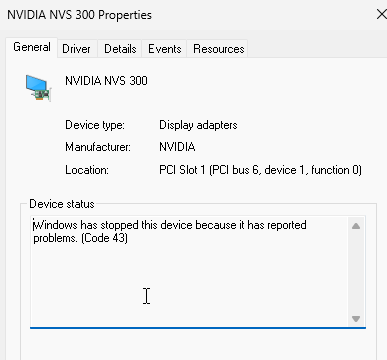
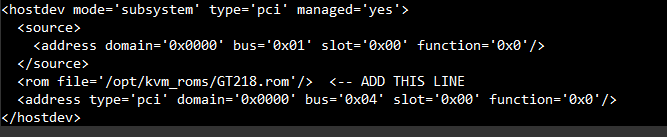
I installed an NVIDIA NVS 300 video card in my Dell T440. I know it is old - don't need any performance or GPU, just a basic HDMI video output that can be used with a Windows 11 VM. I didn't want to use my last PCIe x16 slot, so I found a video card with a PCIe X1 interface. I found from prior experience that passing through the Matrox video that is on the T440 motherboard to the Windows 11 VM crashes Unraid when the VM tries to restart. Apparently the passthrough doesn't share nicely with the T440 BIOS and/or Unraid's boot console. Now I have the NVS 300 installed. It is recognized by Unraid, and I have bound it to VFIO at boot: I have passed it through to the Windows 11 VM as a multifunction device with this XML: <hostdev mode='subsystem' type='pci' managed='yes'> <driver name='vfio'/> <source> <address domain='0x0000' bus='0x17' slot='0x0' function='0x0'/> </source> <address type='pci' domain='0x0000' bus='0x06' slot='0x1' function='0x0' multifunction='on'/> </hostdev> <hostdev mode='subsystem' type='pci' managed='yes'> <driver name='vfio'/> <source> <address domain='0x0000' bus='0x17' slot='0x0' function='0x1'/> </source> <address type='pci' domain='0x0000' bus='0x06' slot='0x1' function='0x1'/> </hostdev> The Windows 11 VM boots and recognizes the NVS300 in Device Manager. But it has "problems" - Error code 43. Searching on Gemini on this error, it recommended "spoofing" the hypervisor with the following XML code which I added to the VM's configuration, modifying the <features> section like this: <features> <acpi/> <apic/> <hyperv mode='custom'> <relaxed state='on'/> <vapic state='on'/> <spinlocks state='on' retries='8191'/> <vpindex state='on'/> <synic state='on'/> <stimer state='on'/> <vendor_id state='on' value='1234567890ab'/> </hyperv> <kvm> <hidden state='on'/> </kvm> </features> With that change I still have the same error. Gemini now recommends adding a VBIOS ROM. I was able to read the ROM using GPU-Z and now have a file GT218.rom. The recommendation is to add a tag to the <hostdev> block like this: (apologies for image - for some reason text Paste has stopped working...) I have not tried this yet. I'm going to be working on other things for a few days, so I wanted to get the input from experts here in the meantime before proceeding.

-
I selected the NVIDIA NVS 300 because it fits in an PCIe 1X slot. My use case is only a basic display, no GPU, video, or anything demanding is required. I'm having problems getting it to run - I've got the VFIO binding done, the XML for hostdev in the VM. Device Manager recognizes there is an NVS300 in the Windows VM, but it is giving Error 43. I will start another thread on that topic. Thank you for your help - by removing the Matrox pass-through I am now able to start and stop the Windows VM without crashing Unraid. The matrox VGA output now continues to display the Unraid boot terminal, and eventually goes to sleep. I'm not sure if memory ballooning was also a problem, but eliminating that alone did not stop the crashes. I'll leave it at 16G fixed for now.
-
Now on to making the NVIDIA NVS 300 card available to the Windows VM. Here are the details from Tools / System Devices. There is the option to click the checkboxes in that menu and click on the button "Bind Selected to VFIO at boot" Or there is the XML way, which would be presumably to add this to the VM configuration: <hostdev mode='subsystem' type='pci' managed='yes'> <driver name='vfio'/> <source> <address domain='0x0000' bus='0x17' slot='0x0' function='0x0'/> </source> </hostdev> Are these doing the same thing, or is there a benefit of one over the other? Edit1: checking the checkboxes for "Bind Selected to VFIO at boot" does not work. The NVIDIA is not visible to the Windows VM. The video is not initialized with a monitor connected. So I assume the XML is required. Unfortunately, the checkbox method in System Devices requires a full reboot of Unraid, so I'll have to reboot again. I'm discovering that the "Reboot" button on the Main page of Unraid doesn't seem to work right. It shuts down, but the system never came up again after 10 minutes. I had to use IDRAC to do a hard shutdown of the server, then Unraid started again. When I unchecked the VFIO bindings, I just used Shutdown directly from the Main page.

-
I am back to trying to solve this problem. I have set the memory size to 16384 for Min and Max, so that should stop balooning. However, the VM is still crashing and bringing down the host with every restart. When I start with VNC I can see the Unraid logo with the Windows spinning circle, which freezes, then the Unraid server restarts. I then disabled the Matrox passthrough in Tools / System Devices by removing the XML that I added earlier: <hostdev mode='subsystem' type='pci' managed='yes'> <driver name='vfio'/> <source> <address domain='0x0000' bus='0x03' slot='0x0' function='0x0'/> </source> </hostdev> Now I can shut down and restart the Windows VM and Unraid keeps running. I should be able to shut down a Windows VM either by using the Stop button in the Unraid VM control page, or from within the VM by using Start Menu / Shut Down. Are they completely equivalent? Either way better (safer) than the other? Also I notice a lot of problems with the Unraid VNC, where the mouse doesn't work right, I can't access Start menu, etc. It works fine from Keyboard so OK for BIOS and startup settings. Is this a known issue? I have a TightVNC server running in the VM, and I use the TightVNC viewer for day to day work, but the Unraid VNC is needed for startup tasks.
-
Coming back to this question - how do I maintain and manage snapshots? For example, after some system configuration change, I might want to have a clean snapshot baseline. Now I have a tree of snapshots dating back for months. How do I clear the current tree and start a new one? Here's what Gemini has to offer. Seems reasonable, but my experience is that AI is best for when you already are an expert on the subject, or at least know enough to spot hallucinations. Maybe someone very familiar with snapshots can review? To clean up your Unraid VM's vdisk folder, reduce storage usage, and consolidate to a single image file suitable for offline backup, you need to use the snapshot management features to merge the chained differential files back into the base disk. The process you are looking for is called consolidation or committing the snapshots. This will merge the data from all the .qcow2 differential files into the original base file, vdisk1.img. 1. How to Clean Up and Create a New Baseline The files in your directory represent a chain of snapshots where each subsequent snapshot (and the current running state) is dependent on the previous one: vdisk1.img: This is your original base disk image. vdisk1.Windows--generateqcow2: This is the first snapshot delta file. vdisk1.S20250824132729qcow2: This is the second snapshot delta file, dependent on the first. vdisk1.2025-09-01--generateqcow2: This is the third snapshot delta file. vdisk1.S20250927123248qcow2: This is the most recent snapshot delta file. The total space consumed by this VM is the sum of the base disk and all the differential files: 68.7 GB+28.4 GB+9.9 GB+13.4 GB+5.7 GB≈126.1 GB The Solution: Delete All Snapshots To clean up and get back to a single baseline file, you must delete all of the existing VM snapshots using the Unraid WebGUI's VM Manager. Stop the VM: The most critical step is to fully shut down the "Windows 11" VM in the Unraid WebGUI. Do not just pause or suspend it. Access Snapshot Manager: Navigate to the VMs tab in the Unraid WebGUI. Click on the "Windows 11" VM and locate the Snapshots section or option. Delete All Snapshots: You will typically need to delete the snapshots one by one, or you may have a "Delete All" option, depending on the Unraid/libvirt implementation. Start by deleting the oldest snapshot first, then proceed through the chain. Each deletion will trigger an automatic disk consolidation/merge process (libvirt/QEMU's blockcommit operation) in the background. This process merges the data from the deleted snapshot's differential file into its parent disk. Wait for Consolidation: Allow time for each consolidation to complete. This can take a significant amount of time depending on the disk size, the amount of data to be merged, and your disk speed. Verify Cleanup: Once all snapshots are deleted, the differential files (vdisk1.*qcow2) should disappear. The result: The base file vdisk1.img will now contain the latest state of your VM (which includes all the changes from the deleted snapshots), effectively becoming your new "baseline". The overall storage usage will drop significantly (likely close to the base file's initial size plus the total difference, which may still be over 100 GB, but you will have only one file).
-
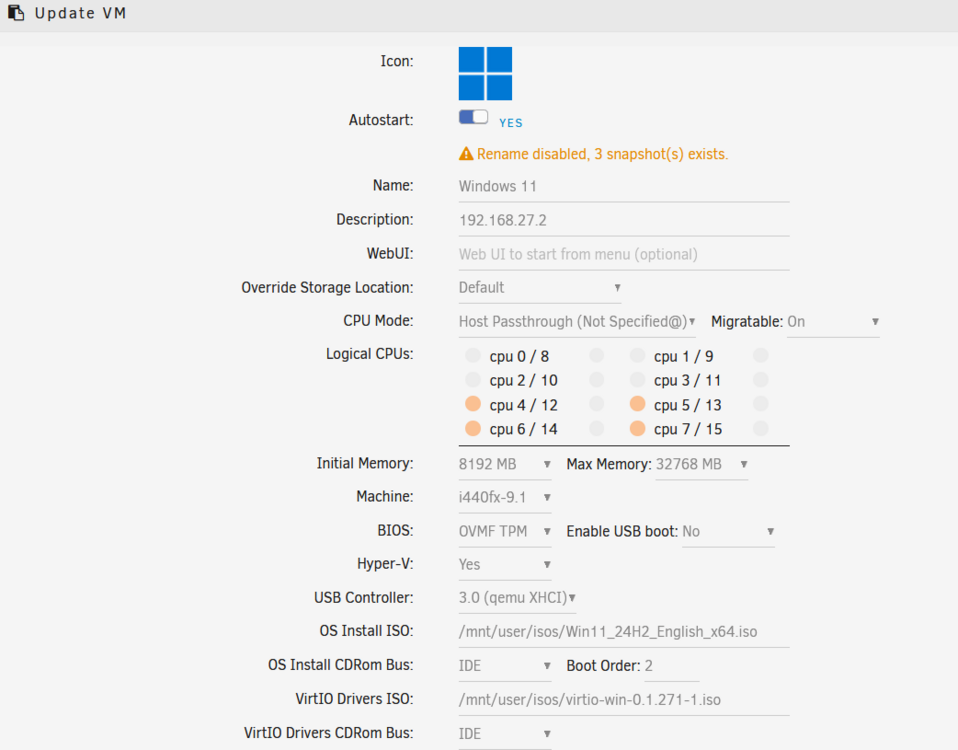
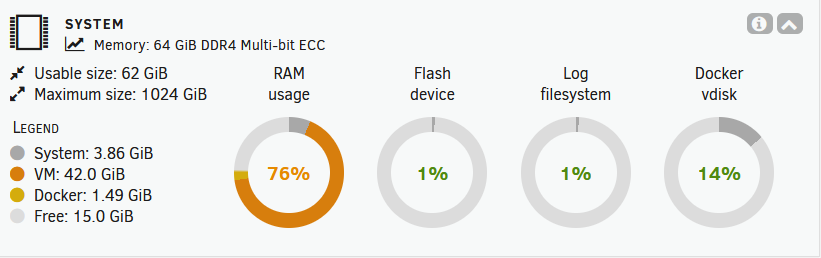
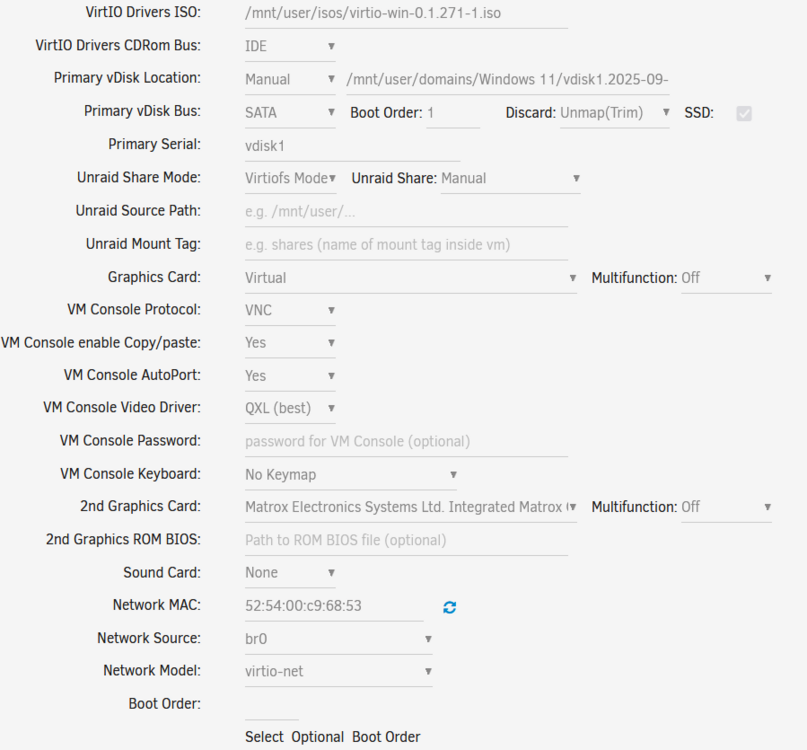
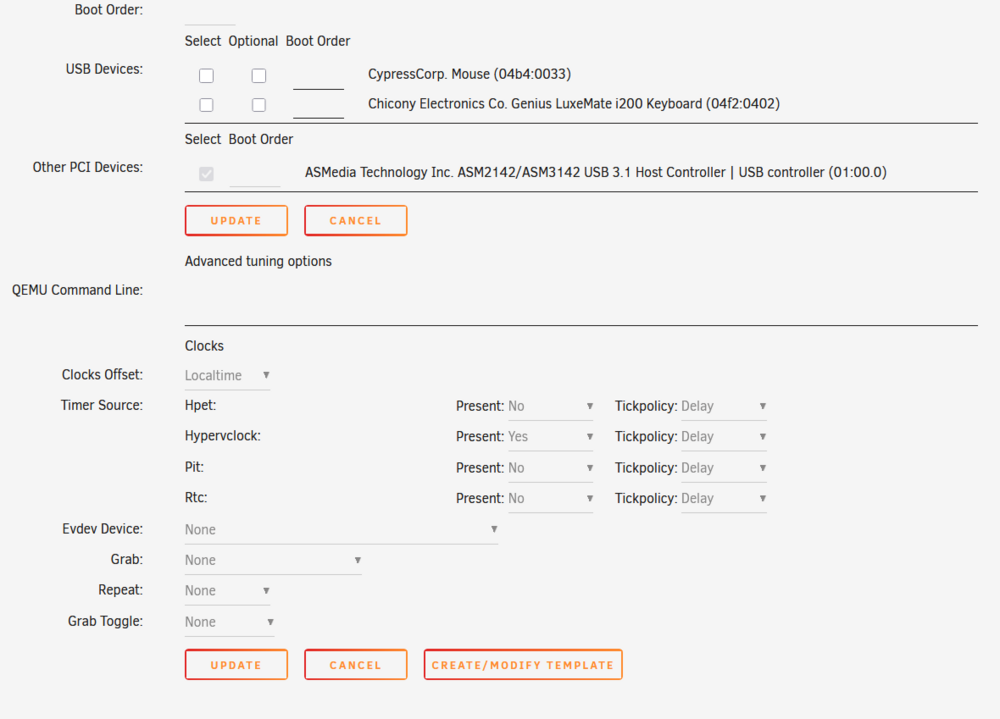
OK, here are some details from the VM "Edit" settings while it is running. So yes, the Max memory is > Initial. So when I edit the VM, I will set them both to 16 GB so there will be no changes. It looks like there is enough free RAM to support that: You said "passthrough's should always be "complete" group or a single iommu device, sample" I'm not sure where the settings like your sample are found? Maybe they are not visible when the VM is running? Or I've forgotten where the IOMMU settings and XML files are reached in the GUI? Hopefully when I remove passthrough for the Matrox VGA and fully passthrough the new Nvidia video, that will resolve the issues.
-
@alturismo thanks for the reply. I'm going to be unable to work on this for the next two weeks, but I will get back to it. From what I can tell, I can't look at the VM configurations while the VM is running. I don't want to stop it until I have a plan of action and am ready and able to spend time with it. In the meantime, please tell me more (or point me to details) on "RAM ballooning". I'm not familiar with it, and would not have enabled it unless it is a default. Yes, the Matrox is the only video built into the T440 system. Please explain what you mean by "when i see your vfio binds, they are empty". The binding was one of the first things I had to figure out. I had a thread on the VGA passthrough and another thread on the USB controller passthrough. These show some of the settings, which have not changed since I got it working. If I can get any other information about the VM setup without stopping the VM, let me know, otherwise I'll stop it and share the detailed setup in a couple weeks. I have ordered a Nvidia Quadro NVS 300 video card with PCIe X1 that I will install at that time. I will remove the Matrox and pass through the Nvidia to Windows. That will allow the Matrox to remain dedicated to the Bios and the Unraid shell. The Nvidia Quadro will be used only by the Windows VM, so hopefully reduce any problematic "resetting" at VM startup or shutdown.
-
I did a simple test of stopping and restarting the Windows 11 VM. I captured a video of the result. Attached as PXL_Unraid_VM.TS.mp4. It is between about 16:36 and 16:46 local time. When restarting the VM, the entire T440 restarts. There are some interesting patterns on the 6 LED bar on the motherboard, but it seems those are undocumented. The VM startup fails, and it restarts, taking Unraid with it. The second time around it restarts Unraid again, and I interact with the VNC and tell it to go ahead and start Windows, which it does. I have attached diagnostics, taken after the video was recorded and the system is running again. I also attached the log from the raspberry pi that I set up as a syslog server, with the portion before the reboots. t440log-09-01.log t440log-09-01.log PXL_Unraid_VM.TS.mp4 t440-diagnostics-20250901-1719.zip
-
It is option 2. The WIndows 11 VM is running or starting, and decides to do an update. Windows Updates always involve a reboot. The strange thing is that the Windows VM reboots doesn't just restart the VM, but reboots the entire T440 server running Unraid and hosting the VM. It seems to be an expected reboot from the Windows perspective, but unexpected from Unraid. I don't suspect hardware issues, since the server runs for weeks without issue, until the Windows VM tries to do an update. I have it configured to not update without asking, but it will still perform an update if rebooted. So the issue happens when I need to shut down the VM and it decides that is the time to do an update.
-
That is Interesting - I don't deny it would work, but I wonder about the case of the system being restarted unexpectedly - a non-clean shutdown. Would the data get written to the local file? With a remote syslog server, Unraid just has to send the UDP out. Using itself as the syslog, it has to send the UDP, receive the UDP, and write it to the log, files have to be flushed, etc. Maybe it would all get done as the system goes down, but it seems safer on the separate server that can write the log and is not in the process of going down.
-
My Unraid system is my server, so I don't think that would work. I think you mean another server. I have a Raspberry Pi on the network, so I configured it as a syslog server and pointed Unraid's remote syslog to the Pi's IP. We'll see what that log file shows next time.
-
Good to know that others are successful with a Windows 11 VM. So what steps can I take to understand why anytime the Windows VM restarts (manually or for updates), it unexpectedly restarts the host Unraid system (followed by 24 hours of parity check). That is a restart from within the Windows VM. If I use the Unraid VM control to stop or restart, it works properly. Are there logs that might give a clue? I look at the Unraid system log, but it starts at the time the system restarts after the unclean shutdown. Are older logs kept anywhere? I have a USB3 interface and a VGA video passed through to the Windows VM. Would either of those cause a VM restart to bring down the host?
-
Jorge, I followed the procedure above. I swapped out the original SSDs with new 1T M.2 SATAs. I put the BOSS board back into the T440 and booted into the BIOS. I deleted the Virtual Disk, leaving the two drives as independent. I started Unraid, and the BOSS card was invisible. The two WDC drives were not seen at all . Needing to get the server back online, I went back into the BIOS and re-created the VM. Then I restarted Unraid, and it the BOSS was visible again under Pool. But is showed it as "Wrong" and still showed the former BOSS 240G as "missing". Based on other posts here, I created a new Pool device called newcache with the new device "DELLBOSS_VD_3d884175dfb60010 - 1TB (sdg)" . I deleted the original cache with the BOSS 240G. That got rid of the "wrong" error. But now for newcache, the status on Main says Filesystem is btrfs. But it also says Unmountable: No File System. On the details page for newcache, file system type is btrfs, but grayed out. How do I correct the file system issue so I can move the Pool devices back from Array to Cache? Edit - I found the format button under Array Start. I was concerned about the stern warning, but since it said it would only format unmounted drives, and all of the array drives were mounted, I went ahead and did it. It seems to have formatted. Now Newcache is showing used and free, and no error. So I'm configuring the primary secondary for the pool shares to use newcache instead of cache, and reversing the mover direction from Arrary to Cache. Edit2 - After the mover worked to move from Array to Newcache, I was able to re-enable and start the VMs and Docker containers. So it's unfortunate the DellBoss card doesn't allow me to let Unraid manage the two drives without doing its own RAID, but at least I have it working again, and have more space to grow with more Docker containers in the cache pool. That's enough panic and stress for one day.... Edit3 - I notices that all the Newcache shares now have a yellow exclamation that says "Some or all files unprotected". I saw this thread, but in that case the issue was files from another cache. I have only one cache, Newcache with the DellBoss SSD. What should I look for to solve the issue?
-
@JorgeB, thanks for reply. So by "Standard replacement" you mean stop array pull the sled for the old drive (T440 supports hot swap), upgrade the drive, re-insert sled, and start array? I would do that twice. First replace parity drive, wait for parity to re-generate. Then replace data drive, and let array rebuild data drive from parity? No need for any copying of data? During the entire 2 day process, the array data is available? Right after I replace the data drive in the array, I can start the array, and access data normally (maybe a bit slower) because it is computed "on the fly" from the parity drive? I understand that protection would not be available for drive failures in the array until all the syncing is done.
-
After looking around, the Startech pex8m2e2 is surprisingly expensive. Even though the M.2 SATA SSDs are more expensive (compared to similar NVME), the total cost is still lower to go with two M.2 SATA SSDs and keep the Dell Boss card. So in that case I would follow the procedure linked above. Between the mover action from cache to array and mover from array back to cache, I'd have some extra steps? Stop array, Power down Server Remove BOSS card, replace M.2 drives with new drives replace BOSS card Power Up, Access the System Setup (BIOS/UEFI) During boot, press F2 to enter System Setup. Navigate to Device Settings > BOSS-S1 Configuration Utility. Go to 3. Virtual Disk Management: If a RAID 1 virtual disk is configured, it will appear here. Delete the virtual disk to revert the drives to non-RAID (unconfigured) mode, making them independently visible to the OS. Start server, boot into Unraid Hopefully the new SSDs will show up assign it, start array and format new cache device (if needed), check that it's using the filesystem you want (original was BTRFS - assume I keep that?) ??? what has to be done to turn the two SSDs into a RAID1 managed by Unraid ?? Once SSDs on BOSS are acting as a 1 TB RAID1, move data back from Array to Cache Click on Shares and change the mover action to move from array to pool for all shares that you want moved back to cache • On the Main page click "Move Now" • When the mover finishes re-enable Docker and VMs Can anyone comment or confirm this is the correct procedure?
-
I am getting back to expanding the Cache for my Unraid server. I understand that boards with "built in Raid" are not good for Unraid. We just need to make the drives available and Unraid will manage them for reliability. So I'm thinking of eliminating the Dell Boss board (which is limited to scarce SATA M.2 drives), and get something like this: https://www.startech.com/en-us/hdd/pex8m2e2 and populate it with a pair of 1TB WD Black SN850X M.2 Nvme drives. How could I transfer the data from the existing SSDs on the DellBoss to this new card? Mount the new SSDs in USB3 enclosures, and copy from the Unraid SSH root while the VMs are stopped? Then remove the Boss and install the Startech. What are the steps to cause Unraid to see the drives as Cache, and manage them as Raid 1?
-
One more question on snapshots. As I (manually) perform a snapshot periodically, these files are building up in /mnt/user/domains/. How do I clean up obsolete or outdated snapshot files? I don't want the space taken by snapshots to grow indefinitely.
-
As I get more familiar with how Unraid is different than Raid, I'm thinking about upgrade strategies. For example, I would like to replace some of the drives in the array with larger drives over time. That is a nice feature of Unraid that the array doesn't have to be built from identical drives. I understand the Parity drive must be the largest of the array. So what is the procedure to upgrade the capacity of an Array drive? Upgrading Parity: 1) Stop Array, Spin down all disks. 2) Hot-swap the parity drive? Or completely power down the server first? 3) Re-start system, start array. 4) Wait a day or so for parity check to be complete. (last check was 23 hours) Upgrading an Array Drive While waiting for parity to update, can I copy data to the new Array drive? Should I insert the new array drive in the server in a spare drive slot and set it up as an Unassigned Drive? If so, I could SSH in as root and copy everything from the drive I'm replacing to the new drive. Hmm - looking at /mnt, I don't see my currently unassigned drive - it does not mount by default. In Main, there is a Unassigned Disk Devices row, and there is a Mount button. It has no effect when clicked. Below that there is a row with a function to edit mount point.. The current Disk Label is ZR714CKY It says "Changing the Mount Point will also change the disk label on all disks and the pool name on a ZFS disk." Finally, once I have the new drive ready, how do I install it in the array and ensure it is properly integrated and used in the array. Should I attempt to copy data to the new drive, or just let the Array reconstruct it from Parity once the Parity process has completed, updating the parity disk from the old array drives? Presumably the data on the Array (or at least the replaced drive) would be unavailable during the parity reconstruction, and given that takes over 20 hours, that could be an logistics and operational issue. If there is a "proper" way to upgrade a drive in an Array with minimum downtime? I'd be interested in learning more.
-
I got it working again by practicing so I could very quickly disable the plugin in the few seconds before Gotify crashed. Once disable, I was able to re-enter the embedded configuration ( Configurer) and re-enabled the plugin. It seems to be working properly now.
-
I found that I could copy the .so file to /mnt/user/appdata/gotify/plugins/, and apparently the Docker container copies files from there to its internal plugins directory within the container. After re-starting the container, the plugin was installed and visible in Gotify. I configured it with smtp details and the token. When I enabled the gotify-smtp-emailer plugin using the slide switch, the Docker container stopped. Now whenever I try to start it, it fails before I can disable the plugin. Here is the docker log after it fails and stops (below). What is the approach to debug this issue? /go/pkg/mod/github.com/gin-gonic/[email protected]/logger.go:249 (0xd12e2b) /go/pkg/mod/github.com/gin-gonic/[email protected]/context.go:185 (0xd12051) /go/pkg/mod/github.com/gin-gonic/[email protected]/gin.go:633 (0xd11ae0) /go/pkg/mod/github.com/gin-gonic/[email protected]/gin.go:589 (0xd11609) /usr/local/go/src/net/http/server.go:3301 (0xa76dad) /usr/local/go/src/net/http/server.go:2102 (0xa54ba4) /usr/local/go/src/runtime/asm_amd64.s:1700 (0x7a9600) 2025/08/09 11:53:13 [Recovery] 2025/08/09 - 11:53:13 panic recovered: runtime error: invalid memory address or nil pointer dereference /usr/local/go/src/runtime/panic.go:262 (0x7a3998) /usr/local/go/src/runtime/signal_unix.go:925 (0x7a3968) /go/pkg/mod/github.com/gorilla/[email protected]/conn.go:345 (0x1477ba7cb9e6) /proj/plugin.go:192 (0x1477ba7cb9e2) /src/gotify/plugin/compat/v1.go:167 (0xdf58da) /src/gotify/plugin/manager.go:137 (0xdf6d2d) /src/gotify/api/plugin.go:197 (0xe1ab93) /src/gotify/api/internalutil.go:13 (0xdfbf5c) /src/gotify/api/plugin.go:183 (0xe1aa86) /go/pkg/mod/github.com/gin-gonic/[email protected]/context.go:185 (0xd0594a) /src/gotify/auth/authentication.go:159 (0xe18866) /go/pkg/mod/github.com/gin-gonic/[email protected]/context.go:185 (0xd0594a) /src/gotify/error/handler.go:17 (0xe19b26) /go/pkg/mod/github.com/gin-gonic/[email protected]/context.go:185 (0xd13d0e) /go/pkg/mod/github.com/gin-gonic/[email protected]/recovery.go:102 (0xd13cfb) /go/pkg/mod/github.com/gin-gonic/[email protected]/context.go:185 (0xd12e44) /go/pkg/mod/github.com/gin-gonic/[email protected]/logger.go:249 (0xd12e2b) /go/pkg/mod/github.com/gin-gonic/[email protected]/context.go:185 (0xd12051) /go/pkg/mod/github.com/gin-gonic/[email protected]/gin.go:633 (0xd11ae0) /go/pkg/mod/github.com/gin-gonic/[email protected]/gin.go:589 (0xd11609) /usr/local/go/src/net/http/server.go:3301 (0xa76dad) /usr/local/go/src/net/http/server.go:2102 (0xa54ba4) /usr/local/go/src/runtime/asm_amd64.s:1700 (0x7a9600) panic: runtime error: invalid memory address or nil pointer dereference [signal SIGSEGV: segmentation violation code=0x1 addr=0x0 pc=0x1477ba7cb9e6] goroutine 10 [running]: github.com/gorilla/websocket.(*Conn).Close(...) /go/pkg/mod/github.com/gorilla/[email protected]/conn.go:345 github.com/david-kalmakoff/gotify-smtp-emailer.(*Plugin).Disable(0xc00037e3c0) /proj/plugin.go:192 +0x26 github.com/david-kalmakoff/gotify-smtp-emailer.(*Plugin).handleWS(0xc00037e3c0) /proj/plugin.go:85 +0x133 created by github.com/david-kalmakoff/gotify-smtp-emailer.(*Plugin).Enable in goroutine 1 /proj/plugin.go:64 +0x245 2025-08-09T11:53:12-05:00 | 401 | 924.676µs | ::1 | GET "/stream?token=[masked]" Error #01: you need to provide a valid access token or user credentials to access this api 2025-08-09T11:53:12-05:00 | 401 | 959.343µs | ::1 | GET "/stream?token=[masked]" Error #01: you need to provide a valid access token or user credentials to access this api 2025-08-09T11:53:12-05:00 | 200 | 390.992µs | 192.168.27.106 | GET "/" 2025-08-09T11:53:12-05:00 | 200 | 36.253µs | 192.168.27.106 | GET "/static/favicon-16x16.png" 2025-08-09T11:53:13-05:00 | 401 | 951.991µs | ::1 | GET "/stream?token=[masked]" Error #01: you need to provide a valid access token or user credentials to access this api 2025-08-09T11:53:13-05:00 | 401 | 1.030815ms | ::1 | GET "/stream?token=[masked]" Error #01: you need to provide a valid access token or user credentials to access this api 2025-08-09T11:53:13-05:00 | 500 | 2.885934ms | 192.168.27.106 | POST "/plugin/1/disable" 2025-08-09T11:53:14-05:00 | 401 | 981.323µs | ::1 | GET "/stream?token=[masked]" Error #01: you need to provide a valid access token or user credentials to access this api 2025-08-09T11:53:14-05:00 | 401 | 859.984µs | ::1 | GET "/stream?token=[masked]" Error #01: you need to provide a valid access token or user credentials to access this api 2025-08-09T11:53:15-05:00 | 401 | 981.004µs | ::1 | GET "/stream?token=[masked]" Error #01: you need to provide a valid access token or user credentials to access this api 2025-08-09T11:53:15-05:00 | 200 | 379.414µs | 192.168.27.106 | GET "/" 2025-08-09T11:53:15-05:00 | 200 | 36.237µs | 192.168.27.106 | GET "/static/favicon-16x16.png" 2025-08-09T11:53:15-05:00 | 401 | 1.07276ms | ::1 | GET "/stream?token=[masked]" Error #01: you need to provide a valid access token or user credentials to access this api 2025-08-09T11:53:16-05:00 | 401 | 641.868µs | ::1 | GET "/stream?token=[masked]" Error #01: you need to provide a valid access token or user credentials to access this api 2025-08-09T11:53:16-05:00 | 401 | 945.115µs | ::1 | GET "/stream?token=[masked]" Error #01: you need to provide a valid access token or user credentials to access this api 2025-08-09T11:53:16-05:00 | 200 | 2.448604ms | 192.168.27.106 | GET "/plugin/1/config" 2025-08-09T11:53:16-05:00 | 200 | 3.03095ms | 192.168.27.106 | GET "/plugin/1/display" 2025-08-09T11:53:17-05:00 | 401 | 856.246µs | ::1 | GET "/stream?token=[masked]" Error #01: you need to provide a valid access token or user credentials to access this api 2025-08-09T11:53:17-05:00 | 401 | 1.164305ms | ::1 | GET "/stream?token=[masked]" Error #01: you need to provide a valid access token or user credentials to access this api 2025-08-09T11:53:17-05:00 | 200 | 615.09µs | 192.168.27.106 | GET "/" 2025-08-09T11:53:17-05:00 | 200 | 38.431µs | 192.168.27.106 | GET "/static/favicon-16x16.png" 2025-08-09T11:53:18-05:00 | 401 | 949.497µs | ::1 | GET "/stream?token=[masked]" Error #01: you need to provide a valid access token or user credentials to access this api 2025-08-09T11:53:18-05:00 | 401 | 1.042185ms | ::1 | GET "/stream?token=[masked]" Error #01: you need to provide a valid access token or user credentials to access this api 2025-08-09T11:53:19-05:00 | 401 | 884.082µs | ::1 | GET "/stream?token=[masked]" Error #01: you need to provide a valid access token or user credentials to access this api 2025-08-09T11:53:19-05:00 | 200 | 1.808123ms | 192.168.27.106 | GET "/plugin" 2025-08-09T11:53:19-05:00 | 401 | 853.216µs | ::1 | GET "/stream?token=[masked]" Error #01: you need to provide a valid access token or user credentials to access this api ** Press ANY KEY to close this window **
-
In the Web GUI, there are tabs for "Shares" and "Users". The share appdata is one of the possible Shares. I am trying to access the appdata share over SMB. The permissions on the Shares page are set to Read/Write for the SMB user (me). The effective permission is Read Only. What could prevent the SMB security/permissions from being applied as configured?
-
I needed to access some configuration files for a Docker plugin. I saw that the container put local files in /mnt/user/appdata, which is shared as appdata. I had not enabled sharing for that directory yet, so I enabled it for read/write for my user. I can browse to the directory and view it with Windows File Explorer, but when I attempt to write or modify files I get permission denied. Other shares are working properly, as configured with R/W access, from this same Windows machine. Settings for the appdata share are: Export: Yes Case-sensitive names: Auto Security: Private. Under "SMB User Access Guests have no access." One user (me) is set to Read/Write. All others are No Access. I logged in to Unraid with SSH and was able to access the directory from the terminal, but I would like to understand the root issue for future reference. What am I missing?
-
I just installed the Gotify server docker container in Unraid. It seems to work and I can see the web interface. I need to add the gotify-smtp-emailer. It is available in a binary .so. Readme.md says "Make the .so file available to Gotify in it's pluginsdir (default /data/plugins)." How do I do that with the Gotify docker container? I'm new to Docker.




