Binary100100
Members
-
Joined
-
Last visited
Everything posted by Binary100100
-
If this is due to the newer kernel... should someone report it to the the developers? Everything was fine with kernel version 6.1.126 in UnRaid 6.12.15 but something in kernel version 6.6.68 breaks the AsRock Z170 board. Maybe the devs should be made aware of the issue? I'm sure a lot has happened between kernel versions 6.1 and 6.6. Looks like the latest version is 6.13. Hopefully the problem was discovered and repaired?
-
Motherboard Temperature: 33.5 °C ASRock Z170 OC Formula American Megatrends Inc., Version P7.60 BIOS dated: Friday, 03/02/2018 Copy and paste from the UnRaid Dashboard.
-
Yeah, it's good that we were able to identify the problem though. Although it effects a very small group of users, it might be worth including it in a disclaimer for OS7 and newer.
-
Okay. That makes sense. So the newer kernel breaks AsRock z170 motherboards. Nice. 😒
-
Okay. I'll give it a try. Thanks. Still... WHY do earlier versions of the OS work, while 7 doesn't? Obviously, something changed. George R (in an email) informed me that UnRaid 6.12.14 and v7 both use the same Intel Microcode which is the latest release. intel-microcode: ver 20241112 So what happened? If they both use the same microcode then why is it an issue on v7?
-
I have one VM and several dockers. I should be okay to do this, right?
-
I can't get that to work either. WebUI keeps asking me for username and password but never gave me an opportunity to set one. How did you manage to set it up? I only need it as an FTP server for my security cameras to backup the feeds to. For some reason, the built in one works for Windows and even an app on my Samsung phone, but when I try with my security camera NVR is says that it can't write to the directory. I'm also not fond of the built in FTP server giving root access by default. I'd like to be able to configure that.
-
Just now seeing this. That was my exact issue. Looks exactly like that. For anyone else that finds this intriguing, JorgeB provided a solution.
-
Indeed. Still... I still feel a bit anxious about disabling the microcode. It's odd that we don't start having issues until this update. Which leaves you wonder, what did they accidentally leave out? Will newer versions include an actual fix to this so we can remove that line? Or will we just have to (finally) upgrade our systems. I mean... if I really have to then... whatever. I'll probably get a 13500 or something. It's just a pain to do when I use this for... pretty much everything. Home Assistant, FTP server, VM, Plex Server, File storage and an Exit Node for Tailscale. Having this go down for long periods is out of the question. I have all of my data on the 12+1 drives encrypted too so if there are any issues with LUKS I'm screwed out of 109+TB. So any major issues make me anxious.
-
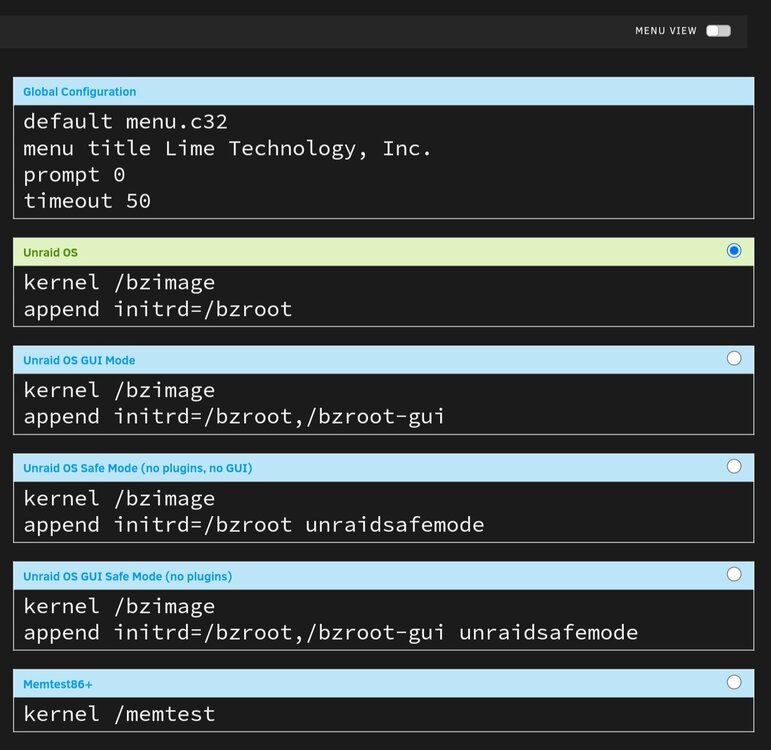
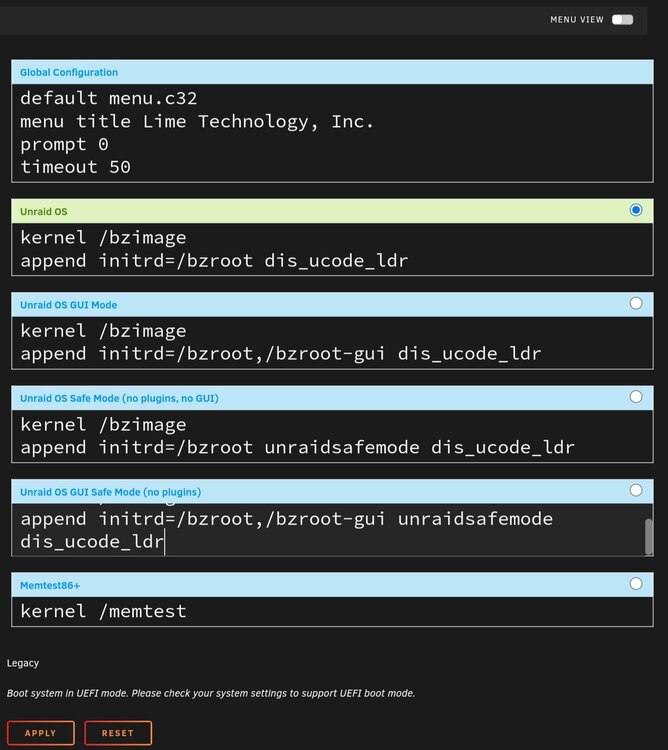
Okay. Made those changes to a CLEAN (separate) USB drive and it booted. I'm going to try to update.🤞 So... I was able to finally update. So the fix is to add "dis_ucode_ldr" to the syslinux.cfg file to prevent the microcode which may potentially put our systems at risk. Is this an actual "fix"... or a temporary patch? syslinux.cfg
-
Awesome. We *should* be able to add the "dis_ucode_ldr" directly into UnRaid OS without editing that file. Right? Maybe I'll give that a try. To
-
Awesome. Did you include the "idle=poll" or no? Mind sharing the cfg file? 😉 I'll give it a try tonight.
-
So .. since @Mundvlhas positive results with this we can positively determine it's a BIOS problem with this particular board? Or is it the entire line of z170 chipset? Also, why are we just now having this issue? What changed in 7 that would prevent our boards from running? Will there be a permanent fix for this in 7.1 or is future updating of our systems going to be involving the removal of the USB drive, modifying the cfg file, reinserting it and hoping it works?
-
All cores running? Everything smooth thus far?
-
So use dis_ucode_ldr and not noapic or noapic?
-
I have the latest bios already. But we do have very similar setups. Same motherboard and chipset. I have a newer CPU so I think we might be able to rule out the CPU. I'm using 64GB of 4000 RAM but can only run it at 3600 obviously. Regardless, I tried running without ANY overclocking at 2133. Curious, I wonder if it has anything to do with other peripherals of the board such as (not limited to) the USB 3.1 port? ASRock Z170 OC FORMULA LGA1151... https://www.amazon.com/dp/B013WPZ02M?ref=ppx_pop_mob_ap_share
-
You were having the exact same problem? I've searched all over and couldn't find a solution. @JorgeB, @itimpiI'm still waiting for my parity check to finish so it might not be until tonight that I give this a shot but assuming it works, what would be the appropriate permanent fix for this issue for everyone that runs into this problem? Will a fix be available in the latest update? Or will we all have to make those modifications to the syslinux.cfg before booting? How will that work exactly?
-
Okay. I'll give it a shot after my array finishes it's Parity check. It's a smaller system (only 204TB) so it's almost done (92.5%)
-
Okay. So like: default menu.c32 menu title Lime Technology, Inc. prompt 0 timeout 50 label Unraid OS menu default kernel /bzimage append initrd=/bzroot nolapic idle=poll label Unraid OS GUI Mode kernel /bzimage append initrd=/bzroot,/bzroot-gui nolapic idle=poll label Unraid OS Safe Mode (no plugins, no GUI) kernel /bzimage append initrd=/bzroot unraidsafemode nolapic idle=poll label Unraid OS GUI Safe Mode (no plugins) kernel /bzimage append initrd=/bzroot,/bzroot-gui unraidsafemode nolapic idle=poll label Memtest86+ kernel /memtest
-
So the file will read: default menu.c32 menu title Lime Technology, Inc. prompt 0 timeout 50 label Unraid OS menu default kernel /bzimage nolapic idle=poll append initrd=/bzroot label Unraid OS GUI Mode kernel /bzimage nolapic idle=poll append initrd=/bzroot,/bzroot-gui label Unraid OS Safe Mode (no plugins, no GUI) kernel /bzimage nolapic idle=poll append initrd=/bzroot unraidsafemode label Unraid OS GUI Safe Mode (no plugins) kernel /bzimage nolapic idle=poll append initrd=/bzroot,/bzroot-gui unraidsafemode label Memtest86+ kernel /memtest Is that correct?
-
Sorry, to which file on the flash drive?
-
I've opened in a ticket in the meanwhile. When it does release, I'll use the other thumb drive to test it first. But just for informational purposes here's my system devices: PCI Devices and IOMMU Groups IOMMU group 0:[8086:5912] 00:02.0 VGA compatible controller: Intel Corporation HD Graphics 630 (rev 04) IOMMU group 1:[8086:591f] 00:00.0 Host bridge: Intel Corporation Xeon E3-1200 v6/7th Gen Core Processor Host Bridge/DRAM Registers (rev 05) IOMMU group 2:[8086:1901] 00:01.0 PCI bridge: Intel Corporation 6th-10th Gen Core Processor PCIe Controller (x16) (rev 05) [8086:1909] 00:01.2 PCI bridge: Intel Corporation Xeon E3-1200 v5/E3-1500 v5/6th Gen Core Processor PCIe Controller (x4) (rev 05) [1fc9:4027] 01:00.0 Ethernet controller: Tehuti Networks Ltd. TN9710P 10GBase-T/NBASE-T Ethernet Adapter [1d6a:00b1] 02:00.0 Ethernet controller: Aquantia Corp. AQtion AQC100 NBase-T/IEEE 802.3an Ethernet Controller [Atlantic 10G] (rev 02) IOMMU group 3:[8086:a12f] 00:14.0 USB controller: Intel Corporation 100 Series/C230 Series Chipset Family USB 3.0 xHCI Controller (rev 31) Bus 001 Device 001 Port 1-0 ID 1d6b:0002 Linux Foundation 2.0 root hub Bus 001 Device 002 Port 1-5 ID 174c:2074 ASMedia Technology Inc. ASM1074 High-Speed hub Bus 001 Device 003 Port 1-6 ID 1a40:0101 Terminus Technology Inc. Hub Bus 001 Device 005 Port 1-6.1 ID 1a40:0101 Terminus Technology Inc. Hub Bus 001 Device 006 Port 1-6.3 ID 0b95:6808 ASIX Electronics Corp. Virtual HUB Ver:0.01 Bus 001 Device 007 Port 1-6.3.1 ID 0b95:6801 ASIX Electronics Corp. Virtual HID Ver:0.01 Bus 001 Device 008 Port 1-6.3.2 ID 0b95:6801 ASIX Electronics Corp. Virtual HID Ver:0.01 Bus 001 Device 009 Port 1-6.3.3 ID 0581:0109 Racal Data Group Bus 001 Device 011 Port 1-9 ID 09ae:2012 Tripp Lite Tripp Lite UPS Bus 002 Device 001 Port 2-0 ID 1d6b:0003 Linux Foundation 3.0 root hub Bus 002 Device 002 Port 2-6 ID 04e8:6300 Samsung Electronics Co., Ltd Flash Drive FIT Bus 002 Device 003 Port 2-5 ID 174c:3074 ASMedia Technology Inc. ASM1074 SuperSpeed hub [8086:a131] 00:14.2 Signal processing controller: Intel Corporation 100 Series/C230 Series Chipset Family Thermal Subsystem (rev 31) IOMMU group 4:[8086:a13a] 00:16.0 Communication controller: Intel Corporation 100 Series/C230 Series Chipset Family MEI Controller #1 (rev 31) IOMMU group 5:[8086:a102] 00:17.0 SATA controller: Intel Corporation Q170/Q150/B150/H170/H110/Z170/CM236 Chipset SATA Controller [AHCI Mode] (rev 31) IOMMU group 6:[8086:a110] 00:1c.0 PCI bridge: Intel Corporation 100 Series/C230 Series Chipset Family PCI Express Root Port #1 (rev f1) IOMMU group 7:[8086:a111] 00:1c.1 PCI bridge: Intel Corporation 100 Series/C230 Series Chipset Family PCI Express Root Port #2 (rev f1) IOMMU group 8:[8086:a112] 00:1c.2 PCI bridge: Intel Corporation 100 Series/C230 Series Chipset Family PCI Express Root Port #3 (rev f1) IOMMU group 9:[8086:a114] 00:1c.4 PCI bridge: Intel Corporation 100 Series/C230 Series Chipset Family PCI Express Root Port #5 (rev f1) IOMMU group 10:[8086:a118] 00:1d.0 PCI bridge: Intel Corporation 100 Series/C230 Series Chipset Family PCI Express Root Port #9 (rev f1) IOMMU group 11:[8086:a145] 00:1f.0 ISA bridge: Intel Corporation Z170 Chipset LPC/eSPI Controller (rev 31) [8086:a121] 00:1f.2 Memory controller: Intel Corporation 100 Series/C230 Series Chipset Family Power Management Controller (rev 31) [8086:a170] 00:1f.3 Audio device: Intel Corporation 100 Series/C230 Series Chipset Family HD Audio Controller (rev 31) [8086:a123] 00:1f.4 SMBus: Intel Corporation 100 Series/C230 Series Chipset Family SMBus (rev 31) IOMMU group 12:[8086:15b8] 00:1f.6 Ethernet controller: Intel Corporation Ethernet Connection (2) I219-V (rev 31) IOMMU group 13:[1b21:1242] 04:00.0 USB controller: ASMedia Technology Inc. ASM1142 USB 3.1 Host Controller Bus 003 Device 001 Port 3-0 ID 1d6b:0002 Linux Foundation 2.0 root hub Bus 004 Device 001 Port 4-0 ID 1d6b:0003 Linux Foundation 3.0 root hub IOMMU group 14:[1b21:1187] 05:00.0 PCI bridge: ASMedia Technology Inc. ASM1187e 7-Port PCIe x1 Gen2 Packet Switch IOMMU group 15:[1b21:1187] 06:01.0 PCI bridge: ASMedia Technology Inc. ASM1187e 7-Port PCIe x1 Gen2 Packet Switch IOMMU group 16:[1b21:1187] 06:04.0 PCI bridge: ASMedia Technology Inc. ASM1187e 7-Port PCIe x1 Gen2 Packet Switch IOMMU group 17:[1b21:1187] 06:05.0 PCI bridge: ASMedia Technology Inc. ASM1187e 7-Port PCIe x1 Gen2 Packet Switch [1b21:0612] 09:00.0 SATA controller: ASMedia Technology Inc. ASM1061/ASM1062 Serial ATA Controller (rev 02) IOMMU group 18:[1b21:1187] 06:06.0 PCI bridge: ASMedia Technology Inc. ASM1187e 7-Port PCIe x1 Gen2 Packet Switch [1b21:0612] 0a:00.0 SATA controller: ASMedia Technology Inc. ASM1061/ASM1062 Serial ATA Controller (rev 02) IOMMU group 19:[1b21:1187] 06:07.0 PCI bridge: ASMedia Technology Inc. ASM1187e 7-Port PCIe x1 Gen2 Packet Switch IOMMU group 20:[10b5:8724] 0c:00.0 PCI bridge: PLX Technology, Inc. PEX 8724 24-Lane, 6-Port PCI Express Gen 3 (8 GT/s) Switch, 19 x 19mm FCBGA (rev ca) IOMMU group 21:[10b5:8724] 0d:00.0 PCI bridge: PLX Technology, Inc. PEX 8724 24-Lane, 6-Port PCI Express Gen 3 (8 GT/s) Switch, 19 x 19mm FCBGA (rev ca) IOMMU group 22:[10b5:8724] 0d:08.0 PCI bridge: PLX Technology, Inc. PEX 8724 24-Lane, 6-Port PCI Express Gen 3 (8 GT/s) Switch, 19 x 19mm FCBGA (rev ca) IOMMU group 23:[10b5:8724] 0d:09.0 PCI bridge: PLX Technology, Inc. PEX 8724 24-Lane, 6-Port PCI Express Gen 3 (8 GT/s) Switch, 19 x 19mm FCBGA (rev ca) IOMMU group 24:[1000:0097] 0e:00.0 Serial Attached SCSI controller: Broadcom / LSI SAS3008 PCI-Express Fusion-MPT SAS-3 (rev 02) [1:0:0:0] disk ATA ST22000NM001E-3H SN01 /dev/sdb 22.0TB [1:0:1:0] disk ATA ST22000NT001-3LS EN01 /dev/sdc 22.0TB [1:0:2:0] disk ATA ST22000NM001E-3H SN01 /dev/sdd 22.0TB [1:0:3:0] disk ATA ST22000NM001E-3H SN01 /dev/sde 22.0TB IOMMU group 25:[1000:0097] 10:00.0 Serial Attached SCSI controller: Broadcom / LSI SAS3008 PCI-Express Fusion-MPT SAS-3 (rev 02) Not that this really matters because I ran it on a clean drive but I also ran the update assistant: Disclaimer: This script is NOT definitive. There may be other issues with your server that will affect compatibility. Current unRaid Version: 6.12.14 Upgrade unRaid Version: 7.0.0 Checking for plugin updates Issue Found: fix.common.problems.plg (fix.common.problems) is not up to date. It is recommended to update all your plugins. Checking for plugin compatibility Issue Found: controlrd.plg is not known to Community Applications. Compatibility for this plugin CANNOT be determined and it may cause you issues. Issue Found: ProFTPd.plg is deprecated for ALL unRaid versions. This does not necessarily mean you will have any issues with the plugin, but there are no guarantees. It is recommended to uninstall the plugin Issue Found: unbalanced.plg is not known to Community Applications. Compatibility for this plugin CANNOT be determined and it may cause you issues. OK: All plugins are compatible Checking for extra parameters on emhttp OK: emhttp command in /boot/config/go contains no extra parameters Checking for disabled disks OK: No disks are disabled Checking installed RAM OK: You have 4+ Gig of memory Checking flash drive OK: Flash drive is read/write Checking for valid NETBIOS name OK: NETBIOS server name is compliant. Checking for ancient version of dynamix.plg OK: Dynamix plugin not found Checking for VM MediaDir / DomainDir set to be /mnt OK: VM domain directory and ISO directory not set to be /mnt Checking for mover logging enabled OK: Mover logging not enabled Checking for reserved name being used as a user share OK: No user shares using reserved names were found Checking for extra.cfg OK: /boot/config/extra.cfg does not exist Checking for root kernel parameter OK: No root kernel parameter found Issues have been found with your server that may hinder the OS upgrade. You should rectify those problems before upgrading [12:0:0:0] disk ATA ST22000NM001E-3H SN01 /dev/sdf 22.0TB [12:0:1:0] disk ATA ST22000NM001E-3H SN01 /dev/sdg 22.0TB [12:0:2:0] disk ATA ST22000NM001E-3H SN01 /dev/sdh 22.0TB [12:0:3:0] disk ATA ST22000NM001E-3H SN01 /dev/sdi 22.0TB [12:0:4:0] disk ATA ST20000NE000-3G5 EN01 /dev/sdj 20.0TB [12:0:5:0] disk ATA ST20000NE000-3G5 EN01 /dev/sdk 20.0TB [12:0:6:0] disk ATA ST12000VN0007-2G SC60 /dev/sdl 12.0TB [12:0:7:0] disk ATA ST20000NM007D-3D SN01 /dev/sdm 20.0TB IOMMU group 26:[c0a9:540a] 11:00.0 Non-Volatile memory controller: Micron/Crucial Technology P2 [Nick P2] / P3 / P3 Plus NVMe PCIe SSD (DRAM-less) (rev 01) [N:0:1:1] disk CT2000P3SSD8__1 /dev/nvme0n1 2.00TB CPU Thread Pairings Pair 1:cpu 0 / cpu 4 Pair 2:cpu 1 / cpu 5 Pair 3:cpu 2 / cpu 6 Pair 4:cpu 3 / cpu 7 USB Devices Bus 001 Device 001 Port 1-0ID 1d6b:0002 Linux Foundation 2.0 root hub Bus 001 Device 002 Port 1-5ID 174c:2074 ASMedia Technology Inc. ASM1074 High-Speed hub Bus 001 Device 003 Port 1-6ID 1a40:0101 Terminus Technology Inc. Hub Bus 001 Device 005 Port 1-6.1ID 1a40:0101 Terminus Technology Inc. Hub Bus 001 Device 006 Port 1-6.3ID 0b95:6808 ASIX Electronics Corp. Virtual HUB Ver:0.01 Bus 001 Device 007 Port 1-6.3.1ID 0b95:6801 ASIX Electronics Corp. Virtual HID Ver:0.01 Bus 001 Device 008 Port 1-6.3.2ID 0b95:6801 ASIX Electronics Corp. Virtual HID Ver:0.01 Bus 001 Device 009 Port 1-6.3.3ID 0581:0109 Racal Data Group Bus 001 Device 011 Port 1-9ID 09ae:2012 Tripp Lite Tripp Lite UPS Bus 002 Device 001 Port 2-0ID 1d6b:0003 Linux Foundation 3.0 root hub Bus 002 Device 002 Port 2-6ID 04e8:6300 Samsung Electronics Co., Ltd Flash Drive FIT Bus 002 Device 003 Port 2-5ID 174c:3074 ASMedia Technology Inc. ASM1074 SuperSpeed hub Bus 003 Device 001 Port 3-0ID 1d6b:0002 Linux Foundation 2.0 root hub Bus 004 Device 001 Port 4-0ID 1d6b:0003 Linux Foundation 3.0 root hub SCSI Devices [0:0:0:0]disk Samsung Flash Drive FIT 1100 /dev/sda 64.1GB [1:0:0:0]disk ATA ST22000NM001E-3H SN01 /dev/sdb 22.0TB [1:0:1:0]disk ATA ST22000NT001-3LS EN01 /dev/sdc 22.0TB [1:0:2:0]disk ATA ST22000NM001E-3H SN01 /dev/sdd 22.0TB [1:0:3:0]disk ATA ST22000NM001E-3H SN01 /dev/sde 22.0TB [12:0:0:0]disk ATA ST22000NM001E-3H SN01 /dev/sdf 22.0TB [12:0:1:0]disk ATA ST22000NM001E-3H SN01 /dev/sdg 22.0TB [12:0:2:0]disk ATA ST22000NM001E-3H SN01 /dev/sdh 22.0TB [12:0:3:0]disk ATA ST22000NM001E-3H SN01 /dev/sdi 22.0TB [12:0:4:0]disk ATA ST20000NE000-3G5 EN01 /dev/sdj 20.0TB [12:0:5:0]disk ATA ST20000NE000-3G5 EN01 /dev/sdk 20.0TB [12:0:6:0]disk ATA ST12000VN0007-2G SC60 /dev/sdl 12.0TB [12:0:7:0]disk ATA ST20000NM007D-3D SN01 /dev/sdm 20.0TB [N:0:1:1]disk CT2000P3SSD8__1 /dev/nvme0n1 2.00TB
-
I already did. I even mentioned that in my posts. "I even flashed 7.0.0 onto a totally different thumb drive and tried that. Same result." (First post) "As I had stated in the first post, I even tried a clean install on a totally different USB drive." (Second post)
-
I even ran the update assistant. Disclaimer: This script is NOT definitive. There may be other issues with your server that will affect compatibility. Current unRaid Version: 6.12.14 Upgrade unRaid Version: 7.0.0 Checking for plugin updates Issue Found: fix.common.problems.plg (fix.common.problems) is not up to date. It is recommended to update all your plugins. Checking for plugin compatibility Issue Found: controlrd.plg is not known to Community Applications. Compatibility for this plugin CANNOT be determined and it may cause you issues. Issue Found: ProFTPd.plg is deprecated for ALL unRaid versions. This does not necessarily mean you will have any issues with the plugin, but there are no guarantees. It is recommended to uninstall the plugin Issue Found: unbalanced.plg is not known to Community Applications. Compatibility for this plugin CANNOT be determined and it may cause you issues. OK: All plugins are compatible Checking for extra parameters on emhttp OK: emhttp command in /boot/config/go contains no extra parameters Checking for disabled disks OK: No disks are disabled Checking installed RAM OK: You have 4+ Gig of memory Checking flash drive OK: Flash drive is read/write Checking for valid NETBIOS name OK: NETBIOS server name is compliant. Checking for ancient version of dynamix.plg OK: Dynamix plugin not found Checking for VM MediaDir / DomainDir set to be /mnt OK: VM domain directory and ISO directory not set to be /mnt Checking for mover logging enabled OK: Mover logging not enabled Checking for reserved name being used as a user share OK: No user shares using reserved names were found Checking for extra.cfg OK: /boot/config/extra.cfg does not exist Checking for root kernel parameter OK: No root kernel parameter found Issues have been found with your server that may hinder the OS upgrade. You should rectify those problems before upgrading As I had stated in the first post, I even tried a clean install on a totally different USB drive.
-
As the title suggests. I tried to upgrade from 6.12.14 to the new 7.0.0. It didn't like it! I feel lucky that I had made a flash backup. I did a memtest, disabled all overclock and everything in bios was set to default settings. I even flashed 7.0.0 onto a totally different thumb drive and tried that. Same result. Advice? Thanks in advance.