





clenga
Members
-
Joined
-
Last visited
-
yes this is what i was reading prior to posting... maybe its just me but that conversation seems like it was started elsewhere and then continued in the thread you linked... either way... will do the stuff in post 1.... not sure why my tips and tweaks plugin was uninstalled but it was.... hmm ... will reply shortly
-
For whatever reason this past month, when doing a simple shutdown or reset from the GUI, upon my server booting back up, ive been getting the dreaded "Unclean Shutdown" message. After doing a bit of reading, Ive adjusted the shutdown time up to 240 seconds on my disks. Im unsure if that was the actual reason for the unclean shutdown in the first place, and i really dont want to continue testing this by repeatedly running restarts as a test. Was hoping someone could take a look at my diagnostic log file, or point me to the file which would indicate the issue (assuming syslog maybe?) ... attaching a diag of the bootup which gave me the unclean shutdown... appreciate your time and help ktower-diagnostics-20260125-1026.zip
-
check here for a possible answer... https://forums.unraid.net/topic/48286-plugin-ca-user-scripts/page/83/ im still waiting on a response myself because i dont have the option to update and therefor cannot fix the issue that way....
-
and if you have no update for user.scripts.enhanced? how to fix this issue? ... im not sure if maybe i had already updated and still the problem persists, or if i just dont have an update... but either way i dont have the option to update and so my user.scripts page is just completely blank? how to fix?
-
+1... purchased b580 for unraid server ... was hoping support would have been a bit further along being the card has been out for almost a year now... kinda already knew it wouldn't work great at the current point in time but got a really good black Friday deal on one and couldn't pass it up ...
-
your the man Jorge!! thank you .. will have to buy a beer for your time 😄
-
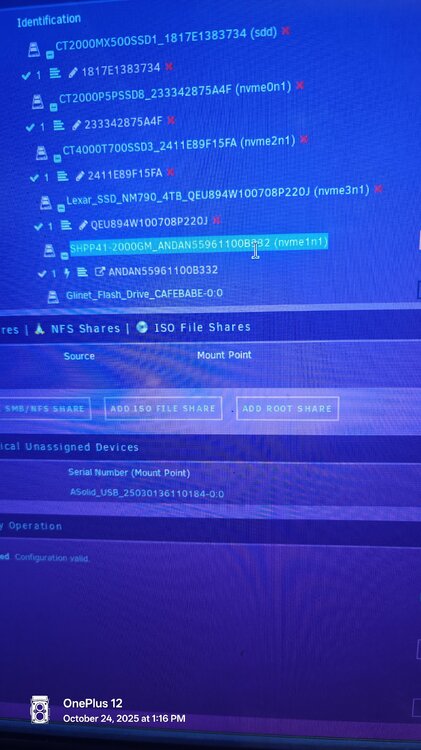
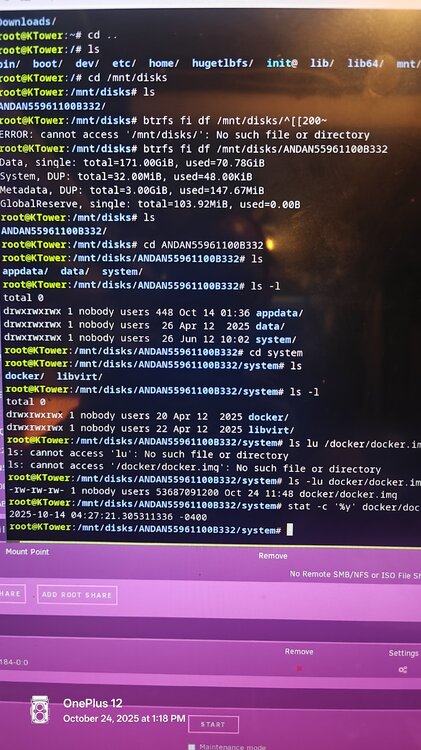
i yanked it before i could read your reply.... but that seems to have done it... drive added back to the pool ... now listed as nvme2n1...so oddill give it a go... will report back... before i tried mounting the nvme1n1 with the other just in unassigned devices but kept getting device is unmountable... will brbroot@KTower:/mnt/disks# btrfs fi usage -T /mnt/disks/ANDAN55961100B332 Overall: Device size: 1.82TiB Device allocated: 177.06GiB Device unallocated: 1.65TiB Device missing: 0.00B Device slack: 0.00B Used: 71.07GiB Free (estimated): 1.74TiB (min: 943.20GiB) Free (statfs, df): 1.74TiB Data ratio: 1.00 Metadata ratio: 2.00 Global reserve: 103.92MiB (used: 0.00B) Multiple profiles: no Data Metadata System Id Path single DUP DUP Unallocated Total Slack -- -------------- --------- --------- -------- ----------- ------- ----- 1 /dev/nvme1n1p1 171.00GiB 6.00GiB 64.00MiB 1.65TiB 1.82TiB - -- -------------- --------- --------- -------- ----------- ------- ----- Total 171.00GiB 3.00GiB 32.00MiB 1.65TiB 1.82TiB 0.00B Used 70.78GiB 147.67MiB 48.00KiB root@KTower:/mnt/disks#probably because it was initially a 2 drive pool .. I needed a slot temporarily for something else so I reduced the pool down to one drive.... then i received some new parts/upgrade, went to try and add drive back and did something wrong ... one secappreciate the help by the way... this is what happens when ya try to rush through an upgrade😶root@KTower:/mnt/disks/ANDAN55961100B332/system# btrfs fi show Label: none uuid: 0c1aa62d-b6fe-44af-8afb-b3f39750706e Total devices 1 FS bytes used 70.92GiB devid 1 size 1.82TiB used 177.06GiB path /dev/nvme1n1p1 Label: none uuid: b78bb323-7a35-4941-83f8-f73ba0f6abb4 Total devices 2 FS bytes used 793.80GiB devid 1 size 1.82TiB used 177.06GiB path /dev/nvme1n1p1 devid 2 size 1.82TiB used 1016.03GiB path /dev/nvme0n1p1 Label: none uuid: 9135eba3-47d2-4e99-ba7b-2f005fab9449 Total devices 1 FS bytes used 61.12GiB devid 1 size 1.82TiB used 64.02GiB path /dev/sdd1 Label: none uuid: f071a6b0-5d89-4a69-acd9-c8e4e1820872 Total devices 2 FS bytes used 50.00GiB devid 1 size 3.64TiB used 53.03GiB path /dev/nvme2n1p1 devid 2 size 3.73TiB used 53.03GiB path /dev/nvme3n1p1 Label: none uuid: 967d35fc-e006-4ae0-819c-6d64f1d8d300 Total devices 2 FS bytes used 222.25GiB devid 1 size 894.25GiB used 267.03GiB path /dev/sde1 devid 2 size 894.25GiB used 267.03GiB path /dev/sdc1Not sure what I did but I need some guidance recovering/restoring cache pool drive to normal operation. Currently cannot mount cache pool drive. Happened while trying to add an additional nvme to the cache pool (from single drive to 2 drives). I stopped array and removed (a different) newly created pool to avoid any further issues. Seems the data is is till there when mounted in unassigned devices. The drive in question is highlighted in photoktower-diagnostics-20251024-1300.zip
 got it... appreciate the response!! beta 6.0.0.23 has been working fairly well in my environment, just as an FYI... omada still has some work to do though with the adoption process... i first tried putting the controller on a different VLAN from the switch but adoption was buggy as a result.... i could get the adoption to work initially but within 48 hours the controller would no longer "find" the switch and become disconnected... just figured i would post in-case anyone runs into adoption issues... appreciate the work you have done providing this container, as its made it so much easier to host the omada controller...



