





frank_sp61
Members
-
Joined
-
Last visited
Everything posted by frank_sp61
-
I completely disconnected the external USB drive and there is no remote device accessing my system. It's still happening. Here are the logs. Is it possible bug? I've also shut off every docker container. linc-diagnostics-20260125-1810.zip
-
I shutdown the Frigate server to ensure there the remote NFS connection wasn't causing the problem and the external USB drive is unmounted. It still persists. I guess the next step is to completely unplug that drive and reboot. linc-diagnostics-20260125-1754.zip
-
I rebooted into normal mode and the smartctl were immediately back. See logs. I have unmounted the external drive (no auto mount) and am rebooting. linc-diagnostics-20260125-1732.zipI have two servers connecting to my UNRAID server. Both are using NFS. 1st is the Homeassistant for backups. These only occur once per day between 4:45-5:45 am. 2nd is a Frigate NVR server and it is connected as a remote share from that server. It uses the UNRAID as storage for upto 3 days worth of triggers. Lastly, I did have a USB drive with all my PLEX movies attached as an unassigned device. Not sure what a root share is. In SAFE MODE, this isn't mounted. Still running in SAFE MODE for nearly 4 hours and there are none of these errors in the logs. Current diagnostics attached. I shutdown every docker container and "unmounted" the external drive prior to SAFE MODE but it didn't seem to matter. I'm gonna try and reboot in NORMAL mode and see if the issue returns. linc-safemode-diagnostics-20260125-1714.zipAfter 1 hour, no smartctl messages in the logs. Is it worthwhile to boot back into normal operation mode to see if "safe mode" fixed the problem? Or will they just reappear?Okay, I booted in safe mode and got diagnostics both before and after the array start. linc-safemode-diagnostics-after-array-start.zip linc-safemode-diagnostics-before-array-start.zipSo should I change the SMART controller type to SCSI for a SATA device? Could it be this?From what I can tell, this the SMART command checking on my disks and running every 9 seconds? How do I tune or turn off? I've turned off all my docker containers except NPM but there is no change in the "spam". Is it possible that I have the SMART controller type set incorrectly? Do I need to change the SMART controller type to SCSI? I ran a Smartctl --scan and here are the results: /dev/sdb -d scsi # /dev/sdb, SCSI device /dev/sdc -d scsi # /dev/sdc, SCSI device /dev/sdd -d scsi # /dev/sdd, SCSI device /dev/sde -d scsi # /dev/sde, SCSI device /dev/sdf -d sat # /dev/sdf [SAT], ATA device /dev/nvme0 -d nvme # /dev/nvme0, NVMe device /dev/nvme1 -d nvme # /dev/nvme1, NVMe device output from the 1st device: root@Linc:~# smartctl -a /dev/sdb smartctl 7.5 2025-04-30 r5714 [x86_64-linux-6.12.54-Unraid] (local build) Copyright (C) 2002-25, Bruce Allen, Christian Franke, www.smartmontools.org === START OF INFORMATION SECTION === Model Family: Western Digital Red Plus Device Model: WDC WD60EFZX-68B3FN0 Serial Number: WD-C80KK9GG LU WWN Device Id: 5 0014ee 269138f9e Firmware Version: 81.00A81 User Capacity: 6,001,175,126,016 bytes [6.00 TB] Sector Sizes: 512 bytes logical, 4096 bytes physical Rotation Rate: 5640 rpm Form Factor: 3.5 inches Device is: In smartctl database 7.5/6045 ATA Version is: ACS-3 T13/2161-D revision 5 SATA Version is: SATA 3.1, 6.0 Gb/s (current: 6.0 Gb/s) Local Time is: Sun Jan 25 12:10:48 2026 CET SMART support is: Available - device has SMART capability. SMART support is: EnabledNot much actually. See attached. I also have a Frigate host writing to it. The HomeAssistant is also a separate host but only writes a tar backup once a day. Finally I have Apple computers writing backups (Time Machine).
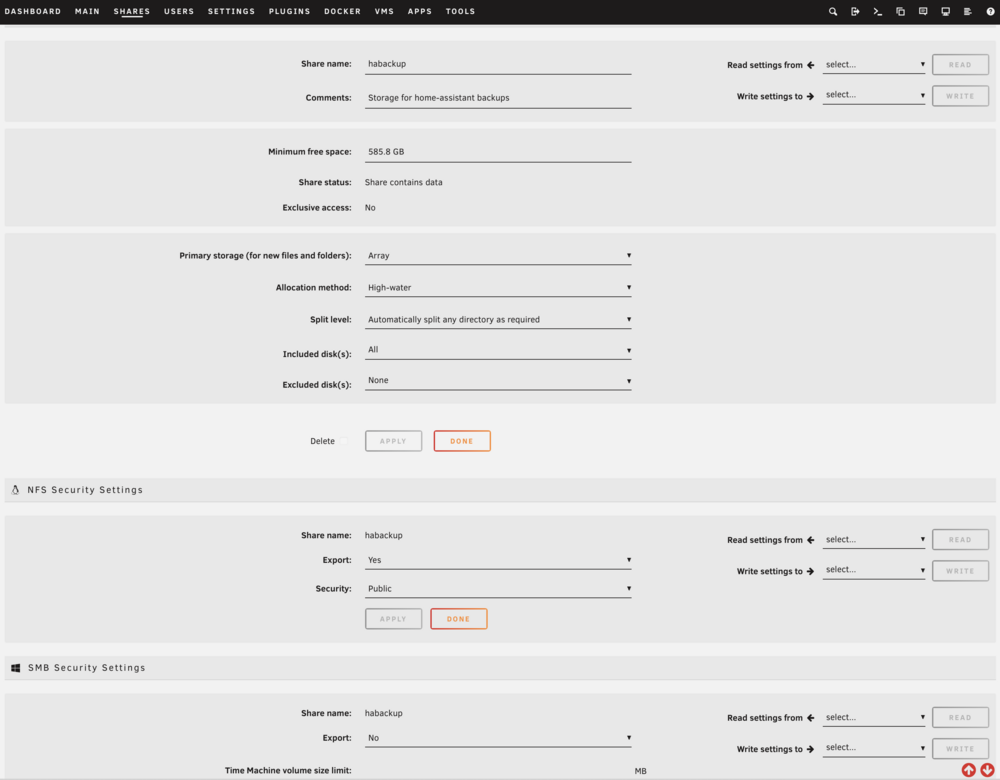
 Sorry, didn't realize it was the entire download. Here it is. linc-diagnostics-20260122-0944.zipHere are the logs. Not sure how to make a "snapshot" of the dataset but I'll google that. syslog.txt syslog.2.txt syslog.1.txtHome Assistant backups (creates a tar archive) and stores it on a remote NFS share. In my case it's '/mnt/user/habackup'. When I configure this share (above) as primary on the array, all works fine, albeit slow. When I configure it as cache first then array, it get an error in the Home Assistant. Here are the relevant logs from HA. 2026-01-22 05:28:49.094 INFO (MainThread) [supervisor.mounts.manager] Reloading mount: NFS_Backup 2026-01-22 05:28:49.175 INFO (MainThread) [supervisor.mounts.mount] Mount NFS_Backup not correctly mounted after a reload. Trying a restart 2026-01-22 05:28:49.247 ERROR (MainThread) [supervisor.mounts.mount] Restarting NFS_Backup did not succeed. Check host logs for errors from mount or systemd unit mnt-data-supervisor-mounts-NFS_Backup.mount for details. 2026-01-22 06:13:49.476 INFO (MainThread) [supervisor.mounts.manager] Reloading mount: NFS_Backup 2026-01-22 06:13:49.547 INFO (MainThread) [supervisor.mounts.mount] Mount NFS_Backup not correctly mounted after a reload. Trying a restart 2026-01-22 04:13:48.870 homeassistant kernel: NFS: server linc.local error: fileid changed 2026-01-22 04:13:48.881 homeassistant systemd[1]: Reloading Supervisor nfs mount: NFS_Backup... 2026-01-22 04:13:48.952 homeassistant systemd[1]: mnt-data-supervisor-mounts-NFS_Backup.mount: Mount process exited, code=killed, status=15/TERM 2026-01-22 04:13:48.952 homeassistant systemd[1]: Failed unmounting Supervisor nfs mount: NFS_Backup. 2026-01-22 04:28:49.102 homeassistant systemd[1]: Reloading Supervisor nfs mount: NFS_Backup... 2026-01-22 04:28:49.153 homeassistant mount[363345]: mount.nfs: Stale file handle for (null) on /mnt/data/supervisor/mounts/NFS_Backup 2026-01-22 04:28:49.158 homeassistant systemd[1]: mnt-data-supervisor-mounts-NFS_Backup.mount: Mount process exited, code=exited, status=1/FAILURE 2026-01-22 04:28:49.158 homeassistant systemd[1]: Reload failed for Supervisor nfs mount: NFS_Backup. 2026-01-22 04:28:49.186 homeassistant systemd[1]: Unmounting Supervisor nfs mount: NFS_Backup... 2026-01-22 04:28:50.085 homeassistant systemd[1]: mnt-data-supervisor-mounts-NFS_Backup.mount: Deactivated successfully. 2026-01-22 04:28:50.087 homeassistant systemd[1]: Unmounted Supervisor nfs mount: NFS_Backup. 2026-01-22 04:28:50.099 homeassistant systemd[1]: Mounting Supervisor nfs mount: NFS_Backup... 2026-01-22 04:28:50.369 homeassistant systemd[1]: Mounted Supervisor nfs mount: NFS_Backup. 2026-01-22 05:13:49.478 homeassistant kernel: NFS: server linc.local error: fileid changed 2026-01-22 05:13:49.485 homeassistant systemd[1]: Reloading Supervisor nfs mount: NFS_Backup... 2026-01-22 05:13:49.525 homeassistant mount[368927]: mount.nfs: Stale file handle for (null) on /mnt/data/supervisor/mounts/NFS_Backup 2026-01-22 05:13:49.529 homeassistant systemd[1]: mnt-data-supervisor-mounts-NFS_Backup.mount: Mount process exited, code=exited, status=1/FAILURE 2026-01-22 05:13:49.530 homeassistant systemd[1]: Reload failed for Supervisor nfs mount: NFS_Backup. 2026-01-22 05:13:49.560 homeassistant systemd[1]: Unmounting Supervisor nfs mount: NFS_Backup... 2026-01-22 05:13:49.655 homeassistant systemd[1]: mnt-data-supervisor-mounts-NFS_Backup.mount: Deactivated successfully. 2026-01-22 05:13:49.656 homeassistant systemd[1]: Unmounted Supervisor nfs mount: NFS_Backup. 2026-01-22 05:13:49.667 homeassistant systemd[1]: Mounting Supervisor nfs mount: NFS_Backup... 2026-01-22 05:13:49.853 homeassistant systemd[1]: Mounted Supervisor nfs mount: NFS_Backup.The HomeAssistant gives an error that says it "Network storage device failed" after the backup. The relevant syslogs entries from unraid server are these: Jan 20 05:00:34 Linc move: move: /mnt/cache/habackup/Automatic_backup_2026.1.2_2026-01-20_04.47_01003761.tar Success Jan 20 05:00:34 Linc shfs: /usr/sbin/zfs unmount 'cache/habackup' 2>&1 Jan 20 05:00:34 Linc shfs: /usr/sbin/zfs destroy 'cache/habackup' 2>&1 Jan 20 05:00:34 Linc move: mover: finished Jan 22 06:00:50 Linc move: move: /mnt/cache/habackup/Automatic_backup_2026.1.2_2026-01-22_04.55_32003308.tar Success Jan 22 06:00:50 Linc shfs: /usr/sbin/zfs unmount 'cache/habackup' 2>&1 Jan 22 06:00:50 Linc shfs: /usr/sbin/zfs destroy 'cache/habackup' 2>&1 Jan 22 06:00:50 Linc move: mover: finishedIt's the same each time. It appears that the 'backup' completes but then the directory/folder is then unavailable for whatever time. I feel like it's something how I have this share setup. The cache pool is setup up as a 2TB zfs filesystem.I have a home assistant server that backs up to my unraid server. Everything works when the share is configured as an array but fails as a cache with mover enabled. Is there a requirement that I have to stop the array or reboot? Here are screenshots. Help is appreciated.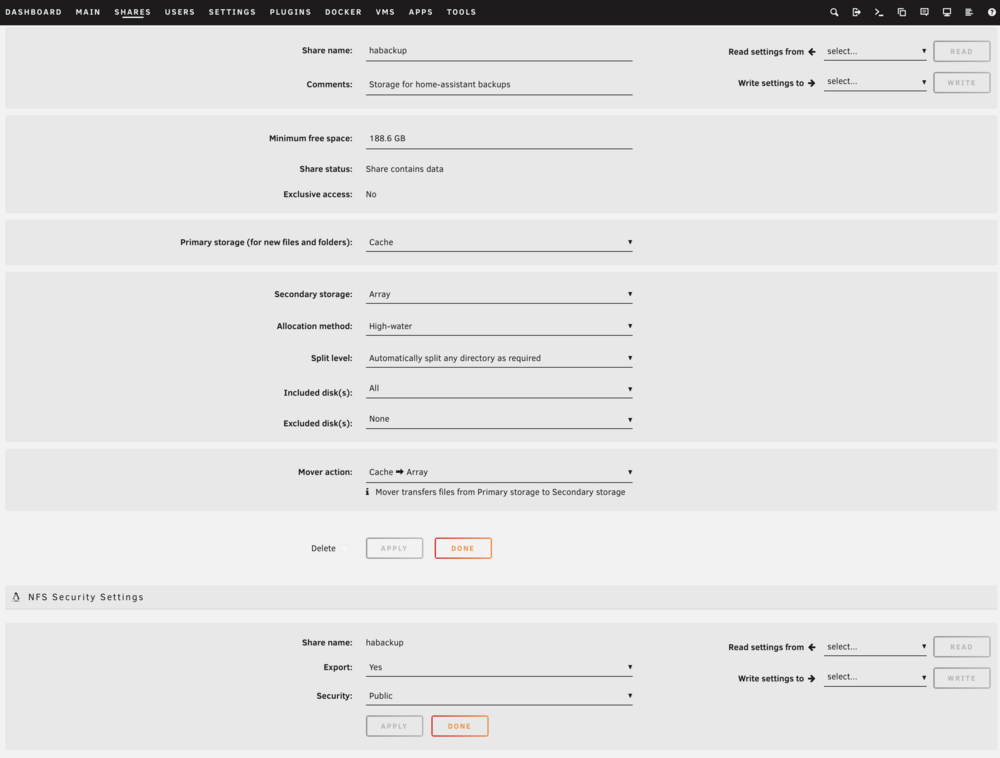
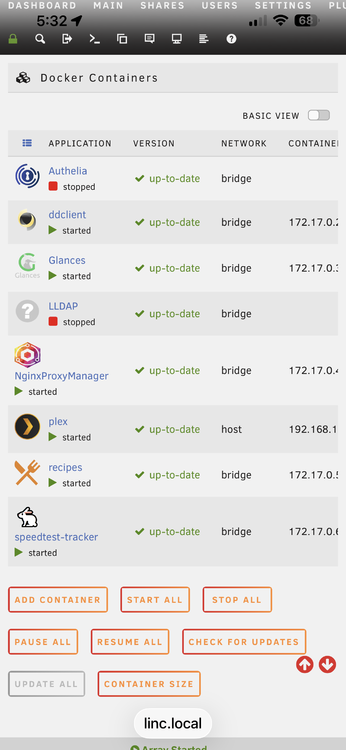
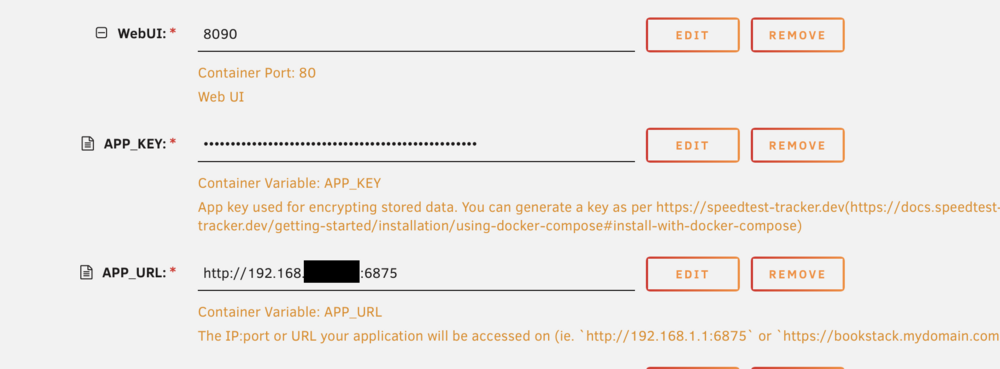
 With that in mind, how can I modify the template without breaking my current deployment. I'd like to be able to test a template without interfering with my current production docker container. Thanks! Also, I've looked into the logs and it shows these variables. Is this from the application or the template? "LDAP_AUTH_ENABLED": false, "LDAP_SERVER_URL": null, "LDAP_TLS_INSECURE": false, "LDAP_TLS_CACERTFILE": null, "LDAP_ENABLE_STARTTLS": false, "LDAP_BASE_DN": null, "LDAP_QUERY_BIND": null, "LDAP_QUERY_PASSWORD": null, "LDAP_USER_FILTER": null, "LDAP_ADMIN_FILTER": null, "LDAP_ID_ATTRIBUTE": "uid", "LDAP_MAIL_ATTRIBUTE": "mail", "LDAP_NAME_ATTRIBUTE": "name",Thank you @wgstarksI resolved this with an Nginx issue. Thanks for the help @ZappyZapSpecifically, what did you find @mswdev? I've noticed the obvious LDAP section that is missing. What did you see?As far as I know, I'm using the latest build. This may be an issue with the Authelia/NPM templates. I'll try and run it there.Also, if I want to deploy LDAP, there are a bunch of variables I need to add. Is there a yaml or do I just do it 1-by-1 in the template?Interesting. The backups I perform in Mealie are exactly 1 hour behind.I tried adding the TZ variable and basically it ignores it. Tried values of CET and Germany/Berlin but doesn't seem to affect anything. Only way I know to check is with the backup timestamp. Also, is there a yaml file for direct editing or only the docker template?Hi @ZappyZap this is the one I'm using. lscr.io/linuxserver/speedtest-tracker Is this not correct?Hello team - I'm just getting this started and have an issue. I'm trying to understand the installation parameters on this template. I can connect to port 8090 but not 6875. Trying to put this in NPM and authenticating with Authelia first. The authentication works and then NPM forwards to port 6875 but it doesn't connect. Do I need to supply the app_key as well somehow? I can't even connect locally to that port. I'm not sure I understand what the point of the APP_URL is. Help!
 Yes, if all goes well, I plan to move it permanently to the Plex docker on my Unraid. I am thinking about moving the media to my array afterwards. Thoughts?


