frank_sp61
Members
-
Joined
-
Last visited
Everything posted by frank_sp61
-
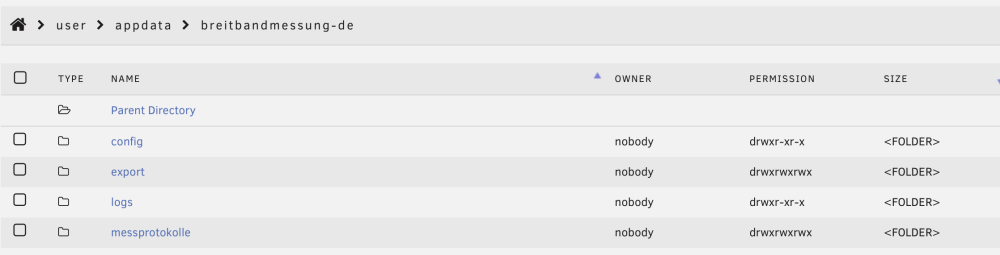
Hello - trying to get this running on my Unraid server but am getting this error consistently. Can anyone help here? Here is my config: timezone=Europe/Berlin crontab=* */2 * * * run_once=true run_on_startup=true Here is the logs output: Setting timezone: Europe/Berlin Run on startup: true PREPARING SPEEDTEST RUNNING SPEEDTEST SPEEDTEST DONE saved results to /export/ fatal error TypeError: Cannot read properties of undefined (reading 'getProperty') at /usr/src/app/index.js:107:45 at processTicksAndRejections (node:internal/process/task_queues:96:5) Exiting... This is my directory structure:
-
Oddly, I was able to connect again to the webui and I think it's working. Not sure what happened.
-
Was sure something happened but wasn't sure what.
-
Hello - I had Adguard Home working for a while and then it stopped. I can't login to the webui either. I checked the router and the first entry pointed to DNS 127.0.0.1 with the 2nd to 192.168.178.3. Not sure how any of this changed, but really need some help. My router has the ip of this container with a static ip of x.x.x.3. Tried accessing the UI from docker options, directly to x.x.x3, unraid server address. Have it shut down at this point at the router is using ISP supplied DNS servers at this point. Help? I have removed/reinstalled the app but no joy. Logs: 2026/08/19 09:27:08.982647 [info] starting adguard home version="AdGuard Home, version v0.107.79" 2026/08/19 09:27:08.986006 [info] tls_manager: using default ciphers 2026/08/19 09:27:09.223977 [info] webapi: initializing 2026/08/19 09:27:09.349740 [info] dnsproxy: upstream mode is set mode=load_balance 2026/08/19 09:27:09.349760 [info] dnsproxy: cache enabled size=4096 2026/08/19 09:27:09.349772 [info] dnsproxy: max goroutines is set count=300 2026/08/19 09:27:09.349821 [info] dnsproxy: server will refuse requests of type any 2026/08/19 09:27:09.349831 [info] dnsproxy: upstream mode is set mode=load_balance 2026/08/19 09:27:09.349838 [info] dnsproxy: cache enabled size=4194304 2026/08/19 09:27:09.349845 [info] dnsproxy: max goroutines is set count=300 2026/08/19 09:27:09.350633 [info] addrproc: processing addresses 2026/08/19 09:27:09.350859 [info] permcheck: warning: found unexpected permissions type=directory path=/opt/adguardhome/work perm=0755 want=0700 2026/08/19 09:27:09.352448 [info] webapi: AdGuard Home is available at the following addresses: 2026/08/19 09:27:09.352773 [info] webapi: serving url=http://127.0.0.1:80 2026/08/19 09:27:09.352787 [info] webapi: serving url=http://[::1]:80 2026/08/19 09:27:09.352795 [info] webapi: serving url=http://192.168.178.3:80 2026/08/19 09:27:09.352839 [info] starting plain server server=plain addr=0.0.0.0:80 2026/08/19 09:27:09.664070 [info] dnsproxy: starting dns proxy server 2026/08/19 09:27:09.664090 [info] dnsproxy: creating udp server socket addr=0.0.0.0:53 2026/08/19 09:27:09.664164 [info] dnsproxy: listening to udp addr=[::]:53 2026/08/19 09:27:09.664172 [info] dnsproxy: creating tcp server socket addr=0.0.0.0:53 2026/08/19 09:27:09.664241 [info] dnsproxy: listening to tcp addr=[::]:53 2026/08/19 09:27:09.664328 [info] dnsproxy: entering udp listener loop addr=[::]:53 2026/08/19 09:27:09.664426 [info] dnsproxy: entering listener loop proto=tcp addr=[::]:53

-
Thanks. Will do.
-
Adguard Home seems to have stopped working in my network. I've tried to remove/reinstall and it's not blocking ads nor can I get to the web ui. Using this repository: adguard/adguardhome Logs: 2026/08/19 09:27:08.982647 [info] starting adguard home version="AdGuard Home, version v0.107.79" 2026/08/19 09:27:08.986006 [info] tls_manager: using default ciphers 2026/08/19 09:27:09.223977 [info] webapi: initializing 2026/08/19 09:27:09.349740 [info] dnsproxy: upstream mode is set mode=load_balance 2026/08/19 09:27:09.349760 [info] dnsproxy: cache enabled size=4096 2026/08/19 09:27:09.349772 [info] dnsproxy: max goroutines is set count=300 2026/08/19 09:27:09.349821 [info] dnsproxy: server will refuse requests of type any 2026/08/19 09:27:09.349831 [info] dnsproxy: upstream mode is set mode=load_balance 2026/08/19 09:27:09.349838 [info] dnsproxy: cache enabled size=4194304 2026/08/19 09:27:09.349845 [info] dnsproxy: max goroutines is set count=300 2026/08/19 09:27:09.350633 [info] addrproc: processing addresses 2026/08/19 09:27:09.350859 [info] permcheck: warning: found unexpected permissions type=directory path=/opt/adguardhome/work perm=0755 want=0700 2026/08/19 09:27:09.352448 [info] webapi: AdGuard Home is available at the following addresses: 2026/08/19 09:27:09.352773 [info] webapi: serving url=http://127.0.0.1:80 2026/08/19 09:27:09.352787 [info] webapi: serving url=http://[::1]:80 2026/08/19 09:27:09.352795 [info] webapi: serving url=http://192.168.178.3:80 2026/08/19 09:27:09.352839 [info] starting plain server server=plain addr=0.0.0.0:80 2026/08/19 09:27:09.664070 [info] dnsproxy: starting dns proxy server 2026/08/19 09:27:09.664090 [info] dnsproxy: creating udp server socket addr=0.0.0.0:53 2026/08/19 09:27:09.664164 [info] dnsproxy: listening to udp addr=[::]:53 2026/08/19 09:27:09.664172 [info] dnsproxy: creating tcp server socket addr=0.0.0.0:53 2026/08/19 09:27:09.664241 [info] dnsproxy: listening to tcp addr=[::]:53 2026/08/19 09:27:09.664328 [info] dnsproxy: entering udp listener loop addr=[::]:53 2026/08/19 09:27:09.664426 [info] dnsproxy: entering listener loop proto=tcp addr=[::]:53
-
Hello - yes, it's the latter. We have a ton of photos on Amazon Photos and I've been setting up my IMMICH server here on UNRAID server. I don't want to have Amazon just decide to change the plan and I've been making an effort to get off all the cloud services. I think IMMICH can do some of this but I rather have a docker container grabbing everything and not tying up one of my computers. Of course there are VM options I'm sure, but then I'd just install the VM and then delete it. I have about 30GB (72K files) that I think would tie up a machine for a while, maybe even overnight.
-
I see there are several apps to backup iCloud Photos and I wa t to do the same with Amazon photos. I’ve looked and can’t find anything. Suggestions?
-
Very much a noob question. I installed Python 3 (Python 3 for UNRAID) thinking it was a docker container. Just needed to run a tinytuya script and I don't have another system to run it on. Question is, I don't need this since it's not a container. I "uninstalled" it but it said it didn't find 'xxxx' so I'm not sure It was uninstalled properly. Can you please let me know how to ensure it is no longer installed? Thanks!
-
I think I found it. Additional host and container path set to /dev/dri. Thanks. Things are running better. 😁
-
Okay, did that. Where is the iGPU setting? For video transcoding or images?
-
Pretty sure it’s the Immich docker. When I turned that off, the cpu and memory usages dropped to reasonable. So can I just “pin” 1 or 2 cpus so it reserves 2 for other things? Pretty sure with the number of phots I’m trying to import, it’s very taxing on resources. Once completed I think it’ll be fine. So is this what pinning is used for?
-
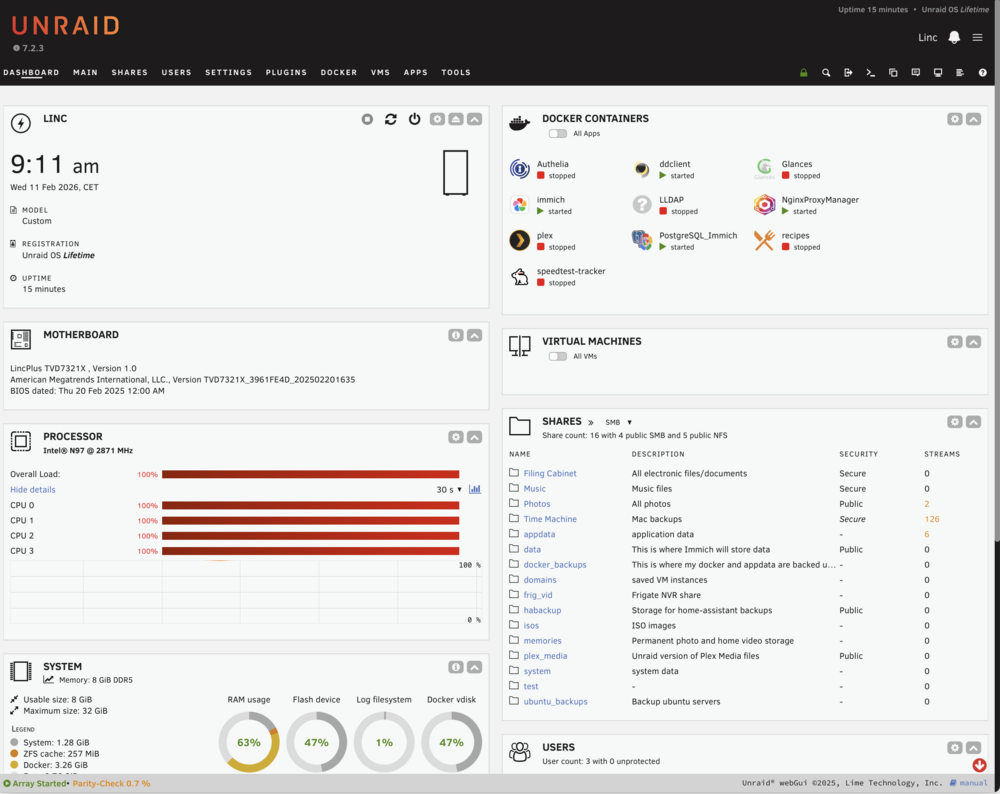
Hello all, Just had my first issue with my server. It went down for no apparent reason (that I know of) and I had to power cycle the unit. It seemed to be stuck in a recycle loop? Not sure. Just a newbie here. I've attached the logs for smart people to review. Hopefully this is a one off. I was running an 'immich' scan of my external library which might have been the culprit. It has 200k+ pics and videos. Maybe this? Maybe because the processors were 100% for a long time? See attached after reboot. Is this what CPU pinning is for? Would immich be the culprit or more likely Post-egres? Appreciate the assist. linc-diagnostics-20260211-0858.zip
-
Just fyi, I confirmed that the SMB does work! Thank you. Also LINCPLUS confirmed that they are using the smartctl in the go file to update the LCD display and is optional.
-
Excellent! I will try that! Thank you again. You've been a big help.
-
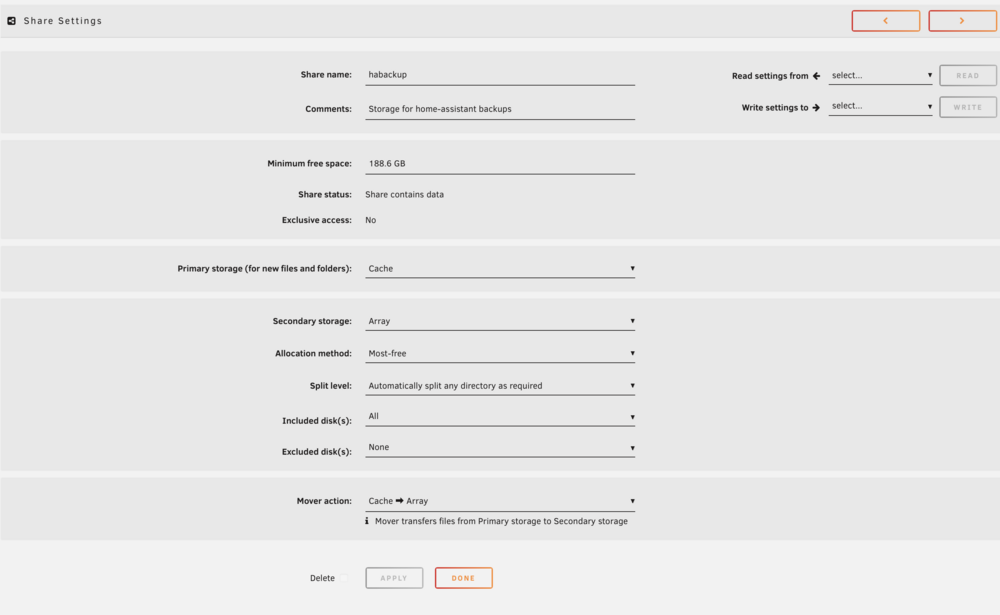
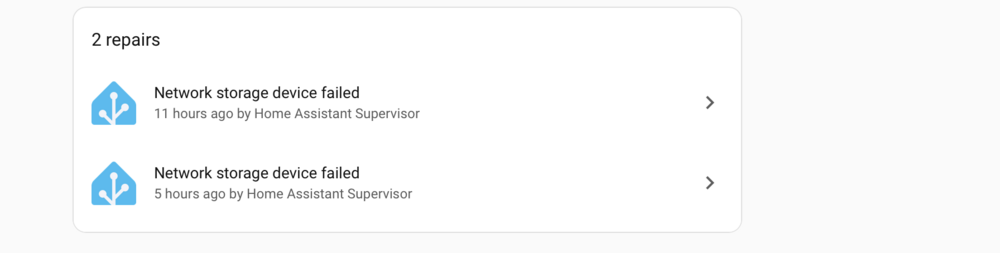
So now, back to my original issue. My Homeassistant server writes a backup file to my UNRAID server once per evening. Homeassistant is on a separate machine and is not on a docker container in my UNRAID server. The share is setup for primary storage as cache and then moved to the array. After the backup, I get an error from my Homeassistant that the NFS share is unavailable and I have to reboot my Homeassistant to clear the error. This does not occur when the share is setup for primary storage as the array. Looking to understand why this is happening. Attached are the logs. You will notice that my Frigate server (also separate, 3rd server) writes just fine without reporting any errors. I've included the diagnostics as well as screen prints from my Homeassistant and the UNRAID share in case anyone can spot a setup error. linc-diagnostics-20260127-1027.zip
-
That's my next step!
-
I 'disabled' the Monitor Service and smartctl messages seemed to have stopped. Attached are the logs. #!/bin/bash # Start the Management Utility /usr/local/sbin/emhttp # Enable probe modprobe i2c-dev # Install PKG installpkg /boot/config/pkg/i2c-tools-4.1-x86_64-1_slonly.txz # Start the Monitor Service # cp -r /boot/config/monitor/ /usr/local/sbin/monitor/ # chmod 777 /usr/local/sbin/monitor/monitor # nohup /usr/local/sbin/monitor/monitor >/dev/null 2>&1 & # Start the Screen Serial Service cp -r /boot/config/serial/ /usr/local/sbin/serial/ chmod 777 /usr/local/sbin/serial/serialtest chmod 777 /usr/local/sbin/serial/test.sh nohup /usr/local/sbin/serial/test.sh >/dev/null 2>&1 & # Start the RESET Service cp -r /boot/config/reset/ /usr/local/sbin/reset/ chmod 777 /usr/local/sbin/reset/reset nohup /usr/local/sbin/reset/reset >/dev/null 2>&1 & linc-diagnostics-20260126-1626.zip
-
Thanks. I can eliminate that at least!
-
I’ll give that a try and let you know.
-
Is it not an issue that smartctl -scan thinks these are SCSI drives but smartctl -I /dev/sdb shows ATA and SATA? root@Linc:~# smartctl --scan /dev/sdb -d scsi # /dev/sdb, SCSI device === START OF INFORMATION SECTION === Model Family: Western Digital Red Plus Device Model: WDC WD60EFZX-68B3FN0 Serial Number: WD-C80KK9GG LU WWN Device Id: 5 0014ee 269138f9e Firmware Version: 81.00A81 User Capacity: 6,001,175,126,016 bytes [6.00 TB] Sector Sizes: 512 bytes logical, 4096 bytes physical Rotation Rate: 5640 rpm Form Factor: 3.5 inches Device is: In smartctl database 7.5/6045 ATA Version is: ACS-3 T13/2161-D revision 5 SATA Version is: SATA 3.1, 6.0 Gb/s (current: 6.0 Gb/s) Local Time is: Mon Jan 26 12:47:52 2026 CET SMART support is: Available - device has SMART capability. SMART support is: Enabled
-
It's the new S1, kind of like a tower. LincPlusLincPlus LincStation S1 6-Bay NAS | 8GB RAM+128G ROM (Dis...This nas storage supports full-featured docker and virtualization, comes with Unraid License. One-click deployment and installation of the docker application suite. Support to build virtual machines i
-
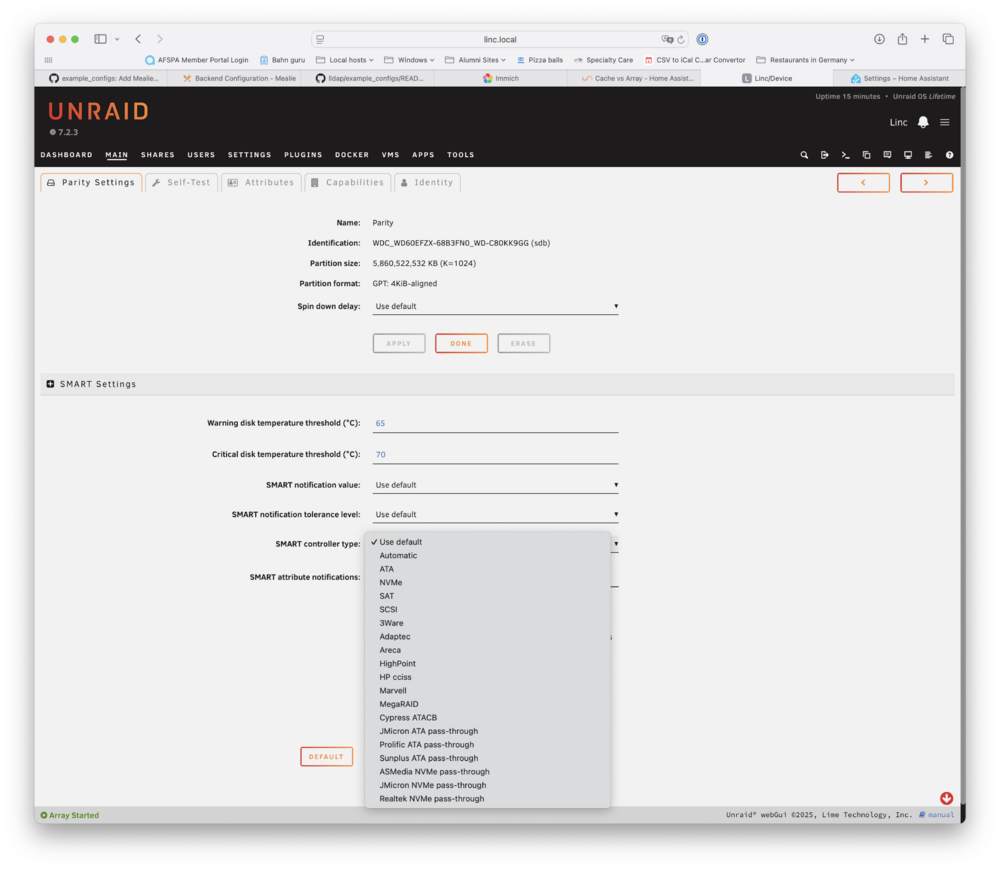
I have not modified the 'go file'. Not sure how to do that. I am still learning this system. Everything was a vanilla startup and just CA plugins and Apps. I have unloaded some of the plugin to see if there is a difference but there is not. Is it possible that the 'smart controller' type is causing this problem? The devices are SATA but when I do a 'smartctl --scan' it shows that the array has SCSI devices. The scan interval changes when I choose ATA or SAT so I'm thinking it has something to do with that? root@Linc:~# smartctl --scan /dev/sdb -d scsi # /dev/sdb, SCSI device /dev/sdc -d scsi # /dev/sdc, SCSI device /dev/sdd -d scsi # /dev/sdd, SCSI device /dev/sde -d scsi # /dev/sde, SCSI device /dev/nvme0 -d nvme # /dev/nvme0, NVMe device /dev/nvme1 -d nvme # /dev/nvme1, NVMe device root@Linc:~# smartctl -i /dev/sdb smartctl 7.5 2025-04-30 r5714 [x86_64-linux-6.12.54-Unraid] (local build) Copyright (C) 2002-25, Bruce Allen, Christian Franke, www.smartmontools.org === START OF INFORMATION SECTION === Model Family: Western Digital Red Plus Device Model: WDC WD60EFZX-68B3FN0 Serial Number: WD-C80KK9GG LU WWN Device Id: 5 0014ee 269138f9e Firmware Version: 81.00A81 User Capacity: 6,001,175,126,016 bytes [6.00 TB] Sector Sizes: 512 bytes logical, 4096 bytes physical Rotation Rate: 5640 rpm Form Factor: 3.5 inches Device is: In smartctl database 7.5/6045 ATA Version is: ACS-3 T13/2161-D revision 5 SATA Version is: SATA 3.1, 6.0 Gb/s (current: 6.0 Gb/s) Local Time is: Mon Jan 26 11:50:23 2026 CET SMART support is: Available - device has SMART capability. SMART support is: Enabled root@Linc:~#
-
I am using all vanilla CA plug-ins and Apps so not sure where that would be coming from. If I have the Docker containers stopped, why would it still be happening?
-
Could it just be that I need to set the SMART control type to SCSI, SAT, ATA, or automatic for each drive in my array? Will this hurt anything if I set it to SCSI or automatic?