





BitCryptic
Members
-
Joined
-
Last visited
-
Template + image updated: Protocol 28 (p28.0.1), and a correction to the history-retention setting 1. Upstream bumped to Protocol 28 bitcryptic/pi-network-node:latest now wraps pinetwork/pi-node-docker:organization-mainnet-v1.0-p28.0.1: stellar-core: v27.1.0 → v28.0.1 horizon: v27.0.0 → v28.0.1 PostgreSQL: 16 (unchanged) This is a straight binary swap: no pg_upgrade, no schema migration, no reingestion, and no config changes. Downtime is just the container restart, usually a few minutes; let it finish if it takes longer. Ports, mounts and variables are unchanged. Pi mainnet hasn't activated protocol 28 on-ledger yet, so Horizon will report current_protocol_version: 27 with supported_protocol_version: 28. That is expected. 2. History retention is now really 125000, and PARALLEL_JOB_SIZE is gone The template has claimed HISTORY_RETENTION_COUNT=125000 for a while, but that value was never actually in effect: Horizon starts via a script that sources /opt/stellar/horizon/etc/horizon.env, and that file overrides the container environment. On a fresh install, upstream's stock horizon.env sets HISTORY_RETENTION_COUNT=0 ("keep everything"), which also disables Horizon's lookup-table reaping, so the database grew without limit. The image now ships a stock horizon.env with 125000, so new installs get the documented value. That is roughly 7 days of history at ~5 s per ledger. Existing installs: your appdata copy of horizon.env is never rewritten by the image, so check it: docker exec PiNetworkNode cat /opt/stellar/horizon/etc/horizon.envThe last HISTORY_RETENTION_COUNT= line is the one that applies. If it says 0 or something very large, add export HISTORY_RETENTION_COUNT=125000 at the end of the file and restart the container. To check what you're actually keeping: docker exec PiNetworkNode curl -s http://localhost:8000/ | grep -E 'history_(latest|elder)_ledger'The difference between history_latest_ledger and history_elder_ledger is your retention window. After lowering it, Horizon's reaper starts within about an hour and deletes the excess in one continuous run, which can mean heavy disk I/O for a while; schedule it for a quiet time. The deletes free space inside Postgres but don't shrink the files on disk. Also removed: PARALLEL_JOB_SIZE. The template claimed it reduced ingestion parallelism, but Horizon dropped that option in v22, so it did nothing. It's gone from the image, README and template. How to update docker pull bitcryptic/pi-network-node:latestThen in the Unraid Docker tab, stop and remove PiNetworkNode (tick "remove image") and recreate it from the template, or use Check for Updates → Apply Update. Don't use Restart to pick up a new image; a recreate is what applies it. More detail, including how to check the effective tuning values, is in the README: https://github.com/bitcryptic-gw/unraid-pi-network-node As always, this is a community-maintained template, not affiliated with or endorsed by the Pi Core Team.
-
@Squid I guess on that basis, we don't need Unraid. Everyone can install headless Linux and use docker compose and monitor everything with a collection of bash scripts ? Or perhaps the whole point is to be more inclusive and give people a platform that lets them use a GUI or CLI as their experience or confidence permits... There's a lot of plugins and docker templates I don't find useful, so I don't install and use them.
-
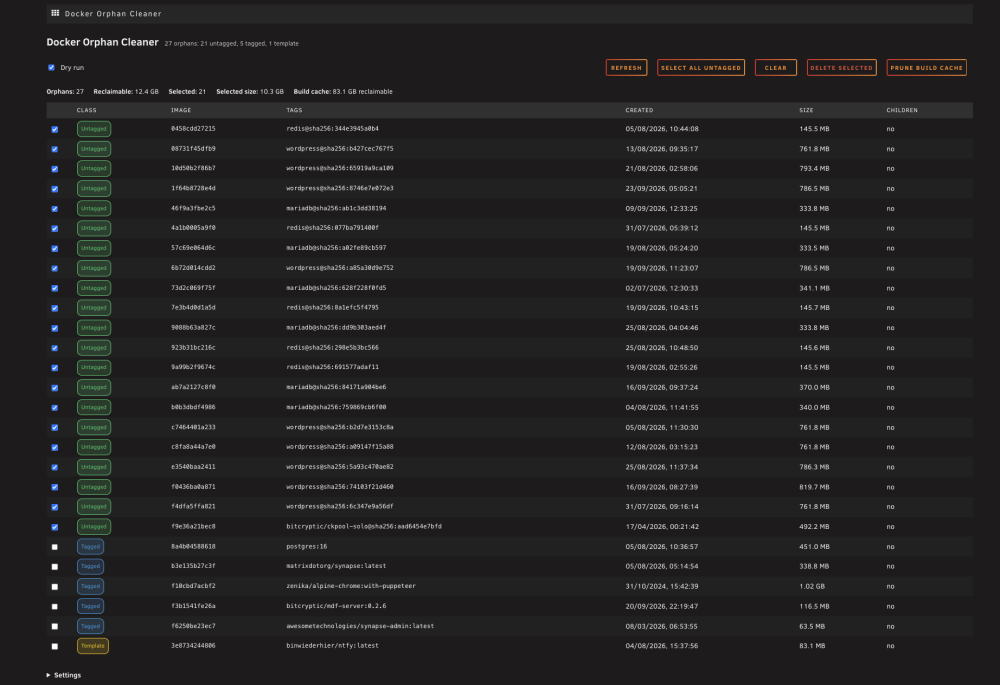
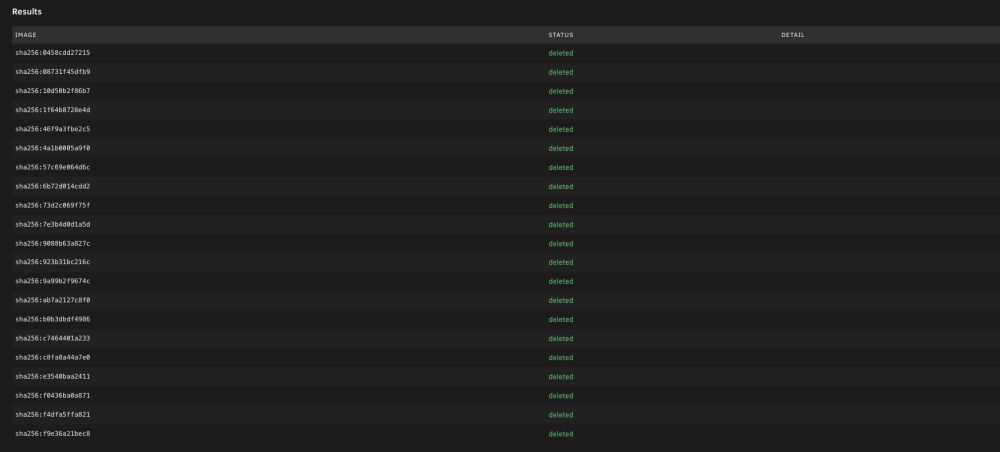
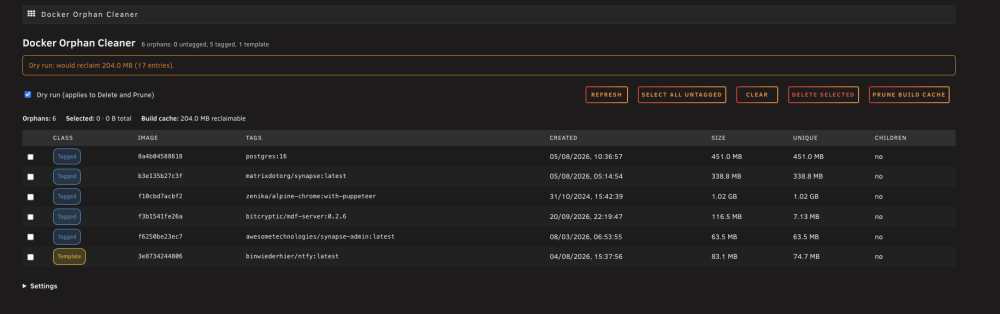
Support thread for the Docker Orphan Cleaner plugin for Unraid (docker.orphan.cleaner). What the plugin doesUnraid removes orphan Docker images (images that no container references) only one at a time, from the Docker tab. That is slow when a host has accumulated a lot of them, and there is no way to see the whole set or to tell how safe each one is to remove. Docker Orphan Cleaner lists every orphan in one place, classifies how safe each one is to delete, and removes the selected images in bulk. It also reports the reclaimable build cache and can prune it on request. It is deliberately conservative. Nothing is force-removed, every manual deletion is confirmed, and a scheduled run only ever deletes untagged images. How images are classifiedEach orphan is placed in exactly one class, in this precedence order: Class Meaning Ticked by default Pinned Matches a user pin pattern. Never deleted, in the UI or on a schedule no Template repo:tag matches a <Repository> in /boot/config/plugins/dockerMan/templates-user/*.xml; the container was removed but its template remains no Compose repo:tag appears as an image: in a Docker Compose stack; a stack that is down makes its images look orphaned no Tagged Has a real tag, but nothing references it no Untagged No tag (<none>), with or without a repo digest yes Untagged includes superseded pulls: when a tag moves to a newer pull, the old image keeps its digest, loses its tag, and is exactly the kind of image you want to clean up. One row is produced per image ID; untagged rows show repository@sha256:<short> so you can tell what the image was. Safety propertiesDry run is on by default and enforced on the server. Delete and Prune do nothing unless the request explicitly carries "dryRun": false. A missing or malformed flag is treated as a dry run. The orphan set is recomputed at delete time from the Docker daemon. What the browser sends is treated as a request, never as authority. An image that is no longer an orphan, or that is pinned, is refused. Nothing is force-removed. Deletion is one image per API call, force=0. A parent image that cannot be removed is reported per image instead of failing the whole batch. Scheduled runs are notify-only by default. Even in delete mode they only touch untagged images, and they respect pins and the minimum age. The plugin never modifies container templates or icons. It only reads them. Screenshots InstallRecommended: from Community Applications. Open the Apps tab, search for "Docker Orphan Cleaner" and click Install. Alternatively, install it manually: 1. In the Unraid webGUI, go to Plugins ▸ Install Plugin. 2. Paste this URL and click Install: https://raw.githubusercontent.com/bitcryptic-gw/unraid-docker-orphan-cleaner/main/plugin/docker.orphan.cleaner.plg It appears as a tile under Settings ▸ User Utilities. Settings (pins, minimum age, schedule) are on the same page. Requires Unraid 7.0.0 or newer (tested on 7.3.2) Source and issuesGitHub: https://github.com/bitcryptic-gw/unraid-docker-orphan-cleaner Issues: https://github.com/bitcryptic-gw/unraid-docker-orphan-cleaner/issues Known limitationsThe "Unique" size is a lower bound. It is Size − SharedSize from /system/df. Layers shared only among the images you selected are also freed but are not counted, so the real saving can be larger than the Unique figure. The "total" figure is the sum of each image's full size and overstates the saving, because it counts shared layers more than once. Only images are cleaned. Unused Docker volumes are not touched. Tagged orphans are never auto-deleted. A scheduled run only removes untagged images that are older than the minimum age. The plugin needs the Docker service to be running.
-
I can take a look at upstream and work out what steps are involved with switching to the main repo using this template.
-
Paperclip template: no longer supported I've stopped maintaining the Paperclip template and the bitcryptic/paperclip image, and I've marked the template as deprecated in Community Applications. I've retired Paperclip from my own setup, so I can't keep it properly maintained. @NeZios — to answer your question from August: there won't be any further updates from me. Sorry for the slow reply. What this means for you: The last image build tracks upstream v2026.529.0 (31 May 2026). No more builds, fixes or support from me. Existing installs keep running. The image will stay on Docker Hub for now, so you can still recreate the container. You don't have to uninstall anything, but you won't receive updates, including security fixes. If you want to keep up with Paperclip, the upstream project is at https://github.com/paperclipai/paperclip. My build added a root-to-node entrypoint fix and Tailscale support for Unraid, so if you move to upstream you'll need to cover those yourself. Thanks to everyone who tried it and gave feedback.
-
NanoClaw template: no longer supported I've stopped maintaining the NanoClaw template and the bitcryptic/nanoclaw image, and I've marked the template as deprecated in Community Applications. I've moved off NanoClaw in my own setup. Back in May I said I planned to re-align with upstream once their v1 to v2 migration settled. I'm no longer doing that, so please disregard that plan. Sorry for the change of direction. What this means for you: The last image build is from 17 May 2026. No more builds, fixes or support from me. Existing installs keep running, and the image will stay on Docker Hub for now. One caution: NanoClaw mounts the Docker socket, and an unmaintained image won't receive security fixes. If you'd rather not run frozen code with that level of access, I'd move to upstream. The upstream project is at https://github.com/qwibitai/nanoclaw, which is the best place to follow it from here. @Jarao — to answer your question from June: yes, the container needs at least one chat channel (Matrix or Telegram) configured before it will start. Thanks to everyone who tried it and reported issues.
-
Template updated — v27.1.0 (image change) The template has been updated to protocol v27.1.0, following the Pi Core Team's latest release. What's changed: Image updated to: bitcryptic/pi-network-node:latest Wraps the official Pi Network image (pinetwork/pi-node-docker:organization-mainnet-v1.0-p27.1.0) with the same performance optimisations as previous versions. Upgrade notes for this version: Binary bump — stellar-core updated to v27.1.0, horizon to v27.0.0 No data migrations on first boot — straight binary swap, no pg_upgrade, no reingestion Ubuntu base and PostgreSQL 16 unchanged Existing users: Unraid's "Check for Updates" will detect the new tag automatically — just hit Apply Update Verify sync after restart: docker exec PiNetworkNode node-status (or curl http://localhost:31401 | python3 -m json.tool | grep ingest_latest_ledger and compare against https://api.mainnet.minepi.com) Note: stellar-core's own sync state is more reliably checked via docker exec PiNetworkNode curl -s http://localhost:11626/info — look for "state" : "Synced!" — since horizon's root endpoint can briefly show stale core_latest_ledger/current_protocol_version values right after a restart before it catches up to core's actual state
-
Template updated — v26.1.0 (image change) The template has been updated to protocol v26.1.0, following the Pi Core Team's latest release. What's changed: Image updated to: bitcryptic/pi-network-node:latest Wraps the official Pi Network image (pinetwork/pi-node-docker:organization-mainnet-v1.0-p26.1.0) with the same performance optimisations as previous versions. Upgrade notes for this version: Binary bump — stellar-core updated to v26.1.0, horizon to v26.0.0 No data migrations on first boot — straight binary swap, no pg_upgrade, no reingestion Ubuntu base and PostgreSQL 16 unchanged Existing users: Unraid's "Check for Updates" will detect the new tag automatically — just hit Apply Update Verify sync after restart: docker exec PiNetworkNode node-status (or curl http://localhost:31401 | python3 -m json.tool | grep ingest_latest_ledger and compare against https://api.mainnet.minepi.com)
-
Template updated — v25.2.2 (image change) The template has been updated to protocol v25.2.2, following the Pi Core Team's latest release. What's changed: Image updated to: bitcryptic/pi-network-node:latest Wraps the official Pi Network image (pinetwork/pi-node-docker:organization-mainnet-v1.0-p25.2.2) with the same performance optimisations as previous versions. Upgrade notes for this version: Binary bump — stellar-core updated to v25.2.2, horizon to v25.1.0 No data migrations on first boot — straight binary swap, no pg_upgrade, no reingestion Ubuntu base and PostgreSQL 16 unchanged Existing users: Unraid's "Check for Updates" will detect the new tag automatically — just hit Apply Update Verify sync after restart: docker exec PiNetworkNode node-status (or curl http://localhost:31401 | python3 -m json.tool | grep ingest_latest_ledger and compare against https://api.mainnet.minepi.com)
-
Update — 2026-05-31 The image has been updated to track upstream v2026.529.0 (released 2026-05-29). If you're running the CA template, it already uses :latest so just stop the container, remove the image, and recreate — it will pull the updated image automatically. Notable upstream changes since the original post: - v2026.517.0 — Grok Build is now a first-class local runtime (adapter registry, UI, CLI, session handling) - v2026.529.0 — Inline document annotations and comments on issues, with revision-aware anchor snapshots No template changes required. Post any issues here and I'll do my best to help.
-
Template updated — v24.1.0 (image change) The template has been updated to protocol v24.1.0, in line with the Pi Core Team's upgrade schedule (deadline: June 2, 2026). What's changed: Image updated to: bitcryptic/pi-network-node:latest Wraps the official Pi Network image ( pinetwork/pi-node-docker:organization-mainnet-v1.0-p24.1.0 ) with the same performance optimisations as previous versions. Upgrade notes for this version: Routine binary bump — stellar-core updated to v24.1.0, horizon to v24.0.0 No data migrations on first boot for existing users already on v23.x Ubuntu base (24.04) and PostgreSQL 16 unchanged Existing users: Unraid's "Check for Updates" will detect the new tag automatically — just hit Apply Update Verify sync after restart: curl http://localhost:31401 | python3 -m json.tool | grep ingest_latest_ledger and compare against https://api.mainnet.minepi.com
-
please move to docker container area
-
This template is no longer supported. See the announcement below. Paperclip is an open-source AI coding agent platform that lets you run Claude-powered coding agents on your own server. This image is maintained by BitCryptic and built from the official Paperclip source with Unraid compatibility in mind. Features Claude-powered coding agents via Anthropic API Web UI served from the same container Authenticated or public deployment modes Tailscale support for private access Requirements PostgreSQL database — a separate Postgres container (e.g. postgres:16) on the same Docker network Anthropic API key from console.anthropic.com (required for Claude-based agents) A securely generated BETTER_AUTH_SECRET (openssl rand -base64 32) Installation Install via Community Applications and search for Paperclip, or drop the template XML directly into /boot/config/plugins/dockerMan/templates-user/ on your Unraid server. You'll need a PostgreSQL container running before starting Paperclip. The default DATABASE_URL assumes a container named postgres-paperclip on the same Docker network — adjust to match your setup. Required fields: DATABASE_URL — PostgreSQL connection string (default: postgres://paperclip:password@postgres-paperclip:5432/paperclip) BETTER_AUTH_SECRET — random secret for session signing, generate with openssl rand -base64 32 PAPERCLIP_PUBLIC_URL — the URL users will access Paperclip from (e.g. http://your-server-ip:3100 or your Tailscale hostname) PAPERCLIP_DEPLOYMENT_MODE — authenticated for private use, public for open access (default: authenticated) ANTHROPIC_API_KEY — required for Claude-based agents After starting the container, access the web UI at http://your-server-ip:3100. Notes Paperclip requires a PostgreSQL database — it will not start without a valid DATABASE_URL. If you don't already have a Postgres container, add one first and put both on the same Docker network. PAPERCLIP_PUBLIC_URL must match the URL you actually use to access Paperclip — if this is wrong, auth callbacks will fail. If accessing from multiple URLs (e.g. local IP and Tailscale hostname), set BETTER_AUTH_TRUSTED_ORIGINS to a comma-separated list of all valid origins. For private access, Tailscale is supported — enable it in the template and set PAPERCLIP_PUBLIC_URL to your Tailscale hostname. Links Template repository: https://github.com/bitcryptic-gw/unraid-templates Paperclip project: https://github.com/paperclipai/paperclip Docker Hub image: https://hub.docker.com/r/bitcryptic/paperclip Post any issues or questions here and I'll do my best to help.
-
Great diagnostics — you've basically pinpointed it. The most likely culprit is a path mismatch in HOST_PROJECT_ROOT. This variable tells NanoClaw where its appdata lives on the host (not inside the container), because it needs to pass correct volume mount paths when spawning agent containers via the Docker socket. Without it resolving correctly, the path from "event decrypted" → "register group + persist message + spawn agent" fails silently at the point it tries to construct the container args — which matches exactly what you're seeing. Check what you have set for HOST_PROJECT_ROOT and verify it matches where Unraid has actually placed the appdata. The template defaults to /mnt/cache/appdata/nanoclaw but depending on your cache pool name or appdata share configuration it could be something different on your system — /mnt/user/appdata/nanoclaw is a common variation. You can confirm the real path with: bash ls /mnt/cache/appdata/nanoclawIf that returns nothing, try /mnt/user/appdata/nanoclaw and update the template variable to match. One other thing worth flagging while you're in the template — Anthropic has deprecated OAuth token auth for Claude Code in automated/non-interactive contexts. Even once agent containers are spawning correctly, CLAUDE_CODE_OAUTH_TOKEN won't get you a working agent. You'll need either an ANTHROPIC_API_KEY from console.anthropic.com, or if you're running Ollama or LiteLLM locally, you can use a per-group provider override (NANOCLAW_PROVIDER_BASE_URL + NANOCLAW_PROVIDER_API_KEY + NANOCLAW_PROVIDER_MODEL) to route agent sessions to a local model instead. Everything else you've described looks healthy — decryption is clean, the network exists, the Docker socket is mounted, and agent images are present. The OAuth situation aside, the HOST_PROJECT_ROOT path mismatch should be the only structural issue. Your post has also prompted us to update our template docs to make both of these requirements clearer — appreciate the thorough writeup, it's exactly the kind of feedback that helps. Give it a restart with both fixes applied and let me know what you see. If agent spawning still doesn't fire, grab the full docker logs output from a fresh message send and I'll dig further.
-
Hey nathan9214, glad you got it working! Telegram is still in there and should work — it's just not my primary channel so it hasn't had as much real-world testing in this build. Matrix is the native channel in the bitcryptic/nanoclaw template and tends to be the more repeatable path if you're open to it. That said, if Telegram is your preference, stick with it. The tweaking you did to get it running is likely the right approach for now. We're planning to re-align with upstream once their v1→v2 migration stabilises — that work is actively in progress over at qwibitai/nanoclaw — so the Telegram experience should improve as things settle. What did you end up having to tweak? Would be useful to know so I can document it properly for others.


