





PikkonMG
Members
-
Joined
-
Last visited
-
Reserve.
-
Reserve.
-
Von is a small local model for making quick decisions about text. A chat model writes its answer one token at a time. Von reads the text once and answers the questions you give it, each with a probability you can put a threshold on. That makes it handy in front of a bigger model: route a message to the right place, triage a ticket, or check a guardrail before anything expensive runs. It serves the same /v1/systemone API as TypeSafe's Jev, so anything written for Jev can point at your server instead. Von has no official Docker image, so I build one from the Von release on PyPI. A GitHub Action checks for a new version every day and rebuilds the image when one comes out. Setup guide: https://github.com/PikkonMG/unraid-docker-templates/blob/main/docs/VON-SYSTEM-ONE.md Project: https://github.com/wfzyx/von Image build: https://github.com/PikkonMG/von-docker What you can ask itThere are three kinds of question, and you can mix them in one request: choice picks one option from a list you give it score places the text on a scale you define noul gives the probability that a statement is true Pick a tag when you installCommunity Applications asks you which one you want. cpu works on any server and runs on OpenVINO. nvidia needs the Unraid NVIDIA Driver plugin and driver 560 or newer. CA fills in --runtime=nvidia for you. First startThe first start downloads about 3 GB of model weights into /mnt/user/appdata/von-system-one. The cpu tag also saves an OpenVINO copy of the model there, about 3 GB more. The container shows healthy once the model is loaded, and later restarts skip the download. The API key is optional. Leave it blank and anything on your network can call it. Set one and clients have to send it as a bearer token. Try itThe API docs page is at http://MY-UNRAID-IP:8013/docs. For a quick test from any machine: curl -s http://MY-UNRAID-IP:8013/v1/systemone \ -H 'content-type: application/json' \ --data '{ "state": "I was charged twice. Please refund the duplicate charge.", "questions": { "department": { "type": "choice", "instructions": "Which team should handle this?", "criteria": {"billing": "payments and refunds", "technical": "bugs and outages"} } } }'Add -H 'Authorization: Bearer MY-API-KEY' if you set a key. On my RTX 3060 an answer comes back in about 50 ms. The guide has a longer example with all three question types. Post here if something breaks on the Unraid side and I will take a look. Bugs in Von itself are better raised on their tracker: https://github.com/wfzyx/von/issues
-
What is Laya?Laya is a small AI model that makes quick decisions about text. You send it a piece of text and a few questions, and it answers all of them in one pass. Every answer comes with a probability, so your own code can tell how sure it is. It understands three kinds of questions: Choice: pick one option from a list, like which department should handle a ticket Score: place the text on a scale, like how urgent it is Yes / no / unsure: like whether the user asked for a refund What is it for?Use it where you want a fast, structured answer and a full chat model would be slow or overkill. Good fits are sorting support tickets, routing requests to the right team or model, moderation, and guardrails in front of a larger model. It works in more than 100 languages, and a built-in router picks the right model for each request. About this containerLaya does not publish a Docker image, so I build one from their source code. The Dockerfile and the GitHub workflow that builds it are public in the image build repo linked below, so you can see exactly what goes into it. The image rebuilds on its own whenever Laya puts out a new release. When you install, Community Applications asks you to pick a tag: cpu runs on any server. nvidia runs on your NVIDIA GPU. It needs the Nvidia Driver plugin, and the template fills in Extra Parameters for you. The API runs on port 8012. Open http://YOUR-SERVER-IP:8012/docs to try requests right in your browser. Setting an API key is optional. LinksSetup guide: https://github.com/PikkonMG/unraid-docker-templates/blob/main/docs/LAYA-SYSTEM-ONE.md Image build repo: https://github.com/PikkonMG/laya-system-one-docker Laya project: https://github.com/NandhaKishorM/laya Laya documentation: https://nandhakishorm.github.io/laya/ Need help?Post your container log and the tag you installed, and I will take a look.
-
Small template update, and worth grabbing if you run a local model. I kept getting reflect timeouts when Hindsight tried to rebuild a memory page, and it turns out two of its defaults are the cause. Hindsight gives a page rebuild 300 seconds, and lets it gather up to 100,000 tokens of text before it writes anything. Fine on a hosted model. On a local one the rebuild sails past 300 seconds and gets killed, and 100,000 tokens is way past what a small model can hold, so the prompt gets cut and you end up with a worse page. Both of those are now settings on the main page, along with the Ollama window size they have to fit inside: Field Default What it does Reflect time limit 1200 Seconds a page rebuild may run before it is abandoned Reflect max context 24000 Most tokens a rebuild gathers before writing the page Ollama context size 32768 Prompt window. Keep it above Reflect max context The two reflect fields will not accept a blank. Hindsight reads them as plain numbers, and an empty value stops the container from starting, so Unraid marks them required. Ollama context size can be left blank if you are not using Ollama. Move all three together to suit your hardware. A bigger window costs more VRAM, so do not just crank it. Already running it?Here is the annoying part. Unraid will not push new fields into a container you already made, so these will not turn up on their own. You have to add them yourself. Nothing gets lost either way, since your memories sit in /mnt/user/appdata/hindsight and the container never touches them. Adding them by hand 1. Docker tab, click the Hindsight icon, choose Edit. 2. Scroll to the bottom and click Add another Path, Port, Variable, Label or Device. 3. A small window opens. Set Config Type to Variable, then fill in Name, Key and Value from one row of the table below. Leave Default Value and Display alone. 4. Click Add. The window closes and the field appears in the list. 5. Repeat steps 2 to 4 for the other rows. 6. When all three are in, click Apply at the bottom. The container restarts on its own. Name Key Value Reflect time limit HINDSIGHT_API_REFLECT_WALL_TIMEOUT 1200 Reflect max context HINDSIGHT_API_REFLECT_MAX_CONTEXT_TOKENS 24000 Ollama context size HINDSIGHT_API_LLM_OLLAMA_NUM_CTX 32768 Name is only the label you see on the Unraid page, so call it whatever you like. Key has to match exactly. If you already have Ollama context size in there, do not add a second one, just change the value to 32768. Or start fresh instead Faster if you have not changed much. Remove the container and leave the appdata folder alone when it asks. Add it back from the template, put your keys in again, and all three fields are already there. Did it work? Watch the log after it restarts. A reflect that used to die at 300 seconds should run all the way through now. Still timing out? Push Reflect time limit higher. If the pages come out thin or look like they are missing things you know are in there, your model window is probably under 32768, so bring Ollama context size and Reflect max context down to match whatever it actually is. Template and guide are in the first post.
-
Reserve.
-
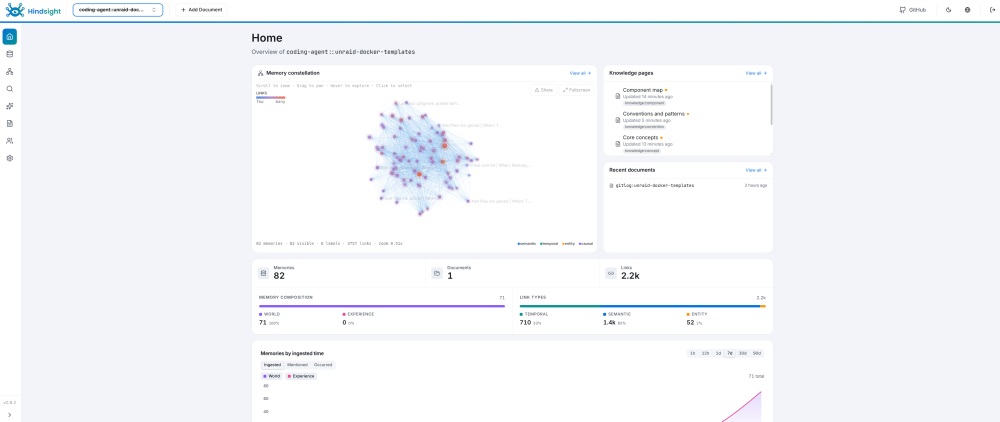
Hindsight is a memory server for AI agents. Your agents save what they work out to it and search it back later, so they stop re-deriving the same decisions every session. It speaks MCP, so anything with MCP support can talk to it: Claude Code, Cursor, Codex, Pi, Grok CLI, and the rest. I put a template together for it. It runs the official upstream image, which carries the API, the web dashboard, the search models and its own PostgreSQL, so there is nothing else to stand up alongside it. Setup guide: https://github.com/PikkonMG/unraid-docker-templates/blob/main/docs/HINDSIGHT.md Project: https://github.com/vectorize-io/hindsight Upstream docs: https://hindsight.vectorize.io Do this before you hit ApplyThe container runs as uid 1000 and will not chown its own appdata, so make the folder yourself first. On the Unraid terminal: mkdir -p /mnt/user/appdata/hindsight chown -R 1000:1000 /mnt/user/appdata/hindsight chmod 700 /mnt/user/appdata/hindsightSkip it and the container comes up, then immediately says /home/hindsight/.pg0 is not writable. Stop it, run those lines, start it again. It does not use the usual PUID and PGID variables. It needs a modelHindsight uses a language model of its own to pull facts out of whatever your agents send it. That is separate from whatever model your agents are running on, and it never talks to you directly. Point it at an Ollama box on your LAN, or paste in a key for OpenAI, Anthropic, Gemini, Groq, OpenRouter, DeepSeek or Ollama Cloud. Going the Ollama route, the model has to support tool calling or the reflect feature will not work. Use your server IP in the endpoint field, not localhost, since localhost inside the container is the container. Ports and keys8888 is the API and the MCP endpoint. 9999 is the dashboard. There are three keys. Memory API key and Web UI backend key have to hold the same value, and that is the one your agents send as a bearer token. Web UI login key is a separate one, and it is what you type to get into the dashboard. Connecting your agentsUpstream ships an installer that detects the agents you already have and wires them all up. Run it on the machine you code from, not on the server. I have only run this on Linux, so I cannot tell you how it behaves on Windows or Mac. npx @vectorize-io/hindsight-coding-agents install all \ --server self-hosted \ --api-url http://MY-UNRAID-IP:8888 \ --api-token MY-MEMORY-API-KEYThat covers Claude Code, Codex, Cursor, opencode, Pi and a few more. After it runs, each repo gets its own memory bank automatically, seeded from your commit history. Anything it does not cover is a plain MCP endpoint. One bank per project, named in the URL: http://MY-UNRAID-IP:8888/mcp/MYBANK/with an Authorization: Bearer MYTOKEN header. The guide has the config block for Cursor, Oh My Pi, plain Pi, Grok CLI and Claude Desktop, which is the one awkward case because its connector dialog has nowhere to put a bearer token. First save on a cold model takes a while, mine was about half a minute on a local one, because Ollama has to load the model before it can do anything. It settles down after that. BackupsStorage lives at /mnt/user/appdata/hindsight. The database runs inside the container but writes out to there, so it survives restarts, updates and rebuilds. Stop the container before you back that folder up. Post here if something breaks on the Unraid side and I will take a look. Bugs in Hindsight itself are better raised on their tracker: https://github.com/vectorize-io/hindsight/issues
-
Your config.yaml looks basically fine. The likely issue is the URL used in Home Assistant. For llama-swap Home Assistant should connect to the API at http://<your-unraid-ip>:8080/v1, not port 5800. The 5800 port in the logs is typically the internal llama.cpp backend launched by llama-swap. Before retrying in HA test curl http://<your-unraid-ip>:8080/v1/models from another machine. If that fails, HA will fail too.
-
Wanted to check back, did you figure it out if not please share your config.
-
That error is a YAML parse error I think, right now I can’t reproduce it from the current template working fine on my end. Please paste your current config.yaml and the full log line showing "did not find expected key" so I can check and see where it might be coming from.
-
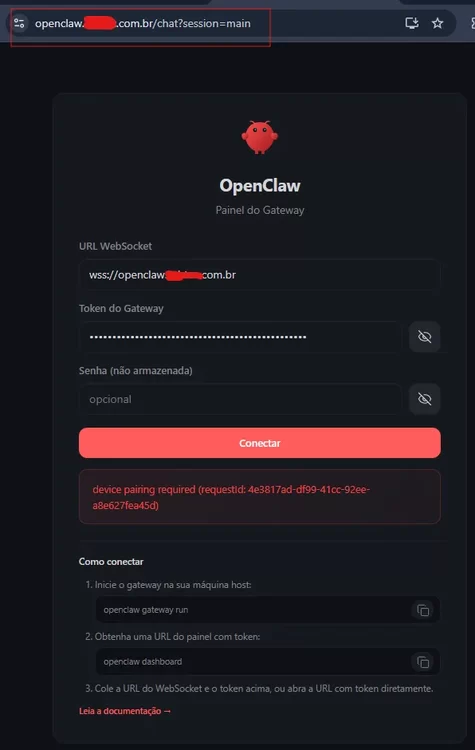
{ "gateway": { "mode": "local", "bind": "lan", "controlUi": { "allowInsecureAuth": true, "allowedOrigins": [ "http://localhost:18789", "http://127.0.0.1:18789", "http://192.168.50.250:18789" ] }, Your request id will show up from you browser like in your post on page before. Please make sure once you figure this out and get it running that you delete and reinstall it dont give out your requestid stuff like that. You can also unauthrize that id and get a new one using commandline inside the container if you wiosh to do that.
-
If your on chrome or like me edge then edge://flags/#unsafely-treat-insecure-origin-as-secure Enable Insecure origins treated as secure and add your local ip on unraid server running openclaw I.E http://192.168.1.100:18789 In your config dont use wildcard like * edit it to use the ip address of your unraid server And you have to pair you device this has been posted on a few times here now you get pairing request via the browser just take that requestid and run it with openclaw devices approve xxxxxxxx-xxxxxx-xxxxxx-4443434cac61 --token "$OPENCLAW_GATEWAY_TOKEN" inside the container.
-
Just did another test install on unraid and it installed just fine. Only difference from post on page 6 is you now get your device pairing required requestId via the browser and don't have to run openclaw devices list. Take the requestId via the browser and pair it openclaw devices approve xxxxxxxx-xxxxxx-xxxxxx-4443434cac61 --token "$OPENCLAW_GATEWAY_TOKEN" if openclaw.json is being edited while the container is running openclaw might overwrite or revert those changes. Stop the container first, edit the file, save, then restart. Also confirm /root/.openclaw is properly bind-mounted to persistent Unraid storage (/mnt/user/appdata/openclaw) or changes may be lost during container recreation.
-
I know this take will probably be unpopular with community here but most will be better off running OpenClaw or Hermes on a Raspberry Pi 5 or Budget VPS with Hetzner/Contabo/OVHCloud. Downside to VPS is local llm usage but you can get around that with wireguard/tailscale.
-
OpenClaw docker doesn't like trying to use tailscale the way unraid doesnt its container setup. Run tailscale directly on unraid.


