





RaidPC
Members
-
Joined
-
Last visited
Everything posted by RaidPC
-
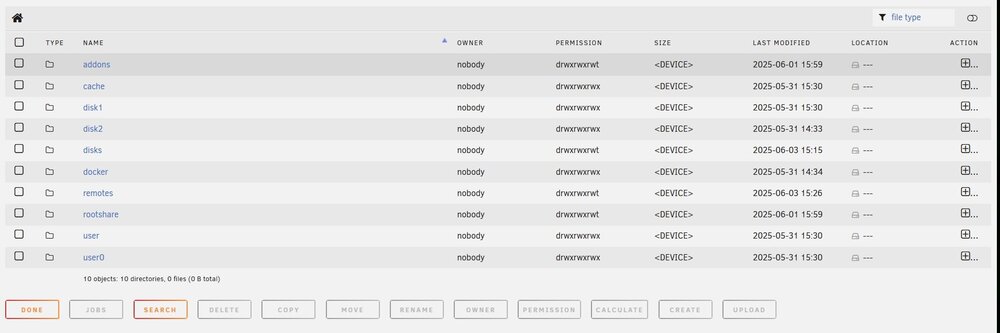
I am working on moving my movies to disk 1 when I noticed all four drives have a Parent Directory of which all four Parent Directories have the exact same sub-folders. This drive I labeled 'Docker' and in my mind I had not created any of these sub-folders nor did I want anything in it, but my docker's (which none have been created yet). Did I do something wrong in my setup, can I change it if I did, or this normal? For some reason disk 2 which like disk 1 is 8TB, has 153 GB of used space. But I didn't put anything there as far as I know. Again the Parent Directory is like below. Thank you in advance for any insight.
-
New to UnRaid. Setting up my new system and moving my movies to the drive, Disk 2. The Parity Drive is at 13.5% (10tb). Writing to the Disk 2 I am seeing 20MB/s on a USB 3.0 connection on the motherboard. Seems really slow. Is that because the Parity Drive is still getting setup with whatever it is doing?
-
This Saturday I will assemble my new UnRaid NAS with all the fancy parts I purchased from NewEgg. 8-Bay Fractal R5 case, etc. Plan on making the license purchase as well. My dilemma is searching a recommendation for a new USB thumb drive. Right now the trial is working of a cheap one I had laying around home. I've looks a long time for Samsung's but they are not sold locally. Seems no one recommends SandDisk (which I have used for other uses for years). Can someone actually recommend one that is in existence these days? And what is the best practice on moving from the trial on that cheap thumb drive to the new one? It is not important I keep what I have already set up. Initial setup was a pool only and I've learned a lot since than.
-
Good to know. My new system's parts are coming Wednesday. I am excited about getting on the UnRaid wagon. Just so happen to also already have an SSD drive just laying around.
-
I was sort of fearing that as much. When I move to the paid subscription (on trial) and reset this up as an array, will the docker service still keep all the disks running? One of the lure's towards UnRaid is from what I read not having the disks run all the time. Granted, I am new to the raid technology and dockers.
-
I am a rookie working with UnRaid and as test environment, I just have two hard drives setup in a pool. I set the spin down time to 15 minutes. But I notice more often then not, both seem to be spinning most of the day. My setup only consists of the above setup and one Docker, Emby. I am not bringing up Emby on all my devices during long lengths of time so I am trying to isolate why they are spinning. Is there any tool in UnRaid which will pin point why they are spinning?
-
No reason, just a noobie who set it up the first time. I am researching more each day how to do it right.
-
A co-worker encouraged me to try unRaid and I am really savoring it thus far. Should have it mastered in a day or two. :-) So I asked him about his screen clip below and he really didn't have an explanation. He is a long time user. Why is my 8TB drive only showing up as 5.5 TB and showing on 2.98 TB free with only 24.GB used? Second, why is my second drive not listing a File Structure like the first drive, btrfs. --I also noticed I can set a spin down idle time on the first drive, but not the second drive. Not sure why this is. Lastly, should I when the trial ends, purchase a subscription, and restart this whole process with xfs instead?

-
Great thank you. Ironically, I use a mysql database as well though I have been trying to get the Kodi headless docker running under UnRaid. (Got it running, but it is apparently an old version and the Community does not have the newer version. Never populated.)
-
I think I understand what you meant. Your supporting the old image that is depreciated, but not the new one I liked to.
-
The credit goes to UnRaid that it pulled it. But yes, I discovered it is depreciated. BUT, still supported too. https://github.com/matthuisman/docker-kodi-headless But, I have no understanding how to install it in UnRaid or Portainer for that matter.
-
The docker for Kodi Headless is depreciated. in the Community list. Yet the author still has been updating it. How do you install a docker not in the Community list. It would not upgrade so I am left trying to figure out how to install one outside the Community.
-
LOL. Well, I click on the Icon in the docker section for the Kodi Headless, in UnRaid, and that is what I get. Do I need to look elsewhere. Sorry, this learning the ropes on several fronts with UnRaid and Dockers.
-
Oddly, it says among other things, "this image is deprecated. We will not offer support for this image and it will not be updated." Yet I pulled it from the Community and assumed it was current. States no errors. [cont-init.d] 10-adduser: exited 0. [cont-init.d] 30-config: executing... Setting timezone to America/New York... [cont-init.d] 30-config: exited 0. [cont-init.d] 90-custom-folders: executing... [cont-init.d] 90-custom-folders: exited 0. [cont-init.d] 99-custom-scripts: executing... [custom-init] no custom files found exiting... [cont-init.d] 99-custom-scripts: exited 0. [cont-init.d] 99-deprecation: executing... this image is deprecated. We will not offer support for this image and it will not be updated. [cont-init.d] 99-deprecation: exited 0. [cont-init.d] done. [services.d] starting services [services.d] done. Starting Kodi.. That's about it.
-
The last post was sometime ago so I am not sure if this is monitored. But I have Kodi headless running no my Unraid, edited the advancedSettings.xml to point to my Maria DB mysql and gave the proper username and password. But the headless docker will not populate with any data. I though maybe I had to setup a share, but realized there is not share to setup to the Maria DB. What am I missing. All my Kodi installations point to and work from that database through their advancedsettings.xml.
-
Perfect, this is the kind of feedback I am looking for at the moment.
-
I see there have been 62 views on my post, but no feedback or suggestions. Was my question on hardware recommendations too subjective? Right now in my 'Pilot' I have UnRaid running on an old PC with 4gb of RAM and two hard drives (using one of the SATA connections from the previous Cdrom drive. But I really want to consolidate what I shared above and make it a bit of future proof. I was hoping someone had an idea what that would look like in purchasing hardware.
-
Background for usage. I currently have two WD MyCloud Ultra EX2's, one Qnap-TS233, two WD MyClouds and two 8tb drives recording and holding 32tb of OTA movies, tv shows and music. All backed up to 5 USB 8tb drives. A lot of overhead. Primarily used with an HDHomeRun tuner, Emby and Kodi. Learning and enjoying working with dockers. I want to consolidate the above paragraph of 'stuff,' hence my interest in UnRaid. I pretty much have decided to purchase UnRaid in the 26 days I have left on the trial. So I have been looking at hardware options. I think the Fractal Design Define 7XL gets good recommendations. (Been quite a few years since I built my current workstation so I am behind on the current technology). I do not currently believe I transcode any videos for streaming. But on the latter it seems the view is go with an Intel MOBO and processor and IGPU. In a nutshell, can I get a recommendation on what hardware that would continue to handle what I am doing now and allow for expansion and new capabilities? Running Dockers, stuff like that.

