





RaidPC
Members
-
Joined
-
Last visited
Everything posted by RaidPC
-
drwxr-xr-x 3 root root 60 Mar 6 07:58 MICROPC_Recovery/
-
No, just verified it is not list in Unassigned Disk Device nor under Unassigned Devices.
-
It is a host path that you can select from a drop-down when mapping a volume
-
I have a smb share that I no longer have to a Windows PC for backup purposes. This URL or path only shows up when I go into a docker template and notice the reference is still there. I've looked pretty had in all my dockers for any reference to it to delete it. Is there a config file or something I can do to delete it when I cannot find it?
-
I use Appdata Backup daily and I have a backup of Nextcloud. Recently, I had to remove and re-install Nextcloud and in particular the Cookbook app. In UnRaid, I can see the path to the recipes folder: /mnt/dockers_ssd/appdata/Nextcloud/data/Fred/files. I thought I could just open the ab_20260301_200020 folder, and extract just the recipes to this folder. There is a Nextcloud.tar.gz I can get to, but no recipes folder anywhere. Indeed, while there is a \mnt\user\appdata\Nextcloud folder, there is no /data/Fred/files. Does Appdata backup not backup the actual data files? I see no Nextcloud/data/Fred/files folder structure anywhere? I have no copies of these recipes outside of what I had on Nextcloud and the backup's.
-
I was able to get this working by going into the docker settings in Unraid and "enabled" Host access to custom networks." Underneath was a little message about knowing what you are doing." So I think it just means the other dockers can see each other. Unless there is a better solution, this works.
-
Can you run NGINX Proxy Manager and Nextcloud docker on the same Unraid server? If I run NGINX PM on a separate Unraid server with Nextcloud on another Unraid server it works. If I run both NGINX PM and Nextcloud on the same server I get a 502 Bad Gateway. Help! What are people doing to resolve this. I found NGINX will not run with a custom network like myhome.
-
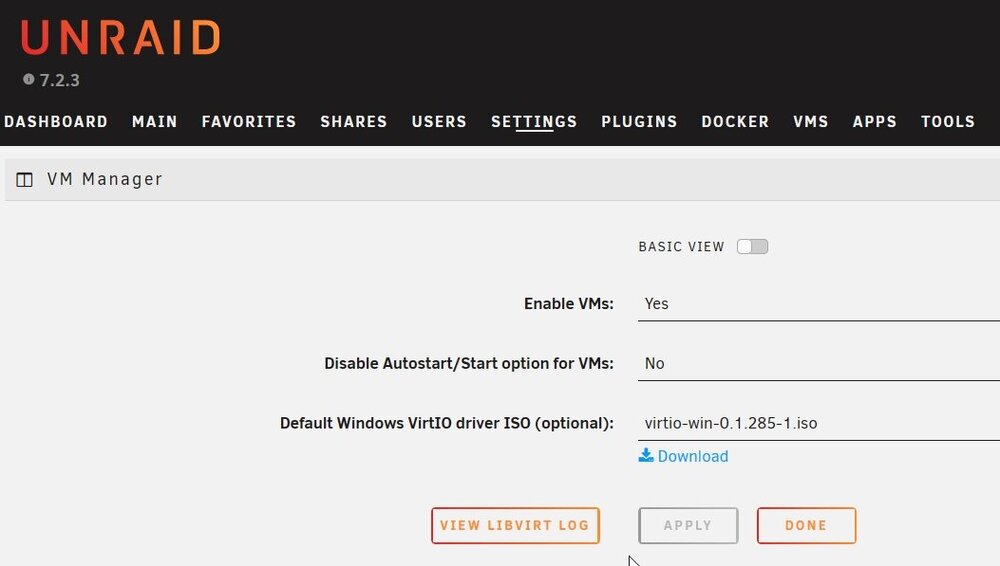
Well, based on your post, I went to the config/domain.cfg on the flash drive and changed it from enable to disable. It saved the change. Rebooted and now the VM Manager is stopped with Enable VMs as "No." Thank you for pointing me in the right direction
-
I removed a Windows VM I really was not using and then proceeded to go to Settings and Disable VMs. I select the "No" option and hit apply. Nothing happens. It stays enabled. I even stopped the array and when that did not work, I rebooted. Sill stuck on Enable VMs Yes. How can I resolve this?
-
Nice work. Installed easily. Can you clarify what the green 'download' arrow is supposed to do? A person uses the tuning mode to physically move the antenna to find the ideal signal strength?
-
Running Unraid Nextcloud Docker and Nginx with own Certificate of Authority and Self-signed certificates. Finally have it working. Lingering question that appears not to make a difference. I placed the certificate and key in /mnt/dockers/appdata/Nextcloud/keys But I see a ssl.conf where it seems to suggest to place them here: /config/keys/ Are they even read by Nextcloud or even used at all?? There is no path or variable in the docker setup that even references these locations.
-
I checked one docker, Nextcloud, that by default wanted to use port 443; but I had changed it to Host Port 4743 during the setup and that is the port I use when accessing it. I have Pi-hole forwarding Unraid to Nginx and the DNS part works fine with its DNS name. I run into problems when I try to tie it down to HTTPS. I think I need to take the unraid_bundle.pem file that resides in the boot thumb drive into Nginx and add it under certificates, but the latter does not recognize that extension.
-
I went into my router, dd-wrt, and set Port Forwarding: set my Unraid at "Protocal TCP" and" Port From 80" with the "IP address" of the Unraid Server "to Port 443." Same error when I click on the fore-mentioned long link. As screen capture. We can't connect to the server at .....
-
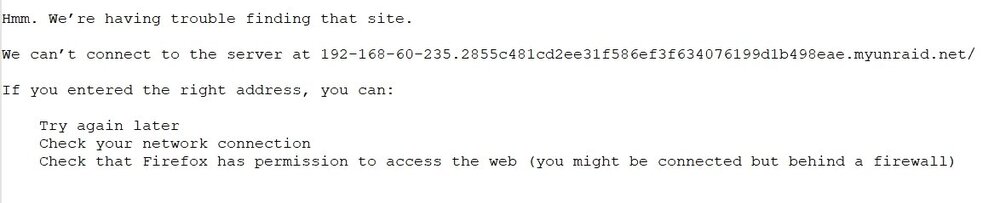
Following the video carefully and enabled provisioning, unlike the instructor, I get an error when clicking on the provided long URL. (I have tried this previously with an error as well). I get a similar error with Chrome. The provisioned link does not work. I used the provided url: https://192-168-60-235.2855c481cd2ee31f586ef3f634076199d1b48eae.myunraid.net/

-
Weeks and hours I have spent trying to get self-signed certificates to work. Finally had it working except my browser's did not recognize Cert as from a CA authority. (Thought I imported everything needed). Giving up, and will go with the easiest way to get this done. I don't want to expose my Unraid to the Internet, but looks like I have no choice. I even tried UnRaid's SSL: Yes and Local: TLD Local and Provisioning. The links that are generated all give me the browser warnings. (Which I understand I should not). If I click on https://192.168.xx.xxx/ I get a browser warning. If I click on https://UnRaid.local/ I get a browser warning. If I click on https://192-168.xx-xxx.3855c481cd2ee31f586ef3f634076199d1b49eae.myunraid.net/ , I get a browser warning. Help, what's the best way to get there and put this SSL stuff to rest. Simplest and ideally not opening anything to the Internet.
-
THIS is exactly what I have been looking for going on weeks. Before I get too excited, will Pi-hole which I already have installed work instead of using AdGuard home? Also, when you state Docker is installed and running, do you mean the Docker container from the Unraid Community apps? Not sure how Docker comes into play. When I run the syntax openssl req -x509 -new -nodes -key myCA.key -sha256 -days 10950 -out myCA.pem \ -subj "/C=DE/ST=NRW/L=Home/O=PrivateCA/OU=IT/CN=Home Root CA" I keep getting req:Extra option "/". I get the same error running openssl req -new -key home.lan.key -out home.lan.csr \ -subj "/C=DE/ST=NRW/L=Home/O=PrivateCA/OU=IT/CN=*.home.lan" I googled for an answer, but nothing specific has come up
-
Is this the backstory? Share users... Can only be created and managed by the root user. Can access shares via SMB, NFS, or FTP (if enabled). Don't have access to the WebGUI, SSH, or Telnet. IE. you can only have one management user (root) who can login to the website?
-
Thank you, but the other user account root, gets in with no issues. My keyboard also has a light to indicate when num lock is enabled. I wonder if I have to reboot the server for the changes to take place??
-
This has happened several times and I just have to wonder what is up? I have an account created and assigned it a password. Same password entered into the fields for verification. Matched in other words. I also pasted that password in a password manager. So again, the same password. Username is lower case. I try to login with that user account and that password, and after three attempts I get locked out. Frankly, it is quite irritating. Even when I worked in government I had more login attempts than that. I know I am typing it or even pasting it correctly. The password is upper case, lower case with a & included. What gives? This happens often when I try to use this account. As an update. I just changed the password to "Blank" and after I hit Change and Done, I could not get into that account. Now I know this isn't right. Is there some delay or something?
-
Perfect, that further helps my understanding. I appreciate the clarification!
-
/mnt/disk3/Photos is the folder on the array drive. Single drive disk 3. - My share is /mnt/user/Photos. This share is only allocated to disk3. So my share Photos in reality is not pointing to the exact same place even though Windows sees the files in /mnt/disk3/Photos, but not vice-a-versa as mentioned above? Yes I have cache setup and understand how that works. I appreciate your input!
-
I have an array drive called Photos and an unassigned drive called Photo Backup. I also have a specific share of Photos that I see on Windows 11. I created a folder in Unraid in the array drive Photos called "Test." My User Script created the folder "Test" to my unassigned drive called Photo Backup. Perfect. I created a simple text document and put it in the share Photos. Opening both the drive Photos and the unassigned drive Photo Backup, that simple text document does not show up. Why? I assume it has something to do with a share vs the actual drive. So is the simple text document really not in the array drive Photos? Where is it then? I can open and delete it in windows, but the array and drive where that share is pointed to, it is not there. AND, when I delete the "Test" folder out of the array drive and run my script, the "Test" folder is still in the unassigned drive Photo Backup. I expected it should have been deleted! Why was it not deleted? My script is simple, rsync -avh --progress /mnt/disk3/Photos/library "/mnt/disks/4TB Easystore/Immich" How would I point this to the Photo share instead if need be?
-
Excuse my advance ignorance. There are two UrBackup dockers. The original I reckon "UrBackup" and this version "binhex-urbackup." The first time I installed the original version I didn't pay attention to the logs so I likely did not see the errors below: --2025-12-03 10:30:34: ERROR: No permission to access "/backups/urbackup_tmp_files" --2025-12-03 10:30:34: Image mounting disabled: TEST FAILED: guestmount is missing (libguestfs-tools) Testing for btrfs... TEST FAILED: Creating test btrfs subvolume failed Testing for zfs... TEST FAILED: Dataset is not set via /etc/urbackup/dataset I have tried to figure out the first error about tmp files and it seems to be some permission error. With that being said, would life be easier with installing the "binhex-urbackup" and what is the difference in the two dockers? This answer would help this noob here better understand the 'flavors' I am seeing in the 'app community.'
-
Spent two full days trying to find the "right" backup solution. Seems running an rsync script or two will do the job. This is the script I have: #!/bin/bash #rsync -avh --progress /mnt/user/Photos/profile /mnt/disks/Recovery/Immich/ #rsync -avh --progress /mnt/user/Photos/library /mnt/disks/Recovery/Immich/ #rsync -avh --progress /mnt/user/Photos/upload /mnt/disks/Recovery/Immich/ rsync -avh --progress /mnt/user/Photos/backups /mnt/disks/Recovery/Immich/ --But as a test on just one line, the last I get several errors: IE. failed: Operation not permitted. --But I do get this output in the correct directory. immich-db-backup-20251202T160000-v2.3.1-pg16.8.sql What am I doing wrong? --The /mnt/disks/Recovery/Immich/ is a mounted flash drive. Script location: /tmp/user.scripts/tmpScripts/Backup Immich Profile/script Note that closing this window will abort the execution of this script sending incremental file list rsync: [generator] chown "/mnt/disks/Recovery/Immich/backups" failed: Operation not permitted (1) backups/backups/.immich 13 100% 0.00kB/s 0:00:00 (xfr#1, to-chk=1/3) backups/immich-db-backup-20251202T160000-v2.3.1-pg16.8.sql.gz 32.77K 0% 31.25MB/s 0:00:02 rsync: [receiver] chown "/mnt/disks/Recovery/Immich/backups/.immich.gVITnG" failed: Operation not permitted (1) 80.90M 100% 1015.14MB/s 0:00:00 (xfr#2, to-chk=0/3) rsync: [receiver] chown "/mnt/disks/Recovery/Immich/backups/.immich-db-backup-20251202T160000-v2.3.1-pg16.8.sql.gz.pFxnF9" failed: Operation not permitted (1) sent 80.92M bytes received 58 bytes 161.84M bytes/sec total size is 80.90M speedup is 1.00 rsync error: some files/attrs were not transferred (see previous errors) (code 23) at main.c(1338) [sender=3.4.1]
-
Great advice by everyone. Weird, but the storage drive even though it was written to earlier from the cache, I noticed later this evening it said it was not formatted. Once I formatted it, it allowed me to create shares again. Additionally, and this I should have remembered from the larger server, I had to create a unique user for my Windows PC to see the share. I really appreciate both suggestions as those will come in handy for future reference!


