





RaidPC
Members
-
Joined
-
Last visited
Everything posted by RaidPC
-
I'll make a note of these suggestions. Late last night I hooked up another WD drive, Easystore, only this one has the regular 3.5 hard and power adapter. Everything wrote to it with the same script with no issues. I then hooked up the one 'problematic' MyPassport "REBOOT" earlier drive, and ran the same script on my second UnRaid box, reversing the order. No issues reading from the MyPassport (no external power supply) drive to the internal hard disk. Then this morning a ran a WD sector by sector scan of the "problematic" drive (MyPassport). Two hours later, no SMART Thresholds tripped or diagnostic failures. For now I have a working solution. I'll make a note to follow the suggestions above if I venture to hook up the previous drives again.
-
Looks like every time I run the script below, my drives hits the "Reboot" dialog box. I have no clue why. The scripts used to run fine. Using Syncback SE worked fine. But attaching the drive to an USB port on my Unraid server is faster. #!/bin/bash rsync -avh --delete --progress /mnt/disk3/Photos/backups /mnt/disks/Backup_4TB/Immich rsync -avh --delete --progress /mnt/disk3/Photos/encoded-video /mnt/disks/Backup_4TB/Immich rsync -avh --delete --progress /mnt/disk3/Photos/library /mnt/disks/Backup_4TB/Immich
-
Thank you, but now another new 4TB USB external drive is coming up with a REBOOT, just after I ran a rsync script to copy files to it. Two different drives, different USB cables and different USB ports. Something changed. Only recent environmental change was upgrading the UnRaid OS. Going to opt for now to not use the plugin and copy the files over my LAN with Syncback SE. Slower, but I maybe able to get more insight into the issue by doing so.
-
Unassigned Drive is now showing my USB SSD external drive as grayed out REBOOT. I have rebooted the entire server once already and it came back online. But now I see it is showing grayed out REBOOT again. This is my back up drive. The drive works fine when connected to my Windows 11 PC. Is Unraid saying the drive is going bad?
-
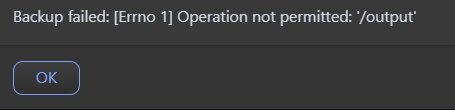
Can the "Output" be set to a mounted and shared external drive on a Unraid Server? Currently I have all my backup's going to an External USB drive hooked up to my 1st Unraid Server. Then once a week that drive's contents is copied over to another Unraid Server's internal storage. I tried to point UnraidConfigGuardian to the shared External USB drive (mounted on 1st Server), but it fails. The templates cache-templates get written to it, then the rest fails.
-
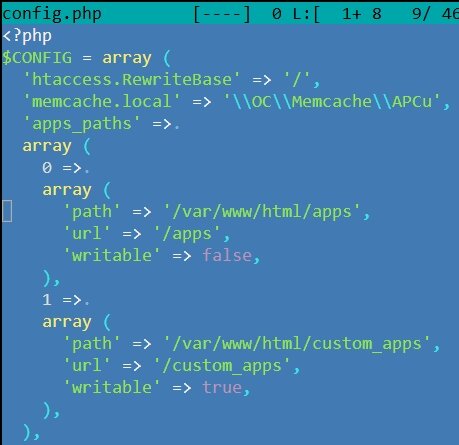
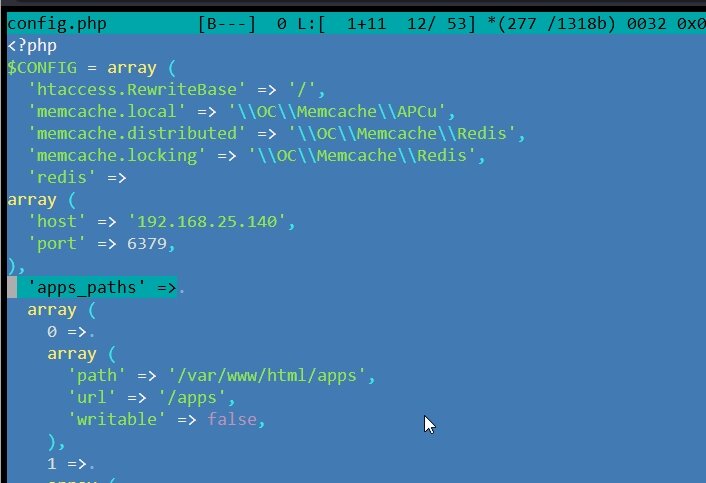
I added a static IP to the Redis docker and it now "appears" to work. It opens and there is no longer a security & setup warning about Transactional File Locking. Outside of that I assume it is working, not sure how to tell for sure. But in my config.php, I have an entry 'apps_paths' =>. Seems to be misplaced now. Where does it go. Attached are my original config and the modified one.
-
Appreciate the idea, but my install of Redis from the Community Apps, the "Official Redis" did not have a field for a password. I saw a video where one version does require a password; but this one does not.
-
Nextcloud adding Redis. (Due to recommendations in the Security and Setup Warnings). Installed Redis and edited Nextcloud's config.php. Added the following lines to the config.php. <?php $CONFIG = array ( 'memcache.local' => '\\OC\\Memcache\\Redis', 'memcache.locking' => '\\OC\\Memcache\\Redis', 'redis' => array ( 'host' => '192.168.1.10', 'port' => 6379, ), But when I stop and start Nextcloud, I just get the following error: The server encountered an internal error and was unable to complete your request. It is supposed to be easy to integrate. :-) What am I missing?
-
I backed up using the "boot device backup" function from the GUI (never knew that existed). Also specifically ran the adddata/backup plugin with my new internal boot. Boot resulting .zip files are identical. Same size and number of files and creation dates. So it looks like both methods will work as previously.
-
Just the "Internat Boot" - Boot Partition.
-
Been using the plugin Backup/Restore Appdata to backup my flash drive. I have two UnRaid servers. One just has the internal boot on one cache drive (shared with Data Partition). The other Unraid server has two internal boot drives on two cache drives (shared with Data Partition). What is the recommended app/plugin or solution for backing them up?
-
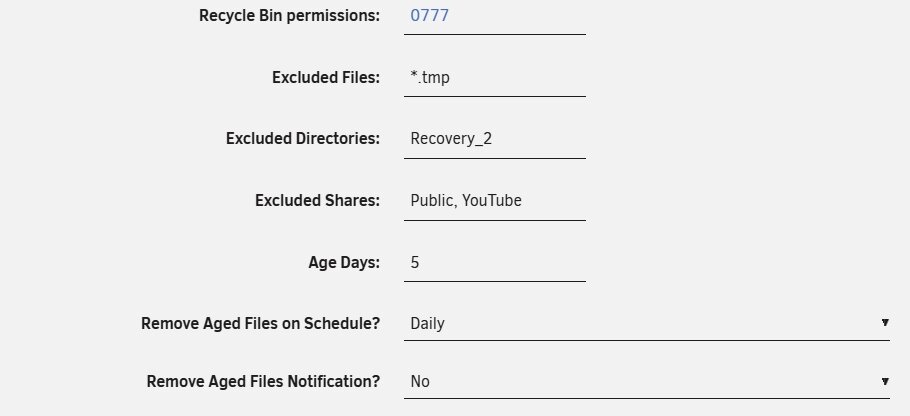
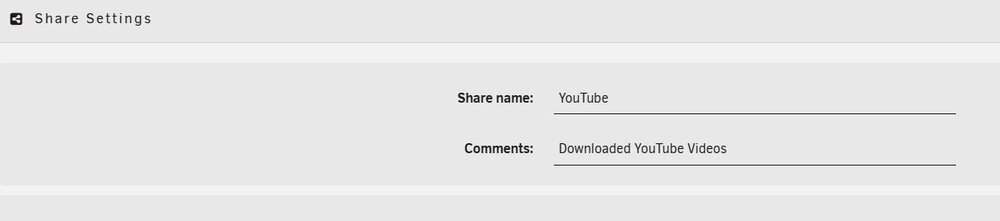
I have a share called "YouTube" and I have it set in the Recycle Bin plugin to be an Excluded Share. Yet it is still creating the .Recycle.Bin folder. What do I have set wrong? I do not want to have the deleted files in this share to go into a recycle bin.
-
Cool. Didn't know that was the case when writing a lot of files to a new or cleared drive. While I believe 100% what you wrote, not sure why when I wrote 30% to my drive, disconnected from Unraid, hooked to my PC and Windows found fragmentation.
-
"That makes no sense, if you wiped and copied again there would be no fragmentation then, so pointless to run defrags." Can only speak on what I saw. But when files are written to a drive, unless things have changed, they are not written in a nice, neat order, from the front of the disk to the back. So when you load a lot of files as in terabytes, I would expect fragmentation. Just didn't expect coming from Rsync to Windows defrag it would be so bad for Windows to struggle with it. Using Windows defrag as suggested above, with the process of stopping after so many gigabytes and de-fragmenting.
-
Thank you, good to know!
-
Actually I have not tried it with the copying the files as described above. I'll give it a try. :-)
-
Besides Rsync, does Unraid support a file manager that does not change the file attributes? Discovered the hard way Krusader does and appears Midnight Commander does as well.
-
Last significant post I could find on this subjected started in 2016. I recently took an unassigned drive off my Unraid server and hooked to my Windows PC. It is formatted NTFS. I found it was 27% fragmented. Indeed, Windows had a such hard time de-fragmenting it, I ended up wiping it and copying the files manually with Krusader. I would copy so many gigs, bring it to my Windows PC, defrag it, and hook it back up to Unraid. Kept doing the process until everything was copied, about 3TB. (I was using Rsync to copy the files previously). Which brought me to the question, is there a solution to de-fragement these drives while attached to the Unraid NAS? Also, had me wondering about the drives in my Array itself. How fragmented are those?
-
Thank you. I had the add-on actually installed, but apparently was doing the steps incorrectly. Finally, I did something right and after selecting clear (again) this time format came up with options. Your suggestion of using UnRaid to format NTFS was what I needed to get me to look at what I was doing wrong. Appreciate it!
-
Probably my ignorance, but not sure how to format it NTFS. Only seems to do xfs. I want to be able to hook it up to my Windows PC and see the files as necessary.
-
Have not been able to figure this out all day. I have a WD Easystore drive which I keep formatting with one entire partition on my Windows PC. Unraid keeps seeing it having two. I keep using Disk Management in Windows and it shows just 1.

-
This is great! Nice GUI and very straightforward. Trying it on a simple Unraid and works swift. Dummy me though, how do you delete backups? I ended up creating one twice it was done so fast. Also, is there a way to clear the logs?
-
Yes my server has that ability, IE. TPM. I thought one of the benefits was the ability to get rid of that USB Key sticking out from the back of the server by moving to an internal drive. If that is the case, that is what I am hoping I can do. Just in light of what I shared above, how would one achieve that? IE. the steps.
-
Watched some videos on the new license option where we can install the license internally on a drive. My question is the only drives I have to use are my two 1 TB SSD NVME drives which are used as cache drives. They are in a pool so both are really just a mirror of the other. IE total 1 TB. Not an Unraid expert. But what I understand and observe is they are written to first and then the data on those drives is written to my Device drives during the moving phase. My device drives are Sata drives. With the new licensing option, is it possible to have one of those 1 TB drives still used as a cache drive and the other for the licensing? And since the licensing drive surely does not need an entire 1 TB, still use that remaining space for cache or something else? Best way to do this would be?
-
Great, thank you that worked. Thought I had tried that, but that reboot did the trick. Must be an entry in the flash drive. Be nice to just be able to remove it from some config file on the flash drive.



