





b-riched
Members
-
Joined
-
Last visited
Everything posted by b-riched
-
Sorry, just found out that this obviously is a mover but no backup problem. Backing up the shares instead of the array disks to get around this. Thanks anyway.
-
[false alarm, resolved] luckyBackup ignores files to sync after renaming there are 3 of 5 new files in a newly created folder that are ignored during sync process. Theses three .jpg files were created new and renamed with names taken from another folder. After that the files were again adjusted (date contained in the title). The other two .html files were synced ok (files are on disk, the others are not). I experienced in the past that files were ignored but I cannot tell any circumstances. I would be glad if we could solve this puzzle.
-
luckyBackup -- backing up system unraid system from USB stick hi there, I am currently using luckyBackup for saving my unraid installation. The aim is to being able to completely restore the system if needed. The appdata and docker folders are stored ok, but the initial system's backup from everything on the USB stick throws tons of warnings and errors. Any ideas on how to set this up correctly. Many thanks in advance! My setup: Profile: BACKUP_system_files Task: BACKUP -- system Source: / Do NOT create extra directory: YES Snapshots to keep: 3 Exclude: Backup files, Cache folders, Trash, System mount folders Include: none Remote: no Command Options: Preserver Ownership times: YES Preserve Permissions: YES Preserve symlinks: YES Preserve hard links: NO Use numeric group and user IDs: NO Delete files on the destination: NO Recurese into directories: YES Ignore files the CVS way: NO Destination is FAT/NTFS: No Atempt super-user activities: YES Also Execute: none Log summary from "manage backups\view log" reads as follows: ===================================== execution of task : BACKUP -- system, starting Source : / Destination : /mnt/user/fn-backup/system/ sending incremental file list [...] Number of files: 73,333 (reg: 57,274, dir: 7,855, link: 8,175, dev: 11, special: 18) Number of created files: 28,573 (reg: 27,807, dir: 132, link: 634) Number of deleted files: 0 Number of regular files transferred: 59,491 Total file size: 2.16G bytes Total transferred file size: 1.35G bytes Literal data: 1.35G bytes Matched data: 0 bytes File list size: 327.65K File list generation time: 0.001 seconds File list transfer time: 0.000 seconds Total bytes sent: 1.35G Total bytes received: 1.20M sent 1.35G bytes received 1.20M bytes 17.25M bytes/sec total size is 2.16G speedup is 1.59 rsync error: some files/attrs were not transferred (see previous errors) (code 23) at main.c(1338) [sender=3.2.7] -----| Backing-up profile, logfiles and snapshot data -> Ok |----- execution of task : BACKUP -- system, finished =====================================
-
luckyBackup syslog entry hi there, would you help me with some luckyBackup automation? The tool sends log eMails ok, but I would prefer reading things in the UnRaid syslog (just as everything else). Basically everything that is currently put into an eMail could occur in the syslog file. Plus a link to the curresponding log file. Unfortunately I am not good at linux scripting and logging so I need some help here please. If I was to misuse the eMail function for this, what command / options are best? BTW: I believe summarizing actions into the syslog would be a nice feature in general. Many thanks in advance.
-
Hi there, I have some issues and questions: My setting: latest adguard home container v0.107.61 running on latest unraid build v7.1.2. fritzbox 6690 on 192.168.y.1, DNS set to adguard IP: 192.168.y.2 clients get forced IP addresses via DHCP (router), adguard DHCP not in use adguard docker port set to 3000 (default) various clients (PC's, phones, iPads) access WAN using the routet DNS, traffic (DNS calls, filtered rejects, etc, is listet by adguard GUI). My issues: calling adguard's GUI via 192.168.y.2:3000 gets rejected. I have to delete the port from the address to get access. (since installation) adguard GUI reports only one client to generate traffic: 192.168.0.0 (since last update on 2025-05-23) forcing DNS IPv6 address via router blocks WAN access completely (since install, I think) Any ideas? Many thanks in advance.
-
Hermine to Ron and Harry: “Honestly boys, it would do you good reading!” 😁
-
Yup… modified some files, reran mover. Log states it updated the sync day. Cfg. files contains: lastCacheSync=1747568606 So seems to work although I don’t understand why it didn’t before. Thx.
-
I am afraid it isn’t. If I am looking at the right file. === /config/plugins/ca.mover.tuning/ca.mover.tuning.cfg === testmode="no" logging="yes" movenow="yes" version="2025.05.04" freeingThreshold="70" fillupThreshold="0" omovercfg="no" age="yes" cleanFolders="yes" cleanDatasets="no" ctime="no" atime="no" enableTurbo="no" filelistf="no" filetypesf="no" ignoreHidden="no" rebalanceShares="no" sizef="no" sparsnessf="no" synchronizeCache="yes" resynchronizeCache="no" notify="yes" debuglogging="no" loggingFolder="/tmp" logfilesDaysold="5" listfilesDaysold="10" validateFilenames="yes" moverDisabled="no" advancedSettings="no" parity="yes" moverNice="0" moverIO="-c 2 -n 0" force="no" beforeScript="" afterScript="" movingThreshold="90" advancedFilters="yes" advancedOptions="no" daysold="-1" ===
-
Hmmmm /config/plugins/ca.mover.tuning/ca.mover.tuning.cfg tells me: version="2025.05.04" although I thought it had updated recently. Cannot find any last update date in here. Anyway, log of 2025-05-16 tells me mover was on sync, no test, synced 3 files to array. Last sync day was not updated (at least not in the log file).
-
Yes, I did, and the mover was counting them all for actions. specifically, I touched some 1500 files reading from the array which were not stored in the cache. I created 201 files which are saved to the cache and the mover identified them for syncing (but did not sync due to test mode).
-
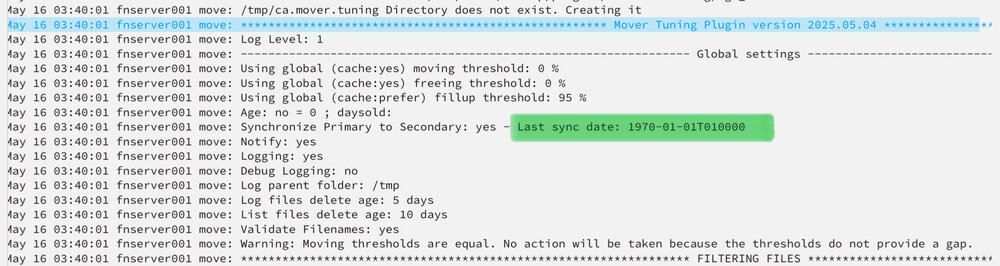
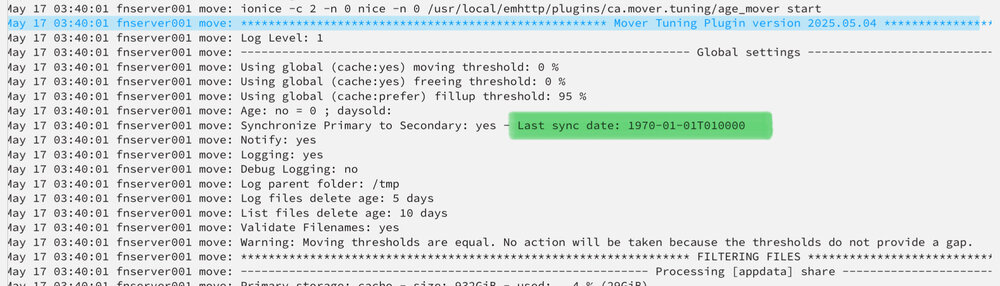
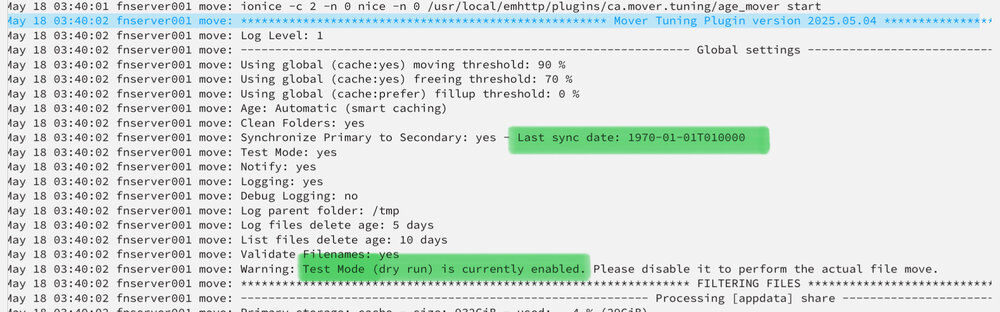
Not sure whether we talk about the same thing. Toggling test mode is not the issue. Mover has been running for two weeks now in either test or real mode. Issue is: last sync date message stays on 1970-01-01 regardless of mover running in the past in whatever mode. Me personally couldn’t care less but if the last sync date determines the mover’s behaviour (which it presumably does) it is probably worth having a closer look?
-
No Sir, test mode has in fact been switched on again for the first time last night. Before it was running in real mode for some days. No matter which mode it was running in the message stayed the same.
-
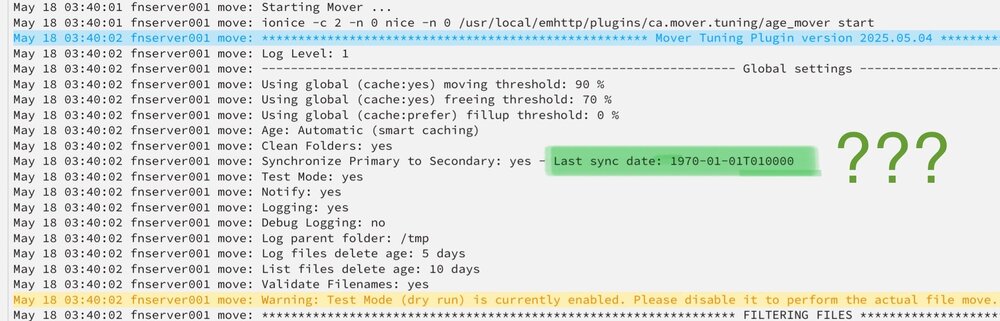
This Message stays the same regardless of daily activity. Bug or feature? 😁
-
Ok that lifts most of the fog.
-
I see, so if the share is configured cache -> array I can ignore this setting?
-
Yes sir, and I did try some alternative settings, looked at the logs, seemed to understand how it works and in real ops it didn’t. This is why I’m here.
-
Well, when it comes to data I believe “trail & error” is not exactly the right approach. Especially considering that the tuned mover does not seem to show the same behavior in dry-run and in real op’s. So maybe we could leave the RTFM mode and come to some more decent questiens. First: are my presumptions correct? “move” means copy from source to destination + delete from destination “Synchronize” means copy if newer than the same files at destination + not delete from source. Toggling PRIMARY FILES TO SECONDARY to YES leads to every “moving” operation to stay as described (if files are new) apart from files not being deleted from source. “Synchronize “ means syncing from source to destination and NOT also syncing from destination to source. Given that these presumptions apply ONLY MOVE (sync) IF ABOVE THIS THRESHOLD OF USED PRIMARY SPACE (moving threshold) means no moving will happen if cache fill level is not reached? AND no syncing will happen likewise? OR (presumingly) no moving will happen if cache fill level is not reached? BUT syncing will happen anyway? Same question with the second (freeing) threshold: Freeing means moving files off the primary until this threshold is reached (i.e. should be lower than moving threshold + max file size) BUT syncing will take place anyway and threshold only applies to moving ops’s when reducing occupied disk space down to the freeing threshold? Remark: the term “prime up” does not directly translate into German and is somewhat confusing. I would offer myself assisting with an Addon Translation for the German language pack if you considered to launch one. FILL UP/PRIME UP TO THIS LEVEL OF USED PRIMARY (CACHE) SPACE confuses me the most. what does “cache:prefer” mean and where do I toggle this? Does this decide on the cache rate, i.e. how many files are copied to the cache when read from the array? Or does this decide how many cached files remain in the cache after a scheduled mover run? And if so how is this different from the combination of the moving and freeing thresholds? Is the value supposed to be lower or equal to the moving threshold? Is the value supposed to be lower or equal to the freeing threshold? Or is this value completely independent from the first two thresholds? I know that my questions may appear a bit picky. But I really do want to understand what happens here before I accidentally have my disks pump TB’s of data. Many thanks for your patience.
-
Ah, ok, in this case the installed Version was 2025.05.04. Just updated to 2025.05.17, switching to dry run mode and see what happens.
-
Hi there, first: many thanks for this pretty plugin! Being very new to this homeserver business (second week or so after UnRaid install) I am quite overwhelmed with all the possibilities and obligations. So, sorry in advance for asking stupid questions. If you could help me out setting up my mover scenario I would really appreciate it. My setting is: parity disk (12 TB) => array disk1 media (12 TB) => array disk2 data (4 TB) => array 1 nvme (1 TB) => cache, appdata, docker folders 1x disk (16 TB) => primary backup drive user share data on disk2 (cache => array) user share media in disk1 (cache => array) user share backup on backup drive UnRaid V. 7.1.2 Installed Version 2025.05.04 Scenario: Scheduled sync (i.e. copy to array if new and leave on cache) of files in data + media share every night if cache nvme reaches fill level of 80% then move (i.e. copy to array and and delete from cache) files older than 15 days until fill level has reached 50% Questions: Is there any reason to adjust the scenario? after fiddling around with some dummy data on a dummy share the mover will ignore appdata, docker folders and backup drive (as it should) and nightly move (i.e. copy to array and delete from cache) files from data and media shares (which it should not). Any hint on how to set this up properly? Many thanks in advance.



