





charettepa
Members
-
Joined
-
Last visited
Everything posted by charettepa
-
here it is tower-diagnostics-20251127-1346.zip
-
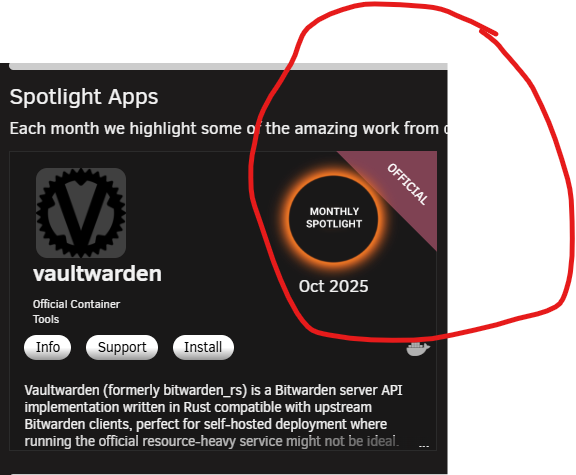
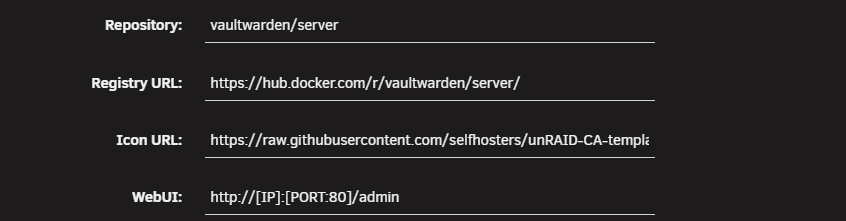
hello what "drives" the "store"/"store registry" to know if a docker container/app is installed all my apps and dockers are reflected correctly except for Vaultwarden i have not changed the registry or repository details it IS installed and IS working but the store keeps showing it as not installed i have uninstalled and re-installed 3x now this is problematic as i never know if there are updates i keep having to check and re-install there must be an eroneous value somewhere that can be corrected below is screenshot of store and docker and registry etc.. please help

-
1- I also posted my screenshot of the store as well as a snip from docker, showing its running 2- As well as explain that it is installed and is working, but the store thinks its not 3- and i asked about how safe it is to post the diags here 4- and asked about what i am looking for in the diag files 5- what in the diags will tells us about this? i have the file and ready to post, but still have not heard back if its safe
-
i looked through the diag files i see a plugins file but not a app or docker registry file only docker settings
-
is it safe to post the diags here?
-
i am in the process of getting the diagnostics for you i think you are not understanding my issue It DOES install it DOES work but the store reports it as not installed and therefore does not offer updates what "drives" the "store" registry? there has to be an invalid error somewhere for it to believe its not installed I'm not referring to this exact app/container i mean for any container what tells the store it is installedhow do i do that? where do i get that? there is nothing wrong with the container it works but i can never update it, and the store thinks its not installed regardless of how many times i install it what exactly tells the store something is installed? there has to be erroneous data somewhereonly this oneVaultwarden not recognized as installed and as a result never advises of any updates i have uninstalled and reinstalled 2x the "app store" never recognizes it as installed what exactly tells the "store" its installed other than "registry url" and "repository" which i did not change i tried posting in the vaultwarden Unraid page but after several weeks I'm not getting any responses how can i fix this^^^^^^ any updates on this and what to do to fix it anyone?I have Vaultwarden installed but the Unraid app store thinks its not installed i have uninstalled and re-installed 2x no matter what its not recognized as installed and as a result i never get any of the updates why would this happen to only this app I have not changed anything with the registry or icons or any of that simply set the local folder mappings for my needs Repository: vaultwarden/server Registry URL:https://hub.docker.com/r/vaultwarden/server/ Icon URL:"http://[IP]:[PORT:80]/admin" WebUI:http://[IP]:[PORT:80]/admin (i used quotes above so it does not show the icon instead of the address)the only possible issue for not caching folders in terms of plugins would be the directory cache plugin as it is responsible for performing that task however, as per my previous response the issue is gone since setting "Scan user shares (/mnt/user):" to yes but according to the warning this can increase cpu usage has the default changed? i do not know if it was set to yes before or not, i just used the defaults was there an update to the plugin at the same time as 7.2 update? i dont know but the reality is that it works as expected since changing the setting i dont see a change in CPU , yet should i be concernedok, i just checked the folder cache settings not sure if a default has changed recently in updated versions or not however "Scan user shares (/mnt/user):" was set to no i changed it to yes now when i browse the folder it does not spin up the drives and they stay spun down unless being written toI have tried rebooting nothing changed safe mode is not reporting any issuesas per title since version 7.2 drives no longer spin down everything was fine before update you can manually spin down but as soon as something accesses the disks they spin up and never spin down again also dynamix directory caching is no longer working either browsing to a folder now forces the disk to spin up simply from browsing to the folder again, it never spins down afterwards unless you manually spin down this is exclusive to 7.2 previous versions were fineIs this script still valid for Unraid V7 I tried to use this the drive in question instantly shrunk from 4tb to 16gb then gave an error saying it could not write due to insufficient spaceI will be testing booting up using the external port once i get a bit more time as i will need to dismantle to remove the usb which is sandwiched between the board and chassis in the mean time, my numbers were off by a bit when it starts and copies the first 2 BZ files, that is almost instant then when it moves on to verifying the checksum of the 5 BZ files the first 4 take 25 seconds total the bzfirmware takes just over 2 minutes for a total of 2.5 minutes to verify the checksum of all 5 files from here its about 10 seconds to fully loaded and at login screen i also tried booting without my coral TPU or the mouse/keyboard plugged in this changed nothing again, i will test using the external USB port as soon as i have at least 30-60 minutes of free time just dropping this here to correct my original info as i originally stated 3 minutes for bzfirmware checksum alone but its 2.5 for all 5 and 3 minute mark from pressing power button to all checksums done then ~10 seconds to loaded and seeing ip/logini have no other ports this is the internal on motherboard port on a terramaster f4 424 pro externally there is 1 usb c and 1 usb a both in use, C for my coral TPU, A for my mouse/keyboard its a fairly new model everything i read says its 3.x the usb drive itsself is a (Sandisk) 3.2 gen1 could the external devices be conflicting somehow edit** creating and downloading the 850MB backup of the USB (boot) disk takes 29 seconds this is for sure not USB1 looking at the "main" window in unraid i can see it is reading from the flash disk when this happensWhat is considered "normal" time to boot unraid i could have sworn when i first set it up it was much quicker i get past post very quickly then it starts to load the OS fairly quickly when it gets to the bz checksums the first 3 are quick but bzfirmware checksum takes about 3 minutes i dont remember it ever taking this long unless i just did not notice im fairly new to unraid started seting up 4 months ago been getitng it the way i like it and installing plugins/apps/dockers now im just getting ready to "pull the trigger" and move all my data i powered down to remove one of the drives that i will not need i felt powering on took long i read that on disk swap or change or move it can make bootup slower but i powered off and on 3x no matter what the first 3 "bz checksum" are quick but "bzfirmware checksum" is about 3 minutes to itsself is this normal?how do you pass an environent variable that contains multiple - here is an example 1 variable needs to contain all of the below but keeps getting split into myultiple variables -e SpecialEXTRAPARAM='-u [email protected] -p password 123 -d 14 -N 14 -n 14 -j -M -T -c ./cache/ZAPD -o tvguidez.xml -A "new live" -U -T -9' all of this is one line i need to pass'-u [email protected] -p password 123 -d 14 -N 14 -n 14 -j -M -T -c ./cache/ZAPD -o tvguidez.xml -A "new live" -U -T -9' to the environment variable SpecialEXTRAPARAM but it keeps splitting at all the - "dashes" and creating additional parameters is there some sort of escape character i need to use comming from another system, all docker ever needed was -e SpecialEXTRAPARAM='-u [email protected] -p password 123 -d 14 -N 14 -n 14 -j -M -T -c ./cache/ZAPD -o tvguidez.xml -A "new live" -U -T -9' how do i make the whole line pass as one parameter valueHi sorry for the delay no I'm not aware of a list but alot of them do not have it I know Samsung 980 pro and 990 pro have DRAM@googleg I had already tried disabling spin down, that did not help it just started reporting drive down instead the kernel tweak "append initrd=/bzroot pcie_aspm=off" did not help with my NVME it does seem to help with NVME that "should" be working it would seem that you should never use NVME without DRAM in ZFS , even single drive i have since purchased 990 pro's, which do have DRAM its been a few days and is holding up i do however still have the kernel tweak "append initrd=/bzroot pcie_aspm=off" as i noticed some people with 990's still needed this, so i just left it on one thing that might be of value or help is making sure your drives are from the same batch and same production center ie. samsungs can be made in korea, malaysia, and a few others when i bought mine i went to a local store and specifically requested same country and same production date apparently this helps somehow and , well , if it costs nothing extra, why not sorry for the long reply i'd rather give details than just 1 line answers and leave you hangingno, like i mentioned above it did not help Plus, power usage stayed at max power of 6.5 watts per NVME at all timesbroke the mirror and created a new "temp" pool for the affected drive at first it seems like it would be ok but after about 2.5 hours it dropped again i have found that in other older threads you recommended a longer string for the bootup "append initrd=/bzroot nvme_core.default_ps_max_latency_us=0 pcie_aspm=off pcie_port_pm=off" i am now trying this but the nvme drives nver drop below 6.5 watts now thats 13 extra watts as the drives idled to 0.01watts before again i dont mind buying more disks if i know they will work are 990 pro a safe bet the only threads i have found so far with issues were able to resolve by using what you first recommended to me "append initrd=/bzroot pcie_aspm=off"


