Tom7320
Members
-
Joined
-
Last visited
Everything posted by Tom7320
-
Hm. No. Unfortunately no solution so far…
-
Interesting side note: it only happens with VMs that have Docker installed. Still no solution.... PS: Unfortunately, Spice console is not an alternative to VNC. With Spice many things are not working correctly. Wrong keyboard layout, no native Mac viewer, ....
-
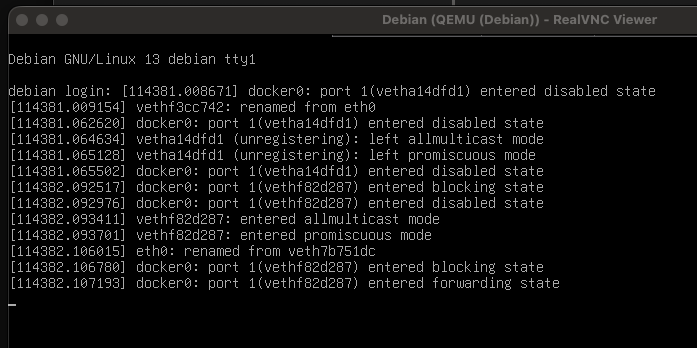
Hi! I have a Debian VM on my Unraid box, which is running fine so far. However, the VNC Console just stops working a few hours or days (it varies) after boot up of the VM. It just stops responding while the VM itself is running fine. Services are running, accessing the machine via SSH is possible, etc. Just VNC stops working, cursor is not blinking, and it does not accept any keyboard strokes: Does anyone know how to fix this? Thx a lot! Have a nice weekend Thorsten
-
Uh. That was quick! Thx a lot!! 🙂 I'll try it out and report my findings! My shutdown time for disks was 90s, the vm shutdown time was 120s. This might have been the problem. But I have to wait until parity check is finished... 😉 Have a nice evening
-
Hi! Every time I reboot my machine, it starts a parity check. If I understand syslog.txt correctly, it's because unmount fails because of a device being busy: Nov 17 15:35:28 Unraid emhttpd: shcmd (3417785): /usr/sbin/zpool export -f tank Nov 17 15:35:28 Unraid root: cannot unmount '/mnt/tank/vmdata': pool or dataset is busy/mnt/tank/vmdata contains data for a vm. The share is mounted in the vm using 9p mode (/etc/fstab): vmdata /mnt/vmdata 9p trans=virtio,version=9p2000.L,_netdev,rw 0 0 For a clean shutdown/reboot it's crucial, that all vms shutdown before trying to unmount this share. My question is, why does this happen? How can I achieve a clean shutdown? Thx a lot! 🙂 Thorsten unraid-diagnostics-20251117-1535.zip
-
I can confirm that CNAF does the job for me. Thank you for putting me on the right track!!
-
Thx! I'll give it a try!
-
Ah, ok, I understand. Would it be conceivable to implement an "update all containers expect xy" feature? This would be great! I don't have the Backup Appdata plugin installed. I'll take a look at it!
-
Hi! I have a Gluetun VPN container to provide VPN access for other containers (Network type: container, Container network: gluetun). After an auto update of the Gluetun container, the dependent containers are not getting restarted. On manual update Unraid restarts this dependent containers automatically, but on auto updates this mechanism does not work. Hence, the dependent containers/services are unaccessible after an auto update. Any ideas how to fix this? Thx!
-
Ja, ok, danke Dir. Mir wäre auch kein Plugin bekannt, das bei allen Containern ein "force update" durchführt. Dann eben von Hand... ;-)
-
Ja, sorry, ich hatte mich etwas "schnodderig" ausgedrückt. Dass man einzelne Container so updaten kann, ist mir klar. Aber ich habe mittlerweile über zwei Dutzend Container am Laufen, deren Tailscale Version ich gerne auf einmal ("in einem Rutsch") updaten wollte. Darum ging es mir...
-
Moin! Mal eine kurze Frage an die Experten hier: wie kann ich in einem Rutsch für alle meine Docker Container die Tailscale Version aktualisieren? Ich habe alle Versionen zwischen 1.86.x bis 1.90.x in den Containern am Laufen. Ein simpler Neustart des Containers reicht bei mir zumindest nicht aus, um Tailscale zu aktualisieren... Besten Dank und einen schönen Abend Thorsten
-
+1 turn off blinking
-
Alles klar! Danke sehr! Ich werde mich am WE mal in Ruhe einlesen! 👍
-
Ja. So etwas Ähnliches hatte ich mir auch schon überlegt. Wahrscheinlich würde es mir genügen, die jetzigen Ordnernamen als Tags zu verwenden (also ohne Paperless Speicherpfade im zweiten Schritt). Ein entsprechendes Importtool, das das PDF in Paperless importiert und automatisch die bisherigen Ordnernamen in Tags verwandelt, müsste ich mir aber IMHO selbst basteln. Oder gibt es ein entsprechendes Importtool für Paperless schon?
-
FYI: The Tools -> New Permissions script did not work for me since /mnt/user/Public and /mnt/user/Scan are only Symlinks to /mnt/tank/Public and /mnt/tank/Scan accordingly. I had to fix it manually: root@Unraid:~# chmod -R go-rwx,u-x,go+u /mnt/tank/Public/ root@Unraid:~# chmod -R go-rwx,u-x,go+u /mnt/tank/Scan/ root@Unraid:~# find /mnt/tank/Public/ -type d -exec chmod 777 {} \; root@Unraid:~# find /mnt/tank/Scan/ -type d -exec chmod 777 {} \; @Frank1940 THANK YOU SO MUCH 😊
-
Ok. Thanks! I understand! But I did not change anything manually. I just created the shares and set them as exported and public?! So it's expected behavior, that public shares do not work "out of the box"? chmod 777 für "Scan" and "Public" will fix the issue w/o further side effects?
-
root@Unraid:~# ls -al /mnt/tank total 82 drwxrwxrwx 11 nobody users 11 Aug 24 18:33 ./ drwxr-xr-x 11 root root 220 Aug 20 12:55 ../ drwxrwxrwx 3 nobody users 4 Aug 15 15:43 Aktuell/ drwxrwxrwx 28 nobody users 28 Aug 24 12:17 appdata/ drwxrwxrwx 3 nobody users 3 Aug 24 09:14 domains/ drwxrwxrwx 2 nobody users 3 Aug 24 09:11 isos/ drwxr-xr-x 5 nobody users 16 Aug 24 17:09 Public/ drwxrwxrwx 2 nobody users 4 Aug 12 19:38 sanoid/ drwxr-xr-x 4 nobody users 7 Aug 24 13:41 Scan/ drwxrwxrwx 4 nobody users 4 Jul 31 19:21 system/ drwxr-xr-x 3 nobody users 3 Aug 3 13:39 webdav/ root@Unraid:~# ls -al /mnt/tank/Scan total 1071 drwxr-xr-x 4 nobody users 7 Aug 24 13:41 ./ drwxrwxrwx 11 nobody users 11 Aug 24 18:33 ../ -rwxrw-rw- 1 nobody users 511573 Aug 24 13:11 24082025131150.pdf* -rwxrw-rw- 1 nobody users 517497 Aug 24 13:41 24082025134119.pdf* -rwxrw-rw- 1 nobody users 6148 Aug 24 17:17 .DS_Store* drwxr-xr-x 2 nobody users 2 Aug 24 08:44 paperless_je/ drwxr-xr-x 2 nobody users 2 Aug 24 08:44 paperless_ts/ root@Unraid:~# ls -al /mnt/tank/Scan/ total 1071 drwxr-xr-x 4 nobody users 7 Aug 24 13:41 ./ drwxrwxrwx 11 nobody users 11 Aug 24 18:33 ../ -rwxrw-rw- 1 nobody users 511573 Aug 24 13:11 24082025131150.pdf* -rwxrw-rw- 1 nobody users 517497 Aug 24 13:41 24082025134119.pdf* -rwxrw-rw- 1 nobody users 6148 Aug 24 17:17 .DS_Store* drwxr-xr-x 2 nobody users 2 Aug 24 08:44 paperless_je/ drwxr-xr-x 2 nobody users 2 Aug 24 08:44 paperless_ts/ root@Unraid:~#
-
root@Unraid:~# ls -al /mnt total 9 drwxr-xr-x 11 root root 220 Aug 20 12:55 ./ drwxr-xr-x 20 root root 440 Aug 24 18:33 ../ drwxrwxrwt 2 nobody users 40 Aug 20 12:54 addons/ drwxrwxrwx 12 nobody users 210 Aug 24 18:33 disk1/ drwxrwxrwx 4 nobody users 50 Aug 24 18:33 disk2/ drwxrwxrwt 2 nobody users 40 Aug 20 12:54 disks/ drwxrwxrwt 2 nobody users 40 Aug 20 12:54 remotes/ drwxrwxrwt 2 nobody users 40 Aug 20 12:54 rootshare/ drwxrwxrwx 11 nobody users 11 Aug 24 18:33 tank/ drwxrwxrwx 1 nobody users 210 Aug 24 18:33 user/ drwxrwxrwx 1 nobody users 210 Aug 24 18:33 user0/ root@Unraid:~#
-
Sure! Thanks for taking a look! 🙂 unraid-diagnostics-20250824-1833.zip
-
Hi everyone I have a "Scan" share (exported, public) on my network to enable read/write access to scanned images/documents for all of my users. The scanner writes documents to this share without any issues. AFAIK the user and permissions are correct: root@Unraid:/mnt/user/Scan# ls -l /mnt/user/Scan lrwxrwxrwx 4 nobody users 7 Aug 24 13:41 /mnt/user/Scan -> ../tank/Scan/ root@Unraid:/mnt/user/Scan# ls -l /mnt/user/Scan/ total 1044 -rwxrw-rw- 1 nobody users 511573 Aug 24 13:11 24082025131150.pdf* -rwxrw-rw- 1 nobody users 517497 Aug 24 13:41 24082025134119.pdf* root@Unraid:/mnt/user/Scan#But when I am connected to this share as a regular user from my Mac's Finder, I can read, but I can not write/delete files in this share?! According to the manual ("Public - The share is unsecured and all users have both read and write access to the contents of the share.") this should be possible if I understand correctly. My goal is to have read/write access to all files and folders for all users on this share. What am I doing wrong? Thanks a lot! Thorsten
-
-
Naja. Es gibt eine über Jahrzehnte gewachsene Ordnerstruktur, die ich ungern aufgeben will. Sie ist nicht perfekt und es sind manche Dinge sicher auch falsch einsortiert. Dennoch würde ich sie nicht komplett über den Haufen werfen wollen. Da Paperless als DMS die Dokumente nicht da lässt, wo sie sind, zögere ich noch etwas damit, die bestehende Struktur komplett aufzugeben. Eine lokale search engine wäre daher perfekt. Hat jemand hier vielleicht schon Erfahrungen mit Apache Solr gesammelt?
-
Ok. Habe es selbst herausgefunden. Hier als Beispiel ein super simples Beispielscript, das sowohl im Vordergrund mit Abfrage der Parameter beim Benutzer funktioniert, als auch im Hintergrund mit Defaultparametern: #!/bin/bash #arrayStarted=true #clearLog=true #argumentDescription=Syncoid to external drive: src_dataset dst_dataset #argumentDefault=tank backup01/unraid args=($1) src=${args[0]} dst=${args[1]} if [ -z "$src" ]; then src="tank" fi if [ -z "$dst" ]; then dst="backup01/unraid" fi echo "Syncoid from "$src" to ${dst%%/*} ("$dst")..." if zpool import ${dst%%/*}; then /usr/local/sbin/syncoid --recursive --skip-parent --no-sync-snap --delete-target-snapshots \ --exclude=tank/system \ --exclude=tank/isos \ $src $dst zpool export ${dst%%/*} else echo "Error: no backup device found" fi
-
PS: Ich glaube, ich beginne zu verstehen. Mehrere Argumente, durch Leerzeichen getrennt, gehen, genau wie beim direkten Aufruf in der Bash. Die finden sich dann in $1, $2, $3 usw. im Script wieder, korrekt?