





Zak501
Members
-
Joined
-
Last visited
-
Thanks this worked for me, my Redis is working again. I am using this with Paperless-NGX and this template was specified by SpaceInvader1 since it has the password=no field
-
I am also currently experiencing this issue, Please confirm if you found a fix. t started happening after upgrading to7.2.2
-
Hi, I would like to confirm the following. If I have 7.2 RC-1 and my license expires will I be able to upgrade to stable 7.2 or I be stuck there till I pay 30$?
-
I can confirm that I'm able to do consecutive backups now after updating to V1.3.1
-
Thanks for all your hard work, Just updated to v1.2.2 and the backup worked 100% 1st time as well reporting the correct version.
-
@stephondoestech Would it be possible to add a note to your U.G Docker advising people to only get the Ibracorp docker proxy.
-
Its my pleasure, glad I could help some one.
-
Yes, This is an issue the DEV still needs to solve, I am not the Dev.
-
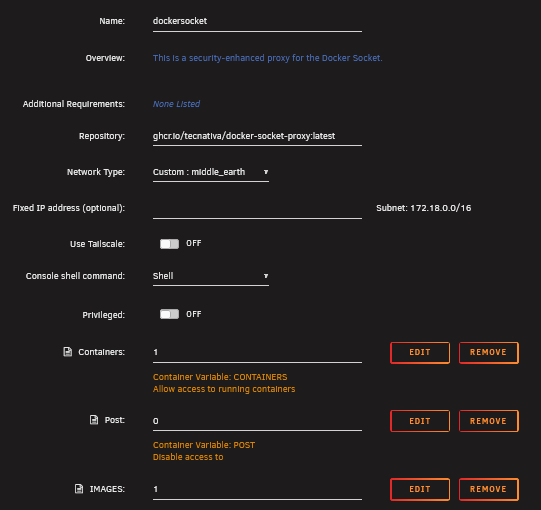
Now I realize where all the issues comes from Please this docker socket and try again This is my config, I am using a custom docket network but you can use any docker network you want, this is my config.
-
Which docker did you get? I have only got this to work with the Ibracorp one and not the from grtgbln. The reason only 3 containers shows up is because Unraid guardian can't see the docker socket it tells you very clearly in the logs Docker not available, using mock data: Error while fetching server API version: HTTPConnectionPool(host='dockersocket-ip', port=2375): Max retries exceeded with url: /version (Caused by NameResolutionError("<urllib3.connection.HTTPConnection object at 0x14cfd0b9d590>: Failed to resolve 'dockersocket-ip' ([Errno -2] Name or service not known)"))Step1:install the ibracorp docker socket and add the images & other changes as specified in page 1 Note NB:Don't activate tailscale in the container Step2: your unraid and docket socket needs to be on the same network, if you created a custom network put both on the custom network. Step 3:Make sure that last entry on you unraid guardian config has been deleted and re-created as instructed on page 1 and should read " DOCKER_HOST" now Step4: if both containers are on a custom network your docker docker want have 192.168.1.178<Port> IP thats use the 172.18.x.x IP This IP will then look something like tcp://172.18.X.X:2375 Step5: open the console on your docker socket and see if you can ping the 172.18.x.x IP of the Unraid guardian if it times out something is wrong with your networking
-
Hi, The dev made some changes please go to page 1 of this thread and make the requested changes. This includes installing docker socket (Ibracorp) etc.
-
I am not the Dev, just another user try to assist my fellow my with what has worked for me. This was quite the conundrum for me as well. 1) The docker socket (Ibracorp worked best for me) and unraid guardiuan must be on the same network, in case your using a custom network the docker socket will not get an <local-IP><port> like your other dockers. Use the 172 generated. Go back to page one and make all the specified changes wit regard to the images changes in the docker socket In the UnraidConfigGuardian container you'll want to remove the docker host path and instead add a variable called DOCKER_HOST and set it to the address of your dockersocket Make a new directory where your should be and the point the docker there look at the logs of the docker socket and unraid guardian when starting up the 1st time. Right below the restart option is the logs option please click that and see what errors are show. Please post a logs output so we can better assist and help you with this issue.

-
There is also instruction to do the following: In the UnraidConfigGuardian container you'll want to remove the docker host path and instead add a variable called DOCKER_HOST and set it to the address of your dockersocket I would also adivse you to look at logs after you did this if you still see a 403 in the logs its not picking up the docker socket correctly.

-
Hi Ren34, Step 1 of troubleshooting this issue is as follows. Please confirm if you installed the docker socket docker and made the advised changes on page 1
-
Hi @mrglass Sorry comment should have been clearer. If you look at the docker container config "Output Directory:" which has a description of "/ouput" the default directory is an an Appdata location. and but most people change to a share where their other backups is located. Mine is "/mnt/disk2/veeam/unraid_config-guardian/" I renamed the "unraid_config-guardian" part to unraid_config-guardian.OLD. a this stage it should create a new folder when run the tool again or you can manually create the folder. Since I have this share mounted in windows I just created a new folder like that but I also tested and confirmed creating folder via the unraid GUI or running "mkdir unraid_config-guardian" works just as well.


