





garfnodie
Members
-
Joined
-
Last visited
Everything posted by garfnodie
-
Got it working. Thanks.
-
Intel i3-14100 with 32g of ram. I installed Immich using Compose Manager Plus, got it all installed and working, was able to add photos, search and all. So since the basics were working, I wanted to see what capabilities, if any, I had with my measly integrated gpu. Below is the compse and env files. I added the Intel iGPU part the env, and then I made some edits to the compose file. Since everything was working, and the only changes I made were tot he machine learning section, I know my issues most likely there. I stopped messing with after a bit and decided to come here and see how to fix it. The system has 32Gb of ram, so I'm hoping that can help make up for the paltry gpu. This may be a fool's errand, but I had to at least try as a discreet gpu just isn't going to happen for a long time. If it is truly fruitless, then I could use help just putting the machine learning section back to the defaults. # # WARNING: To install Immich, follow our guide: https://docs.immich.app/install/docker-compose # # Make sure to use the docker-compose.yml of the current release: # # https://github.com/immich-app/immich/releases/latest/download/docker-compose.yml # # The compose file on main may not be compatible with the latest release. name: immich services: immich-server: container_name: immich_server image: ghcr.io/immich-app/immich-server:${IMMICH_VERSION:-release} # extends: # file: hwaccel.transcoding.yml # service: cpu # set to one of [nvenc, quicksync, rkmpp, vaapi, vaapi-wsl] for accelerated transcoding volumes: # Do not edit the next line. If you want to change the media storage location on your system, edit the value of UPLOAD_LOCATION in the .env file - ${UPLOAD_LOCATION}:/data - /etc/localtime:/etc/localtime:ro env_file: - .env ports: - '2283:2283' depends_on: - redis - database restart: always healthcheck: disable: false immich-machine-learning: container_name: immich_machine_learning # For hardware acceleration, add one of -[armnn, cuda, rocm, openvino, rknn] to the image tag. # Example tag: ${IMMICH_VERSION:-release}-cuda image: ghcr.io/immich-app/immich-machine-learning:${IMMICH_VERSION:-release}-openvino # extends: # uncomment this section for hardware acceleration - see https://docs.immich.app/features/ml-hardware-acceleration file: hwaccel.ml.yml # service: cpu # set to one of [armnn, cuda, rocm, openvino, openvino-wsl, rknn] for accelerated inference - use the -wsl version for WSL2 where applicable deploy: resources: reservations: devices: - driver: openvino count: 1 capabilities: - gpu volumes: - model-cache:/cache env_file: - .env restart: always healthcheck: disable: false redis: container_name: immich_redis image: docker.io/valkey/valkey:9@sha256:c123e3715db63d06d4ad6964884037aa0d5d4d703939b9929954112889708e1d healthcheck: test: redis-cli ping | grep -q PONG || exit 1 restart: always database: container_name: immich_postgres image: ghcr.io/immich-app/postgres:14-vectorchord0.4.3-pgvectors0.2.0@sha256:bcf63357191b76a916ae5eb93464d65c07511da41e3bf7a8416db519b40b1c23 environment: POSTGRES_PASSWORD: ${DB_PASSWORD} POSTGRES_USER: ${DB_USERNAME} POSTGRES_DB: ${DB_DATABASE_NAME} POSTGRES_INITDB_ARGS: '--data-checksums' # Uncomment the DB_STORAGE_TYPE: 'HDD' var if your database isn't stored on SSDs # DB_STORAGE_TYPE: 'HDD' volumes: # Do not edit the next line. If you want to change the database storage location on your system, edit the value of DB_DATA_LOCATION in the .env file - ${DB_DATA_LOCATION}:/var/lib/postgresql/data shm_size: 128mb restart: always healthcheck: disable: false volumes: model-cache: # You can find documentation for all the supported env variables at https://docs.immich.app/install/environment-variables # The location where your uploaded files are stored UPLOAD_LOCATION=/mnt/user/Personal_Stuff/Immich # The location where your database files are stored. Network shares are not supported for the database DB_DATA_LOCATION=/mnt/user/appdata/postgresql/data # To set a timezone, uncomment the next line and change Etc/UTC to a TZ identifier from this list: https://en.wikipedia.org/wiki/List_of_tz_database_time_zones#List TZ=America/Chicago # The Immich version to use. You can pin this to a specific version like "v2.1.0" IMMICH_VERSION=v3 # Connection secret for postgres. You should change it to a random password # Please use only the characters A-Za-z0-9, without special characters or spaces DB_PASSWORD=postgres # Intel iGPU device=/dev/dri # The values below this line do not need to be changed ################################################################################### DB_USERNAME=postgres DB_DATABASE_NAME=immich
-
Why though? Why not offer a completely Google free option that doesn't require Google Services or framework.
-
I'm sorry if I didn't word that title question correctly. I hope my explanation below is easier to understand. When I wake up and look at my Unraid dashboard, I expect at least one notification from "Mover Tuning" saying whether it did or did not transfer any data to the array. The notification for that is just a green circle with a check mark in it. If I haven't deleted or archived past notification though, and there is something with a yellow triangle exclamation from days ago, like say a high cache disk usage, or something from "Fix Common Problems," then the icon will be the yellow triangle, even if those notification were from days ago and I've already seen them. It seems to me that if just clicking the bell to see the notification is enough to reset the bell icon back to the default, then the system has acknowledged that I've see the notification there, and it shouldn't be showing me an indicator for notification from days ago that I've already seen, it should just be whatever has happened since I last clicked the bell. Is there a setting somewhere that change this, or is this a feature request I should submit? Or is this something that is already in the pipeline and I'll just have to wait a bit?
-
I'm trying to some help with the binhex-official-byparr container, but I can't find any support forums for them. The support link in the Unraid app center just takes you to the github issues page, but my problem isn't with the app itself, I just can't find a configuration file on my mac to work with it. I don't want to clutter their issue page with an id10t error. I don't use discord, and was hoping someone here knows a good forum for things like byparr, qbittorrent, and other related(🏴☠️) stuff.
-
Is there any way for me to downgrade to whatever the last version was before this horrible, confusing, and busy redesign?
-
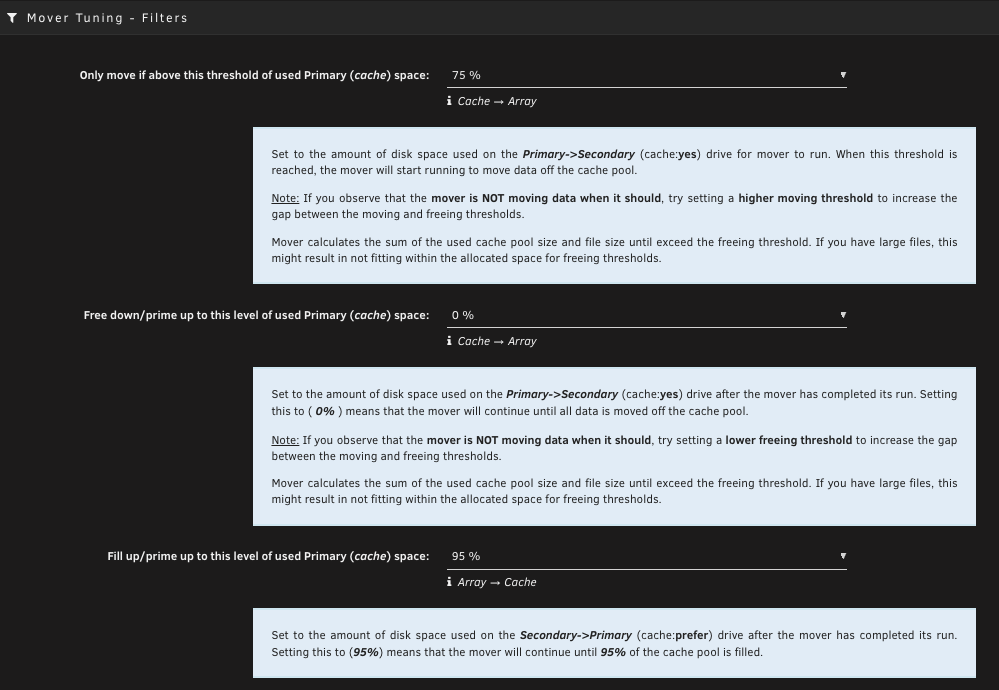
Is there an eli5 for this plugin, because I'm not understanding parts of it. In the attached image, I have the description/help box showing for each of the "Mover Tuning - Filters," but the first line in each one just seems like a jumble of words that sort of make sense, but I can't figure out what exactly they each do.
-
I am really confused by this plugin. I just want to delete the jellyfin stuff that it's showing. the old one I just clicked the checkbox and deleted it. That's all I need to do, but I can't even find a delete button in this thing.
-
Awesome. Thanks. Good to know.
-
I'm pretty new to Unraid, having built my system in December. Prior to today, I had only done one OS update to 7.2.5, and after that update, the system just booted, I logged and and continued on. Today, I update to 7.3.0, and upon booting, it comes up with an onboarding thing that I don't even remember from my initial building of the system, and certainly didn't get it last week when I update to 7.2.5. It really freaked me out for a moment because I was afraid I had just royally f*cked something up and killed my nas. Thankfully, just selecting skip was all I needed to do, but good lord did that freak me out. Why did it do that, and why this update and not 7.2.5?
-
Awesome. That is most useful. I'll look into the Innodisk for sure.
-
Any idea of the quality of the nand used on the 64Gb emmc in Steam Decks? Is it the same lower quality nand used in most flash drives, or does it have similar wear tolerance to regular ssd's? I've been trying to find a good use for it since I replaced it with a 256Gb ssd.
-
I guess I don't get why they aren't always on and running continuously by default. You never know when or what is going to happen, and if you only run logs after something happened, how is that going to help you?
-
So, don't write to the boot drive if it's a flash drive, which mine is. I don't have a reliable enough remote location, or even a reliable enough network, to go remote. I'm left with local, and since the whole reason I'm at this point, is because I lost access to any shares, using cache/share isn't a good idea. Now I'm just back to USB, only external this time, and since a flash drive isn't recommended, I have to use an external SSD, which just sound like overkill. Maybe I'm missing something here, but is writing the logs to the drive really that bad that i'll kill a flash drive that fast, because otherwise, I don't see a good option for those of us on a shoestring budget.
-
It's working. Trying to figure out what happened though.
-
Checked my docker containers as I know had a few set to autostart, but only one, binhex-jackett, is running. None of them have autostart turned on anymore, even binhex-jackett that did start.
-
Here is the diagnostic file.davids-server-diagnostics-20260428-1503.zip
-
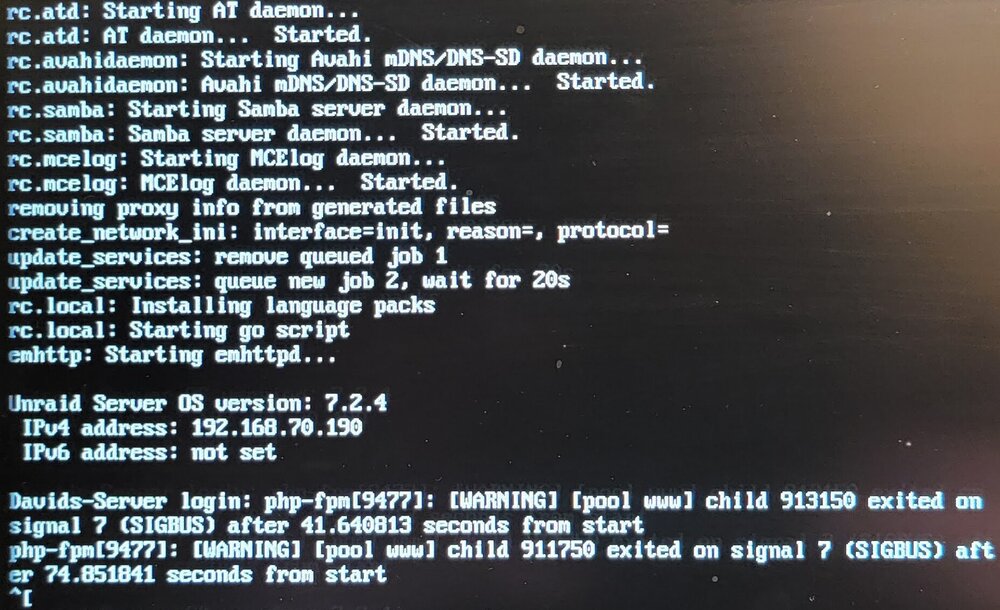
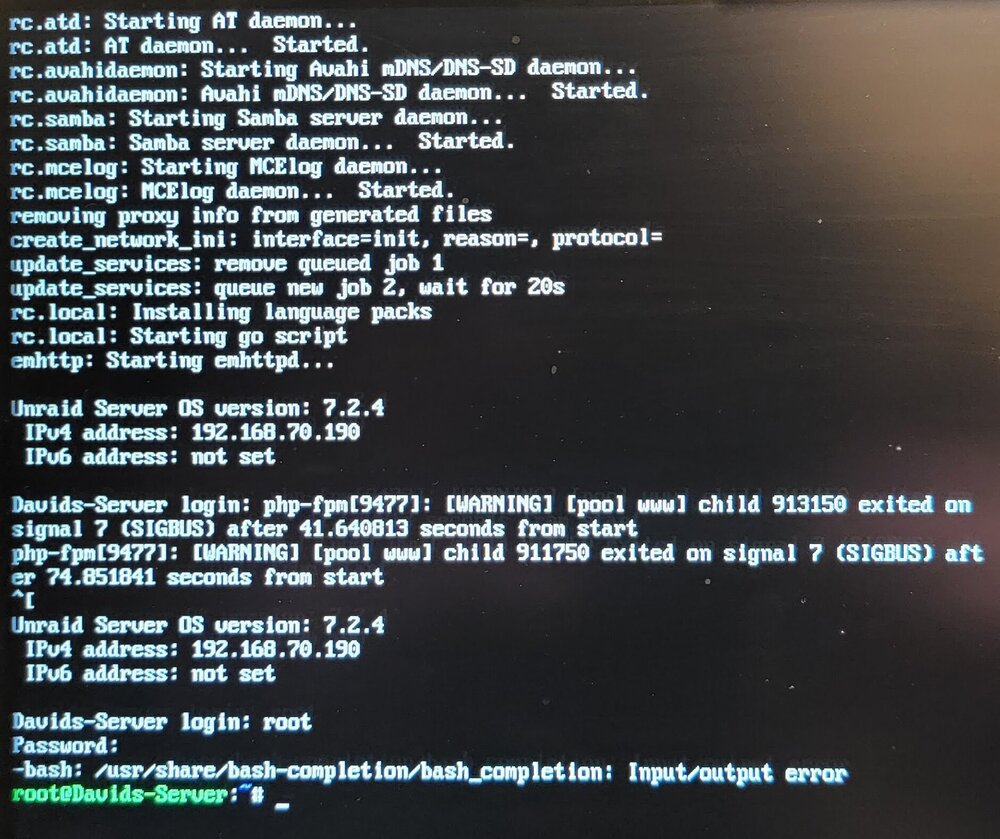
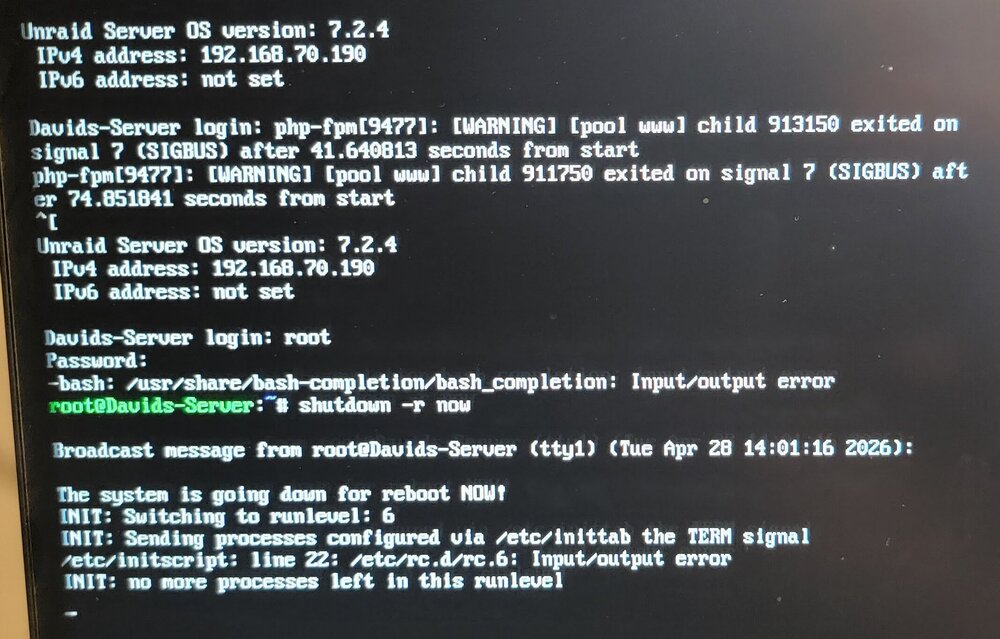
Way ahead of you on that. Here's (001) what I had when I first plugged in the kb and monitor, last line is just me hitting escape to see if kb is working. I had to rearrange a couple of things, and when I turned back to my screen, it looked like it finished starting up. A little surprised, I checked Chrome, and still not webui. I login as root on the CLI, check chrome again, still not webui. Still confused, but I manually initial a reboot using the cli, but it hangs on this (003) and even I knew I was just going to have to do a hard power down at this point. It's back up and running now, webui is working, shares are all accessible over the network, and parity check is running. I did record the boot up as best I could with my phone, and I can post it to YT and share if you really want, though I suspect some log snooping might be more useful, if you're willing to help me. I'm assuming I should get ssh running too, if you could point me to the proper guide, I'll get that done asap. Something similar has happened once before, but it was not too long after I built it, so I just chalked it up to being an Unraid noob.
-
I'm on my Mac, just started transferring some files to my NAS's SMB shares using Finder. I switch back to the other workspace that has my browser (Chrome), and it happens to be on the tab that is the Unraid WebUI. I never even did anything in the WebUI, but it just auto reloaded on it's own, and I haven't been able to access the webui since. My file transfers continued just fine, and I was still able to access all my shares, and plex still worked, just couldn't get to Unraid's own webui. Restarted my Mac, and now I can't access me shares, still can't get to the Unraid webui, but plex is still running just fine. I never setup ssh, didn't' know I needed to, and pressing the power button doesn't shutdown. I'm trying to avoid a hard shutdown with a long press of the power button, as I do know that works. I made no changes to anything, not my mac, not my network, not my router settings, nothing on unraid. Nothing. I had literally just got up, did some organizing of my recent downloads and just started dumping them to the NAS. I do use a commercial VPN, Proton in this case, but it's caused no issues in the past, but even so, I still turned it off, but still can't access the Unraid webui. edit: ended up doing a hard shutdown, and it's back up and runningnow. Trying to understand what happened and why though.
-
Thirteen years later, and this still works. I was about to pull my hair out over two fuse files.
-
This worked for me. I couldn't even get RomVault to run for the first time after installing it, but I could see that it did create the directory inside appdata, so I just used the file manager built right into Unraid's webgui, and changed the permissions of the romvault volder to Nobody. Container started right up first try after changing the folder permissions.
-
I'm still relatively new to UNRAID, and primary use case is a media server for Plex, Jellyfin, qbittorrent, radarr, sonarr, lidarr, etc. I've been using commercial VPN's (PIA, Express, Proton) since 2018, and I've accepted that I regularly have to switch to a different exit point as sites will block VPN IP's, and torrents with slow or stop. I'm used to the dance of stopping torrents, killing my torrent client, changing exit points, then restarting my torrent client, often multiple times a day. I know VPN providers have some automatic changing of exit points, but that appears to be limited to either just your county, or just a small area of your country, and in my case in the US, there are a bunch of regions. Right now, I'd need multiple tunnels set up, and if I want to switch my containers from wg0 to wg1, I have to edit every container and restart them. It seems to me there has to be simple desktop environment, similar to what a docker-Firefox uses, that would allow you to install the native linux app for your VPN provider, or providers if you have multiple, then just route all your torrent based containers through that container. My goal here is that any containers that connect through this "VPN Container" wouldn't have to be restarted, or rebuilt or anything if you change exit points or providers, they just momentarily lose internet, then reconnect a few moments later, just with a new public IP.
-
As I type this, step #6 from the Removing disks from array - Parity-preserve method is running, but it's step #8, "Reset array configuration, retaining all current assignments" that has me confused. What does it mean to reset the array keeping the current assignments? Here's what I had going on, build this box a few months ago, and not knowing exactly what I was doing, I put an SSD in my array, and it was smack in the middle of the list too. I had a second SSD that I setup as a cache drive, and that one is fine. I'm not wanting to mirror the cache and am instead going to set up the soon to be liberated SSD as another pool device. Thankfully, I refrained from using the SSD in question for any data, so I finally got around to getting it removed from the array and writing zeros to it, I'm just confused on the next instruction. I also need to change what disk numbers the HDD's were assigned so that they are in the same order as the are physically in the case. p.s. step #2 of the instruction (parity-preserve method) explain that the drive won't mount when you start the array, and it indeed did not mount, but then in step #5, it says to run a bash command to unmount the disk, but you get an error when you run that command because the drive never mounted to begin with.


