





nick5429
Community Developer
-
Joined
-
Last visited
-
It looks like drives A: and B: don't get mapped/mounted/available for selection in the Backblaze UI. If I've got to map each share on a zpool too (it looked to me like all my zpool shares were getting backed up previously, but I didn't dig too deep there...), I'm unfortunately out of drives to map without A and B! Is there a solution for mapping beyond 26 drives (minus C and Z) in Windows/Backblaze? edit: it looks like at least for me, Backblaze is at least looking inside individual directories (the "Archive" directory which is an "exclusive share" on my /mnt/ztank ZFS zpool), which is mapped to drive D newfstatat(AT_FDCWD</config/wine/drive_c/windows/system32>, "/config/wine/dosdevices/mountpointmanager", 0x7ffffdfff530, 0) = -1 ENOENT (No such file or directory) --- SIGUSR1 {si_signo=SIGUSR1, si_code=SI_TKILL, si_pid=1896, si_uid=99} --- --- SIGUSR1 {si_signo=SIGUSR1, si_code=SI_TKILL, si_pid=1896, si_uid=99} --- newfstatat(AT_FDCWD</config/wine/drive_c/windows/system32>, "/config/wine/dosdevices/d:/Archive/nickdesktop backup/myDir/ectory", {st_mode=S_IFDIR|0777, st_size=4, ...}, 0) = 0 fstatfs(16</drive_d/Archive/nickdesktop backup/myDir/ectory>, {f_type=ZFS_SUPER_MAGIC, f_bsize=131072, f_blocks=258493881, f_bfree=99665724, f_bavail=99665724, f_files=25515974823, f_ffree=25514425426, f_fsid={val=[0xfff2ece9, 0xdbf026]}, f_namelen=255, f_frsize=131072, f_flags=ST_VALID|ST_NOATIME}) = 0 Ah -- I see what's happening. Certain of my top level directories on my ztank zpool are plain directories rather than separate ZFS datasets for whatever reason (probably me moving around files under the hood/at CLI). Confirmed that the ones which are actually separate datasets don't appear to be backed up, as you said. Note that this appears to apply to single-drive ZFS disks in the array too, which complicates the "use disk shares for Backblaze" plan if you've got ZFS disks in your main array
-
This share I'm testing with is full of large files instead of a ton of tiny ones, but once it got to the point of actually uploading files it's uploading at a significant fraction of my gigabit upstream link (200-500 mbit/sec) In the upload-prep phase (bztransmit -prepare_bzcombs) on the same shfs share, build 301 made no fstatfs calls on the shfs drive at all (vs ~80/s at 5.45 ms each before, 48% of wall time) and zero .ciopfs probes. The process is no longer waiting on shfs: wineserver now runs at ~75% of a core and bztransmit at 35-50%, with upload threads reading file content syscall profile while uploading files: % time seconds usecs/call calls errors syscall ------ ----------- ----------- --------- --------- ---------------- 64.11 381.670886 316 1207587 read 15.79 94.009386 45 2070102 rt_sigprocmask 3.88 23.102137 45 504686 write 3.67 21.824808 46 472780 writev 2.72 16.201333 300024 54 pselect6 2.28 13.548210 46 293070 clock_gettime 1.88 11.210074 46 242804 getsockopt 1.04 6.213267 63 97293 26 sendmsg 0.88 5.257933 47 111506 11711 newfstatat 0.49 2.936435 46 63332 48527 recvmsg 0.48 2.853184 66 42824 850 mmap 0.37 2.214767 46 47223 75 close 0.31 1.819285 56 32162 32162 getxattr 0.29 1.747434 40 43600 mprotect 0.26 1.529106 43 34756 2870 openat 0.23 1.382583 41 33154 lseek 0.22 1.314960 42 31257 fcntl 0.21 1.240101 42 29370 50 fstat 0.16 0.930960 42 22100 fchdir 0.15 0.902320 66 13572 getdents64 0.11 0.634950 5079 125 clone 0.10 0.606234 12124 50 wait4 0.09 0.523412 42 12410 12360 ioctl 0.06 0.345682 40 8550 250 access 0.05 0.327091 45 7225 munmap 0.05 0.281705 1126 250 50 pread64 0.05 0.268928 5378 50 execve 0.03 0.199884 39 5000 3150 readlink 0.01 0.037420 41 900 fstatfs 0.00 0.028524 76 374 pwrite64 0.00 0.024236 35 675 rt_sigaction 0.00 0.013196 38 346 brk 0.00 0.012618 48 262 getrusage 0.00 0.012359 35 350 prlimit64 0.00 0.011034 147 75 poll 0.00 0.008531 37 225 50 prctl 0.00 0.008124 40 200 getcwd 0.00 0.007560 43 175 150 connect 0.00 0.007461 42 175 socket 0.00 0.007341 41 175 set_robust_list 0.00 0.007166 40 175 pipe2 0.00 0.006787 38 175 arch_prctl 0.00 0.006459 49 131 sched_yield 0.00 0.006357 42 150 futex 0.00 0.005787 38 150 setsockopt 0.00 0.004301 43 100 uname 0.00 0.004257 42 100 sysinfo 0.00 0.003831 38 100 open 0.00 0.003665 35 102 getrandom 0.00 0.003619 36 100 dup2 0.00 0.003605 36 100 umask 0.00 0.002958 39 75 gettid 0.00 0.002931 39 75 sigaltstack 0.00 0.002839 37 75 rseq 0.00 0.002814 56 50 socketpair 0.00 0.002484 49 50 fadvise64 0.00 0.002332 93 25 sendmmsg 0.00 0.002290 45 50 recvfrom 0.00 0.002138 42 50 50 fgetxattr 0.00 0.001975 39 50 50 userfaultfd 0.00 0.001890 37 50 getuid 0.00 0.001819 34 52 dup 0.00 0.001783 35 50 getpid 0.00 0.001745 34 50 set_tid_address 0.00 0.001724 34 50 setsid 0.00 0.001107 44 25 25 clone3 0.00 0.001098 43 25 rt_sigreturn ------ ----------- ----------- --------- --------- ---------------- 100.00 595.365221 109 5433009 112406 total summary entries/s (getxattr) 536.0 fstatfs 15.0/s avg 41 us read 20126.5/s avg 316 us My own drive-based backup is mostly complete so I'm personally going to shut down this test usershare container and stick with that I think, but this change may have taken things to the point where backing up based on usershares is actually viable
-
Tested build 301 on a user-share scan of TV-CurrentShows, which spans 3 array disks and where native statfs through shfs still takes ~20 ms: 442 entries/s vs ~185 before, .ciopfs probes 0 vs ~63/s, and fstatfs calls per entry dropped about 17x (~0.34 to ~0.02). So the caching works! Collected raw data: ===== after Backblaze64_usershares bzfilelist.exe 2026-10-09 10:55:09 ===== ===== image ===== repository ghcr.io/iamfoz/backblaze-personal-wine:beta image built 2026-10-08T18:56:30.87503774Z Container Image: beta build: version=beta build: revision=9005a85627f5b44d0bed133ca1a50ba61d877433 build: build=301 build: variant=beta-ubuntu26 build: built=2026-10-08T18:56:30Z Wine: wine-11.19 Backblaze client Installed: 10.0.3.1075 Available: 10.0.3.1075 (via ca000) Status: up to date ===== drive mappings and backing filesystem ===== /drive_y fuse /mnt/user/TV-CurrentShows ===== wall-clock syscall profile, 60s (pid 1025052) ===== process age at start: 9 s strace: Process 1025052 attached strace: Process 1025052 detached % time seconds usecs/call calls errors syscall ------ ----------- ----------- --------- --------- ---------------- 65.43 33.578809 509 65860 read 12.14 6.231815 11455 544 fstatfs 5.13 2.633308 52 49736 2601 newfstatat 4.54 2.329150 17 132235 rt_sigprocmask 4.17 2.142396 80 26528 26196 getxattr 3.06 1.572704 930 1691 getdents64 1.00 0.513205 18 27956 write 0.88 0.453982 18 24251 writev 0.69 0.352019 17 19688 lseek 0.56 0.286198 18 15406 close 0.55 0.281865 20 13732 fchdir 0.41 0.208192 24 8446 fstat 0.39 0.201743 25 7897 openat 0.32 0.165721 22 7508 recvmsg 0.28 0.142422 17 8226 fcntl 0.24 0.120629 19 6347 6347 ioctl 0.13 0.066737 18 3607 rt_sigreturn 0.05 0.025775 44 574 pwrite64 0.02 0.009839 19 505 505 pread64 0.00 0.000258 23 11 mprotect 0.00 0.000176 43 4 mmap ------ ----------- ----------- --------- --------- ---------------- 100.00 51.316942 121 420752 35649 total summary entries/s (getxattr) 442.1 fstatfs 9.1/s avg 11455 us 10.4% of wall read 1097.7/s avg 509 us 56.0% of wall ===== fstatfs by drive, 20s ===== 31 calls 0.517 s total 16.662 ms avg /drive_y ===== .ciopfs probes, 10s ===== 0 probes in 10 s ===== CPU, 3 x 5s (scanner/prep process and wineserver) ===== PID USER PR NI VIRT RES SHR S %CPU %MEM TIME+ COMMAND 1025052 nobody 20 0 2045612 26744 9936 S 0.0 0.1 0:06.58 bzfilel+ 1018387 nobody 20 0 18424 14968 1424 S 0.0 0.0 0:08.86 wineser+ PID USER PR NI VIRT RES SHR S %CPU %MEM TIME+ COMMAND 1018387 nobody 20 0 18424 14972 1424 S 5.4 0.0 0:09.13 wineser+ 1025052 nobody 20 0 2045612 26744 9936 S 2.8 0.1 0:06.72 bzfilel+ PID USER PR NI VIRT RES SHR S %CPU %MEM TIME+ COMMAND 1018387 nobody 20 0 18424 14972 1424 S 4.6 0.0 0:09.36 wineser+ 1025052 nobody 20 0 2045612 26744 9936 S 2.4 0.1 0:06.84 bzfilel+ Digging a little deeper monitoring the trace: --- SIGUSR1 {si_signo=SIGUSR1, si_code=SI_TKILL, si_pid=1852, si_uid=99} --- --- SIGUSR1 {si_signo=SIGUSR1, si_code=SI_TKILL, si_pid=1852, si_uid=99} --- newfstatat(AT_FDCWD</config/wine/drive_c/windows/system32>, "/config/wine/dosdevices/y:/myDir/ectory", {st_mode=S_IFDIR|0777, st_size=42, ...}, 0) = 0 fstatfs(16</drive_y/myDir/ectory>, {f_type=FUSE_SUPER_MAGIC, f_bsize=4096, f_blocks=14264479561, f_bfree=4780425483, f_bavail=4780425483, f_files=32173436487, f_ffree=32171879627, f_fsid={val=[0, 0]}, f_namelen=255, f_frsize=4096, f_flags=ST_VALID|ST_NOSUID|ST_NODEV|ST_NOATIME}) = 0 newfstatat(AT_FDCWD</config/wine/drive_c/windows/system32>, "/config/wine/dosdevices/mountpointmanager", 0x7ffffdfff530, 0) = -1 ENOENT (No such file or directo ry) Claude notes: (but this is likely minor compared to the fix you already made) Nice work!
-
I like this a lot, thanks! FYI to anyone coming across this (I was confused and couldn't find the tab at first in the vanilla docker): as of the time I'm writing this, you have to be running the :beta tag of foz's Backblaze64 to have the API tab that this plugin needs
-
First: wonderful work here, thanks so much for maintaining this container. It fills a huge need for me! It looks like I independently came to similar conclusions to what is suggested here: using /mnt/disk* mapped as drives in the container rather than user shares. As another datapoint this took my initial file scan from ~10 hours to ~15 minutes, and now my backup is proceeding at a very reasonable pace instead of looking like it's going to take 6 months to complete based on the pace it was moving through my small files. I additionally used Backblaze's XML configurable exclusions file because I didn't want to add all the directories I want to exclude (mostly media shares) over and over again while testing. This conveniently excludes the path across all disks: https://www.backblaze.com/computer-backup/docs/configure-custom-exclusions-using-xml-windows I was working with Claude to diagnose slow backups when the container's drives are mapped to Unraid user shares (/mnt/user/<share>) before switching to mapping disk and pool paths. Along the way it had me take a series of strace measurements, and they point to one specific Wine behavior that looks responsible for much of the slowdown on user shares. Its findings and suggested change are below, in case you think it's worth patching in your locally maintained WINE fork or for contributing upstream. Claude wrote up the following summary which may or may not be useful/interesting: Setup Backblaze64 :beta on Unraid 7.3.2, client 10.0.3.1075, about 2.8M files. Each user share was mapped to its own drive letter (/mnt/user/<share> -> /drive_x). For comparison, a second container had the same data mapped through disk and pool paths (/mnt/diskN, /mnt/<pool>). Finding On user-share drives, a large share of wall time goes to fstatfs() calls that each take about 21 ms. Each of those calls is followed by a failed stat() of .ciopfs. This looks like Wine's directory case-sensitivity check in ntdll: when statfs reports a FUSE filesystem, Wine looks for a ciopfs marker. The result doesn't appear to be cached, so the check repeats for every lookup, roughly 50 times per file during upload preparation. shfs is FUSE, and its statfs is slow, presumably because it aggregates across every disk the share spans. On XFS and ZFS the same call takes about 20 µs, and the .ciopfs probe never runs. Evidence All figures come from strace -c -w -f -p <pid>, which reports wall-clock time per syscall, unless noted otherwise. bztransmit -prepare_bzcombs on user-share drives, 30 seconds: fstatfs: 2,418 calls at 5,450 µs average, 13.2 s total, 48% of wall time read (mostly wineserver replies): 11,555 calls at 938 µs average, 39% of wall time newfstatat: 1,305 failed calls; ioctl: 2,439 failed calls; getdents64: 1,026 calls Throughput: about 1,740 files per hour, 0.3 Mbit/s, monitor showing 0.0 threads, with the CPU and network mostly idle The same process, strace -f -T -y -e trace=fstatfs for 20 seconds, grouped by path: About 520 calls on shfs-backed drives, totaling about 10.8 s, about 21 ms per call About 2,050 calls on ZFS paths (/config, exclusive shares), totaling 0.04 s, about 20 µs per call The failed newfstatat calls were all ".ciopfs", apart from the client's own .tmp status files. bzfilelist scan on user-share drives: About 185 entries per second fstatfs at about 17.9 ms average About 63 .ciopfs probes per second read at 0.7-1.5 ms average Native statfs on the host, measured as 500 calls in a single stat -f process to remove process-start overhead: /mnt/disk18: 45 µs /mnt/user/Nick (an exclusive share, which resolves to ZFS): 202 µs /mnt/user/OldD and /mnt/user/Backups (spread across array disks): 21,586 µs and 21,416 µs For comparison, a per-file stat on the same files: 40 µs through the disk path, 549 µs through /mnt/user. winedevice's periodic fstatfs sweep of the drive roots: 20-28 ms on each shfs drive, about 20 µs on each ZFS drive. The same data mapped through disk and pool paths: Scan: 1,042 entries per second (5.6x), with a full scan finishing in under 15 minutes. fstatfs 18 µs, read 19 µs, 0 .ciopfs probes. prepare_bzcombs: per-entry work rate 4.8x higher. fstatfs 18 µs (0.7% of wall time), read 83 µs (16%), 0 .ciopfs probes. Interpretation The .ciopfs probe accounts for about half of the upload-preparation time on user shares. read latency (wineserver round trips) is also 10-50x higher on user shares. My guess is that wineserver itself sometimes blocks on shfs calls and stalls every client, but that's an inference: I didn't trace wineserver directly. Suggested change Cache the case-sensitivity result per filesystem (keyed on st_dev), or at least per directory, so the fstatfs and .ciopfs check runs once instead of on every lookup.
-
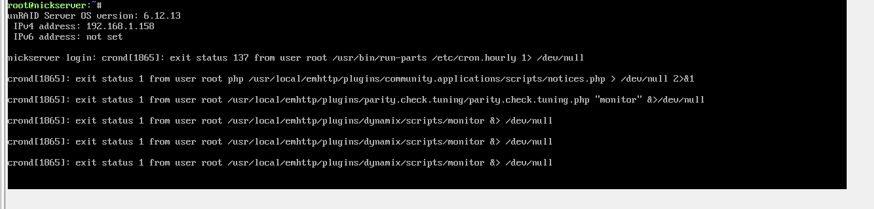
System: Supermicro X8DTE-F, 24GB ram, Xeon L5640 HBA330, bunch of spinning data drives, 1 out-of-pool SSD for misc tinkering and docker storage At least once a week lately, my system will completely hang and be unresponsive to any input. No unraid networking page, nor even respond to physical keyboard attached. Cursor doesn't blink, "enter" doesn't insert a new console line, numlock doesn't toggle, etc. This time, it happened when I was starting a VM which triggered the OOM process. Frequently other times, it will happen 'randomly' as far as I can tell, though with indications an OOM was involved. I'm not sure this even makes a ton of sense outside of this VM-induced crash today, as generally I run no VMs and just typical collection of dockers with 24GB of RAM. `free -m` would typically show at least 1+GB completely free and ~8GB buffered/cached which could be reclaimed under memory pressure rather than killed-for. Aside: I'm playing around with ZFS pools on the 'cache' mount, but is used only as a data drive/pool. I'm unconcerned about associated reported errors in the syslog. Various zfs things use 10-12GB, but nevertheless -- an OOM event should not cause a complete system hang [especially the more routine 'random' ones that aren't requesting 8GB all at once, which aren't captured here] Diagnostics attached; syslog mirrored to flash and captured in diagnostics Screenshot from IPMI "physical console" showing some killed when hung It looks like process 'unraid-api' gets killed at some point; is that a noteworthy problem? nickserver-diagnostics-20240911-0957.zip
-
Another temporary workaround which will allow you to examine things while debugging is to increase the size of the "/var/log" ramfs filesystem: # increase tmpfs for logging mount -t tmpfs tmpfs /var/log -o size=1G,remount
-
I have a proof-of-concept script here which pulls info from Plex's "on deck" API, and remaps the file paths from my docker's paths back into my unraid filesystem paths. I haven't integrated any of this into the actual preloading script You'll need to get your plex API token; a "temporary" token is pretty easy and straightforward to get, see https://support.plex.tv/articles/204059436-finding-an-authentication-token-x-plex-token/ IIRC, these temporary tokens still maybe last 'a while'/long enough to be useful beyond just development? #!/bin/bash # Plex server details PLEX_URL="http://192.168.1.10:32400" API_KEY="" # Define the path mappings declare -A path_map=( ["/Movies/"]="/mnt/user/Movies/" ["/TV-Kids/"]="/mnt/user/TV-Kids/" ["/TV-CurrentShows/"]="/mnt/user/TV-CurrentShows/" # Add more mappings as needed ) # Define the video file extensions video_ext='avi|mkv|mov|mp4|mpeg' # Function to remap file paths remap_path() { local original_path="$1" for prefix in "${!path_map[@]}"; do if [[ "$original_path" == "$prefix"* ]]; then # Replace the prefix with the mapped path echo "${original_path/$prefix/${path_map[$prefix]}}" return fi done # If no mapping found, return the original path echo "$original_path" } # Function to get "On Deck" items from Plex and process file paths get_ondeck() { local plex_url="$1" local api_key="$2" # Query the On Deck list from Plex local plex_on_deck_url="$plex_url/library/onDeck?X-Plex-Token=$api_key" # Get the list of On Deck items (assumed response in XML format) local response=$(curl -s "$plex_on_deck_url") # Parse the XML response and extract the full file paths from <Part> tags local video_files=() while IFS= read -r line; do # Dynamically create a regular expression using the video_ext variable local file_path=$(echo "$line" | grep -oP "(?<=file=\")[^\"]+\.($video_ext)\"") if [[ -n "$file_path" ]]; then # Remove trailing quote that gets included file_path=$(echo "$file_path" | sed 's/"$//') # Remap the file path using the remap_path function local remapped_file_path=$(remap_path "$file_path") video_files+=("$remapped_file_path") fi done < <(echo "$response" | grep -oP '<Part[^>]*file="[^"]*"') # Output the array elements, one per line printf "%s\n" "${video_files[@]}" } # Get and print the remapped On Deck video files echo "Remapped On Deck video files:" # Capture the output of get_ondeck into an array called "ondeck_files" mapfile -t ondeck_files < <(get_ondeck "$PLEX_URL" "$API_KEY") # Print the remapped file paths printf "%s\n" "${ondeck_files[@]}"
-
And if that doesn't work, let us know what filesystem you were using. If it was xfs and not working with the mount command above, show the output of this command [changing the /dev/sdd to the device you are working on]: head /dev/sdd | xxd | grep XFSB
-
I agree completely, and the response here has been pretty indifferent and the issue ignored. Not great. Anyway see my response in the bug, but TL;DR for anyone encountering this: try mounting the partition with -o offset=0, or the disk with -o offset=32768. In my case: mount -t xfs -o offset=0 /dev/sdd1 /tmp/is-disk6/
-
fwiw this post isn't me; appears somebody else had this same problem:
-
I'm on 6.12.11 Docker start command shows as: docker run -d --name='binhex-sickchill-fresh' --net='bridge' -e TZ="America/New_York" -e HOST_OS="Unraid" -e HOST_HOSTNAME="nickserver" -e HOST_CONTAINERNAME="binhex-sickchill-fresh" -e 'UMASK'='000' -e 'PUID'='99' -e 'PGID'='100' -l net.unraid.docker.managed=dockerman -l net.unraid.docker.webui='http://[IP]:[PORT:8081]/' -l net.unraid.docker.icon='https://raw.githubusercontent.com/binhex/docker-templates/master/binhex/images/sickchill-icon.png' -p '8091:8081/tcp' -v '/mnt/user/appdata/data':'/data':'rw' -v '/mnt/user':'/media':'rw' -v '/mnt/disks/SanDiskSSD/appdata/binhex-sickchill-fresh':'/config':'rw' 'binhex/arch-sickchill' Manually running /home/nobody/start.sh didn't give me any additional info beyond the prior 'illegal instruction' Redirecting the config/install dir back onto /mnt/user/appdata didn't change anything
-
A brand new copy of this container with none of the default populated settings changed, into a blank config directory, fails in exactly the same way on my system Copying my full config directory and pointing the latest top of tree version of the LSIO sickchill container at it seems to work
-
Created by... ___. .__ .__ \_ |__ |__| ____ | |__ ____ ___ ___ | __ \| |/ \| | \_/ __ \\ \/ / | \_\ \ | | \ Y \ ___/ > < |___ /__|___| /___| /\___ >__/\_ \ \/ \/ \/ \/ \/ https://hub.docker.com/u/binhex/ 2024-07-25 14:24:41.201040 [info] Host is running unRAID 2024-07-25 14:24:41.257635 [info] System information Linux 12937845fbd7 6.1.79-Unraid #1 SMP PREEMPT_DYNAMIC Fri Mar 29 13:34:03 PDT 2024 x86_64 GNU/Linux 2024-07-25 14:24:41.311686 [info] PUID defined as '99' 2024-07-25 14:24:41.401049 [info] PGID defined as '100' 2024-07-25 14:24:41.495063 [info] UMASK defined as '000' 2024-07-25 14:24:41.545407 [info] Permissions already set for '/config' 2024-07-25 14:24:41.630897 [info] Deleting files in /tmp (non recursive)... 2024-07-25 14:24:42.005329 [info] Starting Supervisor... 2024-07-25 14:24:42,748 INFO Included extra file "/etc/supervisor/conf.d/sickchill.conf" during parsing 2024-07-25 14:24:42,748 INFO Set uid to user 0 succeeded 2024-07-25 14:24:42,757 INFO supervisord started with pid 7 2024-07-25 14:24:43,759 INFO spawned: 'start-script' with pid 47 2024-07-25 14:24:43,760 INFO reaped unknown pid 8 (exit status 0) 2024-07-25 14:24:44,762 INFO success: start-script entered RUNNING state, process has stayed up for > than 0 seconds (startsecs) 2024-07-25 14:24:45,028 DEBG 'start-script' stderr output: /home/nobody/start.sh: line 7: 49 Illegal instruction "${install_path}/bin/sickchill" --config /config/config.ini --datadir /config 2024-07-25 14:24:45,028 DEBG fd 8 closed, stopped monitoring <POutputDispatcher at 22418072691408 for <Subprocess at 22418073011728 with name start-script in state RUNNING> (stdout)> 2024-07-25 14:24:45,028 DEBG fd 10 closed, stopped monitoring <POutputDispatcher at 22418085474448 for <Subprocess at 22418073011728 with name start-script in state RUNNING> (stderr)> 2024-07-25 14:24:45,028 WARN exited: start-script (exit status 132; not expected) 2024-07-25 14:24:45,029 DEBG received SIGCHLD indicating a child quit Docker fails to start I rolled back to binhex/arch-sickchill:2024.2.18-01 a while back; tried again today and it's still failing
-
Thanks for clarifying It would be great to have this documented much more clearly/prominently and explicitly, since in other places IIRC parallels are/were drawn between the prior concepts of 'cache' and 'main unraid array' as 'pools'. If that were the case, then what I was originally trying to do ought to have been possible

