





Fireball3
Members
-
Joined
-
Last visited
Everything posted by Fireball3
-
Yes, it was me. Thanks for your help - the issue is solved in my opinion. Here is the post containing the files. Copy txz to \\tower\flash\config\plugins\dynamix.cache.dirs and replace the plugins\dynamix.cache.dirs.plg Rename your existing files for backup purposes. There is much confusion about the dynamix plugin frontend, and the underlying shell-script. I wish the dynamix plugin would be updated asap. Apparently more and more people face this issue.
-
There are several conditions you can choose in the plugin settings. Drive activity is one of those.
-
Yes indeed, I see. Unfortunately not much better. I must have mixed the forum. There are forum solutions where it makes a difference. Sorry for bothering you.
-
@interwebtech Would you mind wrapping your posted code into "code" tags? It really improves readability! Thank you!
-
That one is the known bad version. The latest work in progress is here. This one is working very well. I don't know, when Alex will release it into the plugin, but you can exchange the files on your USB manually and give it a try (effective on next reboot). Some more testers are welcome.
-
Yes, this seems to work. Drives are not spinning any more. I will monitor if its reproducible.
-
I ran find against all disks and everything was cached as it should. Then I accessed the share and the 3 known (xfs) drives were spinning up.
-
There is a version not yet commited to the repository, as there are just a few testers. Please feel free to test and feedback in this tread.
-
Not sure if it matters, but the disks that spin up are XFS while the others are reiserFS.
-
I guess it won't hurt if he gives some feedback also before committing. Would you please read my addition to my last post. I edited while you were typing.
-
OK, I can adjust that. Is the new version available via the plugin update? A friend of mine also had the plugin updated and then it wouldn't start. I could tell him to update as the bug seems fixed. Edit: I suspect some content is not cached. Is there a way to check what drives are and what not? When I'm accessing the share - just browsing, it will pause to spin up some discs. I checked the GUI and found only 3 disks spinning. The share definitely spans mor than those 3 disks.
-
I tried to explain the solution in this post.
-
OK, copied the files and rebooted the server. Checked the plugin status on the GUI and...tadaaaa...running. Attached a cache_dirs_diagnostics. find_defunct.sh is now also running, just in case. cache_dirs_diagnostics_30.09.2018.zip
-
No, the dynamix-plugin didn't start at start-up. The cache_dir -L was the only instance running. Your modified script invoked with ./cache_dirs -i Video -e Audio -e Backup -e Fotos -e Spiele -l on didn't block the shutdown. I will confirm with other runs. How to instiall the modded version instead the onf of the dynamix suite? And finally, what's wrong with the autostart of the plugin?
-
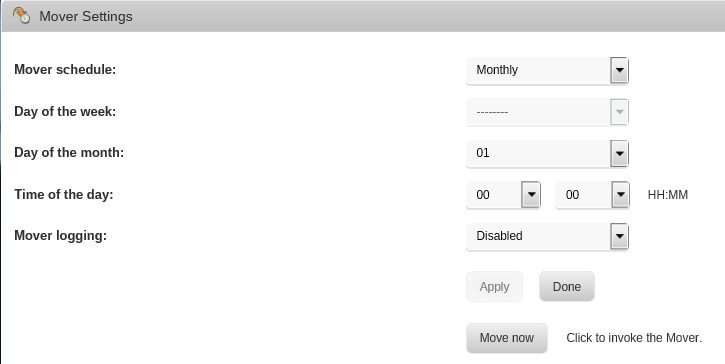
Here I am. I updated the diagnostics in the post of this morning. Can't see anything of use. Attached to this post the first cache_dirs_diagnostics together with a screen shot of the cache_dirs GUI. I'm not sure if the log generated with -L is showing the running plugin or the instance that is pulling the log data!? Therefore I attached the ps and pstree output. cache_dirs -q says it it not running. This means, the GUI is not lying. I fired up the modified version as planned. ./cache_dirs -i Video -e Audio -e Backup -e Fotos -e Spiele -l on The second file show the logs right after the script start. The GUI is also showing the plugin status "running". The defunct.sh is also running. I think I managed to remove the mover & logger spamming the log. The mover settings had logging enabled. # Generated mover schedule: 0 0 1 * * /usr/local/sbin/mover |& logger Once it is set to disabled the file \flash\config\plugins\dynamix\mover.cron contains # Generated mover schedule: 0 0 1 * * /usr/local/sbin/mover &> /dev/null It seems there is no switch to fully disable the mover. cache_dirs_diagnostics.zip cache_dirs_diagnostics_arberg_mod_28.09.2018_2252.zip
-
OK, thanks for your effort! Here is the plan: 1. check if the GUI is lying. Execute the ps and pstree right after reboot to have evidence. 2. kill all running instances of cache_dirs ./cache_dirs -q 3. run the one you posted above -without -T (wait until it locks up again, dump diagnostics) ./cache_dirs -i Video -e Audio -e Backup -e Fotos -e Spiele -l on -with -T (see if it locks up again, dump diagnostics) ./cache_dirs -i Video -e Audio -e Backup -e Fotos -e Spiele -l on -T -without -T but with memory limit -U100000 if it still locks up ./cache_dirs -i Video -e Audio -e Backup -e Fotos -e Spiele -l on -U 100000 I have to check the log, but my mover has no timed job. I fire up the move by hand if necessary. Edit: I picked the wrong diagnostic.zip in the hurry. The file is from yesterday evening 20:14... Edit2: I was up late yesterday. By that time, the S3sleep plugin should have shutdown the server but it wasn't. That was suspicious, but the CPU wasn't locked up by that time. I will post the correct diagnostics dumped this morning when I'm home later. Maybe there is some clue within. The S3sleep is logging if a condition is preventing shutdown.
-
Here is a set of new logs. This morning one CPU core was locked @100%. I will comment on your post later. diagnostics_28.09.2018.zip tuerke-diagnostics-20180928-0734.zip
-
That was after I started it manually. See attached. in /etc/cron.d is the attached file "root" Because it says "Status: stopped". There is nothing cached. Once the drives spin down I have to wait for the drives to spin up when browsing the cached smb shares. Is there a way to check how many entries are actually cached? I'm checking the memory chart within the stats. When using 2.1.1 almost all of my 8GB RAM is "cached". When starting with 2.2.0j there is nothing cached. The only difference is the plugin version. This might not be a good approach though. Not sure about the log snippet you posted. I don't see any cache_dirs entry. Also attached a diagnostics after 10 hours uptime. No abnormal CPU load registered yet. root ps.log pstree.log tuerke-diagnostics-20180927-2014.zip
-
Here you go. Attached both logs. 1. right after reboot, plugin doesn't start automatically 2 enabled logging, manually started the plugin Now waiting for the CPU load event to happen. tuerke-diagnostics-20180927-1012_fresh_start_after_plugin_install.zip tuerke-diagnostics-20180927-1021_logging_enabled_plugin_manually_started.zip
-
OK, I'll install the new version, enable logging and give it a reboot. The plugin won't start presumably, then I will start it manually and after a couple of minutes I will dump the logs. Not sure about this one, it's intended to find the process that's keeping the CPU load pinned? If so, I have to wait for the "event" to happen, then I'll dump that info.
-
Yes, because it is not running! Issue #1 Thanks, definitely a dynamix entry. You mean: crontab -l I will give your modified logging a try when I have a couple of minutes. Maybe the other guys with the same issue can also contribute...
-
I agree. I would even suggest to have an extra thread for each dynamix plugin... Starting is the one issue. The second is the locking up and using 100% CPU on one core after some time (when manually started). I reverted to v2.1.1 which doesn't have that issues for now.
-
I'm a bit confused. Alex, are you maintaining the new Dynamix CacheDirs plugin or is your talk about some other plugin? Anyway, the Dynamix CacheDirs seems to have some other issues too. Me and some others posted in the Dynamix support thread.
-
Are you referring to the card BIOS? If your card is operating in IT mode, there is nothing to check/change.
-
For some reason my server didn't shut down last night (as usual). This evening I found it running with one cpu pinned @100% After stopping cache_dirs the cpu load returned to idle. tuerke-diagnostics-20180914-2316.zip

