





chip
Members
-
Joined
-
Last visited
-
My issue was with The spotty Helper Binary Crash / Executable Flag Spotty uses a standalone helper binary (compiled for Linux x86_64) to handle Spotify's auth and decryption. If that binary lacks executable permissions, crashes due to missing GLIBC libraries, or gets blocked by Unraid's mount flags, it fails quietly during login and never writes the key files. That is the culprit! The helper: '' setting means Spotty has no path configured for its backend helper binary. Stop the DOCKER Edit spotty.prefs Directly Update helper: '' to point directly to the binary path inside the container: Restart Docker It worked now............
-
docker exec LyrionMusicServer ls -ld /config /config/cache drwxrwxr-x 6 nobody users 61 Feb 5 2025 /config drwxrwxr-x 10 nobody users 4096 Aug 30 09:45 /config/cache docker exec LyrionMusicServer ps -eo user,pid,ppid,args docker exec LyrionMusicServer ps -eo user,pid,ppid,args USER PID PPID COMMAND root 1 0 /usr/bin/python3 -u /sbin/my_init root 36 1 /usr/sbin/syslog-ng --pidfile /var/run/syslog-ng.pid -F --no-caps root 663 1 /usr/bin/runsvdir -P /etc/service root 664 663 runsv sshd root 665 663 runsv lyrionmusicserver root 666 665 /bin/bash ./run nobody 668 666 /usr/bin/perl /usr/sbin/squeezeboxserver --u nobody --prefsdir /config/prefs --logdir /config/logs --cachedir /config/cache --httpport 9000 nobody 669 668 /usr/bin/perl /usr/sbin/squeezeboxserver-resized nobody 712 668 /config/cache/InstalledPlugins/Plugins/Spotty/Bin/i386-linux/spotty-x86_64 -c /config/cache/spotty -n Spotify Authorization (Lyrion Music Server (Docker)) --authenticate root 745 0 ps -eo user,pid,ppid,args
-
Not sure what broke but I can no longer get the Spotify plugin to work on my setup. Only changes would be docker image update and Spotify plugin update. This is the error I see in the log file - [26-08-27 09:51:09.2526] Slim::Networking::IO::Select::__ANON__ (131) Error: Select task failed calling Slim::Web::HTTP::processHTTP: read_file '/config/cache/spotty/__AUTHENTICATE__/credentials.json' - sysopen: Permission denied at /config/cache/InstalledPlugins/Plugins/Spotty/AccountHelper.pm line 323. ; fh=Slim::Web::HTTP::ClientConn=GLOB(0x5579fcc71138) [26-08-27 09:51:09.9731] Slim::Control::Request::execute (1884) Error: While trying to run function coderef [Slim::Control::Queries::statusQuery]: [read_file '/config/cache/spotty/__AUTHENTICATE__/credentials.json' - sysopen: Permission denied at /config/cache/InstalledPlugins/Plugins/Spotty/AccountHelper.pm line 323. ] Has anyone else seen this issue? I asked the spotify guy if he knew why the json file gets created as root ls -la /mnt/cache/appdata/LyrionMusicServer/cache/spotty/__AUTHENTICATE__/ total 4 drwxr-xr-x 2 nobody users 30 Aug 28 13:41 ./ drwxr-xr-x 3 nobody users 30 Aug 28 13:41 ../ -rw------- 1 root root 321 Aug 28 13:41 credentials.json It writes as the user LMS is run as. I'm surprised this would be root, as we try to refuse to do this. Might have to do with the Docker image you're using.
-
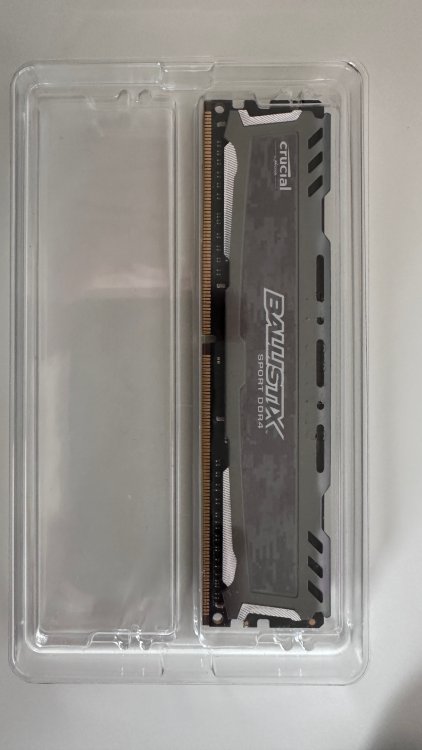
Used Ballistix Sport LT 8GB DDR4 2400 (PC4 19200) Memory DDR4 2400 (PC4 19200) Timing 16-16-16 CAS Latency 16 Voltage 1.20V $25 Plus Shipping US
-
I added the Homepage docker which is stored in \\server\\cache\appdata. But anytime I try to edit any of the yaml files I get Save Failed Please check whether if this file is opened in another program. I don't see it open anywhere. I am also running Dashy and can edit the yaml files fine in that docker folder.
-
How do we monitor dockers with the agent?
-
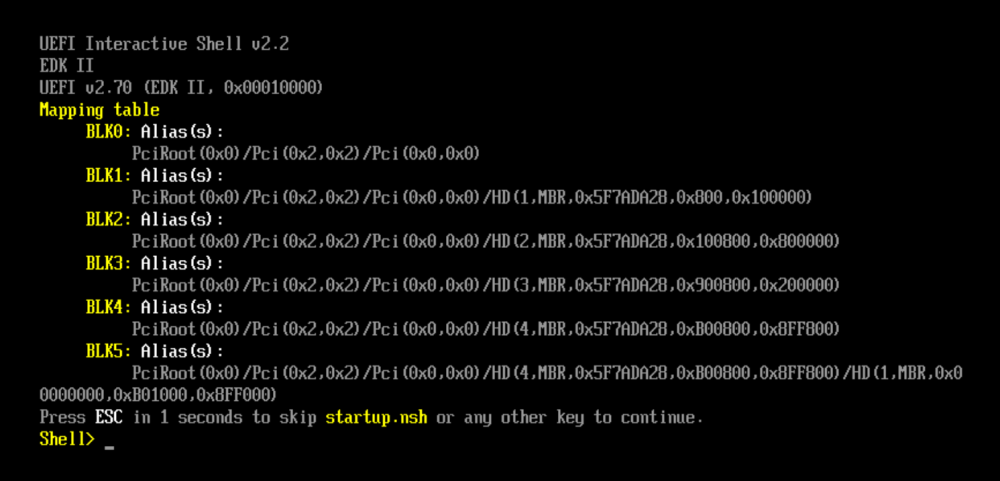
So I wanted to test this out - https://www.zabbix.com/download_appliance#64 Zabbix appliance and installation CD versions are based on AlmaLinux 8 (x86_64). - Downloaded the KVM, QEMU (.qcow2) file. - unzipped the tar.gz file - then unzipped the .tar file - copied the qcow2 file to my domains folder on my server - Setup a new Linux VM with the above file - All items in the VM are default except for VNC screen keeps showing this FS0: at shell shows no mapping Does this appliance not work as a VM in unraid?
 I removed that bad ram and now it is running fine. Still need to order a replacement stick.It ended up being a bad stick of ram. Still haven't replace the bad one.Looks like I have a bad stick of memory.... Intel Xeon E5-2658 V3 ES QEYF 2.0Ghz 12Core 30M Equivalent to QEYP ARCTIC COOLING Freezer i32 Ballistix Sport LT 16GB (2 x 8GB) 288-Pin DDR4 SDRAM DDR4 2400 (PC4 19200) *2 ASRock X99 Extreme3 LGA 2011-v3 Intel X99 SATA 6Gb/s USB 3.0 ATX Intel Motherboard So do I replace the bad stick with same stick or upgrade the two channels with (2*16)? which would bump me to 48gb ram. Board supports: Number of Memory Slots4x288pin (DDR4) Memory StandardDDR4 3000+(OC) / 2933+(OC) / 2800(OC) / 2400(OC) / 2133 / 1866 / 1600 / 1333 / 1066 Maximum Memory Supported64GB Channel Supported Quad Channel Current Memory specs: Capacity 16GB (2 x 8GB) Speed DDR4 2400 (PC4 19200) CAS Latency 16 Timing 16-16-16 Voltage 1.20V ECC No Buffered/Registered Unbuffered Do the speed/CAS/Timiing/Voltage need to match the other pair if I did the 2*16?I've recently started having odd system issues. No big changes on my system that I can think of. Usually is what happens is I can't get to the web gui, I attach a monitor to it and nothing on the screen so then I just restart it and all seems good for a day or two. Recently I started testing graylog on a different device for this purpose along with others. This is the error I see in the log on my graylog server.... 2023-12-10 03:33:19.000 HPTower HPTower kernel: CPU: 3 PID: 5701 Comm: php-fpm Tainted: P O 6.1.49-Unraid #1 2023-12-10 03:33:23.000 HPTower HPTower kernel: CPU: 4 PID: 1886 Comm: lsof Tainted: P D O 6.1.49-Unraid #1 2023-12-10 03:33:43.000 HPTower HPTower kernel: CPU: 4 PID: 5853 Comm: emhttpd Tainted: P D O 6.1.49-Unraid #1 2023-12-10 03:33:43.000 HPTower HPTower kernel: CPU: 4 PID: 2255 Comm: grep Tainted: P D O 6.1.49-Unraid #1 2023-12-10 03:33:43.000 HPTower HPTower kernel: CPU: 4 PID: 2256 Comm: sh Tainted: P D O 6.1.49-Unraid #1 2023-12-10 03:33:45.000 HPTower HPTower kernel: CPU: 4 PID: 2298 Comm: awk Tainted: P D O 6.1.49-Unraid #1 2023-12-10 03:33:45.000 HPTower HPTower kernel: CPU: 4 PID: 2302 Comm: sh Tainted: P D O 6.1.49-Unraid #1 I am running memtest right now as that seemed to be the starting point. Anything else?Ok thanks I put it in maintenance mode and ran a xfs_repair on it and we will see if it comes back.I have been troubleshooting other issues but saw this pop up recently... Dec 2 11:25:36 kernel: XFS (md2p1): Metadata corruption detected at xfs_inode_validate_extsize+0xde/0x134 [xfs], inode 0x1a292f04c dinode Dec 2 11:25:36 Tower kernel: XFS (md2p1): Unmount and run xfs_repair Dec 2 11:25:36 Tower kernel: XFS (md2p1): First 128 bytes of corrupted metadata buffer: Trying to figure out what drive is having an issue.Is there a good guide on how to get Graylog installed?


