





Twitchstick
Members
-
Joined
-
Last visited
-
I’m using the default bridge network. I have not changed any of the files. I changed the container settings and that’s it. I even tried deleting the app data folder and starting from scratch but that didn’t help. My server is on the same subnet as my gaming PC. My network is basic for the most part. I have a UDM Pro and a 24 port switch and 10G aggregation switch that my servers and gaming pc are connected to.
-
I was connecting via Ark and searching for my server in unofficial servers. I'm not sure I'm looking in the right place. Also, I can't connect to the SERVERIP:7777. I'm assuming I should be able to
-
I setup Ark SA but I can't see my server when trying to join. The container log show the server is advertising for join. I forwarded port 7777 to the server IP. What else am I missing? Appreciate the help.
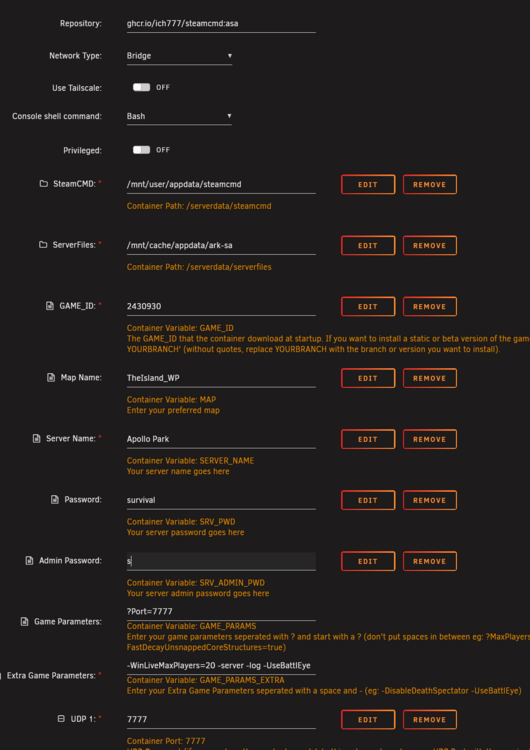
-
Will an update be released for the most recent patch released today? I can't login to my dedicated server until it's been updated. Thanks
-
Recently my logs have increased and the problem seems to be coming from the connect plugin. I have updated the connect plugin. What else can I do? I can reset my server but I'm worried it might increase again. 0 /var/log/pwfail 99M /var/log/unraid-api
-
0 /var/log/pwfail 99M /var/log/unraid-api 0 /var/log/swtpm/libvirt/qemu 0 /var/log/swtpm/libvirt 0 /var/log/swtpm 0 /var/log/samba/cores/rpcd_winreg 0 /var/log/samba/cores/rpcd_classic 0 /var/log/samba/cores/rpcd_lsad 0 /var/log/samba/cores/samba-dcerpcd 0 /var/log/samba/cores/winbindd 0 /var/log/samba/cores/smbd 0 /var/log/samba/cores 4.6M /var/log/samba 0 /var/log/plugins 0 /var/log/pkgtools/removed_uninstall_scripts 0 /var/log/pkgtools/removed_scripts 24K /var/log/pkgtools/removed_packages 24K /var/log/pkgtools 8.0K /var/log/nginx 0 /var/log/nfsd 0 /var/log/libvirt/qemu 0 /var/log/libvirt/ch 0 /var/log/libvirt 104M /var/log
-
My server uptime is only about a month and everything was fine until yesterday. Thanks in advance for the help. apollo-diagnostics-20240112-1811.zip
-
So I've been having issues lately with my server that used to be rock stable. It all started when my original thumb drive of 15 years with unraid installed failed to load properly. The motherboard went bad so I decided to get a brand new thumb drive which more then 2GB of space. I did, and all was well until I started getting thumb drive corruption errors that would crash the server. I began using another thumb drive that I had laying around and same thing. I can start the server now and it runs fine for a few days but then docker just stops working. When I try to disable docker, it just keeps running. "Docker service failed" is the message on the docker tab. I have to restart the server to get things up and running again. I've been dealing with this for the past 2 weeks. I want to know if I can "start fresh" without loosing my data. I purchased the same 2.0 thumb drive that I use in my 2nd server. I'm sure files from the original are corrupt and I just keep transferring that data from drive to drive. I also have a screenshot of the disk assignments so I'm not afraid of accidently assigning the wrong drive to parity. Any help is appreciated.
-
Changed the RAM speeds. apollo-diagnostics-20211026-1434.zip
-
Copy that. I'll change it and report back.
-
Sorry about not posting the diagnostics the first time. Forgot to attach it apollo-diagnostics-20211026-1101.zip
-
I recently added a new cache drive and created new cache pools. I also moved data around to better organize my server. I'm sure I messed something up in the process and I'm getting a bunch of BTRFS errors when the scheduled mover runs. It's not moving any files now and I'm clueless on what to do. The errors are coming from the new SSD according to the log file. apollo-syslog-20211026-1418.zip
-
So I set it back to "bridge" and I'm good to go. Thanks for the help.
-
@Taddeusz Sorry I mean Nginx
-
I need a little help. I'm trying to setup a reverse proxy using NPM with cloudflare. I've done this numerous times for other dockers but I can't get it working. I used spaceinvaderone's YT video to get guacamole setup using a static ip and a custom port which I've never tried creating a reverse proxy after messing with those values. Am i missing something?
