





ivanavich
Members
-
Joined
-
Last visited
-
Congrats @SpaceInvaderOne - looking forward to more content from your stable.
-
I modified the share cfg files with a reboot and that has resolved the problem. OId: shareUseCache="no" shareCachePool="" New: shareUseCache="only" shareCachePool="cache" Something amiss in the handling of handling of SSD moves from array to cache pools; specific to Unraid 7 as it is the only version that allows array to start without at least one drive in Slot 1.
-
Thanks for your reply itimpi. This has occurred on multiple Unraid NUC servers which have a single SSD using New Config. There is no options to change array/cache when there is a single SSD. Have I missed something in using New Config to move a single SSD from the Array slot 1 to Cache Pool? In the release notes for Unraid 7 - "If you are running an all-SSD/NMVe server, we recommend assigning all devices to one or more ZFS/BTRFS pools, since Trim/Discard is not supported with unRAID array devices". The same can be said with XFS formatted SSDs as the trim scheduler works on all supported file systems.
-
Change: Single SSD (XFS) was removed from Slot 1 of array. New Config with no preservations. Assigned SSD as Cache Pool. Fix Common Problems: Default docker appdata location is not a cache-only share Share domains set to not use the cache, but files / folders exist on the cache drive Share system set to not use the cache, but files / folders exist on the cache drive All shares are set: 'Primary storage: Cache' Primary and Secondary storage options show Array greyed out as expected. Server rebooted. Diagnostics attached. diagnostics-20250111-2320.zip
-
Is that because a regular parity check should find any bit-errors?
-
Update: ZFS is scrubbing all the drives as per cron entries in /config/plugins/dynamix that match the current timing. It appears the corrupted bzfirmware is inconsequential. Anyone know where/how those cron schedules were created? I can't find any further information in my digging.
-
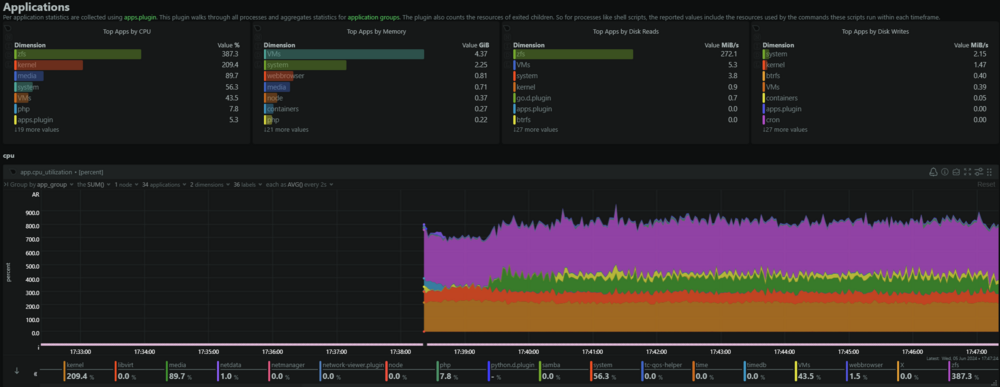
After rebooting: critical medium error, dev sda, sector 1453600 critical medium error, dev sda, sector 1453688 critical medium error, dev sda, sector 1453864 critical medium error, dev sda, sector 1453880 bzfirmware checksum error - press ENTER key to reboot ... I did a Get-FileHash on the boot USB drive bzfirmware and CRC error unreadable. So copied over fresh bz files and the server booted. Parity check kicked off automatically and is running at 1.7 MB/sec. ZFS still smashing CPU and disk access. odin-diagnostics-20240605-1749.zip
-
At this stage it comes down to troubleshooting your hardware. Is the monitor turned on and is the correct input selected? Have you tried a different video cable and/or monitor? Are you using the onboard video output from the motherboard or a dedicated graphics card? If it's a dedicated card, try removing it and use the onboard video output. Also worth noting what the chassis LEDs (power/HDD etc.) are doing as well as the motherboard LEDs - POST code LED display would be informative. Check those first to attempt to get a signal, then you can supply more information on the BIOS/UEFI boot process and whether unraid attempts to boot from USB key.
-
Hi all thanks in advance for the assistance. Dashboard is showing 100% CPU usage for the past couple of hours and all drives are being accessed. Dockers all quiet showing no more that 1% CPU usage. NetData is showing constant 560MiB/sec disk reads. Applications chart shows ZFS is consuming the majority of that. All array and pool drives are formatted ZFS + LUKS. htop unremarkable, top showing ksoftirqd/8 at 35.0 %CPU with 27 instances of z_rd_int_0 and z_rd_int_1. Can anyone shed some light on what ZFS is doing? Diagnostics attached. odin-diagnostics-20240605-1034.zip
-
When either starting or stopping the array, the unraid host becomes unresponsive to pings for up to 30 seconds. Diagnostics attached. nas-diagnostics-20231009-1133.zip
-
ivanavich changed their profile photo
-
I transitioned all array disks to ZFS and am seeing parity check crawling along at 28MB/sec. Previously with XFS it was over 100 MB/sec with 10TB parity. Stopped docker services - no change to parity speed. Started docker services - docker tab showed as not running, no start stop would make a difference. Reboot Partity sync restarted and back to over 100 MB/sec. Docker containers all running fine. strange. diagnostics-20231001-0055.zip
-
Some interesting info here regarding compression from @SpaceInvaderOne https://unraid.net/blog/zfs-guide
-
Just for shz and giggles I rebuilt parity and part the way through parity rebuild.. Unraid StatusNotice [ODIN] - array health report [FAIL]Array has 18 disks (including parity & pools)alert Parity - ST10000NM017B-2TL103_WP00QECY (sdr) - active 54 C [DISK INVALID] Disk 1 - ST10000NM017B-2TL103_WP00TPD4 (sdc) - active 54 C [OK] Disk 2 - ST10000NM017B-2TL103_WP00QEVX (sde) - active 56 C (disk is hot) [NOK] Disk 3 - HGST_HDN726060ALE614_K1HK1RVB (sdh) - active 47 C [OK] Disk 4 - HGST_HDN726060ALE614_K1HJ91ZB (sdk) - active 50 C [OK] Disk 5 - HGST_HDN726060ALE614_K1HJ9AUB (sdm) - active 42 C [OK] Disk 6 - HGST_HDN726040ALE614_K4JWVZ0B (sdf) - active 55 C (disk is hot) [NOK] Disk 7 - WDC_WD40EFRX-68N32N0_WD-WCC7K0EHKAF1 (sdp) - active 41 C [OK] Disk 8 - WDC_WD40EFRX-68N32N0_WD-WCC7K2UVS4TD (sdb) - active 49 C [OK] Disk 9 - WDC_WD40EFRX-68WT0N0_WD-WCC4E2XDVZE4 (sdd) - active 46 C [OK] Disk 10 - WDC_WD40EFRX-68WT0N0_WD-WCC4E4TX8D6R (sdj) - active 46 C [OK] Disk 11 - WDC_WD30EZRX-00DC0B0_WD-WCC1T1410174 (sdg) - active 46 C [OK] Disk 12 - WDC_WD30EZRX-00DC0B0_WD-WCC1T1348759 (sdt) - active 44 C [OK] Disk 13 - WDC_WD30EZRX-00SPEB0_WD-WCC4E0501415 (sdl) - active 42 C [OK] Disk 14 - WDC_WD30EZRX-00DC0B0_WD-WMC1T0290168 (sdq) - active 41 C [OK] Disk 15 - WDC_WD30EZRX-00DC0B0_WD-WMC1T2397360 (sdn) - active 40 C [OK] Nvme-cache-one - Samsung_SSD_970_EVO_Plus_1TB_S4EWNF0M917665F (nvme0n1) - active 45 C [OK] Nvme-cache-two - Samsung_SSD_960_EVO_500GB_S3EUNX0J304522K (nvme1n1) - active 37 C [OK] Parity-Sync in progress. Total size: 10 TB Elapsed time: 4 hours, 18 minutes Current position: 1.67 TB (16.7 %) Estimated speed: 109.8 MB/sec Estimated finish: 21 hours, 4 minutes Sync errors corrected: 0 Seems like a check is out of order. Not bothered by it, perhaps something untoward.
-
Unraid 6.12.4 Rebuilding parity with a new 10TB drive which had been successfully precleared to avoid infant mortality. Largest drive in the array is 6TB at time of rebuild. Received email notification (Odin Home unRAID Status: Notice [ODIN] - Parity-Sync finished (0 errors)): Link: https://Odin.local/Main Event: Unraid Parity-Sync Subject: Notice [UNRAID] - Parity-Sync finished (0 errors) Description: Canceled Importance: warning In Unraid server warning log is one entry- all drives showing as [OK] except the parity drive which shows as: Parity - ST10000NM017B-2TL103_WP00QECY (sdt) - active 44 C [DISK INVALID] At the bottom of the log: Parity-Sync in progress. Total size: 10 TB Elapsed time: 22 hours, 49 minutes Current position: 9.87 TB (98.7 %) Estimated speed: 140.8 MB/sec Estimated finish: 16 minutes Sync errors corrected: 0 Array Operation shows 'Parity is valid.' Last check completed on Tuesday, 05-09-2023, 12:36 am (today). Duration: 23 hours, 6 minutes, 4 seconds. Average speed: 120.3 MB/s. Finding 0 errors Any ideas what happened? Thank you! unraid-diagnostics-20230905-1405.zip
-
No sure if this helps however console shows: Unraid login: /bin/bash: line 3: /usr/local/emhttp/pluginsunbalance/scripts/stop: No such file or directory

