





digitaldoctor
Members
-
Joined
-
Last visited
Everything posted by digitaldoctor
-
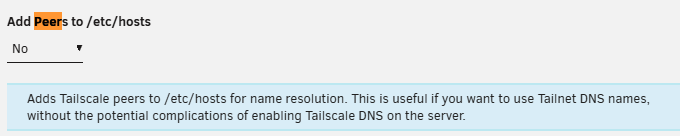
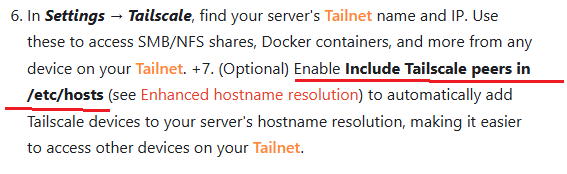
Are these the same ? Did the text change ? source: https://docs.unraid.net/unraid-os/system-administration/secure-your-server/tailscale/#getting-started-with-tailscale For the newbies, having the documentation match the exact text in the settings is helpful. As an example, I thought my Tailscale was missing the Management Access area when I went to Settings → Management Access. Of course I was in Tailscale Tab of settings NOT the UNRAID Tab of Settings :)
-
I removed SMB1 and the setup still works.
-
Note: Alot of the Get commands have Set commands. SmbShare commands
-
I'll ask them but I am reminded of the deteriorating Windows conditions. It's time for me to move away from it. TPM, Secure Boot, almost forced MS account, Privacy nightmare. It really feels like Windows will be entirely cloud based soon and your PC will be a dumb terminal. I should have installed Tiny11 on this PC. Live and Learn.
-
I am going to remove SMB1 soon. I don't think it is needed after I got rid of the Block NTLM (LM, NTLM, NTLM2). I think the peer to peer network will run on NTLM2.
-
Interesting. It was a second hand PC. Probably a corporate one. Are you saying the Block NTLM setting was added as a desired part of a custom install of Windows 11 for the company that had this PC ? I certainly wanted to post my Block NTLM issue as it took me all day to find and there was very little information about it on the internets.
-
I had this problem on a windows 11 Pro PC I added to my work peer to peer network. Block NTLM (LM, NTLM, NTLMv2) This policy controls if the SMB client will block NTLM for remote connection authentication. If you enable this policy setting, the SMB client won't use NTLM for remote connection authentication. If you disable or do not configure this policy setting, the SMB client can still use NTLM. ========= (1) To open it, press Win + R, type gpedit.msc, and press Enter (this was on my 11 Pro box, but isn't on my 10 Home box) Computer Configuration > Administrative Templates > Network > Lanman Workstation. setting: Block NTLM (LM, NTLM, NTLMv2) set to: Disabled Apply the changes and restart the computer or run gpupdate /force. Note: Another way to do with is in Powershell: Set-SmbClientConfiguration -BlockNTLM $false (2) you might have to do this first. Enable SMB 1.0/CIFS Client: Go to Control Panel > Programs > Turn Windows features on or off. Check the box for "SMB 1.0/CIFS File Sharing Support" and restart. Note: I added gpedit.msc to windows 10 home via this method. The Block NTLM policy was not present in Windows 10 Home in this location .. Computer Configuration > Administrative Templates > Network > Lanman Workstation.
-
I had this problem on a windows 11 Pro PC I added to my work peer to peer network. Block NTLM (LM, NTLM, NTLMv2) This policy controls if the SMB client will block NTLM for remote connection authentication. If you enable this policy setting, the SMB client won't use NTLM for remote connection authentication. If you disable or do not configure this policy setting, the SMB client can still use NTLM. ========= (1) To open it, press Win + R, type gpedit.msc, and press Enter (this was on my 11 Pro box, but isn't on my 10 Home box) Computer Configuration > Administrative Templates > Network > Lanman Workstation. setting: Block NTLM (LM, NTLM, NTLMv2) set to: Disabled Apply the changes and restart the computer or run gpupdate /force. Note: Another way to do with is in Powershell: Set-SmbClientConfiguration -BlockNTLM $false (2) you might have to do this first. Enable SMB 1.0/CIFS Client: Go to Control Panel > Programs > Turn Windows features on or off. Check the box for "SMB 1.0/CIFS File Sharing Support" and restart. Note: I added gpedit.msc to windows 10 home via this method. The Block NTLM policy was not present in Windows 10 Home.
