





skank
Members
-
Joined
-
Last visited
Everything posted by skank
-
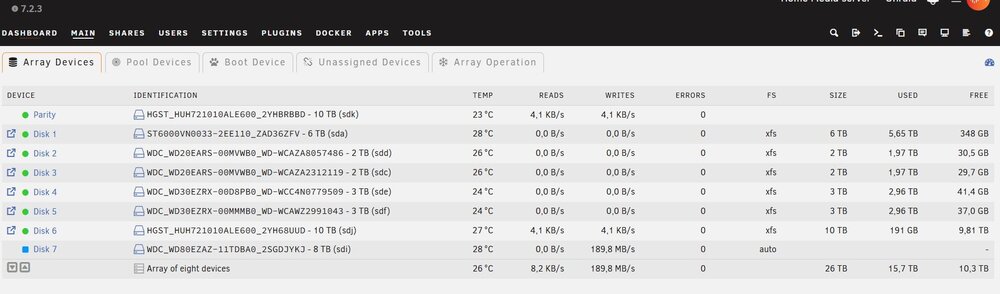
Managed to put it in xfs and added extra drive , which is clearing now Guess all is good now, and after clearing, i can copy over all my recued data , lost nothing Phew That ufs explorer saved my lifte :) my wedding movie was on the bad disk
-
Rebuilding is done and updated to 7.2.3 now what? do new config with that empty disk + the extra disk? How to get that empty disk in xfs?
-
Well i did new config, but then i saw the disk wasnt xfs Then i formatted via terminal, but then it took ntfs again and is now rebuilding.. So thats what i ask, what do i do now so its xfs... and how to add the unassigned disk also. In what order so i only have to sync parity once So ? rebuilding is at 97% so i will wait update to 7.2.3 do new config with that empty disk + the extra disk? How to get that empty disk in xfs? Thx for your patience Hope to do it today
-
unraid-diagnostics-20260118-1241.zip
-
So i should stop rebuilding now? Yeh probably multiple partitions, Can you tell me exact steps please? Cause i didnt see an erase and format button. Its still rebuilding What are the exact steps please to get it to xfs in the array , and add another 8 tb drive (already in xfs)
-
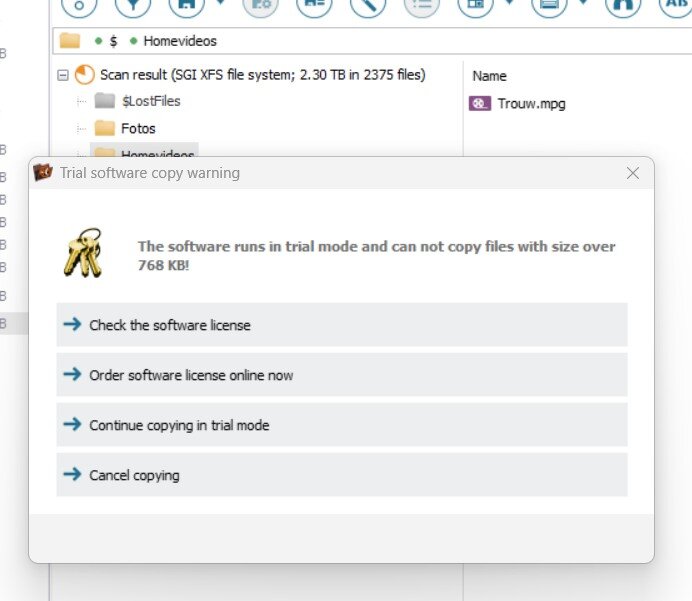
And another problem, i see recoverd things... with UFS explorer However when i want to recover the things... i get this so much for the trial.; I think i downloaded the professional version, im not sure if i download the standard version if i will get the same reults and trial is possible too?
-
Stiil having problems I did a new config with parity 10tb i added a new disk 6 with 10tb free for data (HGST drive) All my data disks are xfs filesystem I started building parity and then i saw the last disk 6 10TB was filesystem ntfs I let him finish parity sync first, i then stopped aray, took out disk 6 and formatted to xfs using command line I readded it to array and now data rebuild is being done, but i see its back to ntfs What am i doing wrong? Disk settings are set to default xfs.. i couldnt add another new disk to slot 7 either.. so i will have to resync again after the rebuild.. crap its taking ages
-
Yes i am (changed after screenshot), its running now
-
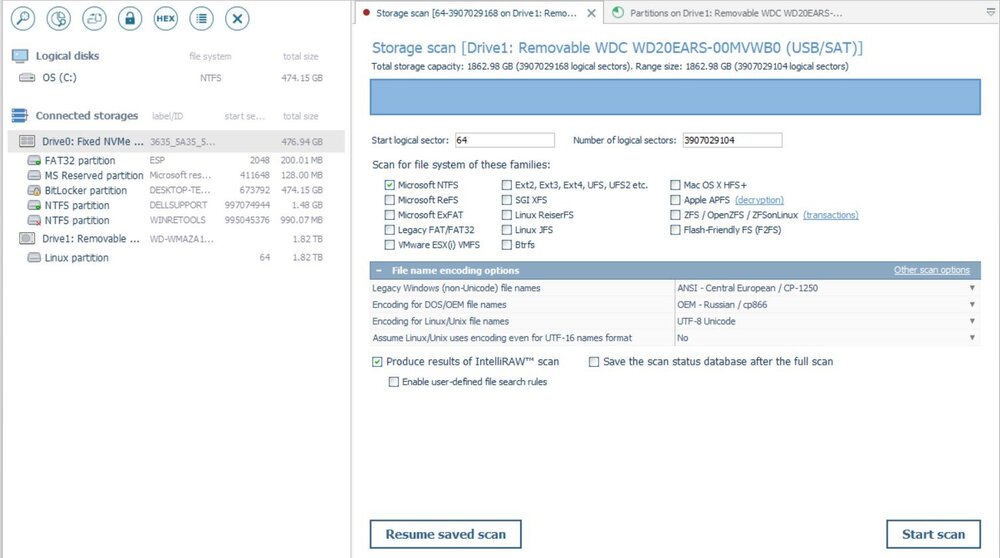
do i need to scan like this on disc 2 with ufs
-
Hi ok cool will do that. If UFS explorer on disk 2 fails, i will lose data anyway i think. So i can safely do the new config with a new 10tb parity
-
Ok tonight i will see if i can recover data from disk 2 with UFS explorer by connecting the physical disk to my laptop. While i do that, and since data from disk 7 is on my spare disk, i assume i can move further on with my unraid machine? Can i do the following safely? Make a new config -> disk 2 and disk 7 out... So array comes from: disk 1,2,3,4,5,6,7 to new array disk 1,2 (old 3), 3 (old 4),4 (old 5), 5 (old 6) ? Without losing the data on those disks? Can i immediately swap my parity for a 10tb disk? Or do i need to build parity first on the new config and then swap? Or will i lose my data on the old disks if i do new config?
-
Downloading right now Got it running, lets see
-
Ok so i copied over data fom disk 7 to the spare 2tb Now what? Try again to repair disk 2 Or do i take out disk 7, format it under windows -> take out disc 2 from array, and put back disk 7 instead?
-
What i meant there is, that the disk in the array page, isnt mounted, cause it was not assigned I dont know how to mount/unmount emulated disk. Anyway its still copying
-
Yesterday evening i ran the check file system on disk 2 then after it i saw a button to fix it. So i pressed fix it. It was still running.. and i went to sleep. this morning it wasnt running anymore. But the button "check file system" was there again... i dont get it. It still isnt mountable. Turned off server then Now i turned on.. everything is still the same. I just started copying over the data from the emulated disk 7 (1.5TB ), its not mounted... but it is copying and i do see the unassigned but mounted 2tb disk filling up... LEts hope it finishes copying then i think i got all data from disk 7 ?
-
With what command?
-
i'm like 3 pages asking what to do lol i have 2 disks with problems disk 2 - 2TB, is in the array, extended smart test ok, cant mount in the array. running check file system for like 3 time.. still running fix there disk 7 - 6 TB is not in array, is at unassigned devices, cant mount there, I do see (using explorer) 1.5 TB data on it, tried to copy/ddresuce without luck. Extended smart test ok Spare/new disks available: 2 TB which is now at unassigned devices/mounted 10 TB to upgrade parity later (which is 8 tb now) 10 TB new lying here So i want to rescue as much as possible. What are the steps after i finished the fix script running on disk 2 and hopefully i can get somewhere today...
-
yes i tried to copy the 1.5tb content on the 6tb disk to a 2 tb disk
-
Did you read my post above? i did ! try ddrescue
-
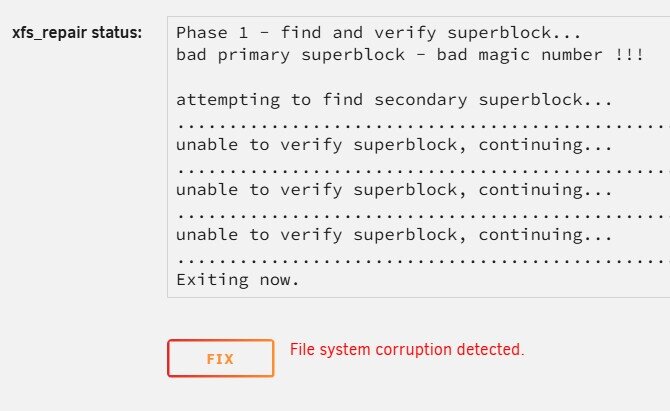
ok i think i understand you. Anyway thx for the patience with me. I hope i can recover some things today.7 Check filesystem is still going for disk 2 as soon as finished, after that i start array and post diagnostics lol edit: aha just finished Trying in fixing disk 2
-
Maybe its better to save data from disk 2 cause it has more data on than on disk 7 right? So what do i do now?
-
Yes, but the commandline was away when it finished, couldnt see anything When i try, it says i cant disk 7= 6tb unassigned ddis= serial ending pc3h, all the same for me. Its both, i cant mount the unassigned physical 6tb disk ending pc3h, nor can i mount that disk in slot 7 I can see the data from disk 7 , i assume you mean the emulated then? around 1.5 TB content. That 1.5 TB data might be correct anyway. So now i want to recover that 1.5 TB So are you saying that disks in my array are emulated disks and not physical? They are physical cause i assign them to it? they have the same serial. I tried to save that 1.5 TB data using ddrescue, without luck: root@Unraid:~# ddrescue -f -n /dev/sdi /dev/sdh /boot/ddrescue_disk7.log GNU ddrescue 1.30 Press Ctrl-C to interrupt ipos: 5974 GB, non-trimmed: 2863 kB, current rate: 0 B/s opos: 5974 GB, non-scraped: 0 B, average rate: 0 B/s non-tried: 6001 GB, bad-sector: 0 B, error rate: 0 B/s rescued: 0 B, bad areas: 0, run time: 0s pct rescued: 0.00%, read errors: 108, remaining time: n/a time since last successful read: n/a Copying non-tried blocks... Pass 1 (forwards) ipos: 6001 GB, non-trimmed: 2887 kB, current rate: 0 B/s opos: 6001 GB, non-scraped: 0 B, average rate: 0 B/s non-tried: 6001 GB, bad-sector: 0 B, error rate: 0 B/s rescued: 0 B, bad areas: 0, run time: 0s pct rescued: 0.00%, read errors: 109, remaining time: n/a time since last successful read: n/a Copying non-tried blocks... Pass 2 (backwards) ipos: 6001 GB, non-trimmed: 2886 kB, current rate: 0 B/s opos: 6001 GB, non-scraped: 0 B, average rate: 0 B/s non-tried: 6001 GB, bad-sector: 1024 B, error rate: 0 B/s rescued: 0 B, bad areas: 2, run time: 0s pct rescued: 0.00%, read errors: 111, remaining time: n/a time since last successful read: n/a Trimming failed blocks... (forwards) ipos: 6001 GB, non-trimmed: 0 B, current rate: 0 B/s opos: 6001 GB, non-scraped: 6001 GB, average rate: 0 B/s non-tried: 0 B, bad-sector: 1024 B, error rate: 860 MB/s rescued: 0 B, bad areas: 2, run time: 36m 26s pct rescued: 0.00%, read errors: 91_570_766, remaining time: n/a time since last successful read: n/a Sweeping non-tried blocks... (forwards) Finished Is there another way to save that data? I assume the ordered expansion sata controller wont make a difference since i tried to connect to motherboard instead and it was the same issue.. Second step i would like to do is disk 2 but lets focus on that 1.5 TB data on disc 7 first Now what?
-
Disk 7 isnt mountin, but passed extended smart test + i repaired it. But its still unassigned, and unmountable. Do i copy over to a spare unassigned 2tb disk? If so, how? Disk 2 is still running check file system status for like the 3 time or so.. , passed a extended smart test too This is the diagn for now I think its time to do something now cause the only thing i keep doing is running smart tests and file system checks.. unraid-diagnostics-20260114-1326.zip
-
i added another 2tb disk to the unassigned disks, i can mount that one. Cant i just copy over the contents from disk 7 (which i cant mount but im able to see contents true my windows explorer)? if so how? (its running systemcheck again on disk 7) Remember disk 7 is 6tb but only has 1.4 TB data, thats why i would use 2tb spare disc (so i can still upgrade my parity to 10 and have a second empty 10tb to add to my array, i cant use ddrescue with smaller disk... so manually copy?
-
Its running again. Meanwhile i ordered a new controller https://www.benl.ebay.be/itm/397484767986?_skw=8087+IT+mode&itmmeta=01KEVK8CR7027K5KHNG0SB19Y7&hash=item5c8bf03af2:g:53oAAeSwaO9pY6NL&itmprp=enc%3AAQALAAAA8O7PUuNWmJ%2B%2BUShgI9tQz%2FqXbxL346tf8HpNLaroxbtch5DLIz8S7FU8irWGQNOqG%2BiR0SHnYJlEl5uQadqaaLdLbrRG32xkHUKKlvCOTM5wXzqiUzKuYhfp2hQNX4l28%2B57piPo09WWa%2BrqKeMSUmMoN%2BKhCQnWoLTRkH6PxTrFW5XIC7OQC2mRHmXJCLzwiQzNdMnZ6Kz%2BBhOceZKjF%2FlB1bYncvEFDUbgfCKpLuEu3gF4xHEeYpekhslK88l5kDouhrz6%2FDSVSaLVklwn0jkXeILljkKznWkYJay8FUsG7CVZt4SYRa4bUSV0Q%2BTxvA%3D%3D%7Ctkp%3ABFBMpMyh8_Zm If its any good. I also added another spare 2 tb (empty) drive to the unassigned ones... i can mount it.. So i might be able to copy over data from disk 7 to that one (temporarily) ? Then disk 2 is still an issue, + i want to change parity from 8 till 10 and then add a second new data 10 tb drive to the array and copy over the data which is now on disk 7 Will report back after filesystemcheck of disk 7, if it says repair? Should i? cause now i can see the content on disk 7 and dont want to waste that


