





skank
Members
-
Joined
-
Last visited
Everything posted by skank
-
What do you mean? Again ??? Or mount it? Cause that i just tried too. Im not getting any further like this
-
yes I did that already, then i could fix it (see some pages back)...ok so i took out drive 3 i attached the sata cable from disk 7 to the motherboard Tried mounting disk 7 Again, couldnt mount See diag Conclusions now? Its not the disk? its not the cables, its not the sata controller? What is it then? What now? So no use in ordering other sata controller? unraid-diagnostics-20260113-2029.zipJust looking in front for a new expansion card, but it seems they are very hard to find in europe? Everything is on ebay from china...ok i will report back tonight.Yeah thats what i asked I have 6 sata connections on motherboard, but they are taken for disk 1-5 + parity , i cant swap those or i will have problems i assume, just to exclude problem with sata expansion cardunraid-diagnostics-20260113-0945.zipChanged port on expansion card, still the same, cant mount. Can i exclude the card somehow? I have 6 sata connections on motherboard, but they are taken for disk 1-5 + parity , i cant swap those or i will have problems i assume, just to exclude problem with sata expansion cardMy sas expansion card has 2 SFF 8087 connectors. The first one has sas cables to 4 drives, including disk 7 I just replaced all those cables.. AND the power cable of disk 7 Yes i use a splitter for those hot swappable cages normally, but for test i use a power cable straigth from the psu, so i'm 100% sure the problem is not the sata cables nor the power cable. Tried mounting again, still no luck. So its definately no power or sata cable issue! Should i try the second SFF 8087 connector? Can i do that without turning off? The psu is use is: corsair cx430 What expansion card you think i should buy? i only need 6 extra sata connections able to fit on my mobo: Gigabyte Technology Co., Ltd. H370 HD3-CFi connected disk 7 to other sata and power cables and it was still the same thing remember.. Then i tried to swap with disk 2, and still the same thing Disk 2 is not connected to the marvel controller. Whats your best shot? Should i go for another controller? (the marvel one has issues with sleep anyway). But i'm not sure that will fix it, since it was the same thing if i swapped it with disk 2The connections are good. I can keep posting diagnostics but i'm not getting further... . I know ur trying to help me which i appreciate ! However its been a whole weekend, and the longer i wait, i get the idea the more problems are rising. So what i see is the emulated disk 7 = not the same as the unassigned one. If i try to mount the unassigned one it doesnt work again here diagnostics. What should i do now? Should i get an extra disk of 6 tb to copy all over. and to change parity to 10tb What about disk 2.. can i swap it alread by that other 2 tb disk i have? unraid-diagnostics-20260112-1221.zip syslog-192.168.1.117.logTry swapping disk 2 with the other 2TB disk? or Buy 6 TB, add it as disk 7 ? copy data over from unmountable disk 7 to new disk 7 which is 6 tb? or both? or something else?1.5T data on disk 7 cant be. Its a 6 tb disk and almost completely full I just use "explorer to see data You dont see smart for the unassigned (original disk 7) but how can see yhe disk 7 then with 1.5T data on it?
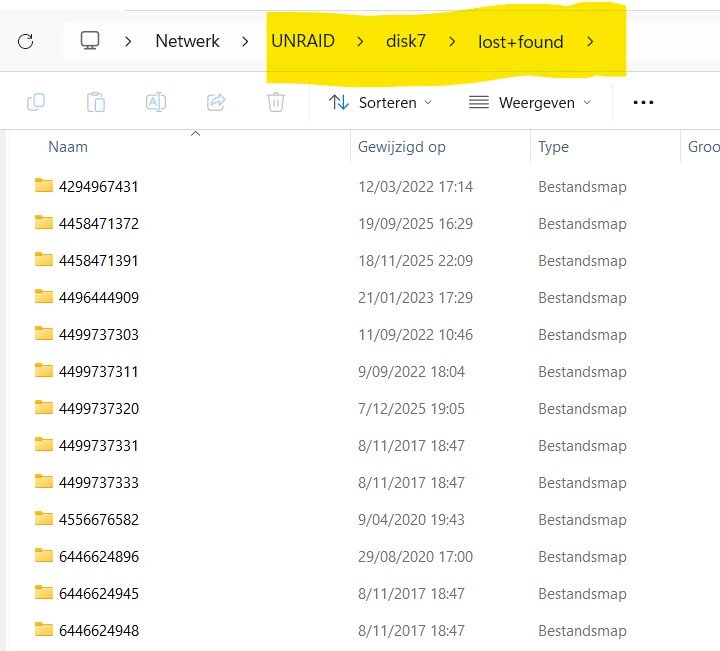
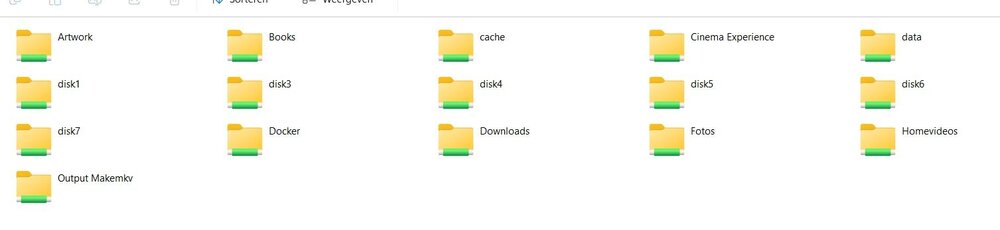 Its been a whole weekend now, hate that i cant do anything. i still got 2 spare drives of 10TB + 1 disk of 2TB which im not sure if it still works I dont want to lose data on disk 7 (its available now). no problem to lose data on disk 2 Should i get another 6tb drive to help me? What do i do know?Ah i'm back in ! Ok heres the diagnostiscs. Ok tell me what to do now pls. 2008 diagnostics -> forgot to mount disk 7 So i tried to mount it ,but got error , see syslog Now added syslog and new diagnostics 2012 unraid-diagnostics-20260111-2008.zip syslog-192.168.1.117.log unraid-diagnostics-20260111-2012.zipNo but i ssh'ed into iti was fixing disk 2 when i was away. I came home and i was about to post the diagn. but now the webui isnt available anymore. I can browse using explorer to all the disks... Except still disk 2, disk 7 i can browse the lost and found items. But why my webui isnt available anymore i dont know?Heres smart report of disk 7, again extended smart results without error. I could run a repair on disk 7, it said the corrupted filesystem has been repaired. Its still unassigned though... Disk 2 is repairing now too.. Now what are the next steps? I have 2x10 tb spare but and my parity is 8tb Should i assign disk 7 and then switch parity ,and then switch disk 7 with the last 10 tb? unraid-smart-20260111-0317.zipSmart test of disk 2 - 2 TB finished without error, see attachment Smart test disk 7 - 6tb still running Im going to try to repair disk 2 via command? After smart test disk 7 i will post new diagunraid-smart-20260110-1720.zipok here are the images I found another 2 tb spare disk, though i'm not sure if it still works. What can i do now, knowing i have a spare 2tb disks (not sure working), 2x10TB coming in today... and free hot swappable bays 2x smart reports still running Should i be able to save disk 7 (6tb) or should i get another 6 tb drive...
 ok so before i do that Heres the situation I got one 8tb parity I got 2 disks failing [url=https://ibb.co/1G5LFzF5][img]https://i.ibb.co/4RG7h1hG/1.jpg[/img][/url] disk 7 is popping as unassigned, but i cant chose to assign [url=https://ibb.co/Kj5p3pvr][img]https://i.ibb.co/99pkCk5r/2.jpg[/img][/url] I can live with losing data on disk 2 (2tb) I cannot live with losing data on disk 7 (6tb) I would prefer losing no data Today , 2x10tb disks are coming in so i can replace. What do i do in what way? extended smart tests are running for both disks. Or do i need to buy another 6tb disk to save the data on disk 7 ?????????/dev/sdb1: UUID="f06fa2e2-8ed9-4012-9f84-3a629409af03" BLOCK_SIZE="512" TYPE="xfs" /dev/sdg1: LABEL_FATBOOT="UNRAID" LABEL="UNRAID" UUID="1C0C-2164" BLOCK_SIZE="512" TYPE="vfat" PARTUUID="852ef2e8-01" /dev/loop1: BLOCK_SIZE="131072" TYPE="squashfs" /dev/md5p1: UUID="f9c9f6d5-b6c5-4f30-9940-bcec0f9143b6" BLOCK_SIZE="512" TYPE="xfs" /dev/md1p1: UUID="40e27459-87d8-45ae-ba69-4b42504c6840" BLOCK_SIZE="512" TYPE="xfs" /dev/loop2: UUID="c15c6455-4916-4e19-aa2c-f6e9865e0031" UUID_SUB="f16c39c7-751a-48d7-a6ae-fdfabca2bfbc" BLOCK_SIZE="4096" TYPE="btrfs" /dev/md4p1: UUID="2eb085d7-0d56-447a-a388-1f73133ce6ba" BLOCK_SIZE="512" TYPE="xfs" /dev/loop0: BLOCK_SIZE="131072" TYPE="squashfs" /dev/md3p1: UUID="aebef0ed-4a59-4526-898f-d74b09a7458b" BLOCK_SIZE="512" TYPE="xfs" /dev/sdh1: UUID="c1b70e10-2cd4-41ab-b2bc-997b1f9b5862" BLOCK_SIZE="512" TYPE="xfs" PARTUUID="4d372051-1f45-49d7-8954-1474c74a63a5" /dev/md6p1: UUID="6fdf01e6-c939-4121-8f77-bb4083cae402" BLOCK_SIZE="512" TYPE="xfs"How do i do that?i swapped place disk 2 and 7 to test other cables too Then both are failing Unmountable disks present: Disk 2 • WDC_WD20EARS-00MVWB0_WD-WMAZA1502825 (sdd) That one had smart errors before Disk 7 i cant add anymore its doesnt rebuild I ordered 2x 10tb drives


