jbrodriguez
Community Developer
-
Joined
-
Last visited
Everything posted by jbrodriguez
-
oh right, i misread the screenshot, unbalanced looks for children of a selection in order to transfer files, what if you select truenas4 folder and unselect $RECYCLE.BIN and any other file/folder you don't want to be transferred
-
i see, it's not finding anything to transfer, the 1 byte is just a default instead of selecting the children of $RECYCLE.BIN, can you select $RECYCLE.BIN itself ? however, i think someone mentioned here or in github that it doesn't transfer files/folders that start with a $, i haven't been able to confirm that.
-
can you check the logs in /var/log/unbalanced.log ?
-
oh cool, that makes sense, i'll check for those changes in my code, thanks for pointing this out !
-
hi, it should work even with the nut plugin, but perhaps something changed "recently" i'll look into it
-
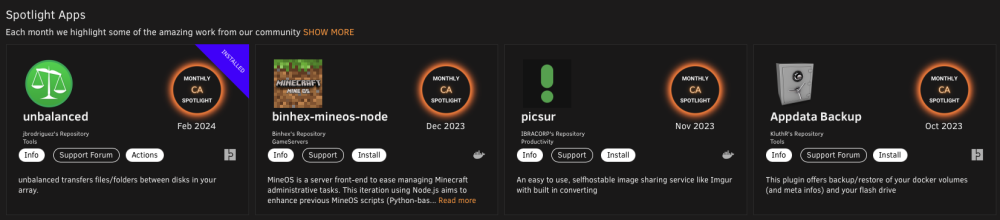
unbalanced was recently featured as the Feb 2024 app of the month thanks to the Community Apps team (@Squid 😀) and also thanks to all the people that have sponsored development of the app Thank you ! ♥️ https://github.com/jbrodriguez/unbalance
-
can you post a screenshot of the issue ?
-
hi, can you check in the history tab if there are some yellow marked commands for that operation ? they should have a rmsrc button that you can use to delete the source folder, just make sure that your target folder is ok. this happens because rsync flagged the command with some error (generally timestamps, permission or possibly i/o errors)
-
this is hal, all your base are belo^C^C ... i mean, the switch went fine, thanks for your help ! 🤣
-
hi, the mobo on my 2nd server died, so i purchased a new one, however the it won't boot my usb for some reason 🤷♂️ (it's a VERY old kingston 2gb) i purchased a new usb, installed unraid via disk creator and it boots 👍 i have the access to old usb contents and made a copy on my workstation so, this is what i'm currently thinking - copy the pro key to the config folder on the new usb - restore old config to the new usb and this is where i'm stuck config is quite big on the old usb, so i'm not sure what to copy, should i copy it all ? any other thoughts ?
-
the trade off that you need to evaluate are - if a docker/plugin/vm/process is writing data to the same disk that unbalanced is writing to, there's a contention for disk allocations, it may (or may not) cause one or both of them to fail, depending on free space - reading and writing from/to the same disk will cause transfers to slow down you know your context the best, so you can make an informed decision if plex is only reading from disk1 and you're transferring between disks 2 and 4, then you should be fine (there might be some additional i/o bottlenecks on the controller, but that's too advanced for me to figure out )
-
yes, it should show a message not sure about this one, the idea of gather is to collect all of a given folder maybe a different algorithm could be applied, i've been thinking about this, a user could "plug" different algorithms to perform transfers, however it's just in the ideas stage
-
i tested on my server and it works is it possible that you're giving it too much data and it doesn't show a target disk because there's no available target disk to hold those 2 shares ? (i don't remember i tried that case, but not showing any disk makes sense) if you try selecting a subset of either share, does it work ?
-
cool, could you open the console (View > Devloper > Javascript Console). to check for any errors ?
-
ControlR 6.3.0 is available on Apple and Google stores ! v6.3.0 The app is now translated to simplified chinese ! Change the language in the settings. This release also includes some bug fixes
-
hi, does it work in another browser ? can you test that ?
-
ControlR 6.2.2 is available on Apple and Google stores ! v6.2.2 Fix docker icon retrieval should fix issues where dockers were not showing up
-
ControlR 6.2.1 is available on Apple and Google stores ! v6.2.1 Fix issue with docker and vm actions (due to localization) VMs (and potentially Dockers) didn't show controls (actions) when the language wasn't english 😮. Do not fret ! This is fixed now 😀
-
ControlR 6.2.0 is available on Apple and Google stores ! v6.2.0 Improve visibility of docker names and operations With this release, docker names will be justified and operations will always be visible and vertically aligned in the next release, i will fix some issue related to the controls of vms (and potentially dockers)
-
there's another issue with the vm controls (and dockers potentially), this will be fixed in 6.2.1
-
i haven't heard about any new requirements related to plugins in 6.12.8, @Squidis there any change needed on the plugin template ? thanks for the heads up @TwistedCarnivore👍
-
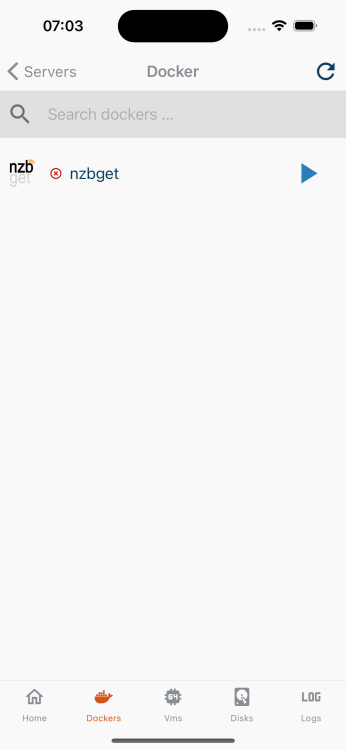
@T.Wilkei got the email and found the issue, turns out that you changed one of the dockers to use a custom icon, and causes troubles for the app i will publish an update in an upcoming version (i have one update currently under review with apple), it will show your dockers, however it won't display that particular icon, since the path is not reachable from outside the server. i don't see a generic way to support custom icons at the moment, but if you want to display the icon it should be on a path that is reachable from "outside" the server: for example, the docker icons are stored in '/state/plugins/dynamix.docker.manager/images/' to summarize, i have a fix that will be available soon so that you can see the dockers, however the icon won't be displayed
-
hi ! i didn't receive the email 🤔, (i checked in spam too) can you try sending it again to [email protected] ?
-
yes, i need to fix this, thanks for reporting !
-
on the screenshot it doesn't look like you're entering a password ? you don't have one set for the server ? i think that became obligatory (i always had one for my servers) ? also if you're logged in to unraid connec (unraid.net), can you try with the long hash name for the server (instead of the ip) ? as for the issue with the dockers/vms not showing the actions, it's working for me on my server @MikeDelta, would you mind running the controlr support script (it retrieves diagnostics info), as described here https://github.com/jbrodriguez/controlr-support ?