





jbrodriguez
Community Developer
-
Joined
-
Last visited
Everything posted by jbrodriguez
-
correct, that's how the app works if there are errors during the copy part, the app will avoid deleting those files, to allow the user to double check what was the issue. the app uses rsync underneath, and rsync errors are not that user friendly, but in general they are related to incorrect date/time, permission issues, etc., unless there's something wrong with the source disk which surface i/o errors the app runs an `rm -rf <folder>` command when deleting files and that is a discrete part of the operation, so yes, there's room for improvement in terms of reporting back to the user there thanks for the detailed explanation @JonathanM 👍
-
up next, i'll look into making the plugin more seamless than it is today i also want to explore the following topics - user scripts (i want to take another stab at this) - unlock encrypted servers if you have any other topics that you feel could be explored, let me know
-
ControlR 6.1.0 is available on Apple and Google stores ! v6.1.0 - Choose language after fresh installs - Determine default language based on device locale - Open matching language faq page - Sort dockers and vms by started/running state - Show feedback on screen taps - Upgrade core libraries This release improves the usability of the app, especially with the touch feedback on buttons and sorting dockers and vms, so that the ones that are running are pushed to the top of the list
-
the script is updated, feel free to use it at your convenience
-
ControlR 6.0.0 is available on Apple and Google stores ! v6.0.0 - Fixed issue with camera permissions - The app now supports various languages ControlR is now localized in - English - German - French - Spanish !!! You can choose the language in the settings, I will add a language selection screen that will run on fresh installs If you find any issue with the translations, let me know 😀
-
that's strange then, never heard of this issue before, would you be willing to create a troubleshooting package as described here https://github.com/jbrodriguez/controlr-support ? i need to make some changes first, because it currently doesn't work (i haven't updated it in a while)
-
hi, currently the only supported login is root, are you connecting as root ?
-
yes, i had planned to add it, but it fell through the cracks , will implement it in an upcoming release
-
the new plugin can be found in community apps, search for unbalanced, more details here
-
i took a look at the doc, it reminded me of this function in excel that had to solve a constraint, it isn't the one for loan payment, but just can't remember what it was, maybe the one for loan to value ? (🤷♂️) i also remembered that the function could potentially not find a solution my take is that this functionality requires multiple passes, each pass consists of multiple data transfers (rsync commands) and a reevaluation after each pass you can't calculate in advance, since it involves data transfers, and even though unbalanced calculates space based on sectors and there's a safety space, there's still overhead depending on how many files are involved (because of inodes and such) this brings me back to the excel function, it's possible that after multiple passes, a solution still can't be found, that is, there's not enough space to move a whole share to a single drive, although a partial fill would probably be a good compromise (maybe?) i can't tackle this, but there might be something there, a simpler version with a different logic that can be further reviewed p.s.: i was wondering if concentrating a share on a single drive is a good practice, parity will save any failure, although it still feels a bit risky to me (considering no backups, etc)
-
hi, the short term solution is to use light mode (click on the moon on the top right) contrast is tricky, i'll look into it
-
i can see the doc now
-
yes, that sounds like a next gen unbalanced it seems to require various considerations and probably a more intelligent transfer phase, currently all the logic happens on the plan phase. if you can think of a pseudo code, it would help clarify this use case (i didn't have access to the google doc)
-
ControlR 5.7.0 is available on Apple and Google stores ! v5.7.0 - Improve VMs user experience - Upgrade dependencies this removes the coming soon screen for vms and displays the vm actions in a separate row
-
yes, i remember your nickname from the early days 👍 ! nice that it worked for you, thanks for the kudos !
-
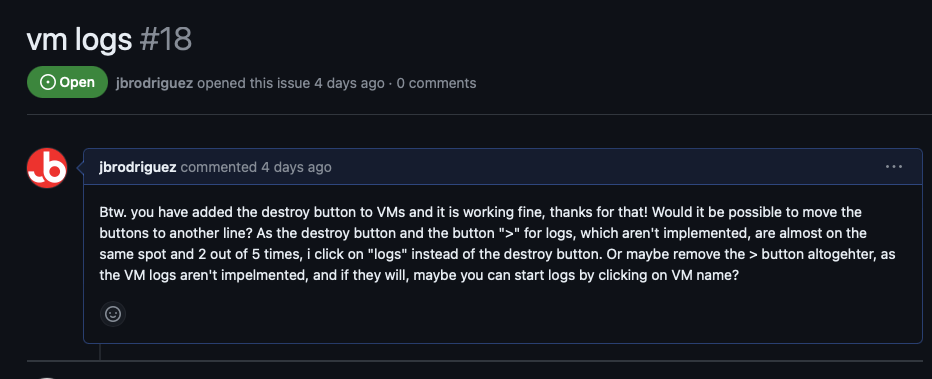
Thanks for the patience ! I have this mapped for an upcoming release but yes, moving the buttons to another line should be the way to go
-
right, that's a network failure, the plugin is hosted on github, so .. microsoft servers can you try installing it manually (just for troubleshooting): in the Plugins page, tab Manual install, paste this url https://github.com/jbrodriguez/unbalance/releases/latest/download/unbalanced.plg
-
this is definitely strange :), what if you go to the Unraid Settings page, at the bottom it should show the unbalanced plugin the port is configurable in the unbalanced plugin page also, although not ideal, can you try manual installation: in the Plugins page, you can try manual install tab then paste the plugin url https://github.com/jbrodriguez/unbalance/releases/latest/download/unbalanced.plg
-
i just published 2024.01.26, which should work again on Unraid versions below 6.11.x, let me know how it goes
-
no, installation should be just as any other plugin, not sure what could be causing the issue, try the latest release maybe ?
-
ControlR 5.6.0 is available on Apple and Google stores ! v5.6.0 - Upgrade core libraries - Implement new settings components This is a maintenance release, I will work on some additional changes now that this is working
-
hi i checked the listings and Australia is definitely up, not sure what could be the issue, it does show up at what should be the Australia link https://apps.apple.com/au/app/controlr/id1152586217?platform=iphone
-
it's basically the same plugin as before, i changed the name mostly because of an issue with the version naming scheme i was using, dating back years
-
thanks for the confirmation ! i will set the new minimum version in the next release
-
i just published 2024.01.21 with some dependencies updates and more significantly - png optimization (reduce overall app size) - favicon implementation (the icon on next to the url in the browser) these last 2 were contributed by @nearcatch, so thanks a lot to you !!!



