





dlandon
Community Developer
-
Joined
-
Last visited
Everything posted by dlandon
-
Are you using UD to mount the remote NFS shares?
-
UD cannot mount disks with that format.
-
Yes, add a Device:
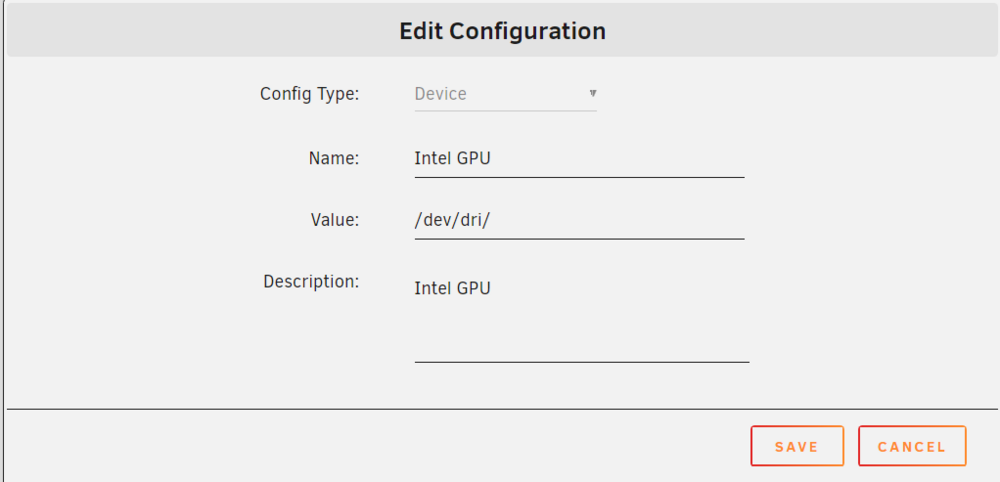
-
The operation of LMS itself is out of my control. Check on the Lyrion Forum here.
-
Are you asking about the Unassigned Devices Plugin?
-
This is what I see in your log: Dec 9 15:47:52 Tower unassigned.devices: Mounting Remote Share '//TH3NAS/data'... Dec 9 15:47:52 Tower unassigned.devices: Mount SMB share '//TH3NAS.LOCAL/data' using SMB default protocol. Dec 9 15:47:52 Tower unassigned.devices: Mount SMB command: /sbin/mount -t 'cifs' -o rw,hard,relatime,noserverino,nounix,iocharset=utf8,file_mode=0777,dir_mode=0777,uid=99,gid=100,actimeo=10,closetimeo=30,seal,credentials='/tmp/unassigned.devices/credentials_TH3NAS_data' '//TH3NAS.LOCAL/data' '/mnt/remotes/TH3NAS_data' Dec 9 15:47:53 Tower kernel: CIFS: enabling forceuid mount option implicitly because uid= option is specified Dec 9 15:47:53 Tower kernel: CIFS: enabling forcegid mount option implicitly because gid= option is specified Dec 9 15:47:53 Tower kernel: CIFS: Attempting to mount \\TH3NAS.LOCAL\data Dec 9 15:47:53 Tower kernel: CIFS: Status code returned 0xc000006d STATUS_LOGON_FAILURE Dec 9 15:47:53 Tower kernel: CIFS: VFS: \\TH3NAS.LOCAL Send error in SessSetup = -13 Dec 9 15:47:53 Tower kernel: CIFS: VFS: cifs_mount failed w/return code = -13 Dec 9 15:47:53 Tower unassigned.devices: Remote Share '//TH3NAS.LOCAL/data' failed to mount. The log messages strongly indicate a credential issue: STATUS_LOGON_FAILURE (0xc000006d): This status code explicitly states that the login attempt failed due to invalid credentials (username or password). cifs_mount failed w/return code = -13: The error code -13 corresponds to EACCES (Permission Denied), which is often seen when the provided credentials do not have sufficient rights or are incorrect. Be sure you don't use any special characters in the user or password fields.
-
Fixed this in today's update.
-
According to the language documentation: "When a PHP script is called by a JavaScript post or get operation, it will not have any translations information, and hence it needs to include the translations module in order to be able to make translations." So I've moved it and it should not be loaded on every page now. Hopefully, this will address this situation.
-
Interesting. It's been that way forever.
-
So far I am unable to make it happen. In the last release of UD Preclear, I changed $docroot and $plugin into constants and not variables. Could either of these changes have affected the search? None of the other changes in UD Preclear should have affected it. What were you doing on the Preclear page when this happened?
-
I've just posted a new Docker Container for the Lyrion Music Server:
-
This is a newer, rebranded Logitech Media Server (LMS). The original LMS has been forked and development is continuing as Lyrion Music Server. It is compatible with the Squeezeserver line of players and has an updated GUI. To install the Lyrion Music Docker Container: Uninstall the Logitech Media Server if you have it insltalled. Install Lyrion Music Server Docker Container. If you want to keep your favorites you can copy them to the new appdata/LyrionMusicServer. Use the file manager and copy appdata/LogitechMediaServer/prefs/favorites.opml to appdata/LyrionMusicServer/prefs/favorites.opml. On the first startup, you will make your folder selections for 'Music' and 'Favorites'. You cannot install the Lyrion Music Server and use the appdata/LogitechMediaServer/ folder. There are incompatibilities and it won't work. Your players should connect automatically to the new server. This Docker Container is available on Community Applications. For issues with the Lyrion Music Server application, check the Lyrion Forum here. The Lyrion Music Server Documentation is here. A software player called Soft Squeeze with a Transporter skin is available here. Stable and Development Versions There are dockers for the 'Stable' and 'Development' versions of LMS if you want to run either of those. Use the LMS template and change the 'Repository:' for the version you want to install. Latest: dlandon/lyrionmusicserver Stable: dlandon/lyrionmusicserver:stable Development: dlandon/lyrionmusicserver:dev You can go back to previous version any time. No changes are made that prevent a clean downgrade. Note: The development version can have bugs and incomplete features. Use at your own risk.
-
Unraid 7.0.0-rc.1 has this fixed. Upgrade and try.
-
It looks like you are talking about UD. That is not this problem. Go to Settings->Unassigned Devices and click on the 'Remote Servers' tab and enter your remote server name or IP address and then click 'Test'. UD will run a check and show what is not working about your remote share mounts. If you need further help, show the test results here.
-
It's probably a credentials issue. Don't use special characters in your user name or password. Also go to the Unassigned Settings and click on the "Remote Servers" and see if the test results provide any answers.
-
I see an issue and I am working on it.
-
If you click on the UD tab, then click on a link like the device settings, and then click 'Done', you will go back to the UD tab.
-
No plan at this point.
-
It looks to me like you are having disk issues: Nov 30 10:23:03 Rapture kernel: scsi 10:0:16:0: Power-on or device reset occurred This occurs a lot in the log. Disk /dev/sdr can't get SMART data: Smartctl open device: /dev/sdr failed: INQUIRY failed This I don't understand: Nov 30 11:09:39 Rapture emhttpd: device /dev/sdaw has size zero Nov 30 11:09:39 Rapture emhttpd: device /dev/sdae has size zero Nov 30 11:09:39 Rapture emhttpd: device /dev/sdak has size zero Nov 30 11:09:39 Rapture emhttpd: device /dev/sdah has size zero Nov 30 11:09:39 Rapture emhttpd: device /dev/sdab has size zero Nov 30 11:09:39 Rapture emhttpd: device /dev/sdat has size zero Nov 30 11:09:39 Rapture emhttpd: device /dev/sdaf has size zero Nov 30 11:09:39 Rapture emhttpd: device /dev/sdal has size zero Nov 30 11:09:39 Rapture emhttpd: device /dev/sdai has size zero Nov 30 11:09:39 Rapture emhttpd: device /dev/sdac has size zero Nov 30 11:09:39 Rapture emhttpd: device /dev/sdz has size zero Nov 30 11:09:39 Rapture emhttpd: device /dev/sdau has size zero Nov 30 11:09:39 Rapture emhttpd: device /dev/sdag has size zero Nov 30 11:09:39 Rapture emhttpd: device /dev/sdar has size zero Nov 30 11:09:39 Rapture emhttpd: device /dev/sdao has size zero Nov 30 11:09:39 Rapture emhttpd: device /dev/sdaa has size zero Nov 30 11:09:39 Rapture emhttpd: device /dev/sdav has size zero Nov 30 11:09:39 Rapture emhttpd: device /dev/sdas has size zero Nov 30 11:09:39 Rapture emhttpd: device /dev/sdap has size zero Nov 30 11:09:39 Rapture emhttpd: device /dev/sdaq has size zero Nov 30 11:09:39 Rapture emhttpd: device /dev/sdan has size zero Nov 30 11:09:39 Rapture emhttpd: device /dev/sdam has size zero Nov 30 11:09:39 Rapture emhttpd: device /dev/sdad has size zero Nov 30 11:09:39 Rapture emhttpd: device /dev/sdaj has size zero
-
Post diagnostics. It may be a php warning or error.
-
Maybe @JorgeB has some suggestions.
-
I suggest you check your BIOS and be sure it is set properly for hot swapping disks.
-
The idea with the NFS settings is to have NFS negotiate the version so servers supporting only version 3 will be mounted without specifying the version in the mount command. For proper version 3 and 4 negotiation the settings should be: Defaultvers=4 so the negotiation will start with NFSv4. Nfsvers=4 commented out so NFSv3 will also be allowed. In UD the 'Auto' setting in the Unassigned Settings for "NFS Version to use when Mounting Remote Shares" initiates the NFS version negotiation. Setting these this way allows servers supporting v3 and servers supporting v4 to be mounted. While I appreciate chenging both to v3 seemed to be a good idea for your situation, we want these settings to be applicable to all users so versions do not have to specified in the mount commands. This also applies to fstab mounts.
-
Edit the /etc/nfsmount.conf file and remove or comment out the "Nfsvers=4": # # Setting this option makes it mandatory the server supports the # given version. The mount will fail if the given version is # not support by the server. # limetech - support v4 # Nfsvers=4 Nfsvers=4 then update the nfs configuration: /etc/rc.d/rc.nfsd reload then try the mount.
-
Post diagnostics.



