





johnieutah
Members
-
Joined
-
Last visited
-
Many thanks for confirming @JorgeB, thought that may well be the case. Back to exFAT it is then (which I've found not exactly rock solid under macOS).
-
Hi there. Thanks for this wonderful plugin. I have moved over to macOS from Windows and want to restore some data from unraid to an APFS formatted SSD. Can UD write to APFS? - I am currently getting this error message so it would seem not. rsync: [generator] recv _generator: mkdir "/mnt/disks/S511NVOM7038997/Transfer" failed: Read-only file system (30) Maybe there is a command line option or something I need to pass through in the settings page? Thanks.
-
The time since I last run one definitely shows - Was sure the array needed to be stopped! Thanks @trurl
-
Hello. Long time v6.13 user and just updated to the latest v7.2. Probably a very silly question, how do I manually start a parity check? Stopped the array, I don’t see any option to start a check. Thanks for the insights!
-
Thanks for sorting this out @dlandon. Can this new version simply drop in or does some additional configuration need to take place? Just worried about settings etc…
-
Just did the same and got everything installed yesterday. Replaced my USG and the need to run this docker container on unraid… that no longer has to be running 24/7 to manage my network. Nice bit of kit and surprisingly affordable (I managed to get one for €90).
-
Are there any significant differences? Everything appears to be working on first glance. Only issue I came across was with the Unifi docker and the host name not being resolved. Using the ip address has fixed it for now.
-
Tried again and it worked. Do I still need to worry about switching from macvlan or is that issue resolved now? I am running a fritzbox and use a unifi docker... Thanks.
-
Just tried updating and it's failing: Mar 2 17:44:07 Toaster kernel: usb 1-1.2: device descriptor read/8, error -110
-
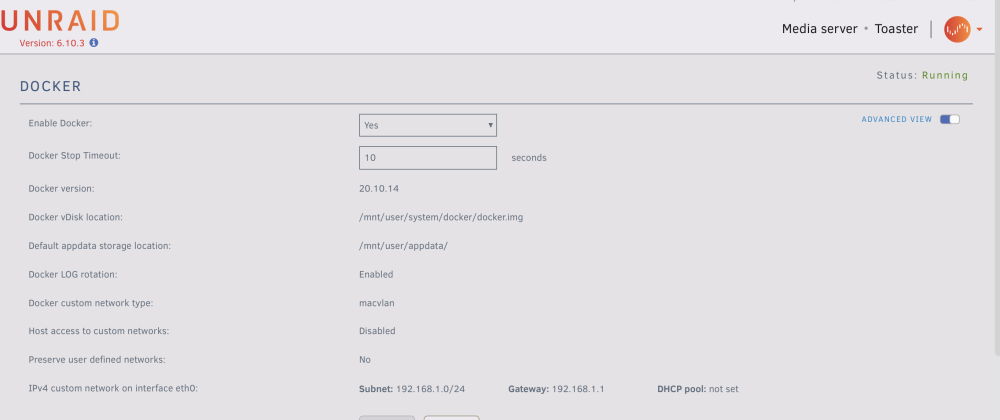
Thinking of jumping from 6.10.something up to this. Or should I take an intermediate release first? I‘ve seen macvlan and ipvlan mentioned a few times for things to watch out for but have no idea what this setting is. I haven’t changed anything from the docker defaults I don’t believe… Thanks for any help.
-
I’m new to the Mac world. Previously I used windows and syncback to synchronise local folders to Unraid shares. Now I’m trying to get a replacement backup process in place using rsync with SSH. I've got it mostly working without SSH, now I want to automate the authentication step. Here’s the basic rsync script: rsync -rtzPi --progress --stats --delete --exclude=".DS_Store" "/Users/matt/Documents/" "root@toaster:/mnt/user/Documents" I have created a public/private key pair using ssh-keygen. I then used ssh-copy-id to transfer these to Unraid. I believe this has worked as the key is there in /boot/config/ssh. I'm not sure what to do now. Every time I run the above command, it asks me for a passphrase (not password) for the key. Obviously I've missed something in the configuration step. Any help appreciated.
-
Don't worry, realised this was a problem with the airplay bridge plugin that had gotten updated... switching to the static binary seems to have settled everything. 😀
-
Hi. After many years of using this docker without issues, I just updated - yeah my fault, everything was running great but the old "update" docker image button was tempting me too much... - anyways, now I am having an issue with Airplay bridge: Restarting Squeeze2raop after crash: /config/cache/InstalledPlugins/Plugins/RaopBridge/Bin/squeeze2raop-linux-x86_64 -Z -I -b 192.168.1.30 -f /config/logs/raopbridge.log -x /config/prefs/raopbridge.xml [19:19:00.043] main:1572 Starting squeeze2raop version: v1.5.3 (Dec 25 2023 @ 19:09:38) [19:19:00.043] Start:1297 Cannot load SSL libraries [19:19:00.044] main:1676 Cannot start, exiting Any ideas? Thanks.
-
Thanks for this. I'm not sure what my setup is running, I guess macvlan: I really don't understand what any of this means though TBH. In the past I've updated unraid and it's usually worked fine.
-
Been away from Unraid for quite a while and am still way back on 6.10.3. Is there anything in particular I need to pay attention to with this update?I did see there was mention of Fritzboxes and Ubiquiti equipment, both of which I run. Thanks!

